Gltf-blender-io: Merge NLA tracks with the same name.
When multiple NLA tracks share the same name, they should be exported as a single glTF animation.
 donmccurdy
All 12 comments
Hmm how do you get multiple NLA tracks share the same name? I find there is no way to do that, If I try to set the name of a track with the same name of an existing one Blender appends ".001"

 aguaviva
on 1 Aug 2019
aguaviva
on 1 Aug 2019
Also there should be 2 options to export the animations
1) export what the timeline currently has (this would be a simple mode)
2) export the NLA tracks (advanced)
The default should be the mode #1, otherwise many people will think the animations are not working.
aguaviva
on 1 Aug 2019
how do you get multiple NLA tracks share the same name?
In the screenshot you've renamed the Action, not the NLA track. NLA tracks can share names:
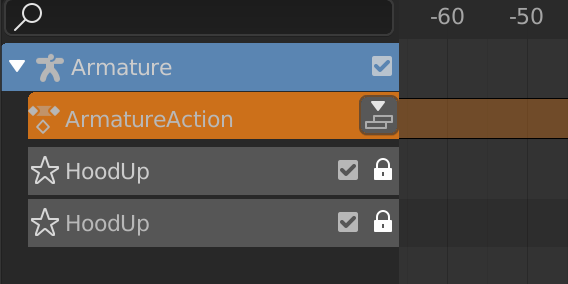
Also there should be 2 options to export the animations
I'd be OK with this, assuming we can get "what the timeline currently has" from the Blender API reasonably. I guess that's the active Action on each object, all merged into a single playable animation in the glTF file.
donmccurdy
on 1 Aug 2019
When multiple NLA tracks share the same name, they should be exported as a single glTF animation.
I have two NLA tracks sharing the same name. Still see two separate animations when I load the .glb in BabylonJS. Is this feature working or am I doing it wrong?
 SurlyBird
on 14 Aug 2019
SurlyBird
on 14 Aug 2019
No, the feature has not been implemented – this issue just tracks the discussion.
donmccurdy
on 14 Aug 2019
OK. Thanks, Don! Having a single track for multiple, separate objects will be greatly appreciated (and seems kind of necessary given you can do this exact thing in Maya using the Babylon exporter). Currently there's no easy solution for what seems like bread-and-butter functionality. Short of combining objects, creating an armature and going through the process of skinning and weighting, I can't find a way to easily get multiple animated objects on one exported track.
SurlyBird
on 14 Aug 2019
Is there a timeframe for this feature? Or any insight into how timeframes get decided?
 dwrodger
on 22 Aug 2019
dwrodger
on 22 Aug 2019
My goal is to get it before the feature freeze of v2.81, planned for mid-september
 julienduroure
on 23 Aug 2019
julienduroure
on 23 Aug 2019
A first draft is available here: #637
Not ready to be merged yet
julienduroure
on 29 Aug 2019
Fixed in 8a38eca
julienduroure
on 11 Sep 2019
@julienduroure Did you have a Blender test file that you were using for this? I'm just wanting to understand how to set things up properly,
 Ziflin
on 8 Oct 2019
Ziflin
on 8 Oct 2019
Here is a really simple file where an armature and a shapekeys are merge into a single animation at export, because of the name of the track:
merge_animation.zip

julienduroure
on 8 Oct 2019
Related issues
 capnm
·
5Comments
capnm
·
5Comments
 spiraloid
·
3Comments
spiraloid
·
3Comments
 WindyDarian
·
5Comments
WindyDarian
·
5Comments
 KannebTo
·
3Comments
donmccurdy
·
3Comments
KannebTo
·
3Comments
donmccurdy
·
3Comments
Most helpful comment
Fixed in 8a38eca