Gltf-blender-io: export issues from blender 2.8 beta
I did a quick run through of the beta to try and verify everything is working properly. But a few things seems to be broken getting a GLTF scene exported and imported properly into various viewers. I figured some test data might help so: I've zipped an archive of the blender scene, textures and the gltf and glb exports files if it's usefull for testing.
the .scene contains an animated skinned mesh, a point, spot and directional light and a camera.
if everything exported correctly the it should look like the image on the left.

unfortunately, not 1-to-1 yet, but very close.
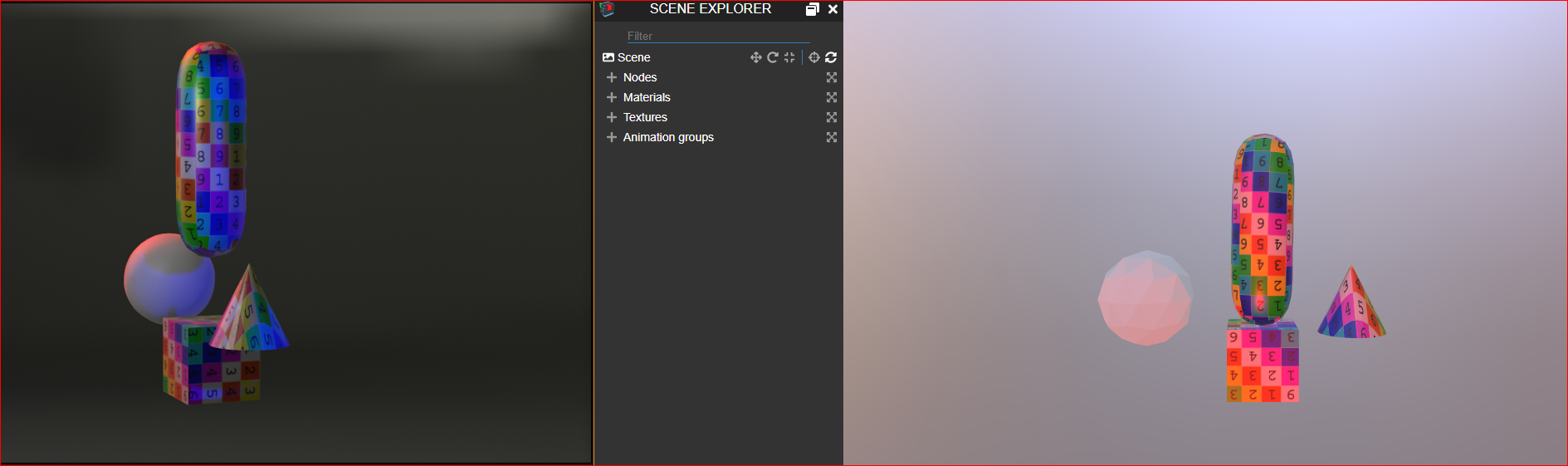
Issues.
-the camera does not come across
-the direction light (red) doesn't seem to have the correct rotation.
-looks like the apply modifier export option didn't apply the subdivision on the sphere,
-the HDR environment map did not export.
Some of these could be a viewer issues: so I started a thread here as well: https://github.com/donmccurdy/three-gltf-viewer/issues/120#issuecomment-442989532
 spiraloid
All 3 comments
the camera did not seem to export properly
I think this is an exporter issue, I've confirmed my viewer is orienting the official camera samples correctly. if lights and cameras are handled the same way, then the light direction may be an exporter issue as well.
the HDR environment map did not export.
These aren't supported — only spot, point, and directional lights.
looks like the apply modifier export option didn't apply
Yeah this is an open bug, see https://github.com/KhronosGroup/glTF-Blender-IO/issues/112.
 donmccurdy
on 30 Nov 2018
donmccurdy
on 30 Nov 2018
114 has been merged so camera and light should be fine now. Since the other points are separated issues or not supported, I will close this.
 ghost
on 30 Nov 2018
ghost
on 30 Nov 2018
Is now merge with Blender repo, will be available next build
 julienduroure
on 1 Dec 2018
julienduroure
on 1 Dec 2018
Related issues
julienduroure
·
5Comments
 rainclaws
·
3Comments
rainclaws
·
3Comments
 scurest
·
4Comments
spiraloid
·
5Comments
scurest
·
4Comments
spiraloid
·
5Comments
 cstfan
·
4Comments
cstfan
·
4Comments