Gltf-blender-io: Wrong position of Child object
Describe the bug
When I parent an object, this child object has a wrong position.
To Reproduce
Steps to reproduce the behavior:
On the version of today's blender
- Create a first simple object (cube) and move it
- Create a second simple object and move it
- Selects both
- CTRL + p (Set to Parent : Keep Transform)
- Export gltf
-> The child object (blue cube) does not have the same position when I view the glft file
Expected behavior
The child object should have the same position between blender and glft file
Screenshots
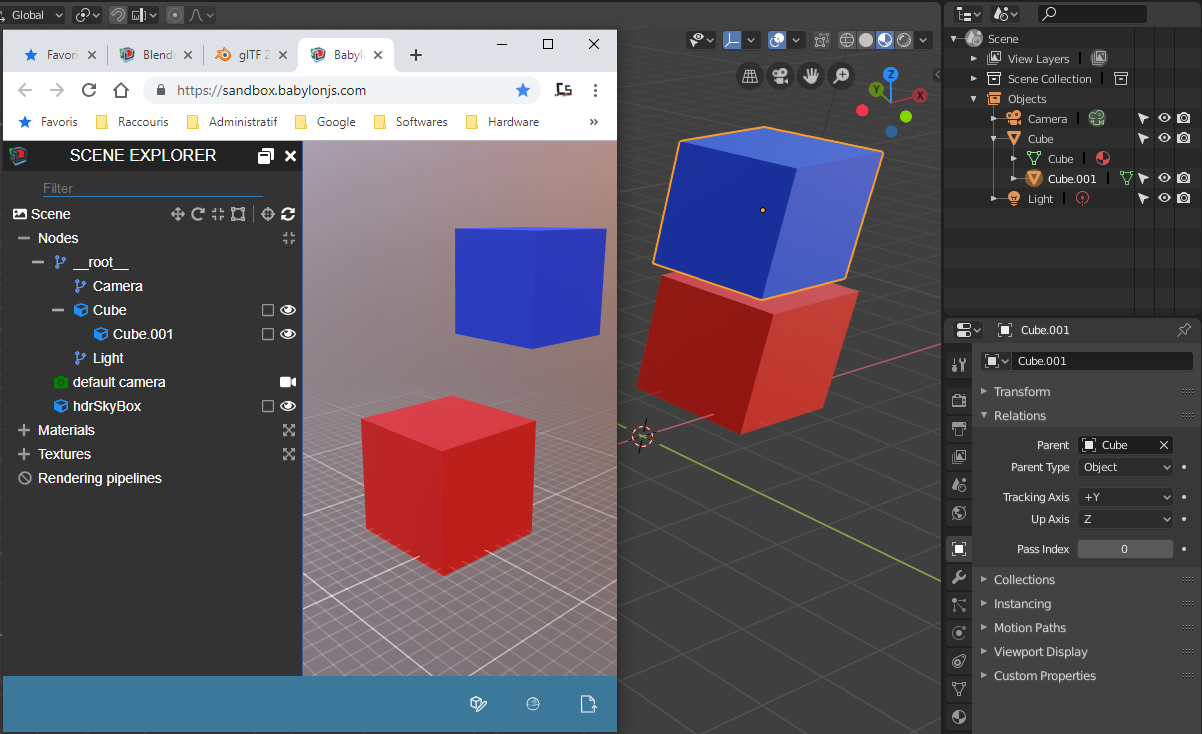
.blend file/ .gltf
Blend_gltf_files.zip
Version
- OS: Windows 10 64 bits
- Blender Version 2.80 (2019-04-24)]
 cstfan
👍1
All 4 comments
This should be fixed in dadde634dd117df5c1bc0c19978291f30a3f8bd1 of #446.
 Cyp
on 24 Apr 2019
Cyp
on 24 Apr 2019
👍3
Great
cstfan
on 24 Apr 2019
446 is now merge, this should be fixed.
Don't hesitate to comment if there is still an issue
 julienduroure
on 14 May 2019
julienduroure
on 14 May 2019
Wonderful it works, I'm going to test with an important scene, thanks for your great work
cstfan
on 15 May 2019
Was this page helpful?
0 / 5 - 0 ratings
Related issues
 donmccurdy
·
3Comments
donmccurdy
·
3Comments
 spiraloid
·
5Comments
julienduroure
·
3Comments
spiraloid
·
5Comments
julienduroure
·
3Comments
 dsinni
·
3Comments
dsinni
·
3Comments
 Quinten123
·
4Comments
Quinten123
·
4Comments
Most helpful comment
This should be fixed in dadde634dd117df5c1bc0c19978291f30a3f8bd1 of #446.