Gltf-blender-io: GLB models with Draco compression don't load in Blender 2.8
Hello,
GLB models with Draco compression don't load in Blender 2.8. I get this error:
RuntimeError: Error: Extension KHR_draco_mesh_compression is not available on this addon version
Blender 2.8 build: 74db65e5424-win64
 EtagiBI
All 14 comments
Hello,
this is a known "issue", Draco is not implemented in this addon (importer neither exporter).
There is some plan to implement it. We will keep you informed when we will work on it
 julienduroure
on 24 Jan 2019
julienduroure
on 24 Jan 2019
Hello,
this is a known "issue", Draco is not implemented in this addon (importer neither exporter).
Hmm. I was sure it worked in some old builds of Blender 2.8 Beta. Or was it KHR_Texture_Transform?.. Anyway, I do hope that Draco compression will have a high priority in your roadmap.
Thanks for all your efforts!
EtagiBI
on 24 Jan 2019
until it's settled in blender 2.8...
How to decode draco_gltf_file or draco_gld_file back through the gltf - pipeline? It turns out to encode, but not back …Is there an online tool for decoding?
 Zool1987
on 1 Apr 2019
Zool1987
on 1 Apr 2019
Hello, is there any alternative way to decode a Draco compressed file and import it in Blender (2.81a)?
Thank you very much!
(sorry for bad english, is not my native language)
 rmas97
on 29 Jan 2020
rmas97
on 29 Jan 2020
You can open a Draco-compressed glTF file in https://threejs.org/editor/ and export back out to glTF. That would remove any Draco compression on the file. In general I would recommend keeping source files (plain glTF, or ideally .blend or .3ds etc.) as Draco compression is lossy and not something you'd want to apply and remove repeatedly when making edits to a file.
 donmccurdy
on 29 Jan 2020
donmccurdy
on 29 Jan 2020
It worked. Thank you very much for the hint!
Best regards
rmas97
on 30 Jan 2020
Draco export works now but import is still broken. Is that something on the roadmap?
 lanxinger
on 15 Mar 2020
lanxinger
on 15 Mar 2020
Draco importer is not really "broken", because it is only not implemented yet.
Don't think someone worked on it yet, so I can't provide any roadmap. I will let you know when we will be able to provide more information
julienduroure
on 15 Mar 2020
Sorry for the wrong wording. Thank you for your quick response. Looking forward to having this ability in the future.
lanxinger
on 15 Mar 2020
Another workaround here, probably simpler than https://github.com/KhronosGroup/glTF-Blender-IO/issues/252#issuecomment-579885205 —
npm install --global @gltf-transform/cli@alpha

# Make an uncompressed copy of 'compressed.glb'
gltf-transform copy compressed.glb uncompressed.glb
^The copy command decompresses by default now, but in the future that will probably require a more specific command. After decompressing the file, Blender will be able to read it.
donmccurdy
on 19 Sep 2020
Another workaround here, probably simpler than #252 (comment) —
npm install --global @gltf-transform/cli@alpha

# Make an uncompressed copy of 'compressed.glb'
gltf-transform copy compressed.glb uncompressed.glb
^The
copycommand decompresses by default now, but in the future that will probably require a more specific command. After decompressing the file, Blender will be able to read it.
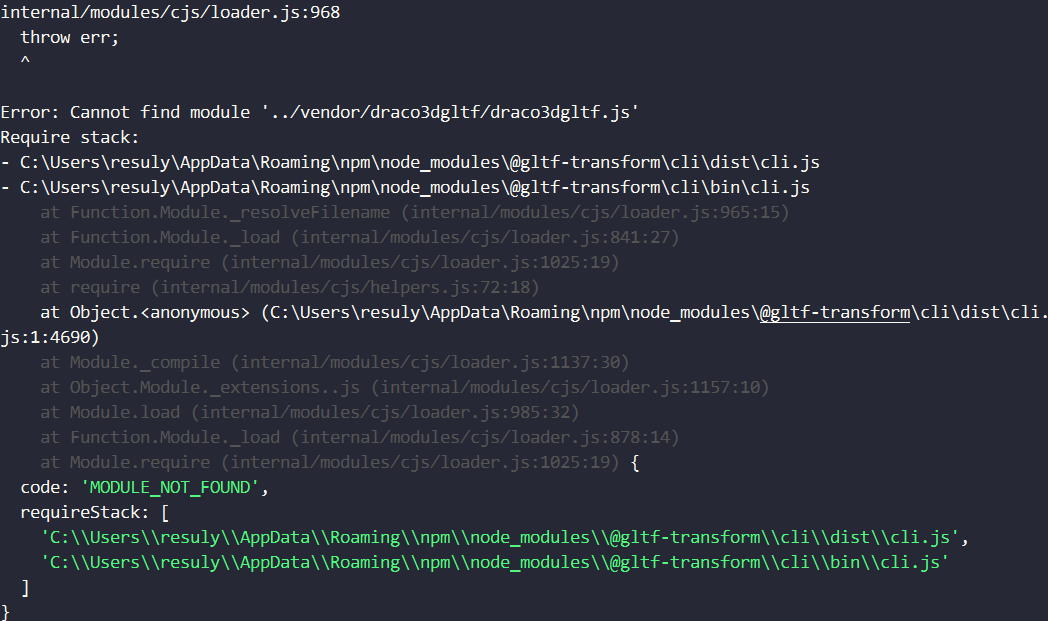
The alpha version keeps throwing this error.
 resuly
on 25 Sep 2020
resuly
on 25 Sep 2020
@resuly You can report bugs on gltf-transform here : https://github.com/donmccurdy/glTF-Transform
Let's try to keep this repo for Blender importer / exporter issues
julienduroure
on 25 Sep 2020
That issue should be fixed if you update to the latest alpha (by re-running the same installation command). Otherwise, as Julien suggests, I'm happy to take bug reports on the repo above. Thanks for letting me know! 👍
donmccurdy
on 25 Sep 2020
donmccurdy
on 24 Feb 2021
Related issues
 rainclaws
·
3Comments
rainclaws
·
3Comments
 spiraloid
·
3Comments
spiraloid
·
3Comments
 cstfan
·
4Comments
cstfan
·
4Comments
 Ali-RS
·
3Comments
Ali-RS
·
3Comments
 KannebTo
·
3Comments
KannebTo
·
3Comments
Most helpful comment
Another workaround here, probably simpler than https://github.com/KhronosGroup/glTF-Blender-IO/issues/252#issuecomment-579885205 —
^The
copycommand decompresses by default now, but in the future that will probably require a more specific command. After decompressing the file, Blender will be able to read it.