Gltf-blender-io: Question regarding "Remove Doubles"
Hi
I am using Blender 2.79 with latest version of this addon downloaded today.
I have a model which has 1814 vertexes after I use "Remove Doubles" in blender Edit Mode it becomes 896 vertexes but after I export it to gltf and reimport it, number of vertexes are 1814 again I also checked it in the game engine and it is 1814 too. It seems gltf exporter regenerate these vertexes on export ?
Is this a bug ?
If not I will appreciate if someone explains the reason for this.
Thanks
Edit:
Here is the blender file:
 Ali-RS
All 3 comments
One of the main goals of glTF is to supply the model data in as ready-to-render form as possible. So, faces are cut into triangles, and vertices are structured the way a GPU would want them for sending into the graphics pipeline directly.
The latter is what's catching your model. The vertices share some discontinuous UVs, where a single Blender vertex has one UV coordinate when used as part of one triangle, but a different UV coordinate when the same vertex is used as part of a different triangle. As far as the graphics hardware is concerned, those are two separate vertices, but applications like Blender can present that as a single vertex to the artist.
So, the Blender exporter must separate these vertices that have discontinuous UVs (and in other models, it will also separate discontinuous normal vectors, such as flat-shaded faces). You can see this happening by re-importing the model and picking "select linked" (CTRL+L) to identify a set of vertices that interconnect:
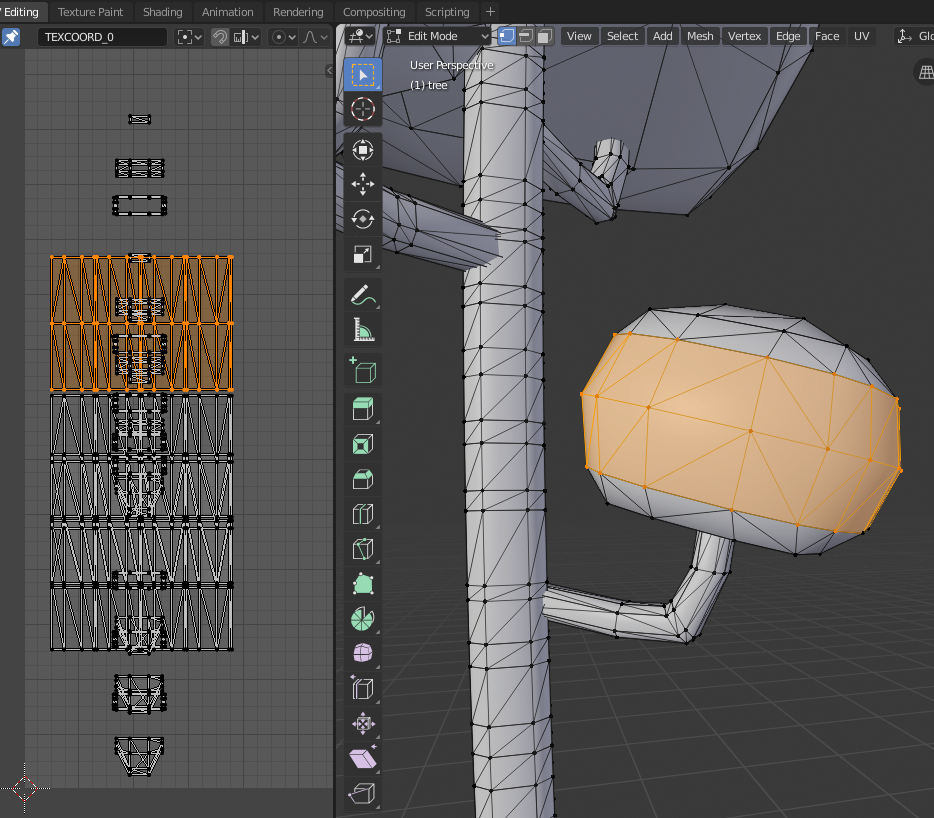
So, having said all that, your export looks like it is also being affected by a known bug here, issue #230. Once the vertices are split, the smooth-shading effect is lost on the exported model, due to this bug. I do hope this will get fixed, but I don't have any ETA. But in your case, you might be able to work around this by having the UV map remain continuous.
 emackey
on 26 Mar 2019
emackey
on 26 Mar 2019
This is not a bug, but more of a limitation of the gltf format. Since gltf is made to closely match the format that the graphic card can display, there are a few things different from Blender.
In this case, the difference is that in gltf, if two triangles meet, the vertices can only be shared if they have the exact same normal and tangent. So unless it is a flat plane, typically the two triangles have to be split, with each triangle getting its own set of 3 vertices.
I'm not sure if I am explaining it very well, but this is the expected behavior.
 Vega-KH
on 26 Mar 2019
Vega-KH
on 26 Mar 2019
I see. Thanks so much for thorough explanation :)
Ali-RS
on 26 Mar 2019
Related issues
 spiraloid
·
5Comments
spiraloid
·
5Comments
 UX3D-nopper
·
3Comments
UX3D-nopper
·
3Comments
 julienduroure
·
3Comments
julienduroure
·
3Comments
 KannebTo
·
3Comments
KannebTo
·
3Comments
 Nehon
·
5Comments
Nehon
·
5Comments
Most helpful comment
This is not a bug, but more of a limitation of the gltf format. Since gltf is made to closely match the format that the graphic card can display, there are a few things different from Blender.
In this case, the difference is that in gltf, if two triangles meet, the vertices can only be shared if they have the exact same normal and tangent. So unless it is a flat plane, typically the two triangles have to be split, with each triangle getting its own set of 3 vertices.
I'm not sure if I am explaining it very well, but this is the expected behavior.