Gltf-blender-io: Multiple UV Layouts
Hi there,
I'd like to have multpile UV-Layouts on my models (one for tiling and one for baking stuff) and I'm fine with not having factors for the mapping as a node in blender but still I need to pick which uv-layout applies for what texture-map.
Here are my nodes:

However, if I use any online-viewer or even the gltf-importer from three-js, only the baking-UV-Layout is used for everything.
If I edit the gltf-file created I can see both layouts and switch them, if I edit TEXCOORD manually but I think it is not intended to work that way. The ao-map gets ignored anyways, but this may be a viewer-issue.

My question is, what is the proper way to deal with multiple UV-Layouts in the blender-exporter?
Here is my .blend-file if someone cares.
Monkey.blend.zip
Thanks!
Goetz
 goetzmoritz
All 14 comments
So, glTF exporter doesn't export mesh with multiple UVs on it or glTF specs don't support multiple UVs ? Either way it's pretty bad. It's extremely important to support multiple UV maps per mesh and multiple vertex colors too.
 motorsep
on 18 Apr 2018
motorsep
on 18 Apr 2018
Well, it seems like it exports multiple UVs. But still, it's not clear for me how to address them in the nodes. Also it seems that they are not exported properly.
But it is also possible that I just use them in a wrong way. I had a look at the examples and I did not find any .blend-file that shows it.
Edit:
It does make a difference where the nodes are connected, though. I made exported two files in which I only changed to UV Layouts plugged to the nodes and this is the diff:
>>diff Monkey_a.gltf Monkey_b.gltf
139c139
<             "uri" : "Monkey_a.bin"
---
>             "uri" : "Monkey_b.bin"
152,153c152
<                     "index" : 0,
<                     "texCoord" : 1
---
>                     "index" : 0
Edit2:
If you look at
https://github.com/KhronosGroup/glTF-Blender-Exporter/blob/8bd9eeacc241ea589cca2e23545844949c53ff9b/scripts/addons/io_scene_gltf2/gltf2_generate.py
at line 1297, there you can see that the coordinates get iterated properly. I'm not so deep into glTF-specs to say how the actual glTF-File is supposed to represent multiple UV-Layouts but it seems that this may be a problem of three-js glTF-importer and the glTF-online-viewer I've tested and discussed there.
goetzmoritz
on 18 Apr 2018
three.js is very particular about how multiple UV sets may be used. Most textures MUST use the first UV set, and ambient occlusion MUST use the second UV set. If ambient occlusion is present and only 1 set of UVs are available, a second set is automatically created at load time.
None of this is a glTF limitation; you can have many sets of UVs and assign any texture to any of them.
But in addition, it's entirely possible this exporter is not associating UVs with textures from cycles nodes correctly. We will have to look into that, or PRs would be welcome. :)
 donmccurdy
on 18 Apr 2018
donmccurdy
on 18 Apr 2018
I have transferred this issue to the new repository.
donmccurdy
on 19 Dec 2018
Not sure what the status is but we should confirm this case is supported in glTF-Blender-IO.
donmccurdy
on 19 Dec 2018
three.js is very particular about how multiple UV sets may be used. Most textures MUST use the first UV set, and ambient occlusion MUST use the second UV set. If ambient occlusion is present and only 1 set of UVs are available, a second set is automatically created at load time.
A little bit off topic, but: Is there a particular reason for this behaviour in three.js? I'd personally use the first UV for AO in a lot of cases. Is there a chance that three.js will give us more freedom with this in the future?
 soadzoor
on 27 Dec 2018
soadzoor
on 27 Dec 2018
If you just have one UV set, the loader will automatically duplicate the UVs for you if needed for AO.
But yeah, it's a bit limiting. I think the odds are good that this will be fixed eventually, but not in the next couple months. One of the more promising avenues would be node-based materials in three.js, which we're exploring.
donmccurdy
on 4 Jan 2019
If you just have one UV set, the loader will automatically duplicate the UVs for you if needed for AO.
But yeah, it's a bit limiting. I think the odds are good that this will be fixed eventually, but not in the next couple months. One of the more promising avenues would be node-based materials in three.js, which we're exploring.
Actually my use-case would be this: I'd have a lightmap on the second UV, and an AOMap on the first. So I believe that's impossible with three.js right now, which is a shame. If it's going to be fixed eventually, that's very good news.
And the node-based materials would also be a huge improvement I guess :)
soadzoor
on 4 Jan 2019
Does anyone know when this will be decided?
 Zool1987
on 17 May 2019
Zool1987
on 17 May 2019
As far as I can tell this issue is already fixed in the exporter – creating multiple UV sets and assigning them to textures works on a quick test here. If others have examples where the UV sets do not export correctly, please share them.
On the other hand, not all engines support multiple UV sets in all configurations, so that's just something you'll have to plan for depending on your use case.
donmccurdy
on 17 May 2019
The gltf exporter is still not exporting multiple uv sets.
Problem is: The same UV islands can't be shared in multiple UV channels. The exporter is always using the 1st UV set in the object uv stack inside blender for all materials.
What currently happen in Blender 2.82 is:
The UV content of the very 1st UV set is used by ALL materials, always.
This means: All UV island positions inside other UV sets, than the 1st are ignored, even if you assign them to textures or materials inside the shader tree.
 Taroslord
on 13 Mar 2020
Taroslord
on 13 Mar 2020
@Taroslord can you share a .blend? You can drag ZIP files into GitHub comments. Note that the problem you're describing is (whether it's broken in this exporter or not) a known issue in some engines, including my viewer (https://gltf-viewer.donmccurdy.com/), which support only 1-2 UV sets regardless of what the glTF file actually contains.
donmccurdy
on 13 Mar 2020
No problem. See my attached files.
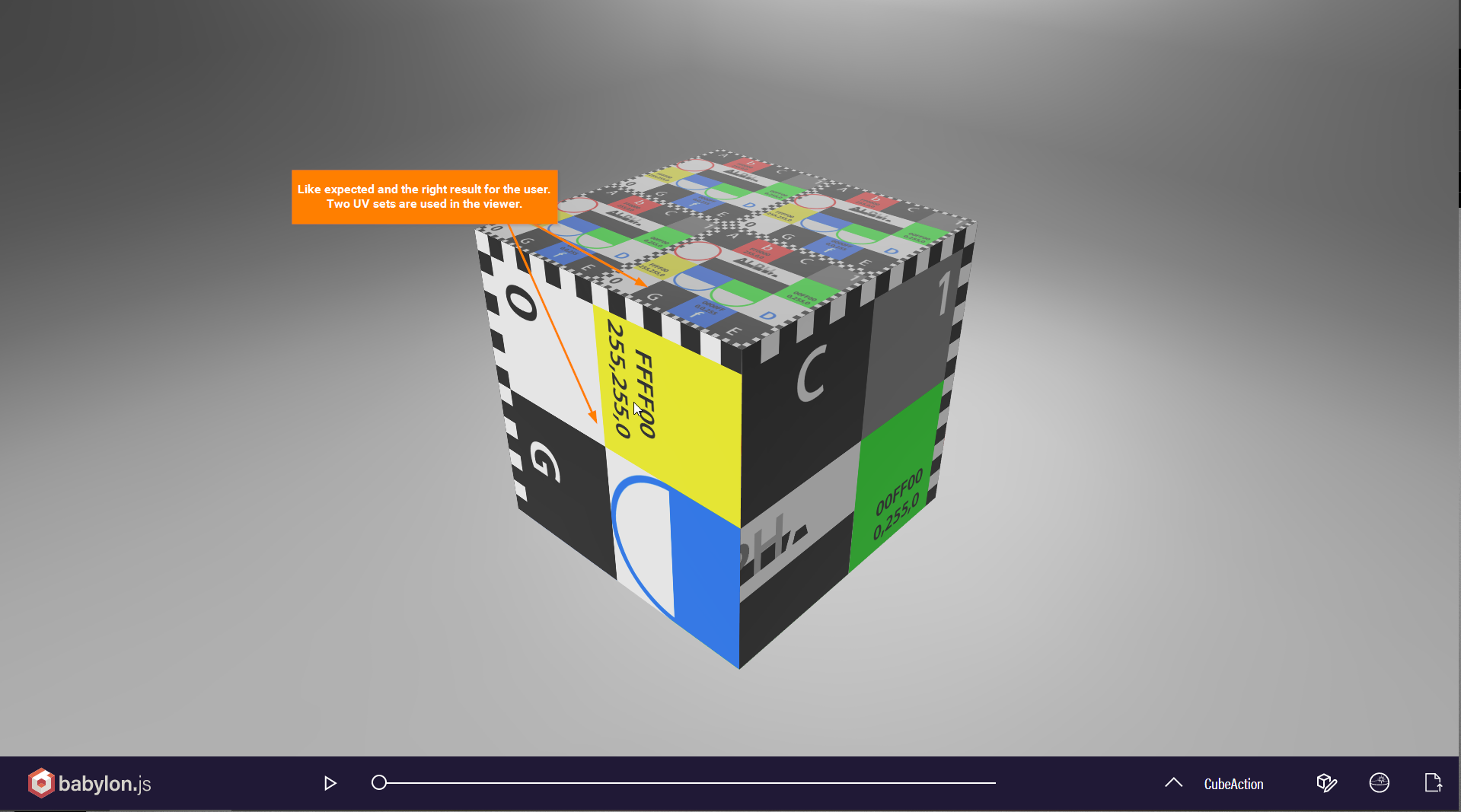
My attached axample will not be displayed correctly in your viewer. It has two seperate UV sets, but only the 1st one will be displayed. This is the same for all models I try to see in your viewer.
In the Babylon.js viewer the very same example file will be displayed correctly https://sandbox.babylonjs.com/
So you are right and it's not the exporter, but the viewer.
My main problem is, when I export the models to usdz. Multiple UV sets will not be accepted there, too. Even the official USDZ converter by Apple is ignoring the 2nd UV set in the example.
One question about this topic: Is there no minimum standard for gltf, that have to be supported in all viewers/engines that are supporting gltf basically?
Best wishes
Chris

Taroslord
on 14 Mar 2020
glTF’s requirement is:
Client implementations must support at least two UV texture coordinate sets, one vertex color, and one joints/weights set.
threejs, the engine used in my viewer, arguably meets that, but is only able to use the second UV set for ambient occlusion (which glTF supports) and lightmaps (which glTF does not). BabylonJS is much more flexible on UV maps.
Apple’s viewers do not support multiple UV sets at all, the last I checked, even though the glTF, USD, and USDZ formats do. I usually refer to this document for the known limitations of the Apple viewers, since they don’t seem to be officially documented: https://github.com/google/usd_from_gltf
donmccurdy
on 14 Mar 2020
Related issues
 cstfan
·
4Comments
cstfan
·
4Comments
 scurest
·
4Comments
scurest
·
4Comments
 KannebTo
·
3Comments
KannebTo
·
3Comments
 WindyDarian
·
5Comments
WindyDarian
·
5Comments
 julienduroure
·
3Comments
julienduroure
·
3Comments
Most helpful comment
three.js is very particular about how multiple UV sets may be used. Most textures MUST use the first UV set, and ambient occlusion MUST use the second UV set. If ambient occlusion is present and only 1 set of UVs are available, a second set is automatically created at load time.
None of this is a glTF limitation; you can have many sets of UVs and assign any texture to any of them.
But in addition, it's entirely possible this exporter is not associating UVs with textures from cycles nodes correctly. We will have to look into that, or PRs would be welcome. :)