Github: Remove "Undo Discard" affordance after committing
Once I have discarded once in a project, the "undo discard" button seems to hang around forever. This seems unnecessarily distracting. I like that this button hangs around even after edits, but it seems like we should maybe clear the discard history after committing the containing file.
/cc @kuychaco
 nathansobo
All 17 comments
After observing myself for a while, I tent to not trust that button unless I just discarded something a few seconds ago. If discarding happened a few hours ago, I'm never sure what that button does and if it's the "right" discard or if there was another discard after. So ya, I think it's ok to keep this button temporary and only for accidental discards.
For a more longer lasting "backup", we might could do the following that came up in #611:
Maybe once we have stashing #557, we could auto-stash every time you "discard all". It would override the last auto-stashed changes (to not clutter up the stash list). Kinda like an auto-save in games.
 simurai
on 16 Mar 2017
simurai
on 16 Mar 2017
I'd really like to see undo discard go away at some point as well or have a way to dismiss it. I feel like it hangs around for a while and several times I've hit it instead of the file I wanted to stage which can cause some pain.
 jnunemaker
on 21 Oct 2017
jnunemaker
on 21 Oct 2017
At the very least the button should be moved.
nathansobo
on 21 Oct 2017
my +1 here, Why cant the discard cached memory just be cleared? like a dismiss option in the dialog options that pops up?
 the-j0k3r
on 26 Oct 2017
the-j0k3r
on 26 Oct 2017
At the very least the button should be moved.
@nathansobo hows that a solution?
the-j0k3r
on 3 Nov 2017
I would like to add a note that never once have I wanted to use that button for its intended purpose, but I regularly click it by mistake and end up with a very confusing file state.
Ideally this button would be dismissable, at the very least the prominence of this button should be reduced significantly. It's certainly not more important then "Stage All"
 dpehrson
on 18 Jan 2018
dpehrson
on 18 Jan 2018
Would it be difficult to add an option to disable that button in the settings?
 ben-z
on 18 Jan 2018
ben-z
on 18 Jan 2018
@ben-z have a read at https://github.com/atom/github/pull/1242 discussion. But short answer is they wont add what you suggest.
the-j0k3r
on 18 Jan 2018
May have found a workaround.
- Undo the discard. Bring all those unwanted changes back up in the git tab.
- Click on the file you want to discard to open it in the editor pane.
- Click on the garbage can icon to discard the hunk. (Next to "Stage Hunk")
- Repeat this for all changes
...
Haven't seen the Undo Discard button since. Hope that helps!
 andreidobrinski
on 16 Feb 2018
andreidobrinski
on 16 Feb 2018
@andreidobrinski sorry if this sounds flippant, since #1242 discussion covers alternatives and a solution that is likely to be accepted. See https://github.com/atom/github/pull/1242#issuecomment-342625850 and https://github.com/atom/github/pull/1242#issuecomment-343346270
I think the discussion going on in #1242 applies to this ticket and should be had here though. For that end Ill make a friendly post there.
Meanwhile, Ill try your workaround. Thx for letting us know. ;)
the-j0k3r
on 17 Feb 2018
@andreidobrinski Haven't seen the Undo Discard button since.
Even when discarding again? If so, that sounds more like a bug.
Here another idea: Move undo into the context menu:
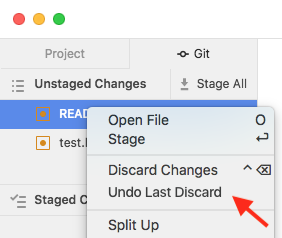
It's a bit harder to discover, but if it's not your first discard, you might remember that there is an "Undo Last Discard" option.
Or even show "Undo Last Discard" all the time, but disable it if no undos are possible. Electron has an enabled: false option: https://electronjs.org/docs/api/menu-item
simurai
on 20 Feb 2018
I missclicked again on this evil button...
It took me so long to find out where the change came from T-T
 Boboss74
on 20 Feb 2018
Boboss74
on 20 Feb 2018
Here another idea: Move undo into the context menu:
This is pretty close to what I suggested in https://github.com/atom/github/pull/1242#issuecomment-341910846 and almost exactly what @BinaryMuse suggested in https://github.com/atom/github/pull/1242#issuecomment-342303559.
 50Wliu
on 20 Feb 2018
50Wliu
on 20 Feb 2018
@simurai good point. I checked again and what happened is that the Undo Discard affordance moved from the global git tab to the file-specific one.

would be nice to have an option to "permanently discard these changes, remove them from the Undo stash, and don't remind me again".
andreidobrinski
on 20 Feb 2018
Manual fix to hide the _Undo Discard_ button. In your ~/.atom/style.less add this:
atom-panel-container button.github-StagingView-headerButton--fullWidth {
  display: none;
}
You can remove Undo Discard button via remove undoDiscardHistory manually:
- open
.git/configfile in project directory, - remove
[atomGithub]section, and save this file, - reopen the project with Atom
 mingelz
on 3 May 2018
mingelz
on 3 May 2018
1702 makes this much less prominent and harder to click on by mistake, so this is less of an issue now. We might iterate further on the UX here in the future, but it's not in our immediate roadmap, so we're going to close these. We'll open new issues in the future when we're ready for that 👌
 smashwilson
on 6 Oct 2018
smashwilson
on 6 Oct 2018
Related issues
smashwilson
·
4Comments
 danielbayley
·
5Comments
danielbayley
·
5Comments
 HidekiHokuto
·
4Comments
HidekiHokuto
·
4Comments
 yubaoquan
·
3Comments
yubaoquan
·
3Comments
![move[bot] picture](https://avatars.githubusercontent.com/in/6673?v=4&s=40) move[bot]
·
3Comments
move[bot]
·
3Comments
Most helpful comment
Manual fix to hide the _Undo Discard_ button. In your ~/.atom/style.less add this: