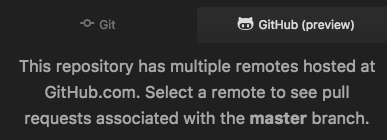
Github: How do I change the remote to see PRs associated
Once I selected a remote, How do I change it to another one?
 HidekiHokuto
👍2
All 4 comments
HidekiHokuto
on 16 Jun 2017
Selected origin remote instead of upstream so I landed here too. I tried enabling and disabling the package but that didn't work.
 mloschia
on 16 Jun 2017
mloschia
on 16 Jun 2017
There's some missing UI here to get back to the remote selection state (/cc @simurai for thoughts).
In the meantime, the current remote is stored in your repository's git configuration, so you can edit that directly:
git config --unset atomGithub.currentRemote
 smashwilson
on 19 Jun 2017
smashwilson
on 19 Jun 2017
👍3
For now could be similar to a pinned PR:
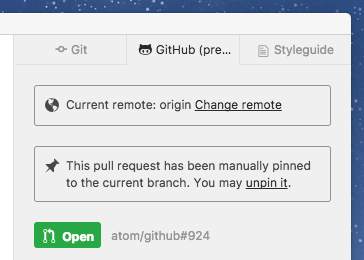
But if, then only short term. Some sort of GitHub browser/filter, like https://github.com/atom/github/pull/714#issuecomment-298145826 is still the better approach.
 simurai
on 21 Jun 2017
simurai
on 21 Jun 2017
Was this page helpful?
0 / 5 - 0 ratings
Related issues
 Ben3eeE
·
4Comments
Ben3eeE
·
4Comments
 sebastianroming
·
4Comments
sebastianroming
·
4Comments
![move[bot] picture](https://avatars.githubusercontent.com/in/6673?v=4&s=40) move[bot]
·
3Comments
move[bot]
·
3Comments
 megaultrachicken
·
4Comments
megaultrachicken
·
4Comments
 RafaelNGP
·
4Comments
RafaelNGP
·
4Comments
Most helpful comment
There's some missing UI here to get back to the remote selection state (/cc @simurai for thoughts).
In the meantime, the current remote is stored in your repository's git configuration, so you can edit that directly: