Gdevelop: New Events now showing in Events Editor
Describe the bug
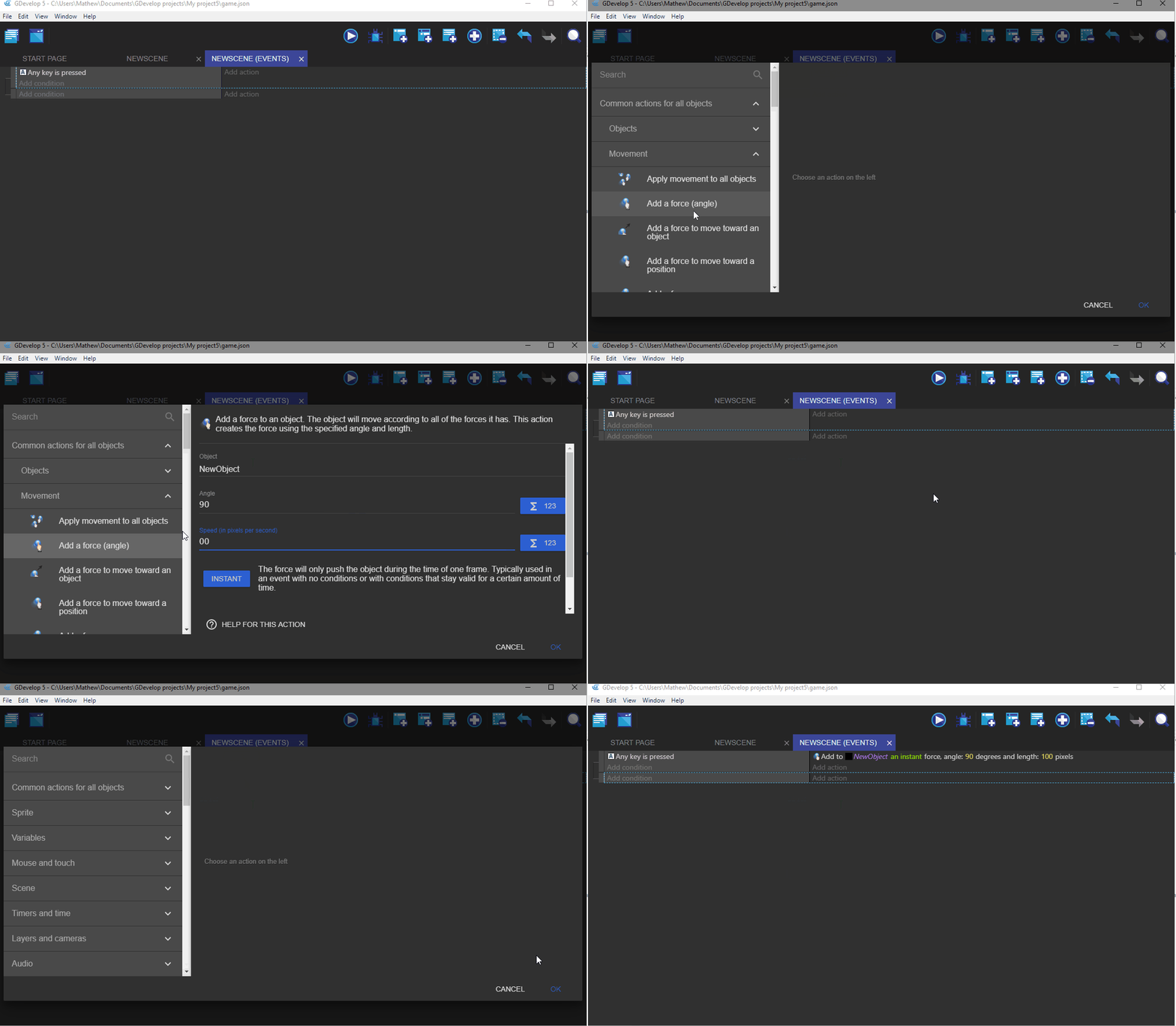
When adding a new event in the event editor, pressing ok does not show the created event. The newly created event can only be seen by closing the scene in the project manager and reopening it, or creating a new event, pressing "add action" and then cancelling it.
To Reproduce
Steps to reproduce the behaviour:
- Go to scene Events (on new or saved projects, seems to be happening universally)
- Click on Add Event
- Scroll down to "Happens to any/all events created"
- Pressing ok, and nothing shows in the events editor, like it has not been created (but it has).
- Please include a link to a game if possible!
- If applicable, add screenshots to help explain your problem.
Other details
- Include any OS/browser version/smartphone that you're using
- Which version of GDevelop are you using? The desktop app or the web-app?
- Add any other context about the problem here.
Windows 10
Gdevelop Beta 74
(was non issue on Beta 73)
 convictedweirdo
All 6 comments
convictedweirdo
on 24 Jun 2019
The newly created event can only be seen by closing the scene in the project manager and reopening it, or creating a new event, pressing "add action" and then cancelling it.
Oh, I didn't have to close the scene & reopen, just click somewhere else and the action appeared. But there's still a delay on it and maybe the difference is because of my OS (Windows 8.1 laptop). Thank you for reporting this!
 Phenomena3
on 24 Jun 2019
Phenomena3
on 24 Jun 2019
The newly created event can only be seen by closing the scene in the project manager and reopening it, or creating a new event, pressing "add action" and then cancelling it.
Oh, I didn't have to close the scene & reopen, just click somewhere else and the action appeared. But there's still a delay on it and maybe the difference is because of my OS (Windows 8.1 laptop). Thank you for reporting this!
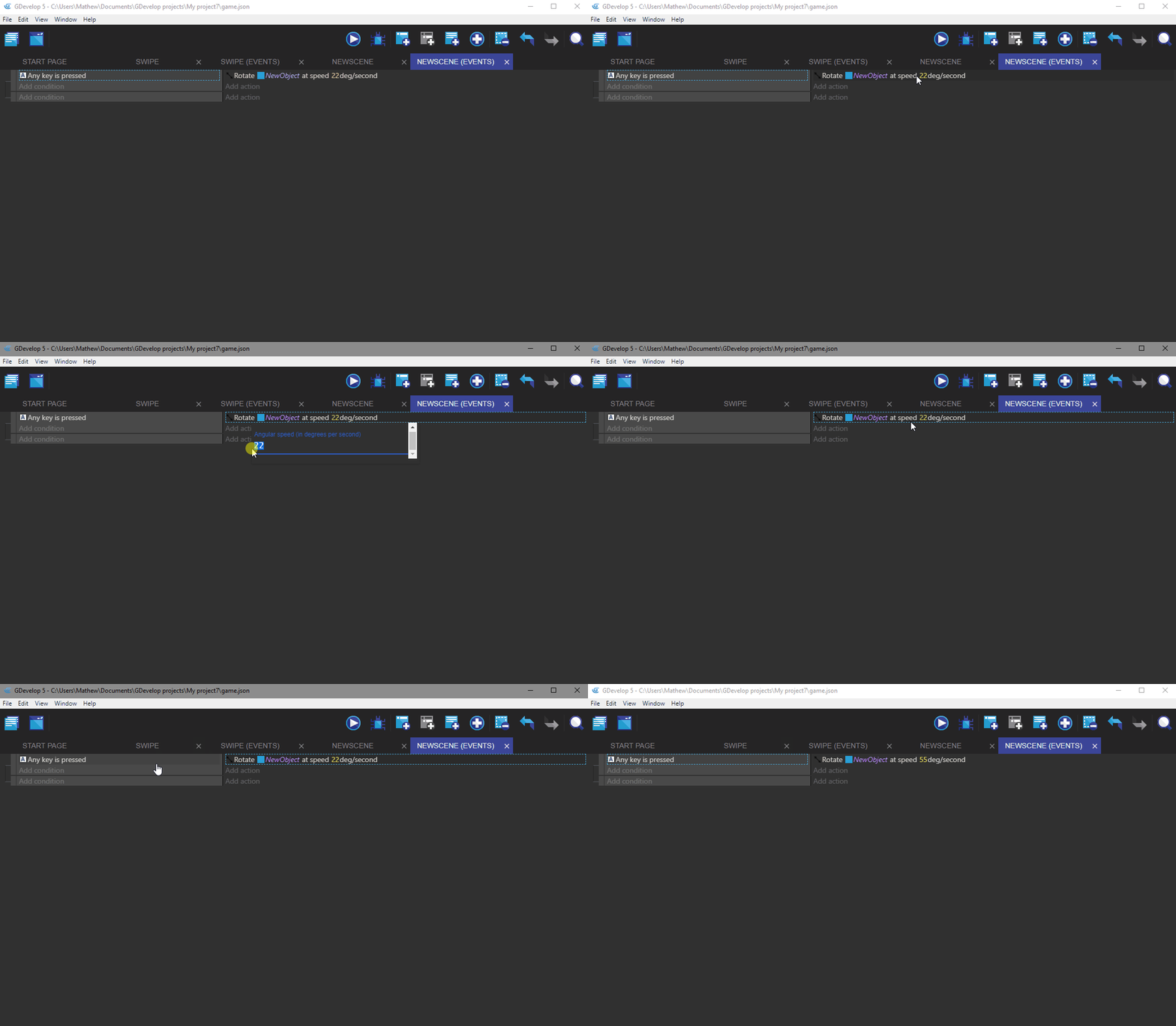
Ah yes you're correct. Seems clicking on the condition will make it display/update.
It also seems that updating event properties is also being delayed.
convictedweirdo
on 24 Jun 2019
Indeed, will fix that tonight. I'm removing the automatic update to beta 74 in the meantime.
 4ian
on 24 Jun 2019
4ian
on 24 Jun 2019
Should be fixed in beta 75, sorry for the regression!
Let me know if there is anything else strange, though I've checked and everything seems back to normal :)
4ian
on 24 Jun 2019
Updating to beta 75 has rectified the issue. Thank you so much for the speedy fix
convictedweirdo
on 25 Jun 2019
Related issues
 Bouh
·
4Comments
Bouh
·
4Comments
 Jose-Moreno
·
5Comments
Jose-Moreno
·
5Comments
 BWPanda
·
4Comments
BWPanda
·
4Comments
 giusreds
·
4Comments
giusreds
·
4Comments
 shadow00dev
·
4Comments
shadow00dev
·
4Comments
Most helpful comment