Gdevelop: Tween scale action not working for Tiled Sprite
Describe the bug
I was looking for ways to animate the scale of a Tiled Sprite but after testing I noticed that the every tween action except for the scale tween actions (X, Y, ALL) are only working for Sprite but not for Tiled Sprite
To Reproduce
Steps to reproduce the behavior:
- Create a
Tiled Spriteobject - Add any sprite to the object (the test files uses a 1px sprite)
- Add the
Tweenbehavior to the object - Instance the object on canvas
- Add a condition to press any key
- Add the action in
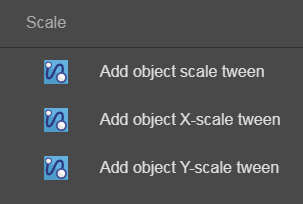
Tween animation > Scale > Add Object Scale Tweenor any of the other scale options - Fill in the scaling options and press ok.
- Run your game preview
- Please include a link to a game if possible!
- If applicable, add screenshots to help explain your problem.
Other details
- OS: Windows 7 Ultimate
- GDevelop 5.0.0-Beta75 Desktop
- Test File:
tiled_sprite_tween_bug.zip
_Note_ This test file has some javascript events to console.log the object width of different objects including the tiled sprite on the preview window developer tools.
 Jose-Moreno
All 5 comments
Unfortunately the Tiled Sprite object doesn't offer any scaling functions at the moment that could be used by the tween extension.
The TilingSprite pixi object has a scale property though, so it should be possible to implement it.
Adding setScaleX and setScaleY functions to the Tiled Sprite object should magically make the tweening work on them.
 Wend1go
on 3 Aug 2019
Wend1go
on 3 Aug 2019
@Wend1go Thanks for answering Wend1go. That'd be great :tada:
Incidentally where can i request exposing the setWidth() / setHeight() methods to work with the tween behavior?
I think the Tiled Sprite object specifically would also benefit from this but since Sprite could use it too it should also work for it (although i'm not sure for if it would have the same result as setScaleX / setScaleY on the latter :thinking: )
Also it'd be nice to see the setXOffset and setYOffset method exposed as well, but please let me know where I can request it properly so this doesn't become off-topic and forgotten :sweat_smile: .
Jose-Moreno
on 4 Aug 2019
I added a card for it on Trello:
https://trello.com/c/eB5Iqgwx/341-add-scaling-functions-to-tiled-sprite-objects
Wend1go
on 4 Aug 2019
Adding setScaleX and setScaleY functions to the Tiled Sprite object should magically make the tweening work on them.
Yes that should work :)
Incidentally where can i request exposing the setWidth() / setHeight() methods to work with the tween behavior?
This is maybe something to consider to add too.
For some objects, scale/width/height are linked (for example, sprite objects: if you change the scale, you're actually resizing the object, and if you change the width/height, you're actually changing the scale) while other have a scale factor that can be independent (even if changing the scale will modify the result of getWidth/getHeight)
 4ian
on 4 Aug 2019
4ian
on 4 Aug 2019
@Wend1go @4ian Excellent, thank you both for the explanation I was actually trying to understand that point, and I'm glad the Tiled scaling consideration is added to the trello :smile:
I have some other suggestions for later but I was adviced by Bouh to drop them on the forum so I'll do that in the coming weeks. Keep up the great work, GDevelop is becoming a mighty fine HTML5 engine for sure!
Jose-Moreno
on 4 Aug 2019
Related issues
 giusreds
·
4Comments
giusreds
·
4Comments
 Silver-Streak
·
4Comments
Silver-Streak
·
4Comments
 Phenomena3
·
5Comments
Wend1go
·
5Comments
Phenomena3
·
5Comments
Wend1go
·
5Comments
 blurymind
·
5Comments
blurymind
·
5Comments
Most helpful comment
Unfortunately the Tiled Sprite object doesn't offer any scaling functions at the moment that could be used by the tween extension.
The
TilingSpritepixi object has a scale property though, so it should be possible to implement it.Adding
setScaleXandsetScaleYfunctions to the Tiled Sprite object should magically make the tweening work on them.