Gdevelop: Ressources paths Windows/Linux : antislashes are replaced by slashes, make ressources as invalid/missing on Linux
Describe the bug
I'm using multiples computers to work on Gdevelop 5, and since the last versions came out, i have an issue : Opening the project on Linux (Ubuntu LTS) is broken : all games ressources have an invalid path, antislashes in paths are replaced by slashes.
To Reproduce
1) create a project on windows, and use ressources (images/sounds) in subfolders of the project
2) save the project
3) Open the .json file of the project with GDevelop on Ubuntu/linux
4) Check the objects and ressources : All ressources are invalids, paths are broken "\" VS "/"
I didn't tested yet, but the contrary (creating on Linux then open on windows) might lead to the same issue, since it's path related to the both OS i suppose.
Other details
GD5b62
Ubuntu 16.04.5 LTS
 KinkGD
All 40 comments
Forward slash is usually properly handled on Windows so we should always have forward slash. I'll check on Windows, unless someone else can double check this.
I think the fix is to be done at the moment where the resources are added to the game, everything should be normalized with forward slashs.
 4ian
on 20 Jan 2019
4ian
on 20 Jan 2019
This is from my json file in windows.... file path looks fine and works, name has backslash... how does the Linux/Windows json look?
 {
    "alwaysLoaded": false,
    "file": "Character/adventurer_jump2.png",
    "kind": "image",
    "metadata": "",
    "name": "Character\\adventurer_jump2.png",
    "smoothed": true,
    "userAdded": true
  },
 zatsme
on 20 Jan 2019
zatsme
on 20 Jan 2019
Interesting, so then everything should work normally. Name has no impact, it's only file that is used. Name is only for displaying internally in the editor..
Still it's strange because while looking at the code it could be possible that backslash are used. @zatsme can you try adding an image to an empty game on Windows, save and take a look at the result?
4ian
on 20 Jan 2019
I added 3 , one in game dir, one below and one in another game dir...
"resources": {
    "resources": [
      {
        "alwaysLoaded": false,
        "file": "RED.png",
        "kind": "image",
        "metadata": "",
        "name": "RED.png",
        "smoothed": true,
        "userAdded": true
      },
      {
        "alwaysLoaded": false,
        "file": "GFX/GREEN.png",
        "kind": "image",
        "metadata": "",
        "name": "GFX\\GREEN.png",
        "smoothed": true,
        "userAdded": true
      },
      {
        "alwaysLoaded": false,
        "file": "../My project31/img/blue.png",
        "kind": "image",
        "metadata": "",
        "name": "..\\My project31\\img\\blue.png",
        "smoothed": true,
        "userAdded": true
      }
    ],
    "resourceFolders": []
They all show up as the files but something's wrong as in resources screen you right click and open folder and the only one that works is the one in game dir...
The others either open the 'local' folder (windows app local) or you get this:-
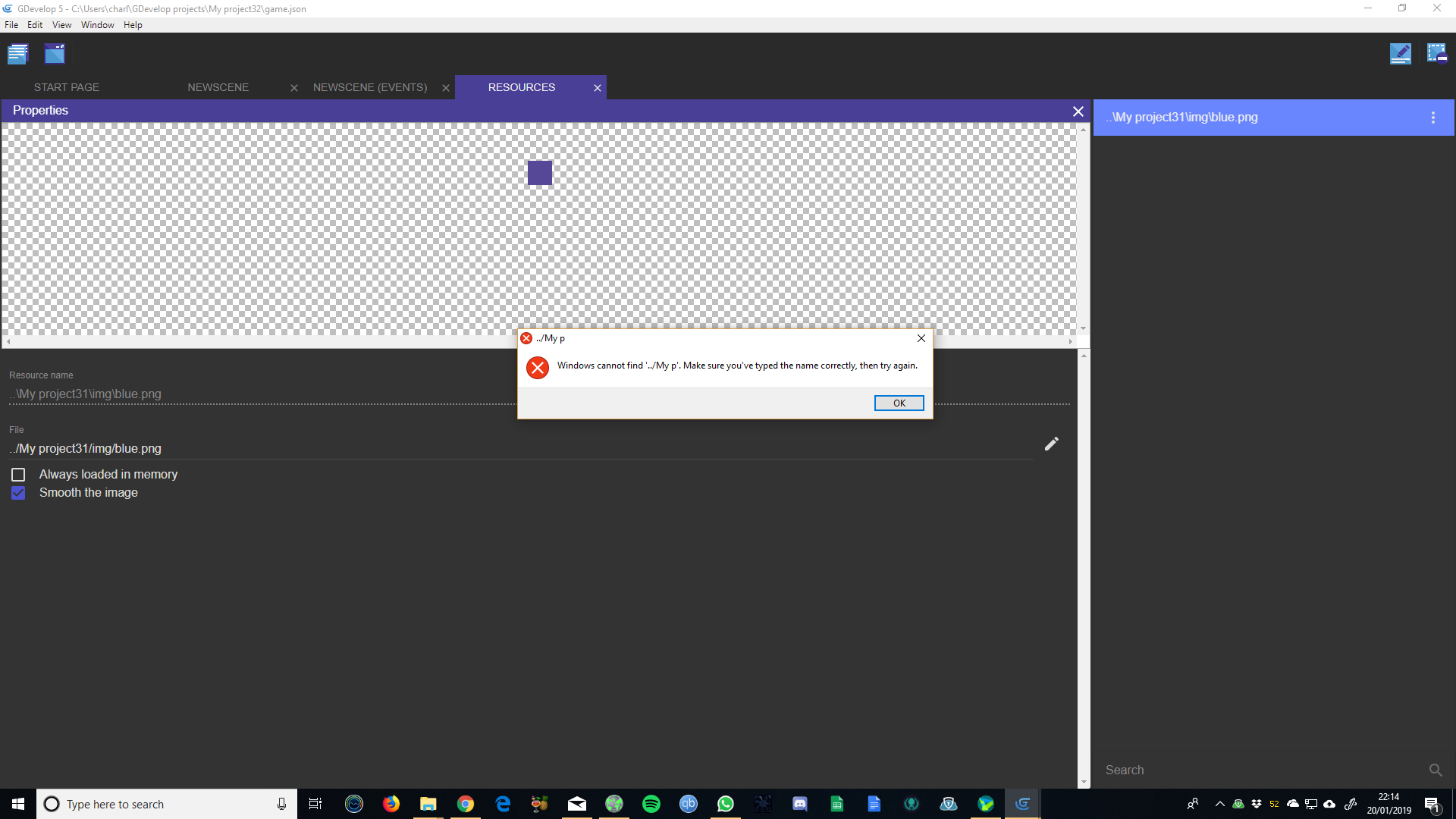
Only the start of the path is there?!
zatsme
on 20 Jan 2019
This is only an issue of the feature that open the game folder. @blurymind
can you have a quick look maybe? I'll double check otherwise tomorrow.
But so far, the files looks good to me. Preview is properly showing too as
far as I can see.
On Sun, 20 Jan 2019, 23:32 Zat <[email protected] wrote:
I added 3 , one in game dir, one below and one in another game dir...
"resources": {
"resources": [
{
"alwaysLoaded": false,
"file": "RED.png",
"kind": "image",
"metadata": "",
"name": "RED.png",
"smoothed": true,
"userAdded": true
},
{
"alwaysLoaded": false,
"file": "GFX/GREEN.png",
"kind": "image",
"metadata": "",
"name": "GFX\GREEN.png",
"smoothed": true,
"userAdded": true
},
{
"alwaysLoaded": false,
"file": "../My project31/img/blue.png",
"kind": "image",
"metadata": "",
"name": "..\My project31\img\blue.png",
"smoothed": true,
"userAdded": true
}
],
"resourceFolders": []They all show up as the files but something's wrong as in resources screen
you right click and open folder and the only one that works is the one in
game dir...The others either open the 'local' folder (windows app local) or you get
this:-[image: 2019-01-20]
https://user-images.githubusercontent.com/17770123/51445951-e4f65600-1d02-11e9-903e-d6162f950f20.pngOnly the start of the path is there?!
—
You are receiving this because you commented.
Reply to this email directly, view it on GitHub
https://github.com/4ian/GDevelop/issues/895#issuecomment-455908795, or mute
the thread
https://github.com/notifications/unsubscribe-auth/ABOIgj6s69PntPN0Bkdti7pVSvkqhYuFks5vFO5kgaJpZM4aJpWf
.
4ian
on 20 Jan 2019
I need to test this out tomorrow on my Linux installation. It sounds exactly as @4ian days , the paths need to be normalized. Can you elaborate on how the resources were imported? Did you use the scan command? Did you select them from the event sheet or other parts of the newIde?
 blurymind
on 21 Jan 2019
blurymind
on 21 Jan 2019
Can you share your project or an example project?
blurymind
on 21 Jan 2019
Wait, so is the problem that the editor doesn't load them at all.. or is it that when you click on locate resource, or any of the open folder commands- they don't work properly under Linux?
blurymind
on 21 Jan 2019
Wait, so is the problem that the editor doesn't load them at all.. ?
Yes, path that should be for example \images\props\something are replaced by /images/props/something in ressources, so everything is broken like if ressources have wrong path.
KinkGD
on 21 Jan 2019
I don't know KinkGD original error, but just using my windows GD the json file looks good as above but I cannot open or locate any resource in a directory other than the games one.
- Create project
- Create object
- assign a png in a different directory, specifically -
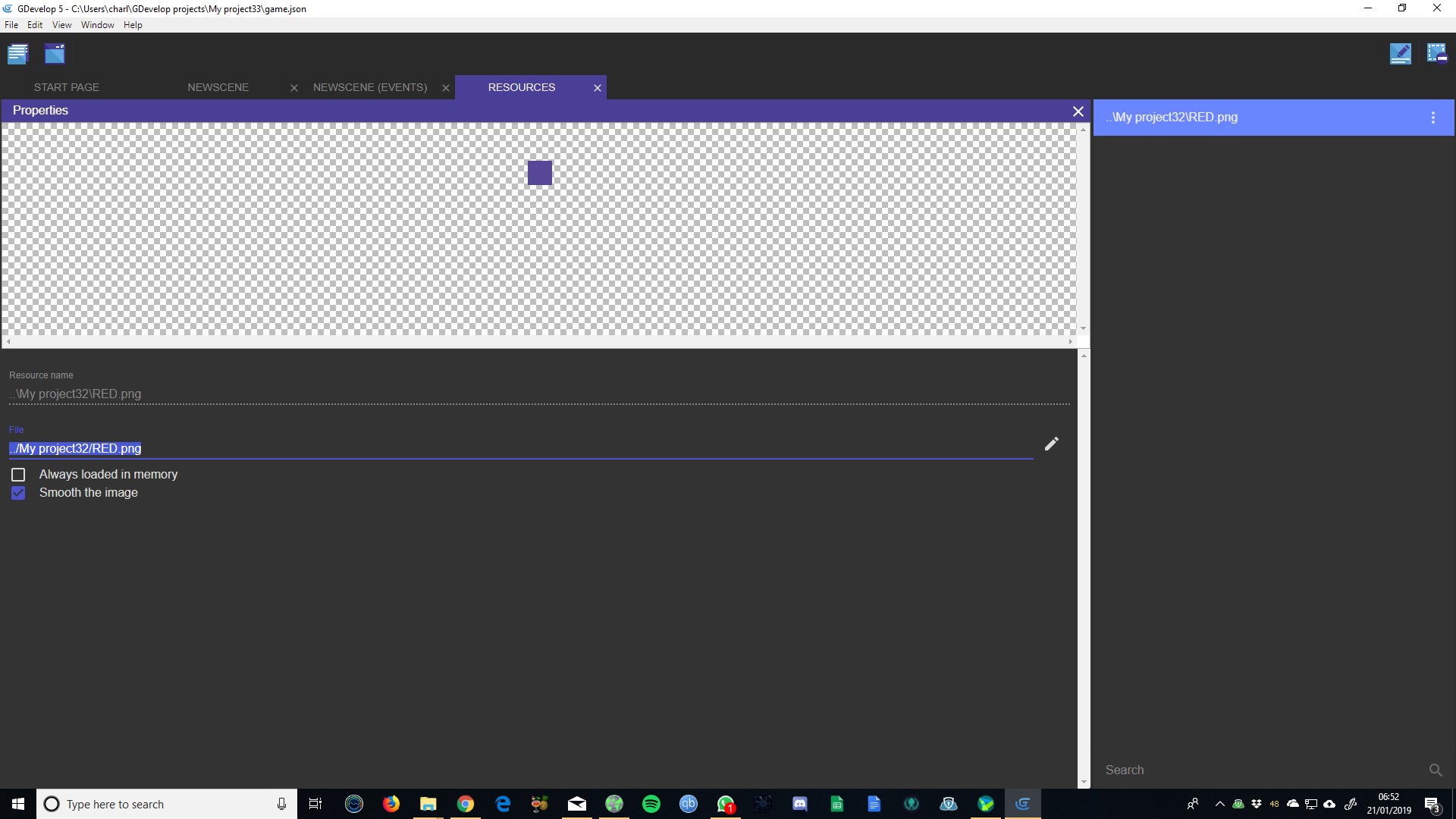
- check resource and cannot open or locate or copy path...
Copy path gives this "../My p" looks like it's being cut off somehow?! 👀
zatsme
on 21 Jan 2019
Just a guess, could it be related to the Space in "My project31"?
 Wend1go
on 21 Jan 2019
Wend1go
on 21 Jan 2019
Ok I think I know what's causing this and I'll look into it
On Mon, Jan 21, 2019, 7:10 AM Wend1go <[email protected] wrote:
Just a guess, could it be related to the Space in "My project31"?
—
You are receiving this because you were mentioned.
Reply to this email directly, view it on GitHub
https://github.com/4ian/GDevelop/issues/895#issuecomment-455969185, or mute
the thread
https://github.com/notifications/unsubscribe-auth/AGMbVVGpzhUHYul3nXIx1Pb4qjijXshiks5vFWfTgaJpZM4aJpWf
.
blurymind
on 21 Jan 2019
@KinkGD can you confirm if this only affects opening/locating files?
Also it will help a lot if you share an example project
blurymind
on 21 Jan 2019
Yes, path that should be for example \images\props\something are replaced by /images/props/something in ressources, so everything is broken like if ressources have wrong path.
Having backslash converted to forward slash IS the proper behavior and is what should be done. Windows understand paths with both / and . Linux/macOS only understand / as a path separator.
So GDevelop goes ahead and make all your path use "/". It works on all OSes.
So I'm not sure what the actual issue is?
4ian
on 21 Jan 2019
@blurymind i' can't provide my files, too much work on it (and it's a 300Mb + project right now, i'm porting a project i was working on since 2014 on GD4/native platform)
Let me explain with linux's screenshots :
1) working/created the project on windows, and save it
2) transfer the project/open the JSon file on linux
3) At Scene opening, all sprites or ressources linked to objects don't appear : it's broken
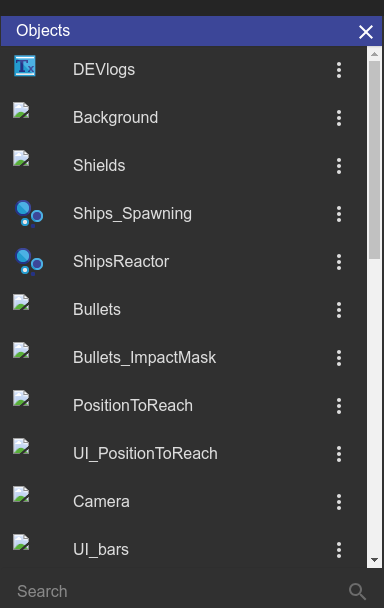
4) In Ressources : just opened the ressources screen (didn't checked to missing/wrong ressources paths, but everything is red from the beginning)
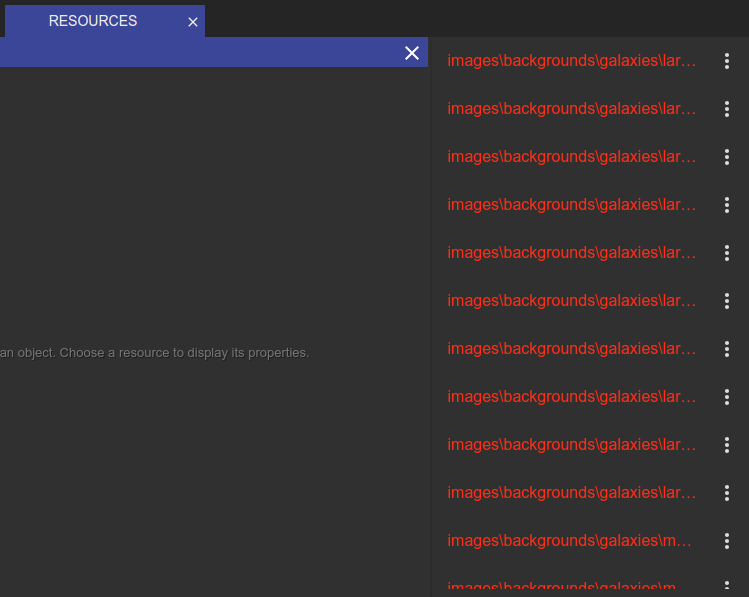
5) Editing a ressource : as you can see, the slashes/antislahes are "conflicting" the correct path for GD
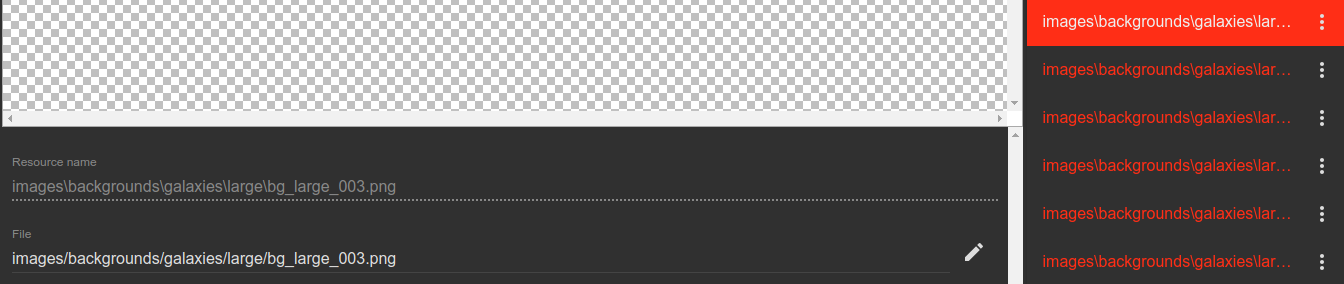
Difference between "Ressource name" (with "\" separator like on windows) and "File" (with "/" like Linux should do) => So the good path is displayed (with "/" linux), but the ressoruces is not found. The preview of the ressources display "unable to load the image".
Notice 3 more things to be sure there is no other troubles:
- I'm using dropbox between the 2 computers, so files are synced (and i always did it in the past, even with GD4 without issues)
- With previous version of GD5 i've tested (
- I never tested to create/edit the project on linux, then open it on windows, so i can't confirm the issue is on the two sides.
KinkGD
on 21 Jan 2019
Not sure why this is not working but if you change the game.json paths to read ./images/blah blah
Does that work? Might help to locate the bug?!
zatsme
on 21 Jan 2019
ok, done some investigations.... This might shock you a little!!!
The name seems to be very relevant, change the name to anything other than the path/filename and it breaks. This is why KinkGD's resources are broken, the name is in the windows format and therefore doesn't work, somewhere the name of the resource is being used to load the file!?
zatsme
on 21 Jan 2019
This is very strange. It shouldn't be using the name as a path. I need to
try and fix it on linux
On Mon, Jan 21, 2019, 5:57 PM Zat <[email protected] wrote:
ok, done some investigations.... This might shock you a little!!!
The name seems to be very relevant, change the name to anything other than
the path/filename and it breaks. This is why KinkGD's resources are broken,
the name is in the windows format and therefore doesn't work, somewhere the
name of the resource is being used to load the file!?—
You are receiving this because you were mentioned.
Reply to this email directly, view it on GitHub
https://github.com/4ian/GDevelop/issues/895#issuecomment-456155972, or mute
the thread
https://github.com/notifications/unsubscribe-auth/AGMbVZNXutm8lvuwNDBB08Kgnow83TR8ks5vFf95gaJpZM4aJpWf
.
blurymind
on 21 Jan 2019
trying this on manjaro linux, I am now trying to replicate the error, but failing to.
I opened a demo project I was working on in windows - and has sub folders. It works fine
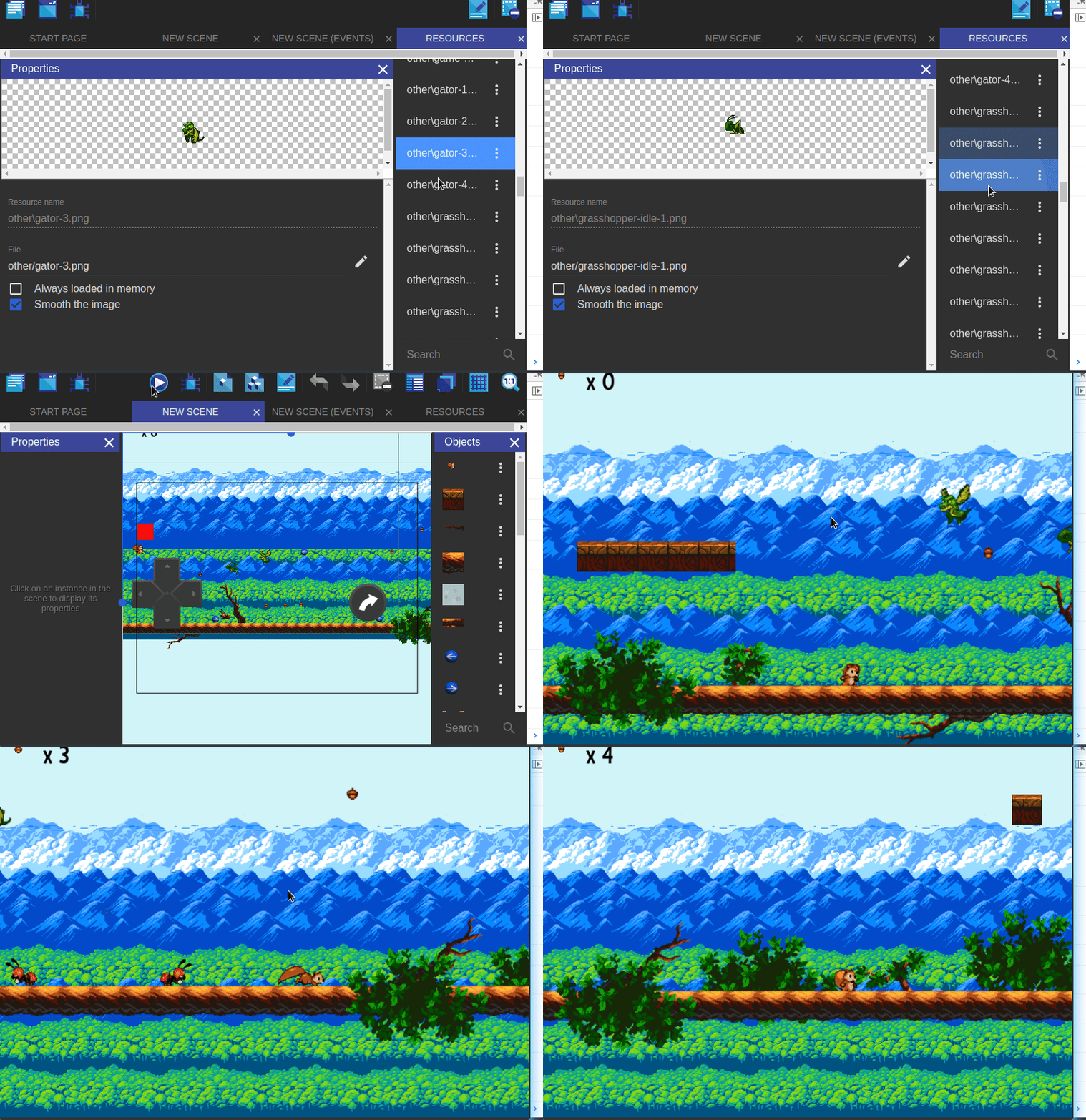
As you can see I have / in paths and \ in names and it works fine. The paths you see there are relative to where the project.json file is placed. If you have copied a bunch of files to a new directory, you have to make sure that the relative paths are the same, otherwise you will have to reasign them.
If you select one of these broken path resources , then click on the the pencil button to edit their path, you should get a navigator window to re-select them.
When you do and select them, are they at the exact same relative path?
@zatsme if you have a minimal project to replicate this,please share it
From what I can see in your screenshot, you are assigning a path that is outside of the project folder ( ../anotherprojectFolder/someImage.png ) . Please note that gdevelop uses relative paths, so I am not even sure you should be allowed to assign resources that are outside of that folder - that is not something I have tested throughly yet.
blurymind
on 21 Jan 2019
What happens if you change the name of the resource, on windows it breaks it.?
zatsme
on 21 Jan 2019
@zatsme if you edit the field under "File", you are not renaming it, you are changing the relative path. That will break it yes. But if you are editing the name via the menu command- that should also work fine. At least it does on linux. I havent tried windows yet
So far only possible corner case bug I found is files that are outside of the project folder can not be located with the locate file or open file command, as their relative paths start with ../ , you end up with a weird path.
@KinkGD I need a minimal example of a project that breaks. Open one of the example projects in windows, edit and save it. Then open it in linux, edit and save it. If bug persists - upload it as a zip here. Just drag and drop the zip file of the entire minimal example project folder. If invalid paths get written to the json, we need to also find out how that happens and when. The reason I want to see a minimal project folder is that I need to inspect your relative paths
blurymind
on 21 Jan 2019
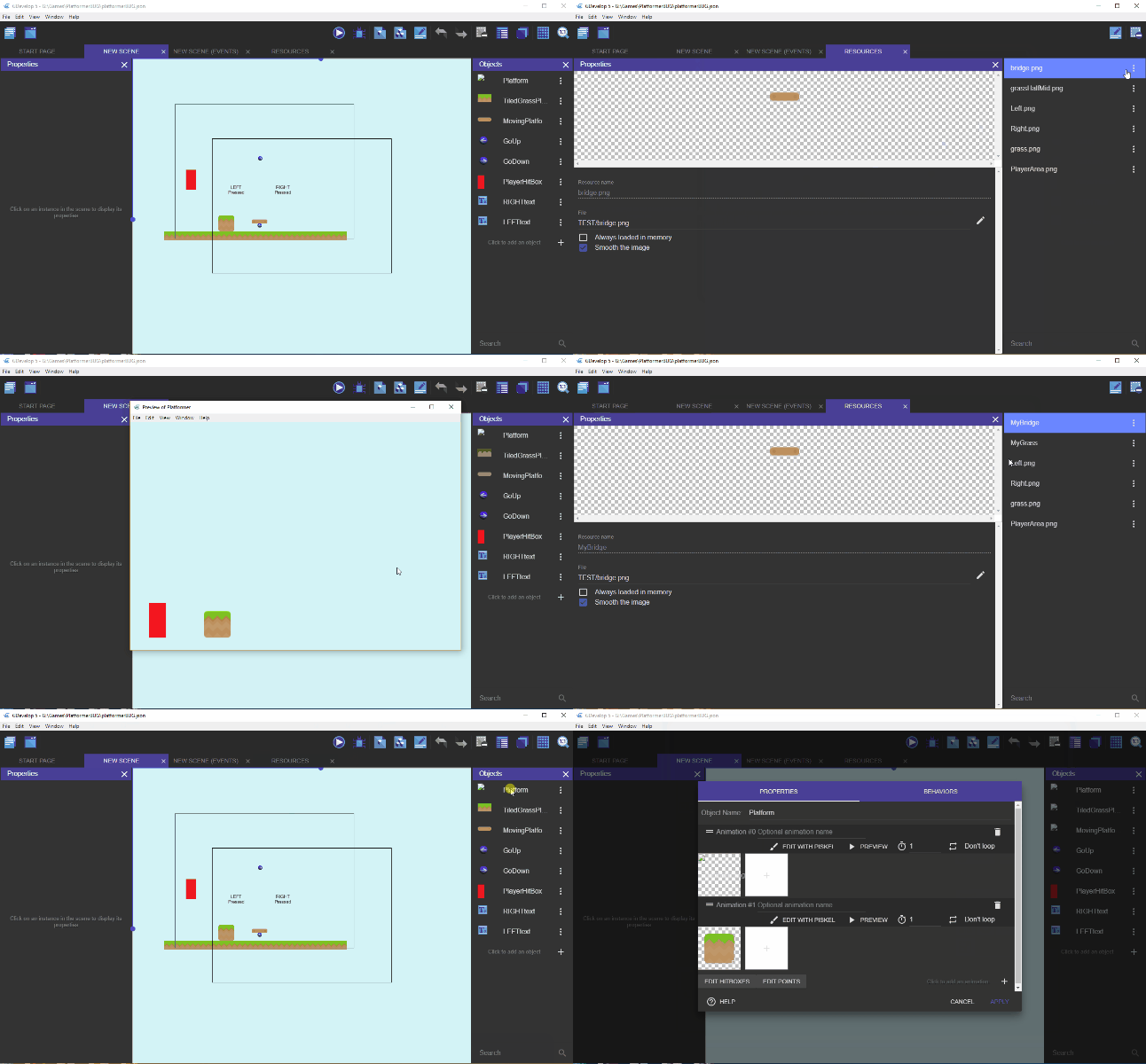
I was not changing the filename, I was using the menu and renaming the resource... my mistake is that once you do this, the game cannot render the animation anymore as it's got the wrong name, this confused me to think the filename was broken.
But, this is a bug! You change the resource name and it should you'd imagine also change the animation name that refers to the resource, or we need a message to say it will break the anim.
Also, the right click open file, locate file etc breaks after the rename.
I wonder if KinkGD's problem has something to do with this renaming problem, are his file paths too long or something, maybe they are more levels than you tested or it's unique to his distro?
Anyway, here's an anim showing what I mean....
zatsme
on 21 Jan 2019
@zatsme this is very strange :o it looks like the relative name is being used as a path. What does it say in the json file?
blurymind
on 21 Jan 2019
There you go 😄
zatsme
on 21 Jan 2019
ok I can confirm that this bug is there. To reproduce, you have to
- rename a resource
- playtest (resource is not there)
@4ian I am not sure what is causing this :( will need to continue tomorrow
pixi.js is failing to find the texture when playtesting, the resource is still shown in the resource list and resource manager, but it is gone in playtesting and the rest of the Ide
blurymind
on 21 Jan 2019
renaming the resource back to its relative path fixes it again
the name and path are properly saved in the json file, just not properly loaded outside of the resource manager
blurymind
on 21 Jan 2019
@KinkGD I need a minimal example of a project that breaks. Open one of the example projects in windows, edit and save it. Then open it in linux, edit and save it. If bug persists - upload it as a zip here. Just drag and drop the zip file of the entire minimal example project folder. If invalid paths get written to the json, we need to also find out how that happens and when. The reason I want to see a minimal project folder is that I need to inspect your relative paths
I'll try to make an example and reproduce in next few days (i'll not be at home). btw I never renamed/changed manually the paths of the ressources.
KinkGD
on 22 Jan 2019
rename a resource
playtest (resource is not there)
Yes, this is because your objects are refering to a resource that does not exist anymore.
Resources are basically:
- a name (can be whatever)
- a file (is a path relative to the game folder, written with forward slash only for portability purpose).
If you rename a resource, any object refering to this resource won't find it anymore, because they are not automatically updated. This still enable you to replace a resource by another in the whole game by changing name of resources. This may be surprising but so far it's not an issue - maybe a user experience to be improved (see below). But from what I see, if you're messing with resource names, then objects refering to these resource names won't find them anymore, which is not a bug per se.
renaming the resource back to its relative path fixes it again
Yes, because the objects still refered to your resource with the name it has originally. So when you put back the original name, the link was found.
To summarize, I think the "bug" here is a missing feature as pointed by @zatsme:
- either a warning telling you that renaming a resource will also break any object using it.
- or, better, automatically go through objects using the resource and changing the resource name there too, so that the link is not broken.
Also, the right click open file, locate file etc breaks after the rename.
This is strange. Opening a file, locating a file, should not be related to the name at all. @blurymind maybe something to check here. But from what I can see in the code, locate file is properly using the file:
so in theory, "Locate File" should be working properly, opening the directory containing the resource (if the path is not broken - i.e: if you see a preview then it's fine)
4ian
on 22 Jan 2019
@4ian I found that if the user has selected a path that is outside of the project folder, the locate file command fails. This is due to the path starting with ../ looking at the screenshots, I think that is what is happening to @zatsme
I will look into fixing that.
The resource renaming can be seen as a bug imo. Would you like me to add a warning message for now?
One thing I could do is have all associated game objects update too in the future, but that would actually kill the ability to easily swap out resources by renaming them.
It would help if we communicate to the user the number of game objects using the resource name. It would also be helpful if previous names are remembered and can be set back to in the future.
So to summarize, I can do a pull that:
- adds a warning when a resource is renamed
- fixes the outside of project folder path file location
- try to add a counter to resources- to communicate to the user the number of objects using them via that name
blurymind
on 22 Jan 2019
This is due to the path starting with ../ looking at the screenshots, I think that is what is happening to @zatsme
Cool, thanks for looking into that. This part sounds definitely like a bug then. You may what to use path.normalize before asking the shell to open the directory.
The resource renaming can be seen as a bug imo. Would you like me to add a warning message for now?
I've added a task on the roadmap here: https://trello.com/c/MQ5IWUjb/237-when-a-resource-is-renamed-automatically-update-resource-names-in-objects-and-events-so-that-objects-and-events-are-not-broken
I agree that it's "almost a bug" as it's very surprising.
Remember that resource editor is something for advanced users that want control on what resources are in their game. In theory, users should almost never rename a resource or anything.
GDevelop takes care of creating the resources, so it's almost invisible. It may still be useful to go there to tweak parameters (smooth/non smooth) or to remove unused resources (but even this, GDevelop could do it in theory).
It may also be used in case you move file on the disk: at this moment, you also need to change the files of your resources (but the name do not need to be changed).
4ian
on 22 Jan 2019
'I found that if the user has selected a path that is outside of the project folder, the locate file command fails. This is due to the path starting with ../ looking at the screenshots, I think that is what is happening to @zatsme'
Except if you look at my zip or gif above I replicated the problem with sub folders only, so the menu commands fails to find the file anywhere apart from the game dir, once the resource is renamed 😕
zatsme
on 22 Jan 2019
@zatsme I will have a look at this again when I get back home tonight
blurymind
on 22 Jan 2019
@4ian I can add a confirmation to rename a resource if you like? It will communicate to the user that the resource might be in use by game objects and that renaming it will lose these connections.
Something like:
"Are you sure you want to rename this resource? Game objects using the old name will no longer be able to find it"
If it's not too difficult to find out how many game objects are using it, I can even check if any are and if not - dont show the confirmation prompt. If yes - show how many in the warning message. I was actually thinking of adding a counter in the project manager to show a number of objects using each resource
Another event more drastic temporary solution would be to disable renaming resources and to simply use the relative path for now
blurymind
on 22 Jan 2019
Such a counter next to each resource would be awesome. Otherwise changing multiple resources would mean lots of clicks.
Wend1go
on 22 Jan 2019
@zatsme thank you for catching this bug! I just noticed I was giving my reusable function the file path, instead of the file name, thus why it wasnt finding it after rename.
Fix here
https://github.com/4ian/GDevelop/pull/898
I will do another pull to add a warning for when a resource is renamed- this should communicate to the user what the effects of that are
Edit: here it is - https://github.com/4ian/GDevelop/pull/899 adds a warning confirmation when renaming a resource
blurymind
on 22 Jan 2019
I cannot reproduce the bug in an example... I've made several try, but no!
Btw i still have the problem, whenever if i open/save on linux the project. If i take in example the first ressources from the ressources manager:
On windows :
- Ressource name : images\backgrounds\galaxies\large\bg_large_001.png
- File path : images/backgrounds/galaxies/large/bg_large_001.png
On Linux:
- Ressource name : images\backgrounds\galaxies\large\bg_large_001.png
- File path : images/backgrounds/galaxies/large/bg_large_001.png
I think i've found, at least i've found something! There is a trouble on uppercase "generated" in linux ressources paths!!
=> i don't use uppercase in my folders names
=> my path is really ok : images/backgrounds/galaxies/large/bg_large_001.png
BUT if i add a new ressources or editing a "broken" ressources to select the file again, linux transform the first character of the path in uppercase :
images/backgrounds/galaxies/large/bg_large_001.png _becomes_ Images/backgrounds/galaxies/large/bg_large_001.png
btw the new ressources added (with first char in uppercase) works fine in sprites...
If i scan for images in ressources manager, all images in subfolders are found, but with the same "issue" : all name and path have their first char transformed in uppercase.
Is it the source of the problem ? idk, but it's the only weird things i can identify at this point.
EDIT :
My second (and biggest) project on GD5 have the same issue, but not for all ressources, about only half or the ressources are identified as missing.
I notice also one thing:
On this second project, the ressources names are just the name of the image (and not full path + image), while on the first project (where i took this screenshot), the ressources names are full path+images name..
The first project was created with the version of GD5 available in late december. The second project is older, i started his development i late august.
Is it normal that the name of ressources are now "full path" + "file name" ?
KinkGD
on 26 Jan 2019
If i scan for images in ressources manager, all images in subfolders are found, but with the same "issue" : all name and path have their first char transformed in uppercase.
What's this uppercase thing going on? There should be no uppercasing at all of anything ? Really confused by this.
My second (and biggest) project on GD5 have the same issue, but not for all ressources, about only half or the ressources are identified as missing.
@blurymind Do you want to give a look at this to see if there is any special work done on the path of resources scanned?
There must be some bug here because it's not normal that things are identified as missing if they are not.
EDIT: Sorry about this but this is really confusing and I spend a lot of time trying to understand what can be wrong.
Can we go back to a more precise way of bug reporting:
1) Example game
2) Step to reproduce
3) Here is what I observe, here is what I should observe instead.
If there is something wrong, it can usually be solved in 5 minutes if everyone has a clear mind on what is going on 😄
4ian
on 27 Jan 2019
Yeah i'm sorry but this is really confusing to me too, so i'm just testifying about what i can see and try to understand..
@4ian , you can take in example the project sent by email related to the issue #900, and try to open it on linux distro.
I don't want to share it publicly, but no problem to share this light version in private to @blurymind ymin.
KinkGD
on 28 Jan 2019
I really can't test if I have fixed it without any test files
You can send a link to [email protected] if you like :)
It would help if you send it to @4ian as well, as he is reviewing pull requests
I need steps to reproduce this. Is it caused by the scan for resources command? How do you import them exactly? Does it only happen to specifically the project you are working on, or can you trigger it on example projects?
It is highly likely that this is caused by some oddity from upgrading your project from gd4 to gd5
blurymind
on 1 Feb 2019
I'll send it to you by mail, 4ian already have a copy (sent for other issue #900 ).
When you'll get the file : just open the project on linux, open a scene : see that sprites for example are "broken", then check in ressources, everything will be red, while the paths and ressoruces names are corrects. And nothing is stored outside the project folder.
On contrary, open the project on windows, and you will see that there are not problems at all.
The project i'll send (and the second project in fact where i see this issue) was not upgraded from GD4, i recreated everything (in betters ways!) from scratch into GD5, only assets where keeped form the old project.
EDIT : mail sent!
KinkGD
on 1 Feb 2019
Related issues
Wend1go
·
5Comments
 Jeje2201
·
5Comments
Jeje2201
·
5Comments
 Bouh
·
4Comments
Bouh
·
4Comments
 Jose-Moreno
·
5Comments
Jose-Moreno
·
5Comments
 ced64k
·
4Comments
ced64k
·
4Comments