Gdevelop: Making an active preview inaccessible.
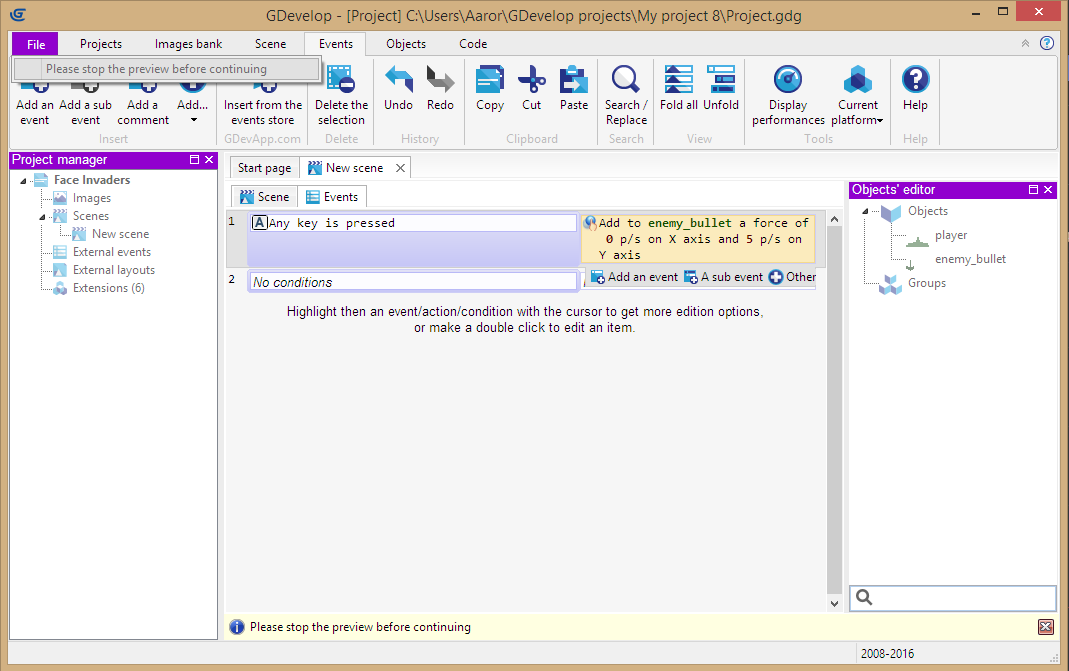
I somehow made the preview inaccessible. The scene (and all other) tabs become unresponsive and the user is left unable to save their project! File simply says "Please stop the preview before continuing".
Conditions to replicate:
I started editing the event sheet and it must have changed the tabs at the top. This was while a preview was still active.
 agameraaron
All 10 comments
Click on Scene tab in the ribbon then on "Stop The Preview" button? :)
 4ian
on 29 Aug 2017
4ian
on 29 Aug 2017
The scene tab was unresponsive. It did nothing when clicked on.
agameraaron
on 30 Aug 2017
Strange. Can you reproduce the same bug again now?
4ian
on 30 Aug 2017
It would appear I was clicking on the wrong 'scene' tab this whole time. There is one above (File, Projects, Images bank, Scene) and one below (Scene, Events). I was trying to click the one above. That's a bit confusing. When people told me to click the 'scene' tab, I was technically doing that, just the wrong one.
agameraaron
on 30 Aug 2017
I think the magic word in 4ian's first comment is "ribbon", but it can be a bit confusing indeed :)
 Lizard-13
on 31 Aug 2017
Lizard-13
on 31 Aug 2017
Ooh, okay, gotcha. I was clicking on the ribbon's Scene button. I will close this as it was a user error on my part. If I think of a good design that might infer what to do when in the same situation, I will put it under feature request.
agameraaron
on 31 Aug 2017
@4ian, could it be possible to change the name of "Scene" in the ribbon into "Preview" while you are doing a preview?, this way the users will se this big "Preview" tab on the top and then the "Stop preview" button 🤔
Lizard-13
on 31 Aug 2017
@agameraaron In the upcoming GDevelop 5, I've split scene and events in two separate tabs.
And the preview runs in a separate window so it's not blocking the whole editor. So this problem should not appear, see this screenshot:
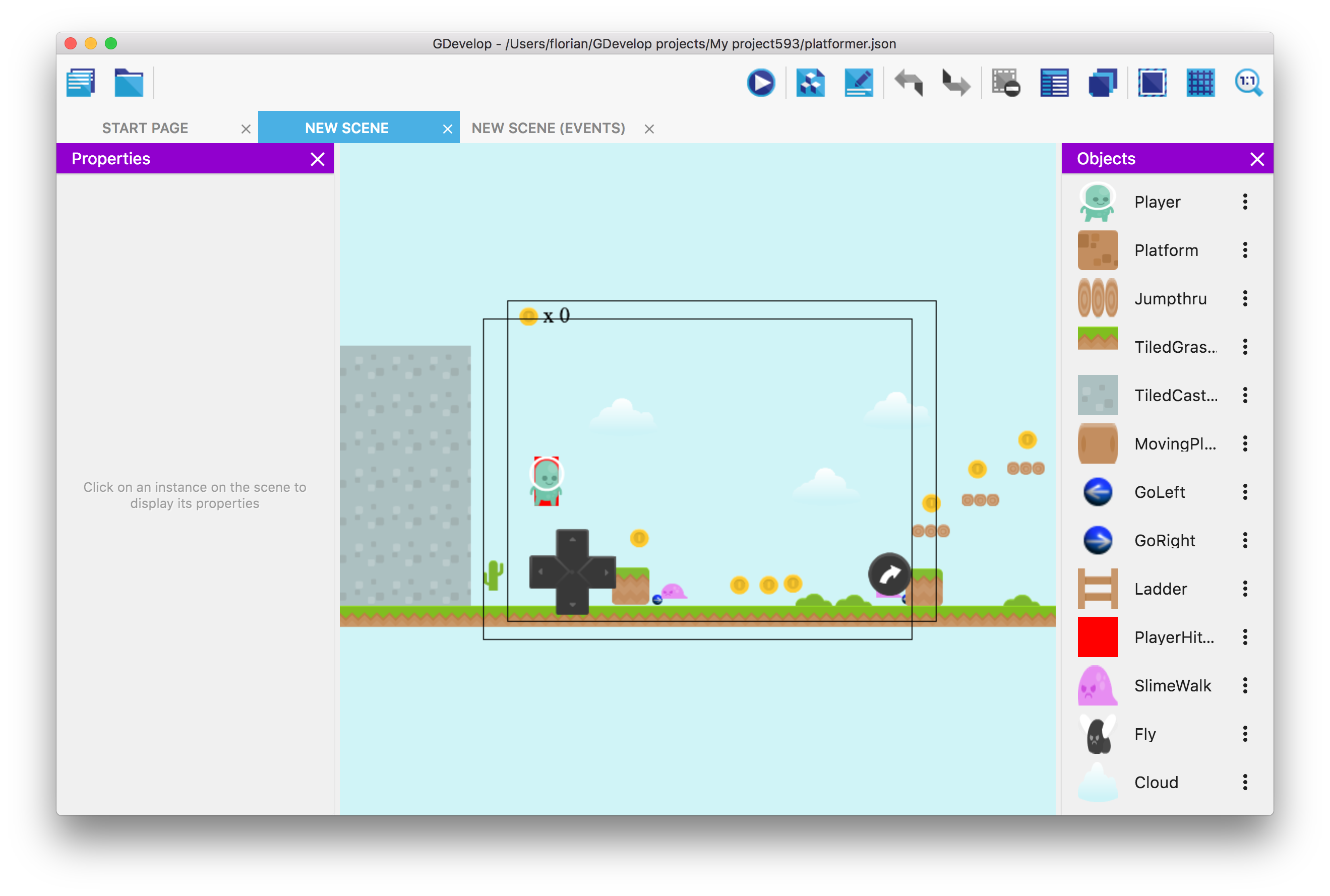
Do you think it's better? 😄
@Lizard-13 I think it would add even more confusion. It's not a common pattern to have ribbon tab changing its name. :/
I'm quite confident the next major version (GDevelop 5) won't have this problem. :)
4ian
on 31 Aug 2017
I like it; looking forward to the next version! The new interface looks to be very user friendly.
agameraaron
on 1 Sep 2017
I feel that the new interface is built more for a mobile device and would not look as good on a bigger screen desktop machine screen as the old one with these giant buttons and tabs . They take away space from the level editor and event sheet frame. There is also a lot of wasted empty space above the tabs in the screenshot, but I am assuming that is because it is a WIP and it might get populated as the editor matures more. :) I am judging it too early
Having more space between the elements does make it look very user friendly though.
 blurymind
on 1 Sep 2017
blurymind
on 1 Sep 2017
Related issues
 RyanNerd
·
4Comments
RyanNerd
·
4Comments
 Jose-Moreno
·
5Comments
Jose-Moreno
·
5Comments
 ced64k
·
4Comments
ced64k
·
4Comments
 Bouh
·
4Comments
4ian
·
3Comments
Bouh
·
4Comments
4ian
·
3Comments
Most helpful comment
@agameraaron In the upcoming GDevelop 5, I've split scene and events in two separate tabs.

And the preview runs in a separate window so it's not blocking the whole editor. So this problem should not appear, see this screenshot:
Do you think it's better? 😄
@Lizard-13 I think it would add even more confusion. It's not a common pattern to have ribbon tab changing its name. :/
I'm quite confident the next major version (GDevelop 5) won't have this problem. :)