Frontend: Related Entities don't show, error in console
Checklist
- [x] I have updated to the latest available Home Assistant version.
- [x] I have cleared the cache of my browser.
- [x] I have tried a different browser to see if it is related to my browser.
The problem
When I click on any related entities, they do not appear for me, I get an error in console.

Expected behavior
Steps to reproduce
1. Open a more info dialog
2. Press settings cog in top right
3. Click "Related" tab
Environment
- Home Assistant release with the issue: 0.105.0b
- Last working Home Assistant release (if known): n/a
- UI Type (States or Lovelace): Lovelace
- Browser and browser version: Chrome stable
- Operating system: macOS
Problem-relevant configuration
Javascript errors shown in your browser console/inspector
ha-related-items.ts:274 Uncaught (in promise) {code: "unknown_error", message: "Unknown error"}
value @ ha-related-items.ts:274
async function (async)
value @ ha-related-items.ts:272
value @ ha-related-items.ts:63
performUpdate @ updating-element.ts:720
_enqueueUpdate @ updating-element.ts:653
async function (async)
_enqueueUpdate @ updating-element.ts:640
_requestUpdate @ updating-element.ts:605
initialize @ updating-element.ts:449
initialize @ lit-element.ts:146
O @ updating-element.ts:438
V @ lit-element.ts:61
i @ subscribe-mixin.ts:13
i @ ha-related-items.ts:29
_clone @ template-instance.ts:99
__commitTemplateResult @ parts.ts:276
commit @ parts.ts:218
update @ template-instance.ts:53
__commitTemplateResult @ parts.ts:268
commit @ parts.ts:218
s @ render.ts:55
V.render @ shady-render.ts:277
update @ lit-element.ts:220
performUpdate @ updating-element.ts:704
_enqueueUpdate @ updating-element.ts:653
async function (async)
_enqueueUpdate @ updating-element.ts:640
_requestUpdate @ updating-element.ts:605
set @ updating-element.ts:313
value @ dialog-entity-registry-detail.ts:131
handleEvent @ parts.ts:505
__boundHandleEvent @ parts.ts:463
j @ property-effects.js:299
C @ property-effects.js:324
w @ property-effects.js:155
(anonymous) @ property-effects.js:242
_propertiesChanged @ property-effects.js:1657
_flushProperties @ properties-changed.js:352
_flushProperties @ property-effects.js:1502
_invalidateProperties @ property-effects.js:1474
_setProperty @ property-effects.js:1459
t.<computed> @ property-effects.js:2015
_selectionChange @ iron-multi-selectable.js:139
_applySelection @ iron-selectable.js:355
_applySelection @ iron-menu-behavior.js:274
setItemSelected @ iron-selection.js:77
select @ iron-selection.js:95
_selectSelected @ iron-selectable.js:292
_updateSelected @ iron-multi-selectable.js:102
I @ property-effects.js:811
w @ property-effects.js:155
v @ property-effects.js:121
_propertiesChanged @ property-effects.js:1654
_flushProperties @ properties-changed.js:352
_flushProperties @ property-effects.js:1502
_invalidateProperties @ property-effects.js:1474
_setProperty @ property-effects.js:1459
Object.defineProperty.set @ properties-changed.js:152
select @ iron-multi-selectable.js:66
select @ iron-menu-behavior.js:125
_itemActivate @ iron-selectable.js:395
_activateHandler @ iron-selectable.js:383
_activateHandler @ iron-menu-behavior.js:415
_activateHandler @ paper-tabs.js:407
(anonymous) @ template-stamp.js:87
M @ gestures.js:662
q @ gestures.js:1058
click @ gestures.js:1017
N @ gestures.js:450
Show 37 more frames
Additional information
 SeanPM5
All 8 comments
That's weird, it means you don't have the search integration loaded, which is marked as a dependency of the frontend and so should always be there. Are you sure you have pulled the latest beta?
 balloob
on 30 Jan 2020
balloob
on 30 Jan 2020
I'm on 0.105.0b in Hass.io Home Assistant (not dev). I see all the other new stuff and have been playing with it but this doesn't appear to be working at all even after a restart.
Just noticed the new automations, scripts, and scenes cards that are under Device Info page also aren't functioning correctly. They all just say "no automations" even though I definitely have a bunch of existing ones in YAML and created a brand new one using the UI editor. I assume that uses the search integration also then.

SeanPM5
on 30 Jan 2020
I have the same issue
 TheZoker
on 30 Jan 2020
TheZoker
on 30 Jan 2020
If you would like to test it before it is fixed, you can add this to your configuration.yaml:
search:
 bramkragten
on 30 Jan 2020
bramkragten
on 30 Jan 2020
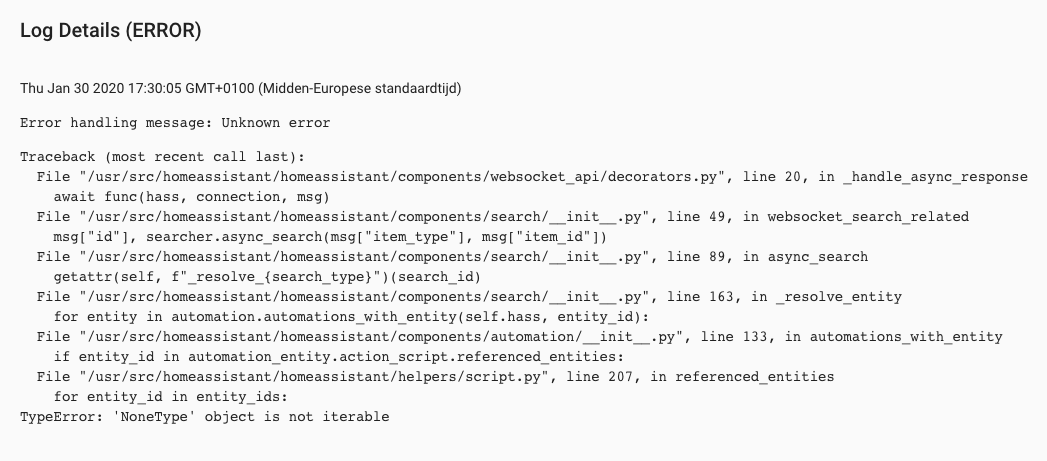
any errors in your backend log
balloob
on 30 Jan 2020
It probably is a backend thing, I see:
bramkragten
on 30 Jan 2020
I see the same error as @bramkragten after adding search: to my configuration
 iantrich
on 30 Jan 2020
iantrich
on 30 Jan 2020
@SeanPM5 please also check the backend error logs next time 👍
balloob
on 30 Jan 2020
Related issues
 OnFreund
·
26Comments
OnFreund
·
26Comments
 rosch100
·
27Comments
rosch100
·
27Comments
 jer78
·
29Comments
jer78
·
29Comments
 tomlut
·
28Comments
tomlut
·
28Comments
![move[bot] picture](https://avatars1.githubusercontent.com/in/6673?v=4&s=40) move[bot]
·
25Comments
move[bot]
·
25Comments
Most helpful comment
It probably is a backend thing, I see:
