Frontend: Unable to input text on automation condition template type
@zerog2k commented on Aug 26, 2018, 9:44 PM UTC:
Running
Home Assistant 0.76.0
docker, ubuntu 16.04
Attempting to use UI to to create new automations, with condition to look at mqtt (json) payload value using value template.
Whenever I select "template" for "condition", the "value template" text area box does not show any text when typed in. So I'm unable to enter any text into "value template" field. (See red circled area of screenshot.)
(I can create other types of automations OK, and with other types of conditions, text boxes are working ok.)

have tested with safari and chrome, both exhibit this behavior.
This issue was moved by fabaff from home-assistant/home-assistant#16213.
 move[bot]
All 25 comments
@zerog2k commented on Aug 26, 2018, 9:46 PM UTC:
this also happens with "numeric state" condition type in the "value template" entry box:
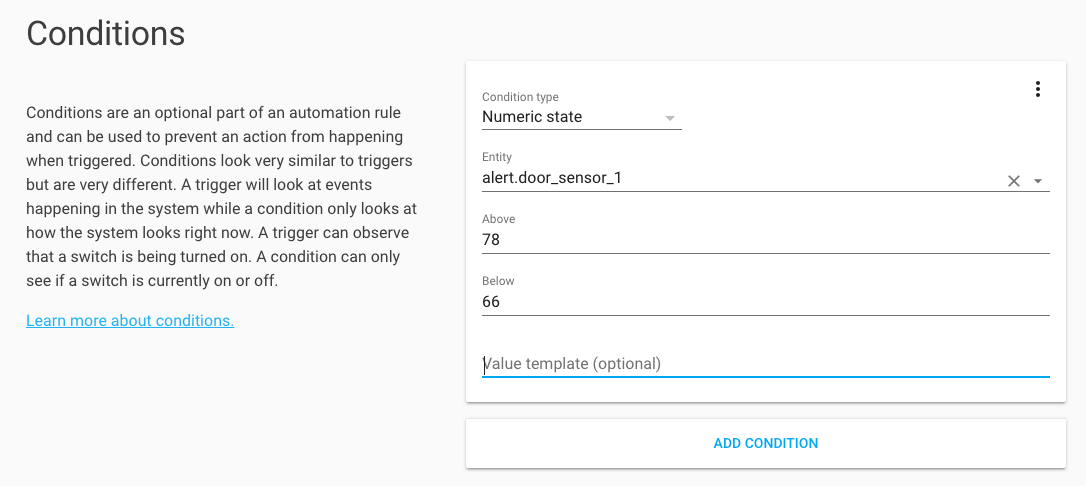
I'm unable to enter any text in "value template"
move[bot]
on 27 Aug 2018
also if I edit the automations.yaml directly and add a value template, the value of the value template will show up in this text box, but will still not be editable.
 zerog2k
on 27 Aug 2018
zerog2k
on 27 Aug 2018
I have the same issue. The input does seem to handle events because when I try to change the value after created the following template {{true}} in yaml it does show the save button. Also when attempting to change the value and saving the following error gets displayed: Message malformed: not a valid value for dictionary value @ data['condition'][0]['condition']
This same problem goes for template triggers.
Tested on firefox
 pstreef
on 30 Sep 2018
pstreef
on 30 Sep 2018
Seeing this exact same issue on Chrome 71.0.3578.62 running under Mac OS X 10.14 with home assistant 0.82.1.
 nkaminski
on 30 Nov 2018
nkaminski
on 30 Nov 2018
Same in Chrome 71.0.3578.98 and Firefox 64.0 on Windows 10. Home assistant 0.84.6 (Docker)
 dominikschubert
on 7 Jan 2019
dominikschubert
on 7 Jan 2019
Throwing a reference in here for myself: https://github.com/home-assistant/home-assistant-polymer/blob/dev/src/panels/config/js/condition/template.js#L18
 iantrich
on 7 Jan 2019
iantrich
on 7 Jan 2019
Same in Chrome 71.0.3578.98 and HA 0.82.1 (Hass.io)
 markdepalma
on 11 Jan 2019
markdepalma
on 11 Jan 2019
Same in Chrome 71.0.3578.98, HA 0.86.4 (Hass.io) and Windows 10.
 Zebble
on 4 Feb 2019
Zebble
on 4 Feb 2019
anybody know if polymer is officially deprecated in favor of lovelace? (I'm assuming they are separate and lovelace is replacement for polymer ui?)
zerog2k
on 4 Feb 2019
@zerog2k Polymer is the web components that were used to build the UI. Lovelace was built with Polymer as well, but is in the process of being migrated to LitElement (still provided by the Polymer Project)
iantrich
on 4 Feb 2019
Any update on this getting the same issue
 DoctorIOT
on 18 Feb 2019
DoctorIOT
on 18 Feb 2019
This issue is quite bothersome to me as well, I may make an effort to debug this in the near future.
nkaminski
on 21 Feb 2019
@nkaminski perfect to get started, tackle a problem that impacts you. How I got started as well :)
iantrich
on 21 Feb 2019
Not the first time I will have contributed either; I presently have changes merged for the SNMP sensor and Venstar thermostat components.
However my area of strength is certainly on the backend side of things as opposed to the web UI so I'm expecting a bit a of a learning curve with this one.
On February 20, 2019 7:17:51 PM CST, Ian Richardson notifications@github.com wrote:
@nkaminski perfect to get started, tackle a problem that impacts you.
How I got started as well :)--
You are receiving this because you were mentioned.
Reply to this email directly or view it on GitHub:
https://github.com/home-assistant/home-assistant-polymer/issues/1601#issuecomment-465822025
--
Sent from my Android device with K-9 Mail.
nkaminski
on 21 Feb 2019
I have the same issue of not being able to type in the text box for Value Templates under the Automations editor. HA 86.4.
 gpearston
on 23 Feb 2019
gpearston
on 23 Feb 2019
Has anyone found a fix for this yet? I'm using hass.io 0.88.1 and I am unable to use the GUI to enter text for a template. I have to edit the automations.yaml file, after which I can view the template info in the GUI, but not edit the template fields.
Other things like "state" I have no trouble creating/editing in the.
 0evmc
on 6 Mar 2019
0evmc
on 6 Mar 2019
Experiencing the same issue. (new user, clean install today). This error occurs in both Safari and Chrome
 twerff
on 13 Mar 2019
twerff
on 13 Mar 2019
Still exists in 0.90.1.
 cwhits
on 23 Mar 2019
cwhits
on 23 Mar 2019
Consistency is the key.....
On Sat, Mar 23, 2019, 12:45 PM Chris Helming notifications@github.com
wrote:
Still exists in 0.90.1.
—
You are receiving this because you commented.
Reply to this email directly, view it on GitHub
https://github.com/home-assistant/home-assistant-polymer/issues/1601#issuecomment-475903281,
or mute the thread
https://github.com/notifications/unsubscribe-auth/AZ55hB5MbM56TX58SV4W9w8XbnOiHi6Yks5vZpJbgaJpZM4WN_yR
.
gpearston
on 23 Mar 2019
Same issue on 0.91.0...
 Vedeneb
on 4 Apr 2019
Vedeneb
on 4 Apr 2019
No promises, but I will try to look into this over the weekend. Significant pain point for myself too.On Apr 4, 2019 8:54 AM, Vedeneb notifications@github.com wrote:Same issue on 0.91.0...
—You are receiving this because you were mentioned.Reply to this email directly, view it on GitHub, or mute the thread.
nkaminski
on 4 Apr 2019
My goodness...soon it'll be a year when the issue got reported and still there's no fix for this yet. Even more - no sign of a fix coming :-/ I guess it's not even diagnosed - I mean no one knows where the problem lies. I'm on the newest HA 0.93 and this is still not working. Shame. Maybeit's not a crucial functionality but sometimes would be handy to change something without hte need of editing the automations.yaml file.
 dgtal1
on 22 May 2019
dgtal1
on 22 May 2019
It looks like there updates to automations coming in 1.0. I'm hoping this will be fixed there.
 PurelyNicole
on 22 May 2019
PurelyNicole
on 22 May 2019
After some investigation, I was able to narrow down the affected element to the ha-textarea custom element initially introduced by @balloob in PR #1576 to work around a Webkit bug.
As the WebKit bug has now been fixed upstream for quite some time and given my limited experience working with Polymer and preact, I have opted to revert the breaking change as opposed to trying to make ha-textarea and paper-textarea functionally equivalent. This revert does indeed resolve this issue on Safari 12.1.1 (14607.2.6.1.1) as well as Chrome 75.0.3770.100.
However, I am not sure if there is a better way to implement this that does not break compatibility with older versions of WebKit.
Here is my fork with the (nontrivial) revert of this change https://github.com/nkaminski/home-assistant-polymer/tree/revert_1576
nkaminski
on 12 Jul 2019
Great work guys! Thanks a lot @balloob for fixing this. What a relief it works now in HA!
dgtal1
on 31 Aug 2019
Related issues
 OkhammahkO
·
80Comments
OkhammahkO
·
80Comments
 SeLLeRoNe
·
39Comments
SeLLeRoNe
·
39Comments
 rosch100
·
27Comments
rosch100
·
27Comments
 mrsnyds
·
42Comments
mrsnyds
·
42Comments
 tomlut
·
28Comments
tomlut
·
28Comments
Most helpful comment
Seeing this exact same issue on Chrome 71.0.3578.62 running under Mac OS X 10.14 with home assistant 0.82.1.