Frontend: 0.111.2 breaks history graphs.
Checklist
- [x] I have updated to the latest available Home Assistant version.
- [x] I have cleared the cache of my browser.
- [x] I have tried a different browser to see if it is related to my browser.
The problem
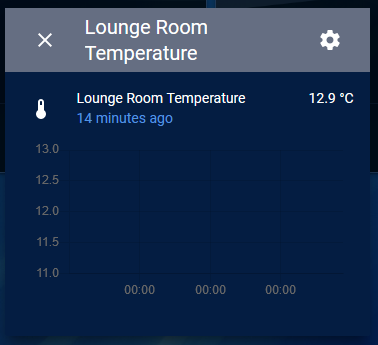
Since updating to v0.111.2 (from 0.110.7) all history graphs, including the core Lovelace card and more info pop-ups show only the current value.
My database is fine and custom-mini-graph cards display entity history correctly.
Expected behavior
History graph card to show a history of entities.
Steps to reproduce
Click on any entity that has history data and a unit.
Environment
- Home Assistant release with the issue:
Home Assistant NUC image 0.111.2 - Last working Home Assistant release (if known):
0.110.7 - Browser and browser version:
Fails on the latest Firefox, Chrome, and the iOS app. - Operating system:
Windows 10, iOS13.5.1
State of relevant entities
N/A
Problem-relevant configuration
N/A
Javascript errors shown in your browser console/inspector
Additional information
 tomlut
All 28 comments
What database do you use?
 bramkragten
on 13 Jun 2020
bramkragten
on 13 Jun 2020
CC @bdraco
bramkragten
on 13 Jun 2020
I have the same issue, I'm using the MariaDB as an addon, manually downgraded HA to 0.111.1 and got all the sensors data back.
 thecode
on 13 Jun 2020
thecode
on 13 Jun 2020
MariaDB addon.
tomlut
on 13 Jun 2020
Setting up a mariadb server now for testing
 bdraco
on 13 Jun 2020
bdraco
on 13 Jun 2020
can it be related to this https://github.com/home-assistant/core/pull/36746?
My system is using Asia/Jerusalem timezone (GMT+3)
thecode
on 13 Jun 2020
can it be related to this home-assistant/core#36746?
My system is using Asia/Jerusalem timezone (GMT+3)
definitely the cause of the regression
bdraco
on 13 Jun 2020
@tomlut you can manually downgrade to 0.111.1 by using:
ha core update --version=0.111.1
From the SSH / Web Terminal
thecode
on 13 Jun 2020
Please try this patch
https://github.com/bdraco/home-assistant/commit/8bcbfdc911b41a49d5e2f88f13dcedc5a47c5038
bdraco
on 13 Jun 2020
Please try this patch
Is there an easy way to apply it on hassio installation?
I have a dev system with the code but I don't have the DB there.
thecode
on 13 Jun 2020
There is a bit of setup to get inside the hassio docker container:
https://developers.home-assistant.io/docs/operating-system/debugging/#home-assistant-operating-system
https://developers.home-assistant.io/docs/operating-system/debugging/#accessing-the-container-bash
bdraco
on 13 Jun 2020
@tomlut you can manually downgrade to 0.111.1 by using:
ha core update --version=0.111.1
From the SSH / Web Terminal
Thanks, but I'm already back on 0.110.7
Didn't realise 0.111.1 would work. Also have other issues with custom cards on 0.111 so am waiting for them to be fixed.
tomlut
on 13 Jun 2020
I did replicate the issue and verified the patch fixes it. It would be good to get a second verification.
bdraco
on 13 Jun 2020
Thanks for the fast response, I have this question too though:
Is there an easy way to apply it on hassio installation?
tomlut
on 13 Jun 2020
Thanks for the fast response, I have this question too though:
Is there an easy way to apply it on hassio installation?
https://github.com/home-assistant/frontend/issues/6161#issuecomment-643668078
bdraco
on 13 Jun 2020
I can get into the container with portainer, how do I apply the patch?
thecode
on 13 Jun 2020
I can get into the container with portainer, how do I apply the patch?
Make a backup of history/__init__.py and replace it with this one https://raw.githubusercontent.com/bdraco/home-assistant/8bcbfdc911b41a49d5e2f88f13dcedc5a47c5038/homeassistant/components/history/__init__.py
bdraco
on 13 Jun 2020
@bdraco I have manually replaced the file on HA 0.111.2 and it solves the issue.
I have verified that the issue exists before replacing the file and that it is fixed after.
Thanks for the effort and fast responses.
thecode
on 13 Jun 2020
Had the same issue (just upgraded to 0.111.2) and just found this issue thread. I've manually applied the patch and the history graphs are now working properly for me, as well.
 amaiman
on 13 Jun 2020
amaiman
on 13 Jun 2020
I can confirm it fixes it as well
 DavidFW1960
on 14 Jun 2020
DavidFW1960
on 14 Jun 2020
I can get into the container with portainer, how do I apply the patch?
Make a backup of
history/__init__.pyand replace it with this one https://raw.githubusercontent.com/bdraco/home-assistant/8bcbfdc911b41a49d5e2f88f13dcedc5a47c5038/homeassistant/components/history/__init__.py
Did this patch as well and history is back :) thanks
 poudenes
on 14 Jun 2020
poudenes
on 14 Jun 2020
Hello, sorry, where is such file for HA on docker (synology)? thank you
 anglrus
on 14 Jun 2020
anglrus
on 14 Jun 2020
Hello, sorry, where is such file for HA on docker (synology)? thank you
It is the same file and process for Docker, you need shell access to the docker running the home assistant container and replace the file there.
In my opinion unless you want to check if it works for you it worth waiting for 0.111.3 or downgrade to 0.111.1.
Patch is already merged and I assume a new version will be out soon.
thecode
on 14 Jun 2020
I had the same problem, I'm using mariadb on external server, my system is hassio with Hassos on PI4 4gb 32bit version. At now I came back to 0.111.1 and everything is ok, I hope in a new patch o version 0.111.3
 arripeo
on 14 Jun 2020
arripeo
on 14 Jun 2020
I can get into the container with portainer, how do I apply the patch?
Make a backup of
history/__init__.pyand replace it with this one https://raw.githubusercontent.com/bdraco/home-assistant/8bcbfdc911b41a49d5e2f88f13dcedc5a47c5038/homeassistant/components/history/__init__.py
I tried to find this file, had no luck. I'm running proxmox hassos, I do not see a history folder in my samba share. Why was this closed when this issue persists with no patch to the integration?
 RoldyBuffalo
on 14 Jun 2020
RoldyBuffalo
on 14 Jun 2020
Why was this closed when this issue persists with no patch to the integration?
Because there is a patch and it has been merged... it's just you don't know how to patch it.
You need to docker exec into the container:
david@debian:~$ docker exec -it homeassistant /bin/bash
Then cd to this location:
bash-5.0# cd /usr/src/homeassistant/homeassistant/components/history
Then use vi to edit the file (which is an utter nightmare actually)
I copied the entire patch to the clipboard before editing the file and deleted the contents of the file and pasted the new file in there.
DavidFW1960
on 15 Jun 2020
Why was this closed when this issue persists with no patch to the integration?
Because there is a patch and it has been merged... it's just you don't know how to patch it.
You need to docker exec into the container:
david@debian:~$ docker exec -it homeassistant /bin/bash
Then cd to this location:
bash-5.0# cd /usr/src/homeassistant/homeassistant/components/history
Then use vi to edit the file (which is an utter nightmare actually)
I copied the entire patch to the clipboard before editing the file and deleted the contents of the file and pasted the new file in there.
Or, instead of Vi, assuming you have wget:
wget -O __init__.py "https://raw.githubusercontent.com/bdraco/home-assistant/8bcbfdc911b41a49d5e2f88f13dcedc5a47c5038/homeassistant/components/history/__init__.py"
Then restart Home Assistant.
 iMiMx
on 15 Jun 2020
iMiMx
on 15 Jun 2020
wget -O __init__.py "https://raw.githubusercontent.com/bdraco/home-assistant/8bcbfdc911b41a49d5e2f88f13dcedc5a47c5038/homeassistant/components/history/__init__.py"Then restart Home Assistant.
That's awesome. I can't tell you how much I loathe VI
DavidFW1960
on 16 Jun 2020
Related issues
 KennethLavrsen
·
3Comments
KennethLavrsen
·
3Comments
![move[bot] picture](https://avatars1.githubusercontent.com/in/6673?v=4&s=40) move[bot]
·
3Comments
move[bot]
·
3Comments
 Misiu
·
3Comments
Misiu
·
3Comments
 aaron9060
·
3Comments
aaron9060
·
3Comments
 Fusseldieb
·
4Comments
Fusseldieb
·
4Comments
Most helpful comment
@bdraco I have manually replaced the file on HA 0.111.2 and it solves the issue.
I have verified that the issue exists before replacing the file and that it is fixed after.
Thanks for the effort and fast responses.