Frontend: Ability to set History Graph colors
It would be nice to be able to change the default colors applied to Lovelace history graph cards. The default colors seem somewhat arbitrary and can clash with other elements in the UI.
Or perhaps to select from a different palette if setting each entity and potential value is too troublesome?

    type: history-graph
    title: 'Lighting History'
    entities:
      - entity: light.counter_switch
        name: 'Counter'
      - entity: light.bedroom_lights
        name: 'Bedroom'
      - entity: light.office_lights
        name: 'Office'
      - entity: light.bathroom_lights
        name: 'Bathroom'
      - entity: light.basement_lights
        name: 'Basement'
      - entity: light.utilityroom_lights
        name: 'Utility'
      - entity: light.garage_lights
        name: 'Garage'
      - entity: light.porch_switch
        name: 'Porch'
      - entity: light.deck_switch
        name: 'Deck'
      - entity: light.landscape_lights
        name: 'Landscape'
 aaron9060
👍7
All 3 comments
While I don't think that this old issue will get attention anymore 😢 there are two additional issues with these colors:
- When using
history-graphwith anbinary_sensorfor doors and windows, closed is red, while open is green which is the opposite you want, if you have these sensors for security reasons (then open doors or windows are bad and should be red). - When
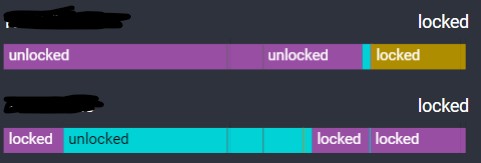
history_graphis used with an regular sensor, you get different colors for the same state (depending on which state comes first). So in this case, I can't see at a glance, which door is unlocked at which times, because the colors are not consistent:
 noxhirsch
on 9 Jul 2020
noxhirsch
on 9 Jul 2020
👍2
 thomasloven
on 23 Sep 2020
thomasloven
on 23 Sep 2020
❤2
8% of human males and 0.6% of females of Northern European ancestry are red-green color-blind.
 jenniferlee1818
on 5 Nov 2020
jenniferlee1818
on 5 Nov 2020
Was this page helpful?
0 / 5 - 0 ratings
Related issues
 Depechie
·
3Comments
Depechie
·
3Comments
 TheZoker
·
3Comments
TheZoker
·
3Comments
 GauthamVarmaK
·
3Comments
GauthamVarmaK
·
3Comments
 agneevX
·
3Comments
agneevX
·
3Comments
 jhollowe
·
4Comments
jhollowe
·
4Comments
Most helpful comment
Workaround: https://gist.github.com/thomasloven/5ee36708908569c8e168419557cefd08