Frontend: script status with wait instruction not well displayed in entities card
Home Assistant release with the issue: 0.94.3
Last working Home Assistant release (if known): Don't know
UI (States or Lovelace UI?):Lovelace
Browser and Operating System: Bug viewed on Chrome 74.0.3729.169 and Safari 12.1
Description of problem:
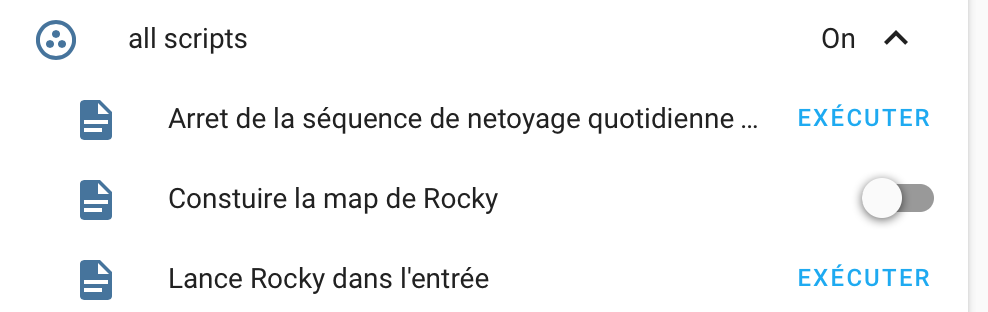
State of script with wait_template instruction is not well displayed in entities card. For example when I launch the script by clicking the toggle. The toggle first go to on and then go back to off after 2 or 3 seconds even if the script is not finished.
Example to reproduce:
script:
  test_debug:
    sequence:
     - service: input_boolean.turn_off
        data:
          entity_id: input_boolean.stop_debug
     - wait_template: "{{ is_state('input_boolean.stop_debug', 'on') }}"
You can recover the good state by refreshing the page in the web browser
Javascript errors shown in the web inspector (if applicable):No message in console
Additional information:
 oncleben31
All 13 comments
@iantrich I don't understand the feature request tag. It's more a bug don't you think? The behavior is not consistent.
oncleben31
on 9 Oct 2019
Re-reading your statement I don't actually even understand what you're referencing. The script row has a button, not a toggle.

 iantrich
on 9 Oct 2019
iantrich
on 9 Oct 2019
The script as a button by default except if you put a wait_template instruction in the sequence. In the last case there is a toggle which is on until the script reach the last instruction.
oncleben31
on 9 Oct 2019
As yes, I see what you're saying now
iantrich
on 9 Oct 2019
I tried to investigate the root cause but didn't really find where to start. Have you got an idea ?
oncleben31
on 9 Oct 2019
no. it would be in ha-entity-toggle
iantrich
on 9 Oct 2019
The problem was not present in 0.84, in that the script indication stayed on while ever the script was running.
I've only recently upgraded to 0.103 and noticed this changed behaviour.
Also, the behaviour is the same when using the delay: instruction as well as wait_template:
 jivesinger
on 9 Jan 2020
jivesinger
on 9 Jan 2020
If the can_cancel attribute is set, it is a toggle
iantrich
on 9 Jan 2020
It is also a toggle without can_cancel being set if wait_template or delay are used.
The bug is that the toggle appears to turn off while the script is still running, but if you hit the refresh button on the browser, the correct state is shown.
Also if you click the script name, the pop up shows the correct state.
The toggle did not behave this way in previous versions of HA.
It was on while ever the script was running.
jivesinger
on 10 Jan 2020
There hasn't been any activity on this issue recently. Due to the high number of incoming GitHub notifications, we have to clean some of the old issues, as many of them have already been resolved with the latest updates.
Please make sure to update to the latest Home Assistant version and check if that solves the issue. Let us know if that works for you by adding a comment 👍
This issue now has been marked as stale and will be closed if no further activity occurs. Thank you for your contributions.
![stale[bot] picture](https://avatars3.githubusercontent.com/in/1724?v=4&s=40) stale[bot]
on 13 Apr 2020
stale[bot]
on 13 Apr 2020
still bug
iantrich
on 14 Apr 2020
Still a bug for me too.
 genestealer
on 30 May 2020
genestealer
on 30 May 2020
It seems to me that this bug has been solved with last HA emission: Home Assistant 0.113
 TheFax
on 3 Aug 2020
TheFax
on 3 Aug 2020
Related issues
 deluxestyle
·
25Comments
deluxestyle
·
25Comments
 jlpouffier
·
30Comments
jlpouffier
·
30Comments
 andriej
·
64Comments
andriej
·
64Comments
 mrsnyds
·
42Comments
mrsnyds
·
42Comments
 tomlut
·
28Comments
tomlut
·
28Comments
Most helpful comment
still bug