Frontend: Binary sensor value is [%key_id:state::default::on%]
Checklist:
- [x] I updated to the latest version available
- [x] I cleared the cache of my browser
Home Assistant release with the issue:
Home Assistant 0.101.2
Last working Home Assistant release (if known):
Home Assistant 0.99
Browser and Operating System:
I replicated the issue with
- Chrome on MAC
- Chrome on PC
- Internet explorer on PC
- FireFox on PC
- Chrome on Android
Description of problem:
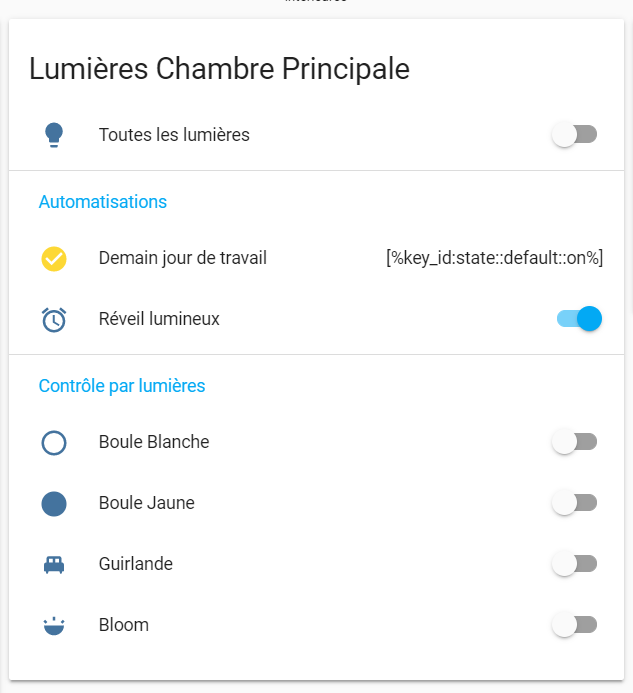
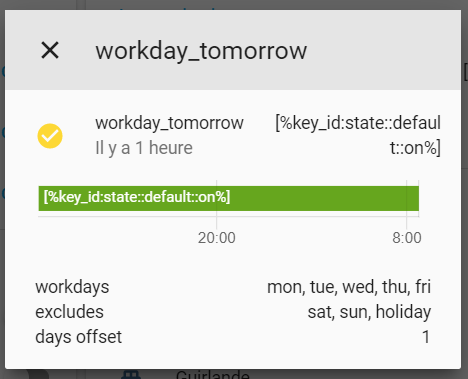
For binary sensor set to "on" without any device class, the display value on the entities card is now _[%key_id:state::default::on%]_
The issue seems to be present only for sensors set to "on", sensors set to "off" are display as"off" as usual
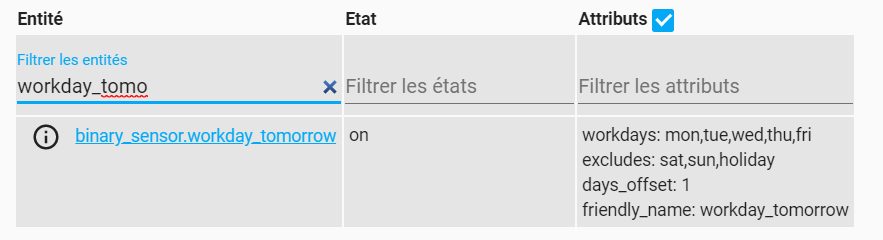
It is only a display issue, the sensor is set to "on" in the developer tools and all my automations are still working.
See screenshots below for a detailed view of the issue.
Additional information:
The entities card with the faulty "on" value for my binary sensor:
The sensor view:
The developer tool, showing the correct "on" value:
NOTE : First time opening an issue on home assistant, I remain available if you need more details
NOTE : Issue experienced by other people : here
 jlpouffier
All 30 comments
I am progressing a bit on my understanding:
I think it's not a polymer issue.
It's a translation issue because everything is correctly displayed in English.
Issue is only here in French.
Nevertheless, I don't 100% get it, because this key is translated in french based on what I can see in lokalise here

jlpouffier
on 4 Nov 2019
I think we only resolve Lokalise variables in our base translations and not in the translations we get from Lokalise. Someone did use that on Lokalise, will check if what I say is true and make sure we do replace these variables.
 bramkragten
on 4 Nov 2019
bramkragten
on 4 Nov 2019
I have got the same issue :
- Fibaro Wall Plug switch :
- When it's on the display is right
- When it's off the display is [%key_id:state::default::off%]
- custom sensor with template :
- when on the display is [%key_id:state::default::on%]
- if off I don't display the card so I don't know what would be displayed if off
I confirm this problem is happening when using the french interface, when the language is set to English it's working as expected.
 yjajkiew
on 5 Nov 2019
yjajkiew
on 5 Nov 2019
For information, I have tried several languages, actually it seems to happen only for French. Sorry, not familiar enough with Japanese or Chinese to check.
 antro31
on 5 Nov 2019
antro31
on 5 Nov 2019
Yes, French seems to be the only language that someone used these keys. I would suggest someone removes them from Lokalise for now.
bramkragten
on 5 Nov 2019
I'm running Home Assistant in french too and confirm that I've that issue since release 0.101.
Any idea where is the bug and how to fix it (submit the correction in next release)?
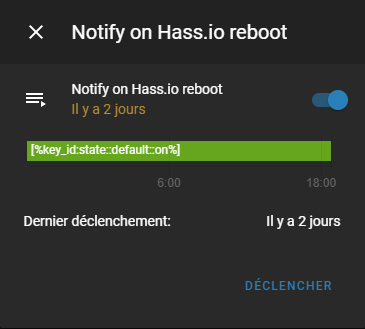
 plmilord
on 6 Nov 2019
plmilord
on 6 Nov 2019
@plmilord I think it would be possible to manually edit localization files.
@bramkragten can You instruct us how to do that?
 Misiu
on 7 Nov 2019
Misiu
on 7 Nov 2019
Go to Lokalize https://lokalise.com/project/3420425759f6d6d241f598.13594006/?view=single&reference_lang_id=640&single_lang_id=673 and enter normal text instead of the [%key_id:state::default::on%]
bramkragten
on 7 Nov 2019
@bramkragten but that change will be visible in the next release.
Can we change the file locally in a running system to get the change instantly?
Misiu
on 7 Nov 2019
Not easily no. Search for the folder static/translations there is the base translation and there are more split out over multiple subfolders.
bramkragten
on 7 Nov 2019
Thank you, I finally understood why I had this state. I am also under Hassio in French. I did not understand why there was little about this problem. I hope you can fix it in the next version.
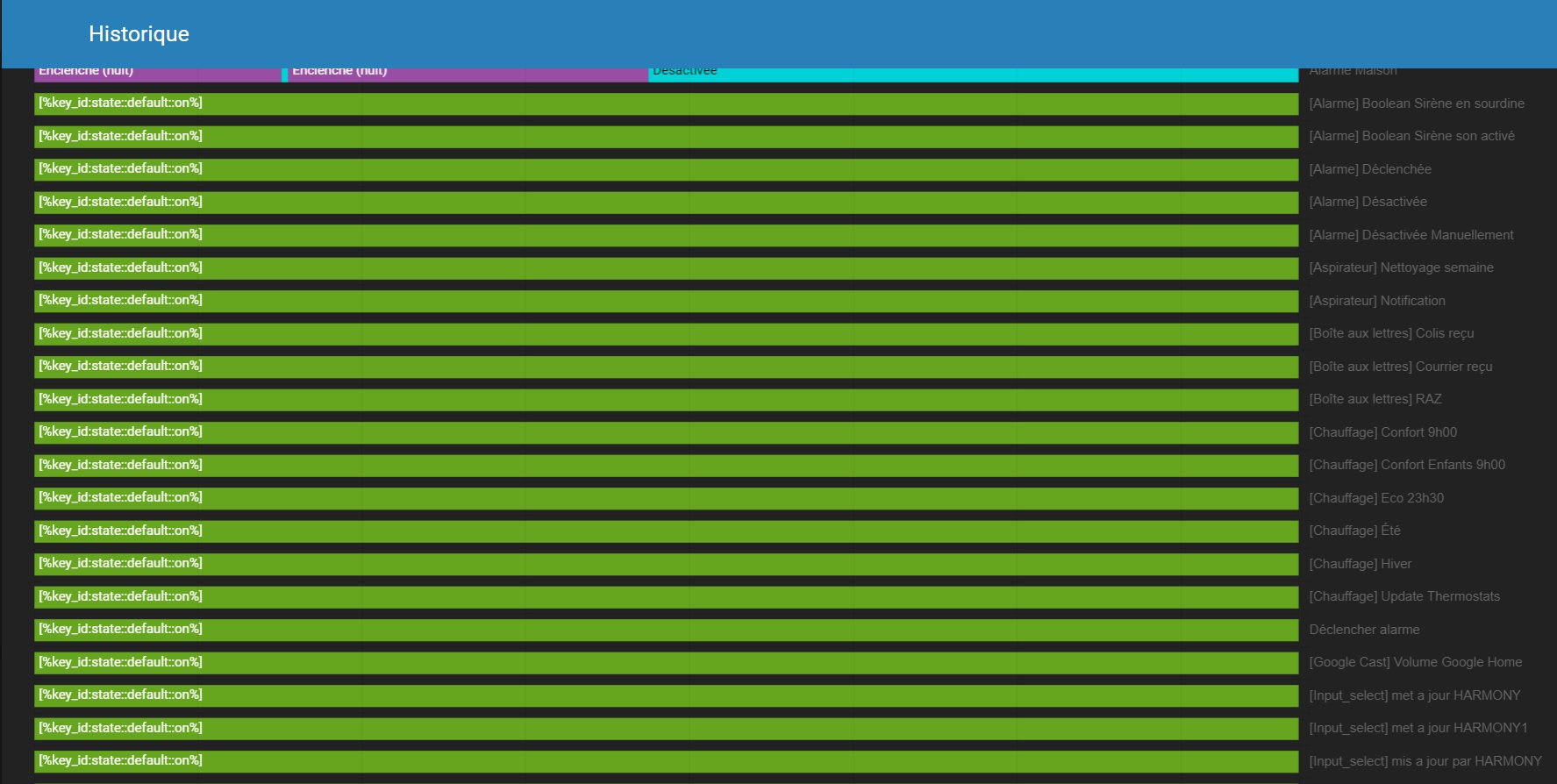
 dckiller51
on 7 Nov 2019
dckiller51
on 7 Nov 2019
I have the same issue (french too) the "on" is correctly displayed but I have [%key_id:state::default::off%] instead of "off"... Please tell us when the fix will be released ! 👍
Thanks
 bourliam
on 8 Nov 2019
bourliam
on 8 Nov 2019
I have the same issue with both
- [%key_id:state::default::off%]
- [%key_id:state::default::on%]
But I laso have some sensor with the sate "Off"
Hope you can fix this soon.
 Ilocans
on 18 Nov 2019
Ilocans
on 18 Nov 2019
This is already fixed, and will be in the next version (currently in beta)
bramkragten
on 18 Nov 2019
Mmm.. I migrated this morning to 0.102.0.
Issue is still there. What happened with the correction?
antro31
on 21 Nov 2019
Mmm .. J'ai migré ce matin à 0.102.0.
Le problème est toujours là. Que s'est-il passé avec la correction?
Hello, problem solved for me with version 0.102.0.
dckiller51
on 21 Nov 2019
Mmm.. I migrated this morning to 0.102.0.
Issue is still there. What happened with the correction?
Please clear your cache.
bramkragten
on 21 Nov 2019
Hi. Just checked with several browsers, cleared cach, still have the same issue:
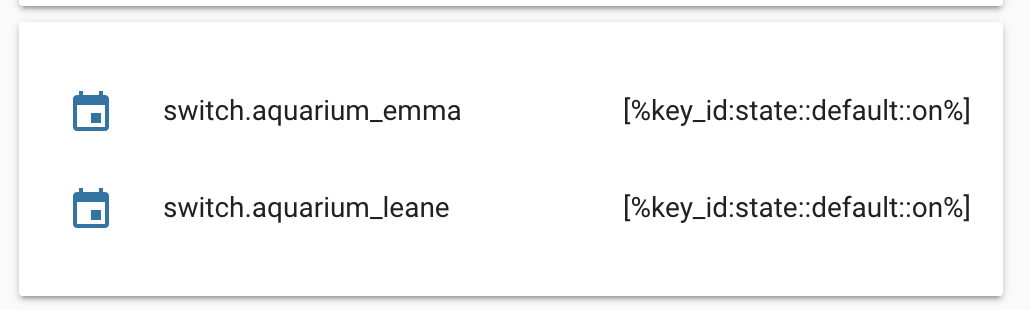
I even tried to disconnect the calendar integration which gives me the value for these sensors, with the same result.
Could this come due to the fact that sensor value has not changed since the migration? Could this come due to calendar integration?
antro31
on 21 Nov 2019
No, it is because the translator used the wrong format; it should be [%key:state::default::on%]
bramkragten
on 21 Nov 2019
OK, so what should I do then ? Completly restart hassio system ? Would this help ?
antro31
on 21 Nov 2019
No, you can't change that on your system. You should wait for the next version.
bramkragten
on 21 Nov 2019
Should we "re open" this problem report?
antro31
on 21 Nov 2019
No, the code is fine (i think it was actually fine from the beginning) the translation was bad. I corrected it, but can't prevent a translator from doing it wrong again.
You can do this yourself btw: https://developers.home-assistant.io/docs/en/internationalization_translation.html
bramkragten
on 21 Nov 2019
Migrated this morning to 0.102.1,.... Still the same issue.
Cleaned Browser cache, even deleted entity database, still the same. !?!..
antro31
on 22 Nov 2019
It is not in 0.102.1, translations will be updated in 0.103
bramkragten
on 22 Nov 2019
@bramkragten sorry to bother with this but let me understand.
That means that in lokalise we should find in home-assistant polymer project some strings translated with this [%key_id::default::state::on%] ? or even [%key_id::default::state::off%] (because in my case i have a switch that shows this with off)...
But having a search in the project i can't find any key translated with this ! Even when the problem appears the 1st time i never saw this particular string in the translations.
But having a search in the code here finds some [%key_id::default::state::on%] :
https://github.com/home-assistant/home-assistant-polymer/blob/ea9e8cc39231b4aeba2e43e8903ae591be14f993/translations/fr.json#L148
https://github.com/home-assistant/home-assistant-polymer/blob/ea9e8cc39231b4aeba2e43e8903ae591be14f993/translations/fr.json#L165
and so on...
 SNoof85
on 22 Nov 2019
SNoof85
on 22 Nov 2019
Last week I corrected some (the off I believe) on Lokalise, we import the Lokalise translations in to this repo (the file you linked) I noticed yesterday that the on labels where still using the wrong format and corrected those on Lokalise. I think there are no bad ones on Lokalise anymore now, but we have not synced our repo with Lokalise yet, so the file in the repo are indeed still wrong.
bramkragten
on 22 Nov 2019
Thx for your answer. I will keep an eye on the lokalize project as much as possible.
SNoof85
on 22 Nov 2019
Go to Lokalize https://lokalise.com/project/3420425759f6d6d241f598.13594006/?view=single&reference_lang_id=640&single_lang_id=673 and enter normal text instead of the
[%key_id:state::default::on%]
How can we get access to this project ?
I've got a "Sorry, you do not have permission to access this resource" error trying to access that link
 olijouve
on 6 Dec 2019
bramkragten
on 6 Dec 2019
olijouve
on 6 Dec 2019
bramkragten
on 6 Dec 2019
Related issues
 SeanPM5
·
3Comments
SeanPM5
·
3Comments
 casperklein
·
4Comments
casperklein
·
4Comments
 infestdead
·
3Comments
infestdead
·
3Comments
 aaron9060
·
3Comments
aaron9060
·
3Comments
 TheZoker
·
3Comments
TheZoker
·
3Comments
Most helpful comment
This is already fixed, and will be in the next version (currently in beta)