FreshRSS API endpoints : Cannot make GoogleReader API to work with nginx on Synology DSM 6.x
Hi,
I'm trying to switch from Fever server to FreshRSS Server.
Some context
My current Fever instance is running on a Synology with the following configuration
- PHP 7.3
- MariaDB 10
- NGINX managed by WebStation
- Multiple Virtual Host in nginx with one dedicated to FreshRSS
Fever works very well but I would like to be able to provide service to multiple users (which is impossible or a bit complex with Fever).
I have other NGINX virtual servers running on this Synology NAS (Fever, CRM, few other webapps...).
All Virtual Hosts are configured to use, each, a specific port number (same URL for all except the port number changing) and were all configured using the standard Synology Web Station GUI.
FreshRSS Installation went very smooth (all preflight check box are green/ok) and everything seems to works as expected except that I cannot use the google reader API.
For info : The Fever compatible API test is OK and it works effectively with an iOS client that use the Fever API (Reeder). But I need to have google API to work for other users.
Issue encountered
Testing the API gives the following error:
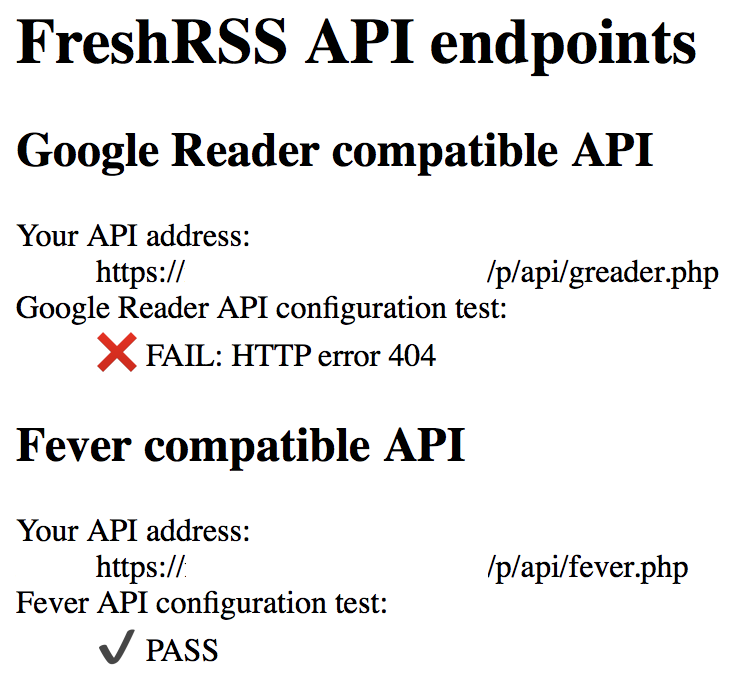
Testing the first link gives a bit more details :
Bad Request!
I read some other issues about errors that looks like similar ( https://github.com/FreshRSS/FreshRSS/issues/443#issuecomment-36666133)
But to be honest I have absolutely no idea of what exactly I should modify in NGINX (without breaking other running virtual hosts). The Synology implementation of NGINX seems to be a bit specific regarding where configuration files are stored and how to modify them so the GUI won't overwrite it. Anyway I can search and find this y myself.
So, what is the exact thing to do (or lines to add) in NGINX configuration file so the PATH_INFO is set correctly (if it is the real culprit).
Is there a specific test in FreshRSS (or PHP) I can do to know what are the current values of NGINX settings and what they should be to run correctly ?
Thanks a lot for your help.
 Ribero
All 35 comments
Bonjour,
It is most likely a bug in the nginx configuration regarding fastcgi_split_path_info
- https://www.nginx.com/resources/wiki/start/topics/examples/phpfcgi/ (see note 2)
- https://freshrss.github.io/FreshRSS/en/admins/02_Installation.html
- https://freshrss.github.io/FreshRSS/en/users/06_Mobile_access.html
En français
- https://freshrss.github.io/FreshRSS/fr/users/01_Installation.html
- https://freshrss.github.io/FreshRSS/fr/users/06_Mobile_access.html
I am not familiar enough with Synology to guide more precisely
 Alkarex
on 20 Oct 2019
Alkarex
on 20 Oct 2019
Maybe in /usr/local/etc/nginx/sites-enabled/
Alkarex
on 20 Oct 2019
Bonjour,
Tout d'abord merci ! I continue in english so other may continue to follow the thread.
The content of /usr/local/etc/nginx/sites-enabled/
is only one file named default
I'm afraid that everything changed here will be applied "server wide" and may affect my other apps running in virtual hosts that do not have any issue with NGINX. Some of this apps will require a lot of time to extensively test.
Anyway I followed the instruction and here is the results of the currents setting. I do not understand if it's OK or not:
Code used : (test.php at the root of FreshRSS installation : /volume1/web/freshrss)
array (
  'USER' => 'http',
  'HOME' => '/var/services/web',
  'HTTP_COOKIE' => 'fever_auth=ea173e28721104e7bbfd1a1156240c58',
  'HTTP_ACCEPT_ENCODING' => 'br, gzip, deflate',
  'HTTP_ACCEPT_LANGUAGE' => 'fr-fr',
  'HTTP_USER_AGENT' => 'Mozilla/5.0 (Macintosh; Intel Mac OS X 10_13_6) AppleWebKit/605.1.15 (KHTML, like Gecko) Version/13.0.2 Safari/605.1.15',
  'HTTP_ACCEPT' => 'text/html,application/xhtml+xml,application/xml;q=0.9,*/*;q=0.8',
  'HTTP_HOST' => 'my.domain.name:myportnumber',
  'REDIRECT_STATUS' => '200',
  'SERVER_NAME' => '_',
  'SERVER_PORT' => 'my_wan_port_number',
  'SERVER_ADDR' => 'my_lan_IP_Addr',
  'REMOTE_PORT' => 'my_remote_port',
  'REMOTE_ADDR' => 'my_wan_IP_Addr',
  'SERVER_SOFTWARE' => 'nginx/1.15.7',
  'GATEWAY_INTERFACE' => 'CGI/1.1',
  'HTTPS' => 'on',
  'REQUEST_SCHEME' => 'https',
  'SERVER_PROTOCOL' => 'HTTP/2.0',
  'DOCUMENT_ROOT' => '/volume1/web/freshrss',
  'DOCUMENT_URI' => '/test.php',
  'REQUEST_URI' => '/test.php',
  'SCRIPT_NAME' => '/test.php',
  'CONTENT_LENGTH' => '',
  'CONTENT_TYPE' => '',
  'REQUEST_METHOD' => 'GET',
  'QUERY_STRING' => '',
  'SCRIPT_FILENAME' => '/volume1/web/freshrss/test.php',
  'FCGI_ROLE' => 'RESPONDER',
  'PHP_SELF' => '/test.php',
  'REQUEST_TIME_FLOAT' => 1571578250.007643,
  'REQUEST_TIME' => 1571578250, )
Can you help interpret the results ?
Note: I'm a bit surprised that API works correctly for Fever and not for Google...
Ribero
on 20 Oct 2019
You should be allowed to add more files to that folder.
For the test, you need to try a URL with more elements, such as https://your.example.net/test.php/hello/world
Alkarex
on 20 Oct 2019
You should be allowed to add more files to that folder.
Yes probably but I have no clue of how to make them specific to a virtual host and not server wide
For the test, you need to try a URL with more elements, such as
https://your.example.net/test.php/hello/world
I followed the instruction given by the link you provided. It seems that it's note relevant, right ?
Sorry I do not understand what to test and how
Ribero
on 20 Oct 2019
Instead of just trying your test.php with https://your.example.net/test.php you need to try a longer URL such as https://your.example.net/test.php/hello/world and it should still work
Alkarex
on 20 Oct 2019
Ok, it does not work: I get a 404 not found.
So I need to add the following complete configuration (or just a part of it ?) somewhere in my NGINX config, right ? :
 location ~ [^/]\.php(/|$) {
    fastcgi_split_path_info ^(.+?\.php)(/.*)$;
    if (!-f $document_root$fastcgi_script_name) {
        return 404;
    }

    # Mitigate https://httpoxy.org/ vulnerabilities
    fastcgi_param HTTP_PROXY "";

    fastcgi_pass 127.0.0.1:9000;
    fastcgi_index index.php;

    # include the fastcgi_param setting
    include fastcgi_params;

    # SCRIPT_FILENAME parameter is used for PHP FPM determining
    #  the script name. If it is not set in fastcgi_params file,
    # i.e. /etc/nginx/fastcgi_params or in the parent contexts,
    # please comment off following line:
    # fastcgi_param  SCRIPT_FILENAME   $document_root$fastcgi_script_name;
}
For my understanding, why does it work flawlessly for fever and not google ?
Ribero
on 20 Oct 2019
It is because the Fever API does not use the mechanism of distinguishing calls based on additional URL elements
Alkarex
on 20 Oct 2019
Only fastcgi_split_path_info should be necessary for this problem
Alkarex
on 20 Oct 2019
only:
 location ~ [^/]\.php(/|$) {
    fastcgi_split_path_info ^(.+?\.php)(/.*)$;
    if (!-f $document_root$fastcgi_script_name) {
        return 404;
    }
or may be only:
fastcgi_split_path_info ^(.+?\.php)(/.*)$;
Ribero
on 20 Oct 2019
Ok I am now searching a way to add fastcgi_split_path_info in nginx.
While doing that I found another issue. Could it be related ? Installation says it was Ok but it seems that there are failed requirements
php /volume1/web/freshrss/app/actualize_script.php
results:
Starting feed actualization at 2019-10-20T16:00:37+02:00
FreshRSS install failed requirements:
• pdo-mysql
• fileinfo
• data
• cache
• users
• favicons
• ok
... and no feed actualization
Should I open a new separate issue for this ?
Ribero
on 20 Oct 2019
Ok got some progress on nginx configuration on Synology.
Virtual Host configuration managed by webstation is stored here:
/etc/nginx/app.d/server.webstation-vhost.conf
The specific configuration of my virtual server for freshrss is:
server {

    listen      my_port_number ssl http2 default_server;
    listen      [::]:my_port_number ssl http2 default_server;

    server_name _;

    ssl_certificate             /usr/local/etc/certificate/WebStation/vhost_a5e73ba7-47f1-460f-b600-81d99f031bd6/fullchain.pem;
    ssl_certificate_key         /usr/local/etc/certificate/WebStation/vhost_a5e73ba7-47f1-460f-b600-81d99f031bd6/privkey.pem;
    include /usr/syno/etc/security-profile/tls-profile/config/vhost_a5e73ba7-47f1-460f-b600-81d99f031bd6.conf*;

    add_header  Strict-Transport-Security max-age=15768000;
    ssl_prefer_server_ciphers   on;

    root    "/volume1/web/freshrss";
    index    index.html  index.htm  index.cgi  index.php  index.php5 ;
    error_page 400 401 402 403 404 405 406 407 408 500 501 502 503 504 505 @error_page;

    location @error_page {
        root /var/packages/WebStation/target/error_page;
        rewrite ^ /$status.html break;
    }

    location ^~ /_webstation_/ {
        alias    /var/packages/WebStation/target/error_page/;
    }

    location ~* \.(php[345]?|phtml)$ {
        fastcgi_pass unix:/run/php-fpm/php-d4878763-d566-438b-9baf-863f0190efd1.sock;

        include fastcgi.conf;
    }

    include /usr/local/etc/nginx/conf.d/a5e73ba7-47f1-460f-b600-81d99f031bd6/user.conf*;

}
I thought that creating the file /usr/local/etc/nginx/conf.d/a5e73ba7-47f1-460f-b600-81d99f031bd6/user.conf and adding the following config would work:
location ~ [^/]\.php(/|$) {
    fastcgi_split_path_info ^(.+?\.php)(/.*)$;
    if (!-f $document_root$fastcgi_script_name) {
        return 404;
    }
I throw a sudo synoservicecfg --restart nginx
Then... completely lost the access to the Synology DSM web management interface which run on nginx too...
Tried to sudo synoservicecfg --hard-enable DSM but it had no effect.
I had to delete /usr/local/etc/nginx/conf.d/a5e73ba7-47f1-460f-b600-81d99f031bd6/user.conf to get an access to the NAS (pfff, a bit frightening).
Well, enough emotions for me. This server it too critical for my every day work. I'm afraid I will stick to Fever Server until I find more clues on how nginx really works on synology.
Anyway, many many thanks for the help and time.
I will update my findings, if any here.
PS: If there is a way to test this nginx configuration issue during the preflight check of FreshRSS I think it would probably be very valuable for novice user like.
Ribero
on 20 Oct 2019
Regarding the requirements, see https://github.com/FreshRSS/FreshRSS/issues/1853
It is because there is typically more than one PHP configuration on Synology, and the one for the cron might not be the same one than for the Web
Alkarex
on 20 Oct 2019
Thanks,
Unfortunately in DSM 6.2.2-24922 Update 3 (latest version) no more php56 command.
The default 'php' command is PHP Version 5.6.11 but fails:
FreshRSS install failed requirements:
• pdo-mysql
• fileinfo
• ok
Tried with sudo php73 /volume1/web/freshrss/app/actualize_script.php :
Starting feed actualization at 2019-10-20T19:16:48+02:00
Actualize admin...
PHP Fatal error:  Uncaught Minz_PDOConnectionException: Access to database is denied for `freshrss` (`mysql:host=localhost;dbname=freshrss;charset=utf8mb4`) in /volume1/web/freshrss/lib/Minz/ModelPdo.php:95
Stack trace:
#0 /volume1/web/freshrss/app/actualize_script.php(61): Minz_ModelPdo->__construct('admin')
#1 {main}
  thrown in /volume1/web/freshrss/lib/Minz/ModelPdo.php on line 95
Results:

I would like to test access to db using 127.0.0.1 instead of localhost. Where can I change this in FreshRSS config ?
Quand ça veut pas ça veut pas ! 😄
[EDIT] : Opened an new issue for this specific point to let this thread clean. See #2587
Ribero
on 20 Oct 2019
Ok, I had a similar issue and the only things that help me is the following one :
  location ~ ^(.+?\.php)(/.*)?$ {
        include fastcgi_params;
        fastcgi_param SCRIPT_FILENAME $document_root$1;
        fastcgi_param PATH_INFO $2;
        fastcgi_pass 127.0.0.1:9000;
        fastcgi_read_timeout 900s;
    }
The whole nginx conf is available here : issues/957#issuecomment-134388220
You should give it a try and reach back to us when you can.
Another edit, my whole vhost conf for FreshRSS:
server {

    server_name sub.domain.fr;
    index index.php index.html index.htm index.nginx-debian.html;
    root /somewhere/in/my/server;

    access_log  /var/log/nginx/reader_access.log combined;
    error_log   /var/log/nginx/reader_error.log error;

    location ~ ^(.+?\.php)(/.*)?$ {
        include fastcgi_params;
        fastcgi_param SCRIPT_FILENAME $document_root$1;
        fastcgi_param PATH_INFO $2;
        fastcgi_pass 127.0.0.1:9000;
        fastcgi_read_timeout 900s;
    }

    location / {
        try_files $uri $uri/ index.php;
    }

    listen 443 ssl; # managed by Certbot
    ssl_certificate /somewhere/in/my/server; # managed by Certbot
    ssl_certificate_key /somewhere/in/my/server; # managed by Certbot
    include /somewhere/in/my/server; # managed by Certbot
    ssl_dhparam /somewhere/in/my/server; # managed by Certbot

}
server {
    if ($host = sub.domain.fr) {
        return 301 https://$host$request_uri;
    } # managed by Certbot


    server_name sub.domain.fr;
    listen 80;
    return 404; # managed by Certbot


}
 c-rilaun
on 23 Oct 2019
c-rilaun
on 23 Oct 2019
Hi @c-rilaun ! Thanks for your help.
Can you please confirm me the path of the file you are editing to change your nginx vhost configuration ?
Seems to me it's not /etc/nginx/app.d/server.webstation-vhost.conf ?
Ribero
on 23 Oct 2019
@Ribero ,
In my case, it is a _dedicated server_, running _debian buster_. But I had the same error (HTTP 404, and if you access _host.fr/freshrss/api/greader.php_, you should have Bad Request!).
So, I have a vhost, a configuration file, per sub domain, and they are all in /etc/nginx/sites-enabled (example.fr = /etc/nginx/sites-enabled/example.conf, sub.example.fr = /etc/nginx/sites-enabled/sub.example.conf).
So, few question to assist you (you probably said it earlier, but i'm a lazy penguin and don't want to read the whole issue, edit : I have read nearly the whole thread and it seems we had the same error, related to PATH_INFO and nginx specifically ).
What do you have in /etc/nginx (folders) on Synology ?
Is app.d a folder you created or is it link to Synology ?
I don't recommand a unix socket for php-fpm (i prefer a tcp socket), you can modify it (in my case at least) in /etc/php/7.3/fpm/pool.d/www.conf, but this is optimization and not related to your error.
(PS: I'm french but I can assist you through Skype if you want, won't be a problem to talk english)
c-rilaun
on 23 Oct 2019
Well, the main problem is to find a way to inject the specific configuration in nginx that is all managed by Synology WebStation. If I try to directly modify the default files of nginx at each restart of the webserver it will be overwritten by the configuration managed by WebStation.
Worse, doing some "blind" modification on some nginx files kills the Synology Web Administration process that manages the whole NAS probably because the new settings probably have side effects on it (it runs on nginx too).
So, my main point here is to find a way to inject some new configuration manually in a way it is not erased by Webstation at restart and it is just applied to one specific virtual host and not server wide.
Synology implementation of nginx seems a bit specific. But it is the first time I face a blocking situation with an application. I run many "web applications (and some are rather complex one)" on this nginx setup without any issues so that's why I do not have found yet how to proceed.
Ribero
on 23 Oct 2019
So, I have a vhost, a configuration file, per sub domain, and they are all in /etc/nginx/sites-enabled (example.fr = /etc/nginx/sites-enabled/example.conf, sub.example.fr = /etc/nginx/sites-enabled/sub.example.conf).
How do you determine that your "sub.example.conf" is related to a specific vhost ?
Currently in /etc/nginx/sites-enabled I only have default (which applies to all hosts).
I can create new specific files but I do not know how to link them to a specifc vhost.
Ribero
on 23 Oct 2019
I have many conf in my nginx (18 conf to be correct), and you can create as many as you want. The thing is, don't put all of your webb app in the same configuration file. You need to have one 'main' conf for root domain (like the syno one who gets updated at each restart), but if you have an app located at domain.local/app1, you'll need a conf especially for this app.
I have a Plex, a Deluge, a Jellyfin, a Radarr, a Sonarr, a Lidarr, an Ombi, a Minecraft server ... and they all have their own configuration file.
In my case, some of my app are in /var/ww/{app1;app2;app3...} and i just set "root /somewhere/in/my/server;" (and for freshrss root /var/www/reader/p/;). And some other app are only accessible through a port and i just made a proxy pass (like proxy_pass http://127.0.0.1:8096; for example).
So i recommend first of all, make everythings work (except freshrss), and when it seems ok, you can create a special conf for freshrss (like the one i give).
(I don't know if i'm clear enough, feel free to ask)
c-rilaun
on 23 Oct 2019
Ok I tried something that did not killed the web management.
I added :
location ~ ^(.+?\.php)(/.*)?$ {
        include fastcgi_params;
        fastcgi_param SCRIPT_FILENAME $document_root$1;
        fastcgi_param PATH_INFO $2;
        fastcgi_pass 127.0.0.1:9000;
        fastcgi_read_timeout 900s;
    }
in /etc/nginx/conf.d/a5e73ba7-47f1-460f-b600-81d99f031bd6/user.conf
After a restart all apps works but I still not get the PASS when testing the API.
I wrote a https://my.domain:my_port/test.php that contains:
<?php var_export($_SERVER)?>
A call to https://my.domain:my_port/test.php gives the following results:
array (
 'USER' => 'http',
 'HOME' => '/var/services/web',
 'HTTP_ACCEPT_ENCODING' => 'br, gzip, deflate',
 'HTTP_ACCEPT_LANGUAGE' => 'fr-fr',
 'HTTP_ACCEPT' => 'text/html, application/xhtml+xml, application/xml;q=0.9, */*;q=0.8',
 'HTTP_USER_AGENT' => 'Mozilla/5.0 (Macintosh; Intel Mac OS X 10_13_6) AppleWebKit/605.1.15 (KHTML, like Gecko) Version/13.0.2 Safari/605.1.15',
 'HTTP_HOST' => 'my.domain:my_port',
 'REDIRECT_STATUS' => '200',
 'SERVER_NAME' => '_',
 'SERVER_PORT' => 'my_port',
 'SERVER_ADDR' => 'x.x.x.x',
 'REMOTE_PORT' => '50910',
 'REMOTE_ADDR' => 'x.x.x.x',
 'SERVER_SOFTWARE' => 'nginx/1.15.7',
 'GATEWAY_INTERFACE' => 'CGI/1.1',
 'HTTPS' => 'on',
 'REQUEST_SCHEME' => 'https',
 'SERVER_PROTOCOL' => 'HTTP/2.0',
 'DOCUMENT_ROOT' => '/volume1/web/freshrss',
 'DOCUMENT_URI' => '/test.php',
 'REQUEST_URI' => '/test.php',
 'SCRIPT_NAME' => '/test.php',
 'CONTENT_LENGTH' => '',
 'CONTENT_TYPE' => '',
 'REQUEST_METHOD' => 'GET',
 'QUERY_STRING' => '',
 'SCRIPT_FILENAME' => '/volume1/web/freshrss/test.php',
 'FCGI_ROLE' => 'RESPONDER',
 'PHP_SELF' => '/test.php',
 'REQUEST_TIME_FLOAT' => 1571844840.842611,
 'REQUEST_TIME' => 1571844840,
 )
Before injecting your configuration testing : https://my.domain:my_port/test.php/hello/world resulted in a 404 not found, now I get a 502
So I feel that the new setting may have been taken into account but does not yet solve the issue. How can I do a test that that would show that new settings are applied successfully ?
But in both case (with or without the new configuration) testing the Greader api results in a Bad Request!
Ribero
on 23 Oct 2019
Maaaah, na. Won't work. You need the whole conf beginning at server {.
The server_name will define how you access to your app, where they are reachable.
You'll need to add an A record pointing to your synology to use your ovh domain (and syno must be reachable outside of your network, if not, no need to use an ovh domain).
In my case, I have a A reccord for reader.domain.fr pointing to my public ip.
I also suggest you to rename user.conf to freshrss.conf (much propper)
And you can check if everythings went fine by checking nginx conf with nginx -t
It's hard to explain the whole nginx functionnement per messages, don't have skype or discord mate ?
c-rilaun
on 23 Oct 2019
 Frenzie
on 23 Oct 2019
Frenzie
on 23 Oct 2019
In fact, your issues are related to understand nginx.
Just using conf of other people wont work. You need to understand what fastcgi is used for and how do you set it up (unix sock or tcp sock per example), where your conf are located and how to setup a subdomain..
I can help you but this is totally out of context, this is more a nginx lesson
c-rilaun
on 23 Oct 2019
renamed user.conf to freshrss.conf, restarted :
https://my.domain:my_port/test.php/hello/world -> 404
renamed again freshrss.conf to user.conf -> 502
So it seems consistent to the vhost config auto generated by Webstation (see last include it only looks at a user.conf* file):
server {

    listen      my_port_number ssl http2 default_server;
    listen      [::]:my_port_number ssl http2 default_server;

    server_name _;

    ssl_certificate             /usr/local/etc/certificate/WebStation/vhost_a5e73ba7-47f1-460f-b600-81d99f031bd6/fullchain.pem;
    ssl_certificate_key         /usr/local/etc/certificate/WebStation/vhost_a5e73ba7-47f1-460f-b600-81d99f031bd6/privkey.pem;
    include /usr/syno/etc/security-profile/tls-profile/config/vhost_a5e73ba7-47f1-460f-b600-81d99f031bd6.conf*;

    add_header  Strict-Transport-Security max-age=15768000;
    ssl_prefer_server_ciphers   on;

    root    "/volume1/web/freshrss";
    index    index.html  index.htm  index.cgi  index.php  index.php5 ;
    error_page 400 401 402 403 404 405 406 407 408 500 501 502 503 504 505 @error_page;

    location @error_page {
        root /var/packages/WebStation/target/error_page;
        rewrite ^ /$status.html break;
    }

    location ^~ /_webstation_/ {
        alias    /var/packages/WebStation/target/error_page/;
    }

    location ~* \.(php[345]?|phtml)$ {
        fastcgi_pass unix:/run/php-fpm/php-d4878763-d566-438b-9baf-863f0190efd1.sock;

        include fastcgi.conf;
    }

    include /usr/local/etc/nginx/conf.d/a5e73ba7-47f1-460f-b600-81d99f031bd6/user.conf*;

}
Thanks for the skype proposal ! Cannot do it today but I certainly will ask you another day if still possible for you. Thanks anyway. !
Ribero
on 23 Oct 2019
I can help you but this is totally out of context, this is more a nginx lesson
I Completely agree ! I won't hold the thread and your time for that. I need to search on my side.
When I will found a way to go forward I will share it here. All Synology users using nginx will face this situation. It will be useful I think.
[EDIT] : Attached nginx.conf file for futur refrence
nginx.conf.txt
Ribero
on 23 Oct 2019
Hi,
I'm sharing my current tests:
nginx error log when invoking https://myserver:my_port/p/api/ (I get a error 502.):
2019/10/28 16:48:58 [error] 30113#30113: *1 connect() failed (111: Connection refused) while connecting to upstream, client: x.x.x.x, server: _, request: "GET /p/api/greader.php/check/compatibility HTTP/2.0", upstream: "fastcgi://127.0.0.1:9000", host: "my_server:my_port", referrer: "https://my_server:my_port/p/api/"
2019/10/28 16:48:58 [error] 30113#30113: *1 connect() failed (111: Connection refused) while connecting to upstream, client: x.x.x.x, server: _, request: "GET /p/api/greader.php/check%2Fcompatibility HTTP/2.0", upstream: "fastcgi://127.0.0.1:9000", host: "my_server:my_port", referrer: "https://my_server:my_port/p/api/"
2019/10/28 16:48:58 [error] 30113#30113: *1 connect() failed (111: Connection refused) while connecting to upstream, client: x.x.x.x, server: _, request: "GET /p/api/greader.php/check/compatibility HTTP/2.0", upstream: "fastcgi://127.0.0.1:9000", host: "my_server:my_port", referrer: "https://my_server:my_port/p/api/"
Then invoking : https://my_server:my_port/p/api/greader.php always results in a _Bad Request!_ and nginx log:
2019/10/28 16:54:39 [error] 30112#30112: *14 open() "/volume1/web/freshrss/favicon.ico" failed (2: No such file or directory), client: x.x.x.x, server: _, request: "GET /favicon.ico HTTP/2.0", host: "my_server:my_port", referrer: "https://news.maroli.ovh:17744/p/api/greader.php
I feel that the injected configuration (/etc/nginx/conf.d/a5e73ba7-47f1-460f-b600-81d99f031bd6/user.conf.freshrss-greaderapi):
location ~ ^(.+?\.php)(/.*)?$ {
    include fastcgi_params;
    fastcgi_param SCRIPT_FILENAME $document_root$1;
    fastcgi_param PATH_INFO $2;
    fastcgi_pass 127.0.0.1:9000;
    fastcgi_read_timeout 900s;
}
is not aligned with main nginx config (/etc/nginx/nginx.conf) that states:
[...]
upstream synoscgi {
        server unix:/run/synoscgi.sock;
    }
[...]
and
in scgi_params:
scgi_param  SCRIPT_FILENAME    $document_root$fastcgi_script_name;
scgi_param  CONTENT_LENGTH     $content_length;
scgi_param  SCRIPT_NAME        $fastcgi_script_name;

scgi_param  REQUEST_METHOD     $request_method;
scgi_param  REQUEST_URI        $request_uri;
scgi_param  QUERY_STRING       $query_string;
scgi_param  CONTENT_TYPE       $content_type;

scgi_param  DOCUMENT_URI       $document_uri;
scgi_param  DOCUMENT_ROOT      $document_root;
scgi_param  SCGI               1;
scgi_param  SERVER_PROTOCOL    $server_protocol;
scgi_param  REQUEST_SCHEME     $scheme;
scgi_param  HTTPS              $https if_not_empty;

scgi_param  GATEWAY_INTERFACE  CGI/1.1;
scgi_param  SERVER_SOFTWARE    nginx/$nginx_version;

scgi_param  REMOTE_ADDR        $remote_addr;
scgi_param  REMOTE_PORT        $remote_port;
scgi_param  SERVER_ADDR        $server_addr;
scgi_param  SERVER_PORT        $server_port;
scgi_param  SERVER_NAME        $host;

fastcgi_split_path_info        ^(.+?\.cgi)(.*)$;
scgi_param  PATH_INFO          $fastcgi_path_info;

uninitialized_variable_warn    off;

if ($fqdn = false) {
    set $fqdn "";
}

scgi_param  HOST               $fqdn if_not_empty;

scgi_intercept_errors          on;
and fastcgi conf (/etc/nginx/fastcgi.conf):
fastcgi_param  SCRIPT_FILENAME    $document_root$fastcgi_script_name;
fastcgi_param  QUERY_STRING       $query_string;
fastcgi_param  REQUEST_METHOD     $request_method;
fastcgi_param  CONTENT_TYPE       $content_type;
fastcgi_param  CONTENT_LENGTH     $content_length;

fastcgi_param  SCRIPT_NAME        $fastcgi_script_name;
fastcgi_param  REQUEST_URI        $request_uri;
fastcgi_param  DOCUMENT_URI       $document_uri;
fastcgi_param  DOCUMENT_ROOT      $document_root;
fastcgi_param  SERVER_PROTOCOL    $server_protocol;
fastcgi_param  REQUEST_SCHEME     $scheme;
fastcgi_param  HTTPS              $https if_not_empty;

fastcgi_param  GATEWAY_INTERFACE  CGI/1.1;
fastcgi_param  SERVER_SOFTWARE    nginx/$nginx_version;

fastcgi_param  REMOTE_ADDR        $remote_addr;
fastcgi_param  REMOTE_PORT        $remote_port;
fastcgi_param  SERVER_ADDR        $server_addr;
fastcgi_param  SERVER_PORT        $server_port;
fastcgi_param  SERVER_NAME        $server_name;

# PHP only, required if PHP was built with --enable-force-cgi-redirect
fastcgi_param  REDIRECT_STATUS    200;
Now I'm trying to figure out how to change the fastcgi conf to make it work.
Ribero
on 28 Oct 2019
Tried with this variant:
location ~ ^(.+?\.php)(/.*)?$ {
     include fastcgi_params;
     fastcgi_param SCRIPT_FILENAME $document_root$1;
     fastcgi_param PATH_INFO $2;
     fastcgi_pass unix:/run/synoscgi.sock;
    fastcgi_read_timeout 900s;
}
2019/10/28 20:12:11 [error] 16623#16623: *277 upstream sent unsupported FastCGI protocol version: 83 while reading response header from upstream, client: x.x.x.x, server: _, request: "GET /p/api/greader.php/check/compatibility HTTP/2.0", upstream: "fastcgi://unix:/run/synoscgi.sock:", host: "my_server:my_port", referrer: "https://my_server:my_port/p/api/"
2019/10/28 20:12:11 [error] 16623#16623: *277 upstream sent unsupported FastCGI protocol version: 83 while reading response header from upstream, client: x.x.x.x, server: _, request: "GET /p/api/greader.php/check%2Fcompatibility HTTP/2.0", upstream: "fastcgi://unix:/run/synoscgi.sock:", host: "my_server:my_port", referrer: "https://my_server:my_port/p/api/"
2019/10/28 20:12:11 [error] 16623#16623: *277 upstream sent unsupported FastCGI protocol version: 83 while reading response header from upstream, client: x.x.x.x, server: _, request: "GET /p/api/greader.php/check/compatibility HTTP/2.0", upstream: "fastcgi://unix:/run/synoscgi.sock:", host: "my_server:my_port", referrer: "https://my_server:my_port/p/api/"


2019/10/28 20:12:17 [error] 16623#16623: *277 open() "/volume1/web/freshrss/favicon.ico" failed (2: No such file or directory), client: x.x.x.x, server: _, request: "GET /favicon.ico HTTP/2.0", host: "my_server:my_port", referrer: "https://my_server:my_port/p/api/greader.php"
It does not work better.
The good news is that the config addendum is loaded correctly (without the new config I had a 404 error, now a 502 error, 😄 ) and it does not crash Synology DSM anymore. I will be able to try other steps without putting the server too much at risk.
Ribero
on 28 Oct 2019
New variant:
location ~ ^(.+?\.php)(/.*)?$ {
     include fastcgi_params;
     fastcgi_param SCRIPT_FILENAME $document_root$1;
     fastcgi_param PATH_INFO $2;
     fastcgi_pass 127.0.0.1:$server_port;
     fastcgi_read_timeout 900s;
}
2019/10/28 20:30:00 [error] 19148#19148: *14 empty URI in redirect to named location "@error_page" while reading client request line, client: 127.0.0.1, server: _, request: "
2019/10/28 20:30:00 [error] 19149#19149: *1 upstream sent unsupported FastCGI protocol version: 72 while reading response header from upstream, client: x.x.x.x, server: _, request: "GET /p/api/greader.php/check/compatibility HTTP/2.0", upstream: "fastcgi://127.0.0.1:my_port", host: "my_server:my_port", referrer: "https://my_server:my_port/p/api/"
2019/10/28 20:30:00 [error] 19149#19149: *17 empty URI in redirect to named location "@error_page" while reading client request line, client: 127.0.0.1, server: _, request: "
2019/10/28 20:30:00 [error] 19149#19149: *1 upstream sent unsupported FastCGI protocol version: 72 while reading response header from upstream, client: x.x.x.x, server: _, request: "GET /p/api/greader.php/check%2Fcompatibility HTTP/2.0", upstream: "fastcgi://127.0.0.1:my_port", host: "my_server:my_port", referrer: "https://my_server:my_port/p/api/"
2019/10/28 20:30:00 [error] 19148#19148: *19 empty URI in redirect to named location "@error_page" while reading client request line, client: 127.0.0.1, server: _, request: "
2019/10/28 20:30:00 [error] 19149#19149: *1 upstream sent unsupported FastCGI protocol version: 72 while reading response header from upstream, client: x.x.x.x, server: _, request: "GET /p/api/greader.php/check/compatibility HTTP/2.0", upstream: "fastcgi://127.0.0.1:my_port", host: "my_server:my_port", referrer: "https://my_server:my_port/p/api/"
Finally, got it 😄 !
So, here is a short resume on how to add additional nginx configuration to a virtual host on Synology DSM 6.2. This procedure allows you to inject additional configuration that will impact only the virtual server of your choice and wont affect DSM Webmanagement console that is also running on nginx.
Another point is, this method will survive DSM and Synology Webstation upgrades and your modification won't be lost/overwritten when using the WebGUI of Webstation.
By default, virtual hosts for Apache or NGINX servers are managed by Synology Webstation. I will cover only the configuration of virtual host for nginx server.
Synology Webstation stores the configuration of your virtual hosts configured through the GUI in a JSON file in /var/packages/WebStation/etc/VirtualHost.json
do a: sudo more VirtualHost.json
look at the virtual server configured for FreshRSS (search the entry that contains the path where you installed FreshRSS; here: "root" : "/volume1/web/freshrss" :
"a5e73ba7-47f1-460f-b600-81d99f031bd6" : {
      "backend" : 0,
      "https" : {
         "compatibility" : 1,
         "compression" : false,
         "hsts" : true,
         "http2" : true,
         "redirect" : false
      },
      "index" : [ "index.html", "index.htm", "index.cgi", "index.php", "index.php5" ],
      "php" : "d4878763-d566-438b-9baf-863f0190efd1",
      "port" : {
         "https" : [ your_virtual_host_port_number ]
      },
      "root" : "/volume1/web/freshrss"
The key that interest you is the first one: a5e73ba7-47f1-460f-b600-81d99f031bd6
This value is auto-generated and managed by Webstation. Please note that this value will be different for you.
You should NOT change the JSON config file generated by Webstation.
Webstation then generates a NGINX configuration file that contains your virtual hosts definition. This file is stored in: /etc/nginx/app.d/server.webstation-vhost.conf. Do not try to modify this file, Webstation will regenerate it immediately using the JSON file.
so, have a look to server.webstation-vhost.conf and search for your FreshRSS virtual host:
server {

    listen      your_virtual_host_port_number ssl http2 default_server;
    listen      [::]:your_virtual_host_port_number ssl http2 default_server;

    server_name _;

    ssl_certificate             /usr/local/etc/certificate/WebStation/vhost_a5e73ba7-47f1-460f-b600-81d99f031bd6/fullchain.pem;
    ssl_certificate_key         /usr/local/etc/certificate/WebStation/vhost_a5e73ba7-47f1-460f-b600-81d99f031bd6/privkey.pem;
    include /usr/syno/etc/security-profile/tls-profile/config/vhost_a5e73ba7-47f1-460f-b600-81d99f031bd6.conf*;

    add_header  Strict-Transport-Security max-age=15768000;
    ssl_prefer_server_ciphers   on;

    root    "/volume1/web/freshrss";
    index    index.html  index.htm  index.cgi  index.php  index.php5 ;
    error_page 400 401 402 403 404 405 406 407 408 500 501 502 503 504 505 @error_page;

    location @error_page {
        root /var/packages/WebStation/target/error_page;
        rewrite ^ /$status.html break;
    }

    location ^~ /_webstation_/ {
        alias    /var/packages/WebStation/target/error_page/;
    }

    location ~* \.(php[345]?|phtml)$ {
        fastcgi_pass unix:/run/php-fpm/php-d4878763-d566-438b-9baf-863f0190efd1.sock;

        include fastcgi.conf;
    }

    include /usr/local/etc/nginx/conf.d/a5e73ba7-47f1-460f-b600-81d99f031bd6/user.conf*;

}
The latest line (include...) gives you the path where you will be able to store your specific configuration for your virtual host. In my example the value is: /usr/local/etc/nginx/conf.d/a5e73ba7-47f1-460f-b600-81d99f031bd6/
create a file (user.conf.freshrss-greaderapi) to add your specific configuration:
sudo vi /usr/local/etc/nginx/conf.d/a5e73ba7-47f1-460f-b600-81d99f031bd6/user.conf.freshrss-greaderapi
Add this content:
location ~ ^(.+?\.php)(/.*)?$ {
    include fastcgi_params;
    fastcgi_param SCRIPT_FILENAME $document_root$1;
    fastcgi_param PATH_INFO $2;
    fastcgi_pass unix:/run/php-fpm/php73-fpm.sock;
    fastcgi_read_timeout 900s;
}
Please note that, depending of your setup (version of NGINX and PHP) your configuration can be slightly different regarding the fastcgi_pass parameter. Please have a look to /run/php-fpm/ to find what is the right name to use in your installation.
Save the file and restart the NGINX server: sudo synoservicecfg --restart nginx
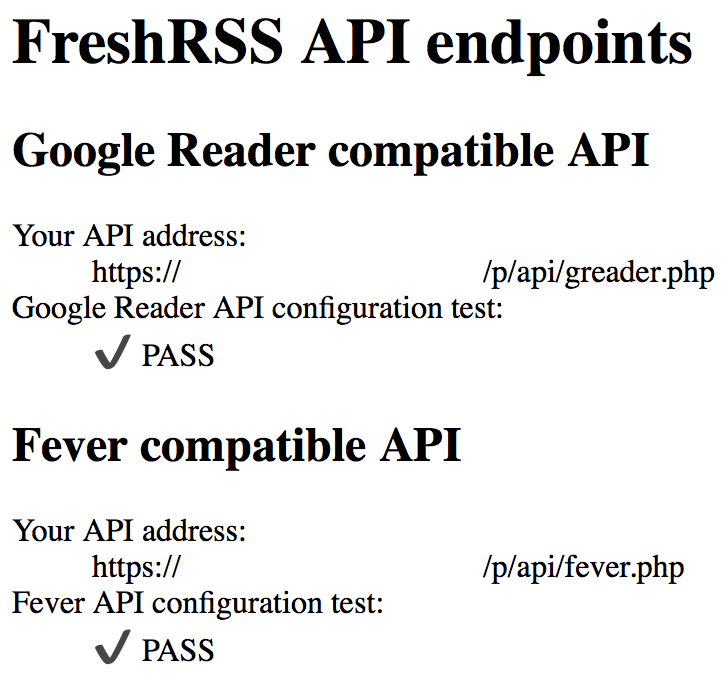
Then test the FreshRSS API: https://your_server:your_port/p/api/
You should see:
Good luck !
Ribero
on 28 Oct 2019
Congrats @Ribero and thanks for the feedback!
Would you mind copy-pasting (more or less) your message into a PR?
Maybe a new file for Synology there https://github.com/FreshRSS/FreshRSS/tree/dev/docs/en/admins/
And a link from e.g. https://github.com/FreshRSS/FreshRSS/blob/dev/docs/en/admins/03_Installation.md
Alkarex
on 28 Oct 2019
Good job @Ribero, you finally made it ! 👍
Just, _"root" : "/volume1/web/freshrss"_ shouldn't be _"root" : "/volume1/web/freshrss/p"_ ?
Because everything for public access is in '_p_' directory inside freshrss.
This mean you access freshrss by fresh-url.fr/i instead of ../p/i and api by fresh-url.fr/api/.
I guess if there is a '_p_' folder, there is a reason.
c-rilaun
on 29 Oct 2019
Yes, if possible, /p/ should not be part of the visible URL.
/p/ is supposed to be the root of the public facing Web service
Alkarex
on 29 Oct 2019
Good job @Ribero, you finally made it ! 👍
Just, _"root" : "/volume1/web/freshrss"_ shouldn't be _"root" : "/volume1/web/freshrss/p"_ ?
Because everything for public access is in '_p_' directory inside freshrss.This mean you access freshrss by fresh-url.fr/i instead of ../p/i and api by fresh-url.fr/api/.
I guess if there is a '_p_' folder, there is a reason.
done. I had to update config file to make it work (do not remember which one, config.default.php ?). Anyway it works with new root base.
Ribero
on 8 Nov 2019
Congrats @Ribero and thanks for the feedback!
Would you mind copy-pasting (more or less) your message into a PR?
Maybe a new file for Synology there https://github.com/FreshRSS/FreshRSS/tree/dev/docs/en/admins/
And a link from e.g. https://github.com/FreshRSS/FreshRSS/blob/dev/docs/en/admins/03_Installation.md
I will be working on it this week-end I think.
EDIT : Sorry I'm not familiar enough with Github and I'm not sure how I can contribute to the documentation using Github. I thought I had to add a Synology specific file (06_SYnologysDSMInstall.md for ex) in https://github.com/FreshRSS/FreshRSS/tree/dev/docs/en/admins/ then edit it and update it. It does not seems to work like this... Got a message from GitHub that I do not understand.
I'm a bit lost and I do not want to brake anything in the repo. Maybe It's safer for me to add a new post in this issue that you will be able to put at the right place, the right way later.
But I'm also very interested to directly contribute to the documentation repo with some guidance.
Ribero
on 8 Nov 2019
Related issues
 javerous
·
5Comments
javerous
·
5Comments
 reinvented
·
4Comments
reinvented
·
4Comments
 uncovery
·
4Comments
uncovery
·
4Comments
 Offerel
·
5Comments
Offerel
·
5Comments
 Aasemoon
·
6Comments
Aasemoon
·
6Comments
Most helpful comment
I will be working on it this week-end I think.
EDIT : Sorry I'm not familiar enough with Github and I'm not sure how I can contribute to the documentation using Github. I thought I had to add a Synology specific file (06_SYnologysDSMInstall.md for ex) in
https://github.com/FreshRSS/FreshRSS/tree/dev/docs/en/admins/then edit it and update it. It does not seems to work like this... Got a message from GitHub that I do not understand.I'm a bit lost and I do not want to brake anything in the repo. Maybe It's safer for me to add a new post in this issue that you will be able to put at the right place, the right way later.
But I'm also very interested to directly contribute to the documentation repo with some guidance.