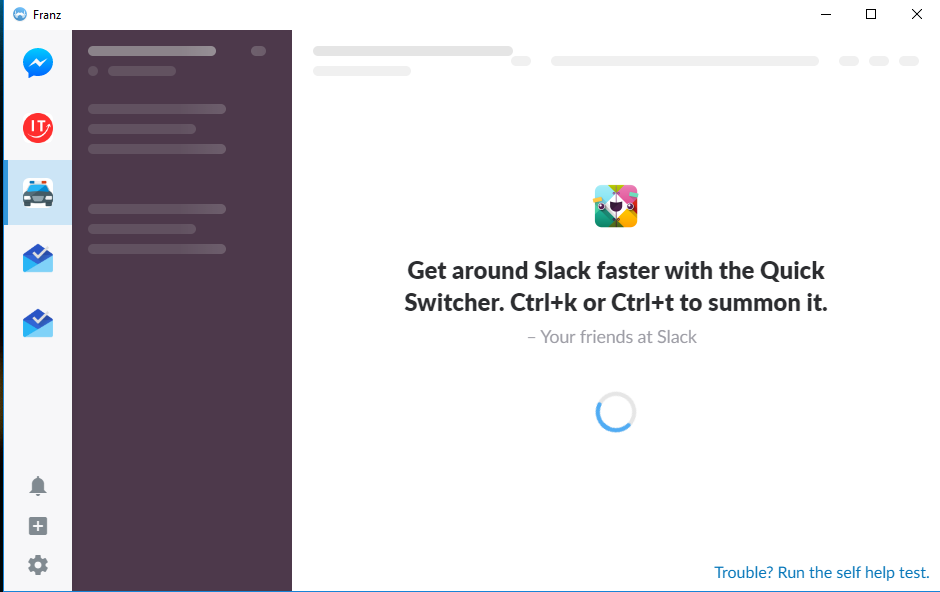
I am using Franz 5. I have added 2 Slack services, yet both of them are constantly loading and never finish. I tried reloading those services, restarting them and restarting Franz, but the issue persists.
I also tried doing the _self help test_ mentioned in the Slack's loading screen. It said that everything is correct.
It allowed me to sign in initially, but then the actual Slack interface with all the channels never finishes loading.
Expected Behavior
The Slack interface should load properly.
Current Behavior
The Slack interface is loading constantly.
Screenshots (if appropriate):

Steps to Reproduce (for bugs)
I have no idea because on my other PC (albeit under other IPS) it works correctly.
Context
I'm just trying to use Slack as Franz's service instead of a separate browser tab.
Your Environment
- Franz Version used: 5.0.0-veta.14
- Operating System and version: Windows 10 Pro Version 10.0.16299
 Gelio
Gelio
All 8 comments
When Slack is getting stuck. Can you try to reload the service with Ctrl+R
 adlk
on 11 Dec 2017
adlk
on 11 Dec 2017
As I've said, I did that many times with no luck. The same goes for restarting Franz and even the PC.
Gelio
on 11 Dec 2017
This might be an issue with the spellchecker init. I'm working on a fix and will update this issue with a test version as soon as it's done.
adlk
on 11 Dec 2017
Should turning off the spellchecker in the settings fix the issue, if it was the reason?
I disabled the spellchecker in the _Advanced_ section in the settings and, unfortunately, Slack still does not load 😞
Gelio
on 11 Dec 2017
It started working today. Both of my Slack services loaded successfully. They work even after reloading.
I did not change anything in the settings. Yesterday it just said in Franz that some services have been updated and there was a button to reload them, which I did.
I guess I'll close this issue then, as it's no longer present.
@adlk Thank you for your help
Gelio
on 11 Jan 2018
I'm experiencing the same bug on one of my five slack services. It works right on chrome and I did try to disable spell checking, didn't help. Running Franz 5.0.0-beta.15.607 on macOS.
 jtiala
on 8 Feb 2018
jtiala
on 8 Feb 2018
Nvm, after 1 day it just started working without even refreshing.
jtiala
on 9 Feb 2018
I get this problem frequently in chrome. Tried reloading, clearing cache / cookies etc. No luck. Self-test says everything ok. Switch to firefox for a day then go back to chrome and it's ok. Weird.
 NeilShadrach
on 20 Feb 2019
NeilShadrach
on 20 Feb 2019
Related issues
 haraldox
·
34Comments
haraldox
·
34Comments
 mayank265
·
47Comments
mayank265
·
47Comments
 thomasbrueggemann
·
65Comments
thomasbrueggemann
·
65Comments
 mrprobot
·
54Comments
mrprobot
·
54Comments
 ifireball
·
52Comments
ifireball
·
52Comments