Franz: Copy from Franz with keyboard shortcut does not work
I have noticed this while developing my very own Electron apps as well - copy from the Electron window does not not seem to work on macOS. The highlighted and copied (via cmd+c are just ignored)
Expected Behavior
It should be possible to copy things from within a service tab of Franz.
Current Behavior
Copying text highlighted within Franz via OS keyboard shortcuts is not possible, however can right click and select copy from the popup menu.
Your Environment
- Franz Version used: 5.0.0-beta.16 (5.0.0-beta.16.762)
- Operating System and version: macOS High Sierra
Thanks!
 thomasbrueggemann
All 65 comments
Hello, I'm MacOS High Sierra (10.13), for me, it's little bit different .. I can paste into Franz services inputs, but anything I copied from services, can't be pasted anywhere because my clipboard is empty, or contains previous copy from other app - clipboard is not updated by my last CMD Copy action
 Kotys
on 21 Oct 2017
Kotys
on 21 Oct 2017
Only cmd-c is not working from what we've observed.
 ylluminate
on 22 Oct 2017
ylluminate
on 22 Oct 2017
Is this only an issue on High Sierra? I'm running Sierra and it seems to work fine.
 henryjw
on 23 Oct 2017
henryjw
on 23 Oct 2017
It's strange ..
When I was writing comment 2 days ago, it was exactly according to my behavior - issue with cmd-v into services... I can't reproduce this situation, but when I have started writing THIS comment, It was buggy, but now, after 2 minutes later, cmd-c and cmd-v works for me. It will happen again, I'm sure.
Kotys
on 23 Oct 2017
I've planned to have a fix with beta 12. Unfortunately I haven't even found a way to reproduce the issue. I'll keep an eye on it.
 adlk
on 4 Nov 2017
adlk
on 4 Nov 2017
I am using version 5.0.0-beta.11.135 now and I can't seem to replicate my initial concerns either!
thomasbrueggemann
on 4 Nov 2017
Also experiencing this intermittently. At first could not copy (cmd-c) an email from search lookup in Gmail tab within Franz and paste within same opened tab (from search bar to email To: in New Message window. Then, I copied text and pasted in place and afterward was able to then paste in all prior locations. Running Sierra 10.12.6 and Version 5.0.0-beta.13 (5.0.0-beta.13.316).
 robwsanch
on 8 Nov 2017
robwsanch
on 8 Nov 2017
same here
 lumir
on 8 Nov 2017
lumir
on 8 Nov 2017
I am getting this with Cmd+C, Cmd+V and also Cmd+A to select all text in text boxes.
 fcoury
on 9 Nov 2017
fcoury
on 9 Nov 2017
Same here on Sierra 10.12.6. Pasting works, copy will not work.
 jovanovski
on 16 Nov 2017
jovanovski
on 16 Nov 2017
For Inbox in Franz Mac OS High Sierra 10.13.1, CMD+C doesn't work. Right click dropdown does let me do it though.
 droegier
on 20 Nov 2017
droegier
on 20 Nov 2017
@droegier all the time or just from time to time?
adlk
on 20 Nov 2017
@adlk Mh, I had the impression it was all the time - but it just worked right now. I didn't do any update in the mean time, so I guess it is from time to time.
droegier
on 20 Nov 2017
Same issue here. Can't CMD-C
 vanlooverenkoen
on 24 Nov 2017
vanlooverenkoen
on 24 Nov 2017
Same here. Fix repro.
 gdetari
on 1 Dec 2017
gdetari
on 1 Dec 2017
Using Franz 5.0.0 beta.14.451
Can't copy from Franz
Pasting text into inbox takes more than 2 seconds
 boernard
on 11 Dec 2017
boernard
on 11 Dec 2017
Can confirm too, this is still happens in Mac OS High Sierra 10.13.2, Franz 5.0.0 beta.14.451.
When CMD+C doesn't work, I'm sometimes able to use the dropdown menu to copy, at other times not
 madsmtm
on 11 Dec 2017
madsmtm
on 11 Dec 2017
As soon as I used the copy command from the right click menu Cmd+c started working for me.
 vishusingh
on 13 Dec 2017
vishusingh
on 13 Dec 2017
I'm having this issue as well. If I restart the app it comes back, but after it's been open for some time it stops working.
 brycehamrick
on 15 Dec 2017
brycehamrick
on 15 Dec 2017
Same here, doesn't work in beta 14
 royteeuwen
on 23 Dec 2017
royteeuwen
on 23 Dec 2017
+1 not working in beta 14
 tsuyo
on 9 Jan 2018
tsuyo
on 9 Jan 2018
hmmm, difficult to reproduce! haven't seen this behavior yet on macOS 10.12.3 (Sierra) and latest Franz 5.0.0-beta.15 ... try installing a clipboard manager (such as Copied or Paste) if the issue persists.
please also post exact test cases, e.g. '"Reply" box in service "Inbox" cmd+C, paste in Chrome address bar'
 haraldox
on 13 Jan 2018
haraldox
on 13 Jan 2018
My specific scenario:
1) Use the Facebook plugin
2) Open a conversation
3) Try to copy text from a message that has been sent/recieved
4) Fail (unless you spam the Ctrl+C buttons multiple times, or just resort to right clicking and selecting copy)
jovanovski
on 13 Jan 2018
@jovanovski works for me :-/
are you on Windows? which version of Franz?
haraldox
on 13 Jan 2018
I am on macOS.
Franz version: Version 5.0.0-beta.15 (5.0.0-beta.15.607)
jovanovski
on 13 Jan 2018
I see, which Mac are you using?
haraldox
on 13 Jan 2018
MacBook Pro (Retina, 13-inch, Early 2015)
macOS Sierra version 10.12.6
jovanovski
on 13 Jan 2018
would you be open to a TeamViewer session, so I can reproduce the issue on your Mac?
haraldox
on 13 Jan 2018
Would love to, but since it's a work laptop, policy doesn't allow it :/
jovanovski
on 13 Jan 2018
too bad!
have you tried reloading the Franz app through cmd+shift+R?
haraldox
on 13 Jan 2018
anyone else up for a TeamViewer (or similar) session to reproduce the issue?
haraldox
on 13 Jan 2018
This has been going since I have been using Franz, so all updates and reinstalls from scratch.
jovanovski
on 13 Jan 2018
@jovanovski have you tried installing a clipboard manager as a temporary workaround?
haraldox
on 13 Jan 2018
Nope, I've not had this issue in any other place except Franz, so I refrain to just right clicking to copy while this is not fixed
jovanovski
on 13 Jan 2018
just thinking out loud here, but could be a shortcut issue in Electron...
@adlk any insight into what else could cause this?
haraldox
on 13 Jan 2018
Hey @haraldox ,I have sent you a mail, I am up to a TeamViewer session
royteeuwen
on 16 Jan 2018
@royteeuwen thanks for your willingness, but I have managed to reproduce the issue in the meantime! now all we need is a fix :laughing:
haraldox
on 16 Jan 2018
Is it possible now?
 pfannenwenderer
on 3 Feb 2018
pfannenwenderer
on 3 Feb 2018
Seems yes.
On Sat, Feb 3, 2018 at 6:09 PM, pfannenwenderer notifications@github.com
wrote:
Is it possible now?
—
You are receiving this because you commented.
Reply to this email directly, view it on GitHub
https://github.com/meetfranz/franz/issues/33#issuecomment-362792353, or mute
the thread
https://github.com/notifications/unsubscribe-auth/AAIAM0U_NFJtzAcpVFBt4vma8IKobao9ks5tRCI2gaJpZM4P_ysf
.
tsuyo
on 4 Feb 2018
Copying my comment from #660 in case it helps anyone.
After running dev locally it worked for me all of a sudden.
Have you tried checking for updates in settings, maybe enabling beta versions then ⌘+Q and restating?I'm running 5.0.0-beta.15 and ⌘+C ⌘+V works on MacOS High Sierra v10.13.3.
 OArnarsson
on 7 Feb 2018
OArnarsson
on 7 Feb 2018
It is working for me now :) I dont know why, but it works.
pfannenwenderer
on 7 Feb 2018
I was facing the same issue & after I quit & reopen the app, it's working. It's been open since early this week.
 azri92
on 15 Feb 2018
azri92
on 15 Feb 2018
I'm on beta 16 mac and can not even copy and paste between services using shortcuts.. I have to right click selected text and select copy for a copy to work at all.
 BrianGilbert
on 1 Mar 2018
BrianGilbert
on 1 Mar 2018
Still happening to me with beta 17
BrianGilbert
on 22 Mar 2018
Same here
Op 22 mrt. 2018 om 21:12 heeft Brian Gilbert notifications@github.com het volgende geschreven:
Still happening to me with beta 17
—
You are receiving this because you were mentioned.
Reply to this email directly, view it on GitHub, or mute the thread.
royteeuwen
on 22 Mar 2018
the reason we migrated from franz to hipchat native app ( including that you have to pay for the own-server variant while those road-blocks still exist ). Pitty, i like(d) franz!
 EugenMayer
on 28 Mar 2018
EugenMayer
on 28 Mar 2018
(In same boat @EugenMayer. We're about to deploy an instance to take care of our needs and paying for Franz is just not an option for us with payment and the surrounding issues.)
ylluminate
on 28 Mar 2018
Strangely it seems to have righted itself now.. I'll monitor for the next few days before changing the status of this issue.
BrianGilbert
on 28 Mar 2018
The problem intermittently persists for me with 5.0.0-beta.17.834
thomasbrueggemann
on 28 Mar 2018
yes, it's back again for me today :(
BrianGilbert
on 29 Mar 2018
I'm experiencing this as well, please provide a fix.
 groop-dev
on 6 Apr 2018
groop-dev
on 6 Apr 2018
Version 5.0.0-beta.18 (5.0.0-beta.18.903)
macOS
Frequently get this issue, but not consistently
 lucymhdavies
on 25 Apr 2018
lucymhdavies
on 25 Apr 2018
Still have this problem :sob:
 RALMAZ
on 16 May 2018
RALMAZ
on 16 May 2018
I can also confirm that cmd+c is not working when you try to copy from code snippet.
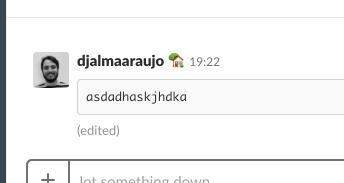
Steps to reproduce:
1 - paste a code snippet
2 - Double click with your mouse
3 - try cmd+c
4 - paste
5 - paste output is not what is expected
Version 5.0.0-beta.18 (5.0.0-beta.18.903) (macOS).
 djalmaaraujo
on 4 Jun 2018
djalmaaraujo
on 4 Jun 2018
Same here..
macOS High Sierra V. 10.13.5
CMD + C does not work
CMD + V does not work
CMD + A does not work (highlight)
Do we need to 'hard code' it for now?
    "electron": "^2.0.2",
    "electron-builder": "^20.15.1",
    "electron-debug": "^2.0.0",
    "electron-devtools-installer": "^2.2.4",
    "electron-packager": "^12.1.0",
    "electron-store": "^2.0.0",
 steffanhalv
on 6 Jun 2018
steffanhalv
on 6 Jun 2018
I'm also having this issue. CMD + doesn't work.
MacOS HS V 10.13.6 - Chrome V 70.0.3538.35 (Official Build) beta (64-bit)
 Joejoboi
on 30 Sep 2018
Joejoboi
on 30 Sep 2018
Version 5.0.0-beta.18 (5.0.0-beta.18.903)
osx 10.14 (18A391)
Still not working.
 ldanicel
on 19 Oct 2018
ldanicel
on 19 Oct 2018
I'm using slack webapp in Franz and this happens to my whole team (of 5). Try to copy something from the conversation
 tkodev
on 27 Nov 2018
tkodev
on 27 Nov 2018
In 5.0.0-beta.19.1004:
- copying from slack works
- copying from telegram (web.telegram.org) doesn't
 hongshaoyang
on 3 Dec 2018
hongshaoyang
on 3 Dec 2018
Note: Cmd shortcuts start to work once you do the right-click Copy. Tested with Teams.
Try this out, and let know if this works for you.
 karanbajaj23
on 3 Dec 2018
karanbajaj23
on 3 Dec 2018
Can still reproduce in 5.0.0-beta.22.1059 on macOS High Sierra 10.13.6. Not limited to a single service. Using the right-click copy method as suggested usually fixes the issue for a while 👍
madsmtm
on 14 Dec 2018
Just wanted to let you know that I haven't forgotten about this issue.
I haven't been able to find out yet what is causing the copy shortcut to lose the functionality in the first place. All hints that help to find a way to reproduce the issue are more than welcome!
adlk
on 14 Dec 2018
By the way, a way to go around this for the time being is to select some text, right click and then simply hit copy. Not as good as the cmd-c but still better than nothing :)
 plasorak
on 26 Feb 2019
plasorak
on 26 Feb 2019
By the way, a way to go around this for the time being is to select some text, right click and then simply hit copy. Not as good as the cmd-c but still better than nothing :)
Recently even "mouse-copy" stopped working. Basically at this point I have exactly zero methods of copy/pasting data, which is a deal-breaker for me. :\
 Razva
on 4 Mar 2019
Razva
on 4 Mar 2019
I am on Windows 10. Franz Version 5.0.0 Release 4.0.4 / win32 / x64
I am unable to copy using keyboard shortcuts or using the mouse and right clicking.
 tlsimmons88
on 4 Mar 2019
tlsimmons88
on 4 Mar 2019
Related issues
 larissaales
·
3Comments
larissaales
·
3Comments
 tayfuuun
·
4Comments
tayfuuun
·
4Comments
 dbfin
·
4Comments
dbfin
·
4Comments
 thmsnhl
·
4Comments
thmsnhl
·
4Comments
 m2kk
·
4Comments
m2kk
·
4Comments
Most helpful comment
Hello, I'm MacOS High Sierra (10.13), for me, it's little bit different .. I can paste into Franz services inputs, but anything I copied from services, can't be pasted anywhere because my clipboard is empty, or contains previous copy from other app - clipboard is not updated by my last CMD Copy action