Franz: [Feature Request] Start Franz minimized
Feature Description
If you start Franz, it would be launched minimized in the background.
Motivation and Context
This feature is a nice addition if you set Franz to autostart. Some people just want their messengers run in the background to get notifications and don't want to minimize the window everytime they're starting the OS.
 mrprobot
All 54 comments
I would love to see this as a toggle option. I have Franz on both my laptop (primarily for work) and desktop (primarily for gaming) - having it start maximized on one and minimized on the other would be awesome!
 colinodell
on 29 Nov 2017
colinodell
on 29 Nov 2017
@mrprobot @colinodell running Franz in the background is already supported (see Settings), you can close the window upon first launch ... is that enough of a workaround?
 haraldox
on 15 Jan 2018
haraldox
on 15 Jan 2018
@haraldox do you mean the the settings in the application? I'm running franz on ubuntu and i cant find an option saying "close the window upon first launch"
 matecode
on 23 Feb 2018
matecode
on 23 Feb 2018
@haraldox Nope that is not a workaround, but rather exactly what @mrprobot wants to avoid in this feature request, that the app should start minimized.
The use case is the following: the user sets up his favourite programs to automatically start with his OS when he logs in, because the user will use them at some point. However when the user logs in, the user does not want to be faced with a gazillion windows popping up, but rather stay in the system tray until they are needed.
Sane GUI apps that are started with the system start in the system tray :D
 erikw
on 2 Mar 2018
erikw
on 2 Mar 2018
i would love to see this feature in next update (if that possible)
 ghost
on 21 Mar 2018
ghost
on 21 Mar 2018
yeah, i would like to see that option also +1
 racakg
on 21 Mar 2018
racakg
on 21 Mar 2018
+1 Vote for this.
Thanks!
 HoracioDos
on 26 Mar 2018
HoracioDos
on 26 Mar 2018
+1
Please implement this. Every messenger app ever had this feature - from Skype to Rambox. People launch messengers always at startup, and it's a huge annoyance that the window pops up.
 poisonborz
on 26 Mar 2018
poisonborz
on 26 Mar 2018
Everyone requesting this feature on Windows, here is a temporary fix
I wrote an AHK script that runs Franz, and closes the window (with alt-w) as soon as it's interactive/loads. I could upload the exe but I guess you wouldn't trust that :P So here are the instructions:
Copy the script into a .ahk file. Download Ahk2Exe (comes with Autohotkey) to compile it to an .exe file. Place it next to your Franz.exe file and use it to launch the app.
#NoTrayIcon
Run, Franz.exe

WinWait, Franz
Loop
{
    WinGet, status,MinMax

    if (status = -1) {
        ExitApp
    } else {
        WinActivate
        Send ^w
    }
}
I don't understand how such this basic functionality in not included with Franz.
 fabricio-garcia
on 10 Apr 2018
fabricio-garcia
on 10 Apr 2018
That window pop up is annoying, and i have been looking into ways to minimize it in linux mint... FYI i couldn't get gdevilspie to work with it either.
ghost
on 19 May 2018
I agree, this is the new feature I want the most.
 Zahrun
on 28 Jun 2018
Zahrun
on 28 Jun 2018
Please, add this feature on Ubuntu's version too.
 leoheck
on 14 Jul 2018
leoheck
on 14 Jul 2018
Workaround for Unix/Linux OS with wmctrl:
Install wmctrl (from Debian-like repos, try sudo apt-get install wmctrl)
Go into your application startup settings (in XFCE, it's in the Menu under Settings, Session and startup) and edit the Franz menu item:
replace the command portion with this:
sh -c "franz& sleep 10; wmctrl -c Franz"
It will popup but autoclose in 2 seconds, make sure Keep Franz in the background and minimize to system tray are enabled in the program settings.
 weaponizedtaco
on 15 Jul 2018
weaponizedtaco
on 15 Jul 2018
Thanks, @weaponizedtaco it didn't work for me in Ubuntu.
I just wmctrl -c Franz to test it after aunch Franz but nothing happened.
leoheck
on 19 Jul 2018
I had to later change it to sleep 10 because the startup sequence made the window appear later than expected
weaponizedtaco
on 20 Jul 2018
Absolutely agree. It's a basic feature for any application like this.
 nicolafarina
on 4 Sep 2018
nicolafarina
on 4 Sep 2018
This issue has been automatically marked as stale because it has not had recent activity. It will be closed if no further activity occurs. Thank you for your contributions.
![stale[bot] picture](https://avatars3.githubusercontent.com/in/1724?v=4&s=40) stale[bot]
on 16 Nov 2018
stale[bot]
on 16 Nov 2018
"activity"
erikw
on 16 Nov 2018
Workaround for Unix/Linux OS with wmctrl:
Install wmctrl (from Debian-like repos, try sudo apt-get install wmctrl)
Go into your application startup settings (in XFCE, it's in the Menu under Settings, Session and startup) and edit the Franz menu item:
replace the command portion with this:
sh -c "franz& sleep 10; wmctrl -c Franz"It will popup but autoclose in 2 seconds, make sure Keep Franz in the background and minimize to system tray are enabled in the program settings.
Agree that this should be the default behavior (regardless of OS), but maybe this is hard to do with an Electron type app. I was able to get the desktop Slack to behave this way only after adding slack -u to my startup. The wmctrl thing would've worked there too.
Thank you for this. Tried hard to do this via devilspie2, but no love. Your trick to trigger this on start only was the needed final mile. This way it only closes it to the tray the first time you run it. After that, it will behave normally.
 kendoori
on 28 Dec 2018
kendoori
on 28 Dec 2018
2019, still waiting for this feature to be added! :)
 renzoofp
on 2 Feb 2019
renzoofp
on 2 Feb 2019
+1
 tijero
on 22 Feb 2019
tijero
on 22 Feb 2019
Hi. There is an easy work around for this issue on Ubuntu & Linux Mint.
First make sure you have wmctrl installed.
Then command we will use to minimize that Franz window to tray is _wmctrl -a Franz && wmctrl -c :ACTIVE:_
_wmctrl -a Franz_ command gets Franz window on focus(on top of other windows) and _wmctrl -c :ACTIVE:_ closes the active window (on focus)
To get Franz minimized to tray whenever we start it; we need to make a very simple bash script and put that bash script file location to startup applications.
In order to do so open a text file editor in your home file and copy-paste the script below into the text file. Save and close. I named my text file FranzMinimized
!/bin/bash
franz & disown && sleep 3 ; wmctrl -a Franz && wmctrl -c :ACTIVE:
exit
Now open your startup applications. Add new startup application. Add this location to command section: /home/your-username-here/FranzMinimized
That's it. Tested; works perfect.
Note: make sure "keep franz in the background" and "show Franz in system tray" boxes are checked in Franz settings.
 altandeniz
on 24 Feb 2019
altandeniz
on 24 Feb 2019
Devs should really start to be more active here... 500 opened issues... This issue opened for more than a year without resolution. Quite embarassing support for software that is trying to convince (more like force by being annoying) users to pay subscription.
 desthercz
on 8 Mar 2019
desthercz
on 8 Mar 2019
@desthercz Totally agree, it's starting to become somewhat annoying. Some positive dev related activity regarding this particular request would be appreciated.
 DonPajero
on 28 Mar 2019
DonPajero
on 28 Mar 2019
I bet you the main reason they don't want to do this is because it basically nullifies the entire reason of having to "wait" before being able to use Franz.
Which is kind of a lame thing anyway, but hey.
 xorinzor
on 28 Mar 2019
xorinzor
on 28 Mar 2019
Actually Franz is dead. I moved to Rambox, it is ugly but it is development.
On Thu, Mar 28, 2019, 17:14 Jorin Vermeulen notifications@github.com
wrote:
I bet you the main reason they don't want to do this is because it
basically nullifies the entire reason of having to "wait" before being able
to use Franz.Which is kind of a lame thing anyway, but hey.
—
You are receiving this because you commented.
Reply to this email directly, view it on GitHub
https://github.com/meetfranz/franz/issues/365#issuecomment-477753707,
or mute the thread
https://github.com/notifications/unsubscribe-auth/ABN_4Kgp134H59nuF_a_6L_Y7tla90boks5vbSKRgaJpZM4Qu36i
.
leoheck
on 29 Mar 2019
adlk is actively updating Franz again since Q4 2018 but the project would need more contributors
https://github.com/meetfranz/franz/graphs/contributors
Zahrun
on 29 Mar 2019
Switched to Rambox too, not sure what you mean with it being ugly, it looks great.
xorinzor
on 29 Mar 2019
I also switched to Rambox-OS and i think it looks fine. I can also greatly appreatiate that it does not enforce annoying "pay or wait" overlay.
@xorinzor Well i dont know about you, but on Linux client i had to wait quite a few times per day even when just opened app from tray. It is not only startup "feature".
desthercz
on 30 Mar 2019
Workaround for Unix/Linux OS with wmctrl:
Install wmctrl (from Debian-like repos, try sudo apt-get install wmctrl)
Go into your application startup settings (in XFCE, it's in the Menu under Settings, Session and startup) and edit the Franz menu item:
replace the command portion with this:
sh -c "franz& sleep 10; wmctrl -c Franz"It will popup but autoclose in 2 seconds, make sure Keep Franz in the background and minimize to system tray are enabled in the program settings.
@weaponizedtaco I am using your script, but would also like to find a way to keyboard shortcut waking Franz up from the tray. If I do wmctl -a Franz
Workaround for Unix/Linux OS with wmctrl:
Install wmctrl (from Debian-like repos, try sudo apt-get install wmctrl)
Go into your application startup settings (in XFCE, it's in the Menu under Settings, Session and startup) and edit the Franz menu item:
replace the command portion with this:
sh -c "franz& sleep 10; wmctrl -c Franz"It will popup but autoclose in 2 seconds, make sure Keep Franz in the background and minimize to system tray are enabled in the program settings.
@weaponizedtaco any suggestions on how to wake up Franz once it's in the tray. wmtctrl -a Franz doesn't do it
kendoori
on 11 Apr 2019
I agree, this feature would be very much appreciated! It is somewhat annoying when the window opens at startup even though I might only need it a few hours later.
 sNiXx
on 6 May 2019
sNiXx
on 6 May 2019
Windows Workaround with VBScript.
Just create franz.vbs and run/place it in startup folder.
set s = CreateObject("WScript.Shell")
s.Run "C:\Users\myuser\AppData\Local\Programs\franz\Franz.exe",2
res=false
Do
  WScript.Sleep 10
  res=s.AppActivate("Franz")
Loop While res=false
s.SendKeys "%{F4}"
 amarullz
on 10 May 2019
amarullz
on 10 May 2019
Makes no sense at all not to have this feature. Every time I log on there comes Franz taking the whole screen. Thats just disturbing. No one wants that. Imagine all your programs you auto start with your session having no way of starting minimized/dockerized. That would be a total mess!
 joaodalvi
on 29 May 2019
joaodalvi
on 29 May 2019
2019 and this feature is not available....
 dacorsa
on 7 Jun 2019
dacorsa
on 7 Jun 2019
@leoheck What exactly are you talking about? I've upgraded to the most recent version and still there's no "start minimized" option.
 rgpublic
on 7 Jun 2019
rgpublic
on 7 Jun 2019
+1
 jeroenst
on 14 Jun 2019
jeroenst
on 14 Jun 2019
Switched to Rambox too, not sure what you mean with it being ugly, it looks great.
Same here! More than 1 year without implement this basic feature means that the development team is not committed
 msnjuegos
on 30 Jun 2019
msnjuegos
on 30 Jun 2019
Wouldn't this: https://www.npmjs.com/package/auto-launch be an option? options.isHidden would allow launching as hidden. I have unfortunately zero experience with Electron, but maybe someone could assess if that would do.
 Jendker
on 11 Jul 2019
Jendker
on 11 Jul 2019
Hey is this anywhere near to being implemented?
 Tasty213
on 18 Jul 2019
Tasty213
on 18 Jul 2019
Sadly had to switch to Rambox too, I also consider this a very basic functionality feature and it's non existence is kind of a dealbreaker for me.
(Plus Rambox also makes it possibile to have the bar on top instead of on the side, something that I have personally also been missing from Franz ever since they changed it - not relevant to this, but just saying).
 cpazaras
on 19 Jul 2019
cpazaras
on 19 Jul 2019
Missing the feature also, +1
 Sauceee
on 19 Sep 2019
Sauceee
on 19 Sep 2019
+1
 XavierTolza
on 14 Jan 2020
XavierTolza
on 14 Jan 2020
Really interesting how nothing happens here. Any news to share?
 EinPinsel
on 2 Apr 2020
EinPinsel
on 2 Apr 2020
Returning from Hamsket after it broke tray icons.
Any news on this issue?
ghost
on 9 Apr 2020
supporting the interest here
 nachog4
on 14 Apr 2020
nachog4
on 14 Apr 2020
For anyone interested: The next version of Ferdi (http://getferdi.com/, a fork of Franz) has this feature implemented. I am currently testing it and it works very well!
 rob-orch
on 14 Apr 2020
rob-orch
on 14 Apr 2020
Yay! One more named fork of the same thing!! I will give it a try, thank you.
leoheck
on 14 Apr 2020
@rob-orch I am using this Ferdi but it has the same issues, this one especially. So, what is the point in sharing it here?
leoheck
on 18 Apr 2020
Ferdi doesn't have this feature either...
 rursache
on 24 Apr 2020
rursache
on 24 Apr 2020
Hmm, just found Franz and was about to buy a licence but then noticed the glaring bug, it won't start in the tray. What, who makes apps nowadays like this? Anyhow, looks like I shall go check out rambox after reading this thread. Good luck with the waiting guys.
 JackDinn
on 2 May 2020
JackDinn
on 2 May 2020
Ferdi just fixed this in v5.5.0, give it a try
Works well on MacOS and Windows
rursache
on 2 May 2020
Ferdi just fixed this in v5.5.0, give it a try
I have tried, it is a bit of a mess on Manjaro KDE.
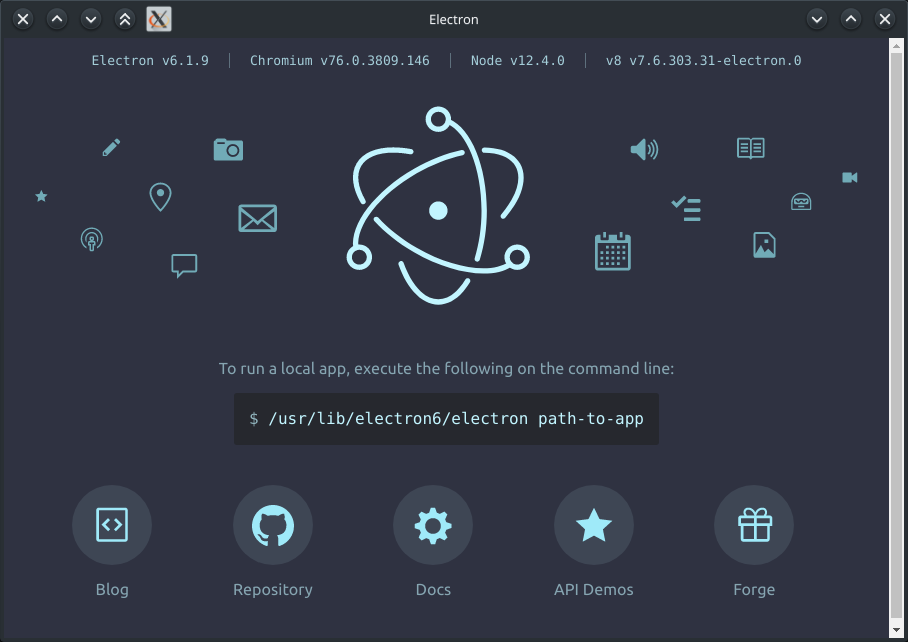
When I try setting the Franz setting to "Launch Franz at startup" all I get is an electron GUI window of some sort. Something to do with electron itself and not Franz.
If I try to use KDE sessions it fails to load at all at boot.
If I try adding a startup command Franz does start but it's not in the tray, it's an open window on top of everything.
JackDinn
on 2 May 2020
Just thought id add a screenshot of what happens if i try to use the setting "Launch Franz at startup". My desktop loads fine but i get this window on top of everything else.
(OS = Manjaro KDE)
JackDinn
on 2 May 2020
Related issues
 G419
·
3Comments
G419
·
3Comments
 ArmeF97
·
4Comments
ArmeF97
·
4Comments
 agodlydeciple
·
4Comments
agodlydeciple
·
4Comments
 AGonLen
·
4Comments
AGonLen
·
4Comments
 PackElend
·
4Comments
PackElend
·
4Comments
Most helpful comment
@haraldox Nope that is not a workaround, but rather exactly what @mrprobot wants to avoid in this feature request, that the app should start minimized.
The use case is the following: the user sets up his favourite programs to automatically start with his OS when he logs in, because the user will use them at some point. However when the user logs in, the user does not want to be faced with a gazillion windows popping up, but rather stay in the system tray until they are needed.
Sane GUI apps that are started with the system start in the system tray :D