Files: The appication triggers UAC on opening any file
Describe the bug
When I try to open any file (even text ones) then Windows (UAC) asks me to allow this action.
To Reproduce
Steps to reproduce the behavior:
- Create any file (for example E:\temp\test.txt) in classic Windows Explorer or "Files UWP".
- Try to open this file in "Files UWP" with doubleclick.
- You see that UAC triggers.
Expected behavior
I expect that UAC do not triggers on any files that do not require admin permissions (such as some exes) and I would expect that file just opens with default program.
Screenshots
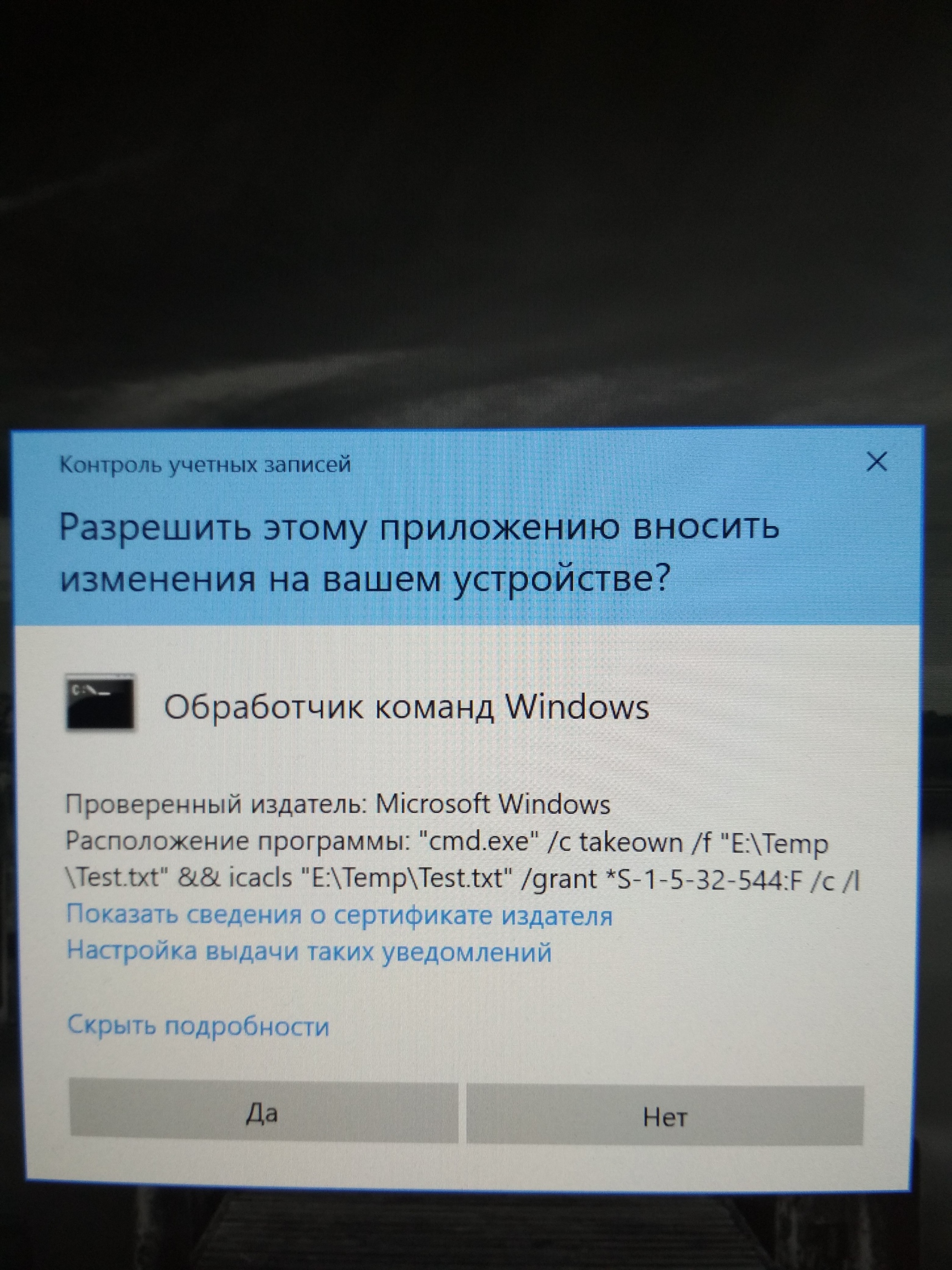
Desktop (please complete the following information):
- OS Version: [e.g. Windows 10 1909 18363.836]
- App version: [v0.9.1]
Additional context
If I choose "No" in UAC dialog, then file opens just right. If I choose "Yes", then the file do not opens.
 FibYar
All 5 comments
I guess you have "takeown" added in the registry
 XPoppyX
on 7 Jun 2020
XPoppyX
on 7 Jun 2020
I guess you have "takeown" added in the registry
Could you please explain what exactly does that means? I have a lot of "takeown" in registry. But I did not add them myself. Is it bad?
FibYar
on 7 Jun 2020
Well, when I added takeown, that dialog also appeared when I wanted to open any file, when I removed it, it no longer appeared.
Delete the TakeOwnership folder from::
HKEY_CLASSES_ROOT*\shell\
HKEY_CLASSES_ROOT\Directory\shell\
Delete the runas folder from::
HKEY_CLASSES_ROOT*\shell\
HKEY_CLASSES_ROOT\Drive\shell\
XPoppyX
on 7 Jun 2020
Delete the TakeOwnership folder from::
HKEY_CLASSES_ROOT*\shell\
HKEY_CLASSES_ROOT\Directory\shell\Delete the runas folder from::
HKEY_CLASSES_ROOT*\shell
HKEY_CLASSES_ROOT\Drive\shell\
Yes, it worked. Thanks for the help!
FibYar
on 7 Jun 2020
Well, when I added takeown, that dialog also appeared when I wanted to open any file, when I removed it, it no longer appeared.
Delete the TakeOwnership folder from::
HKEY_CLASSES_ROOT*\shell\
HKEY_CLASSES_ROOT\Directory\shell\Delete the runas folder from::
HKEY_CLASSES_ROOT*\shell
HKEY_CLASSES_ROOT\Drive\shell\
Thanks a lot!!
 MobiusBeta
on 19 Jun 2020
MobiusBeta
on 19 Jun 2020
Related issues
 rashil2000
·
24Comments
rashil2000
·
24Comments
 Taras-Parfeniuk
·
24Comments
Taras-Parfeniuk
·
24Comments
 KaKi87
·
31Comments
KaKi87
·
31Comments
 szaimen
·
18Comments
szaimen
·
18Comments
 tsvietOK
·
30Comments
tsvietOK
·
30Comments
Most helpful comment
Well, when I added takeown, that dialog also appeared when I wanted to open any file, when I removed it, it no longer appeared.
Delete the TakeOwnership folder from::
HKEY_CLASSES_ROOT*\shell\
HKEY_CLASSES_ROOT\Directory\shell\
Delete the runas folder from::
HKEY_CLASSES_ROOT*\shell\
HKEY_CLASSES_ROOT\Drive\shell\