Files: Windows Explorer context menu
I would like to be able to use Windows Explorer's context menu in Files, especially its custom entries, like, in my case : WinRAR, 7-Zip, LockHunter, Beyond Compare, Git Bash, Sublime Text, etc...
The context menu is also stored in Windows Registry.
I found some of my context menu items on my Windows Registry database, but, they're not located in the same place.
There's at least these :
HKEY_CLASSES_ROOT\*\shell
HKEY_CLASSES_ROOT\*\shellex
HKEY_CLASSES_ROOT\Folder\shell
HKEY_CLASSES_ROOT\Folder\shellex
HKEY_CLASSES_ROOT\Directory\shell
HKEY_CLASSES_ROOT\Directory\shellex
(Source)
Some way, CCleaner and other software manages to find them all.
Two software that I use, TreeSize and WinSCP, allows to display Windows Explorer's context menu, TreeSize isn't open source but WinSCP is : I found the feature in this Delphi file by the ShellDisplayContextMenu function.
I think this approach is different from reading the Registry because it's the genuine Windows Explorer context menu which is shown, so I guess there's some way to access it directly.
Unfortunately, I there's nothing more I can do to help you figure this out.
Good luck
 KaKi87
All 31 comments
Nothing is impossible, especially when other developers have done it before...
And the commands are specified in the Registry

KaKi87
on 18 Jul 2019
@KaKi87 @yaichenbaum Actually it is impossible because, to my knowledge, universal apps do not have access to the registry.
 duke7553
on 18 Jul 2019
duke7553
on 18 Jul 2019
However, we could investigate reading registry values from another Win32 component. e.g. one similar to ExecutableLauncher
duke7553
on 18 Jul 2019
UWP apps can actually read from the registry, however I am not sure how something like this would work with localization.
 yaichenbaum
on 7 Apr 2020
yaichenbaum
on 7 Apr 2020
Context menu strings are exclusively managed by the software which added itself to it. Indeed, if you change Files's language, the software's won't.
KaKi87
on 7 Apr 2020
There are two types of context menu entries that I can think of, the first type would be for the open with menu and the new file menu, the second type would be for additional entries in the right click context menu for items such as 7zip.
We would probably need a way of classifying them and adding sub menus for the ones that require them like 7zip.
yaichenbaum
on 7 Apr 2020
I would like to take a look at this. However what I couldn't find is the menu options for 7-Zip. Where is the submenu items located under the registry of Windows for 7-Zip?
Here is more information about how to create and retrieve shell context menus information from the registry.
 BuraChuhadar
on 13 Apr 2020
BuraChuhadar
on 13 Apr 2020
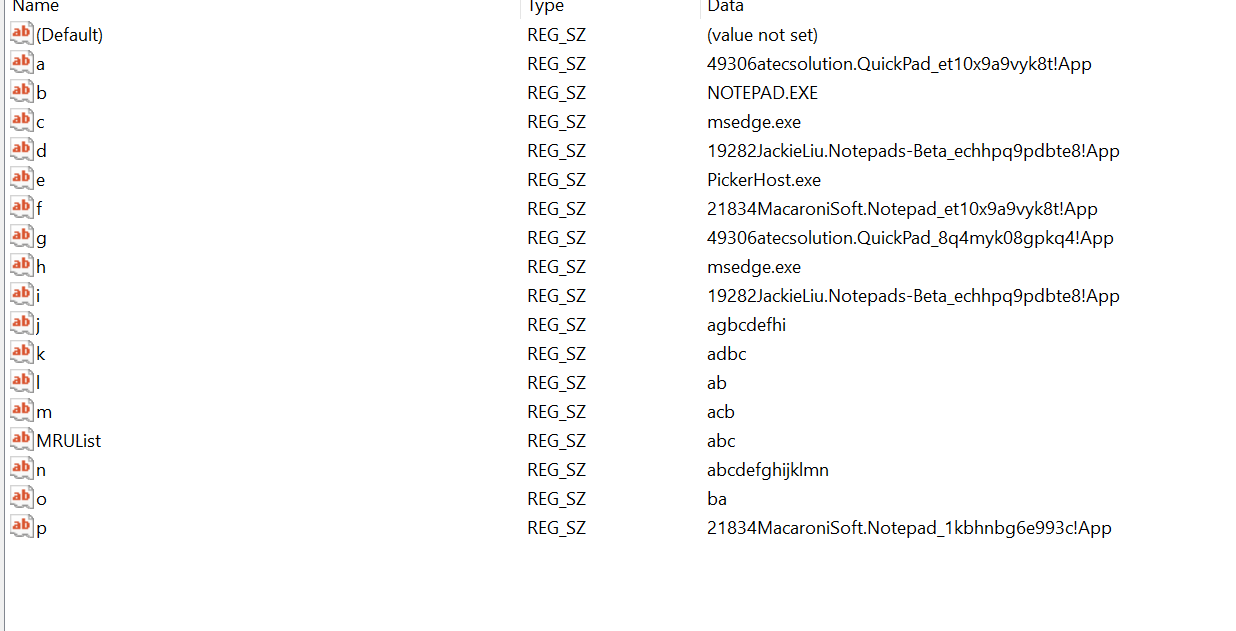
The open with menu items are interesting because it includes more then the programs you would expect to show. For example, the items for text files include a bunch of strings that seem to have nothing to do with opening files.
yaichenbaum
on 13 Apr 2020
Some of the application's shell context menu cannot simply be retrieved from the registry. 7-Zip for example is using shell extensions. These are in-process COM objects which extend the abilities of Windows operating system. To retrieve the menu items for 7-Zip, COM object needs to be queried.
BuraChuhadar
on 14 Apr 2020
@BuraChuhadar We can technically check for 7zip and manually add the menu items like we do for QuickLook.
yaichenbaum
on 14 Apr 2020
I am not sure how did you get the "Open With" list from your registry. I am seeing on my end Open With is also a shell extension which needs to be queried as a COM object. See "ComputerHKEY_CLASSES_ROOT*shellexContextMenuHandlersOpen With" which then calls "%SystemRoot%system32shell32.dll".
BuraChuhadar
on 14 Apr 2020
I got the list from this key Computer\HKEY_CURRENT_USER\SOFTWARE\Microsoft\Windows\CurrentVersion\Explorer\FileExts.
yaichenbaum
on 14 Apr 2020
I would suggest to keep it simple and look only these sections for now without shell extension functionality:
HKEY_CLASSES_ROOT\*\shell
HKEY_CLASSES_ROOT\*\shellex
HKEY_CLASSES_ROOT\Folder\shell
HKEY_CLASSES_ROOT\Folder\shellex
HKEY_CLASSES_ROOT\Directory\shell
HKEY_CLASSES_ROOT\Directory\shellex
Then it can be expanded into "Open With" and/or shell extensions functionality.
BuraChuhadar
on 14 Apr 2020
@BuraChuhadar That sounds like a good starting point, is this something you wanted to implement?
yaichenbaum
on 14 Apr 2020
Yes I want to start implementing the first phase please.
BuraChuhadar
on 14 Apr 2020
I am also sharing this here:
https://stackoverflow.com/questions/5708434/how-to-use-shell32-within-a-c-sharp-application
https://stackoverflow.com/questions/42819959/shell-application-verbs-net-3-5
BuraChuhadar
on 21 Apr 2020
@BuraChuhadar Make sure to keep us updated on your progress 😊
yaichenbaum
on 21 Apr 2020
So far I have this: https://github.com/duke7553/files-uwp/commit/4ee24dbb73956762910aa8b86e9baef9d522db4f
I have been experimenting with also getting the information from other ways.
BuraChuhadar
on 21 Apr 2020
Current progress: https://github.com/duke7553/files-uwp/pull/699 not done yet.
BuraChuhadar
on 25 Apr 2020
Would it also help the support for other shell extensions? Like TC4Shell which is an archive viewer integrated into File Explorer.
 AkazaRenn
on 14 Jul 2020
AkazaRenn
on 14 Jul 2020
I think an approach like Windows Terminal will be better. A single json file will store the context menu data for different file extensions in different profiles, user can edit this file to add/remove/sort the entries of context menu for a certain item. Additionally, we can provide a gui for editing context menu which may contain detected entries from registry as suggestions.
 soumyamahunt
on 18 Jul 2020
soumyamahunt
on 18 Jul 2020
As long as there's a GUI, it's okay.
KaKi87
on 18 Jul 2020
I think an approach like Windows Terminal will be better. A single json file will store the context menu data for different file extensions in different profiles, user can edit this file to add/remove/sort the entries of context menu for a certain item. Additionally, we can provide a gui for editing context menu which may contain detected entries from registry as suggestions.
Most users are not interested in setting up the right click context menu.
yaichenbaum
on 19 Jul 2020
Well, my initial feature request was to add an entry to the UWP context menu which would contain the existing entries of the Windows Explorer context menu, just like TreeSize, WinSCP, Beyond Compare, etc.
So, if that feature gets implemented, then, technically, the context menu would be customizable using existing software with Windows Explorer context menu customization features like CCleaner or ShellMenuView.
Thanks
KaKi87
on 26 Jul 2020
@BuraChuhadar Can you share a status update where things are with this issue? Thank you 😃
yaichenbaum
on 18 Aug 2020
@gave92 Thank you for all your great work on implementing this feature in #1754.
yaichenbaum
on 24 Aug 2020
Nice ! When will the feature be available on MS Store ?
KaKi87
on 25 Aug 2020
Nice ! When will the feature be available on MS Store ?
The feature is already available to users in the beta flight, however it will be a at least couple weeks before we roll it out to regular users since we still working on refining the improved context menu.
yaichenbaum
on 26 Aug 2020
Is there any way to get into beta flight?
 revanmj
on 26 Aug 2020
revanmj
on 26 Aug 2020
I have Files UWP - Preview, version 0.13.1.0, is that the beta flight ? It doesn't seem so, because I can't see find the feature
KaKi87
on 29 Aug 2020
hello everyone, I apologize for the radio silence I have been dealing with some life/work issues and couldn't get to this work. I really appreciate @gave92 for implementing this feature this looks really nice.
BuraChuhadar
on 12 Sep 2020
Related issues
 tsvietOK
·
30Comments
tsvietOK
·
30Comments
 ghost
·
50Comments
ghost
·
50Comments
 ArttuLai
·
24Comments
BuraChuhadar
·
23Comments
ArttuLai
·
24Comments
BuraChuhadar
·
23Comments
 Taras-Parfeniuk
·
24Comments
Taras-Parfeniuk
·
24Comments