Files: Enable us to open everything with just one click
Is your feature request related to a problem? Please describe.
Especially for touchscreens it would be nice beeing able to open every file/folder with just one click.
Describe the solution you'd like
This and other UWP apps are ment to be also used by devices with touchscreen, so I think the option to open files and folders with just one click would be really nice.
Describe alternatives you've considered
Maybe for this also selecting through pulling would make sense?
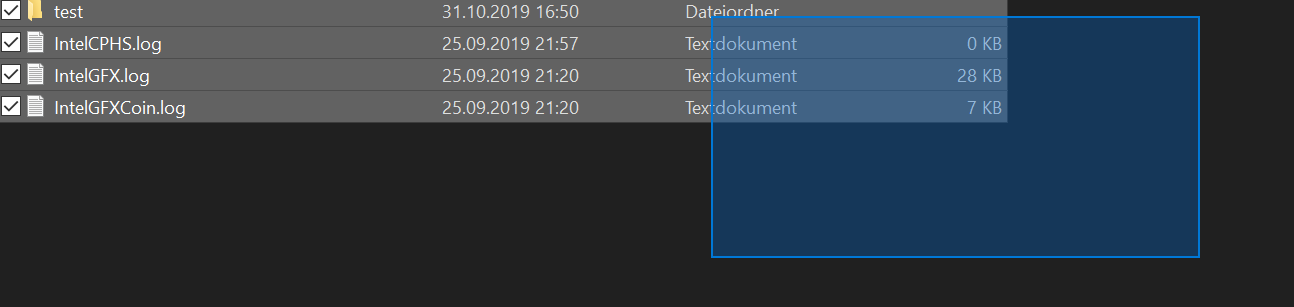
Additional context
In file explorer the option to open everything with just one click can be found in file explorer settings:

 szaimen
All 14 comments
This is great feedback, I see three options we could have -
- An option to open files and folders with one click with mouse input and of course touch as well.
- An option to open with one click only on touch.
- The default which would be the current behavior that requires clicking twice.
Does this cover everything or is there anything else to keep in mind?
 yaichenbaum
on 8 Nov 2019
yaichenbaum
on 8 Nov 2019
@yaichenbaum I think your list is quite complete. I am just missing the option to select files and folders through pulling. This is important for touch input since you cannot use the shift and/or ctrl button to select files/folders if the keyboard isn't available. And you probably shouldn't be forced to use them imho.
Maybe these ribbon options from file explorer could also be useful for that:

If you want: I can open a new issue to track this seperately.
szaimen
on 8 Nov 2019
@szaimen That should be tracked in a new issue. I believe that #94 will work on touch when implemented.
yaichenbaum
on 8 Nov 2019
@yaichenbaum Thanks for pointing to #94, I must have overseen it.
For the additional ribbon options I opened:
https://github.com/duke7553/files-uwp/issues/274
szaimen
on 8 Nov 2019
I think it needs a new approach to select files. (for example, long-press or a "select" button to enter select mode)
Otherwise there'll be conflict between opening files and selecting files.
 hez2010
on 15 Jun 2020
hez2010
on 15 Jun 2020
@hez2010 In that case we can use hover to select.
 Jaiganeshkumaran
on 16 Jun 2020
Jaiganeshkumaran
on 16 Jun 2020
If a user has this option turned on, they will need to use ctrl + click to select a file. Another option for the user will be to use the selection rectangle when it's implemented.
yaichenbaum
on 16 Jun 2020
Why not hover? File Explorer uses hover for selecting if the user has the option to use single click turned on.
Jaiganeshkumaran
on 16 Jun 2020
Here's my opinion on the implementations for the actions, would this work?
| action | double click | single click | touch |
|--|--|--|--|
|open|double click|single click|touch|
|options|right click| right click|long press (better when displayed in space between navigation and search buttons instead of context menu)|
|single select (no need for this- no options are exposed while selecting in desktop use case; all options are in context menu)|single click|hover (or ctrl + single click)|long press (this way both selection and options are handled by single action)|
|multiple select|ctrl + single click / rectangle|ctrl + single click (as in win32 explorer) / rectangle|long press (then continue to select multiple by single touch)|
I remember from somewhere that the decision to remove the ribbon from the old design was because there was no need for it since everything was available through the context menu. The single-file select use case is redundant (except for times when the user needs to select multiple files ie. multiple select), I think.
 jayasio
on 10 Jul 2020
jayasio
on 10 Jul 2020
I think there must be checkbox in the top left corner of icons, that appear on hover and allow to select the file.
In standard File explorer there is such an option indeed:

 emvaized
on 17 Sep 2020
emvaized
on 17 Sep 2020
I would love to see an option for single click to open on desktop.
This is also good for people with physical injuries, for whom it is difficult to quickly double click.
emvaized
on 17 Sep 2020
I think there must be checkbox in the top left corner of icons, that appear on hover and allow to select the file.
In standard File explorer there is such an option indeed:
It's good. But, I think we need a better design rather checkboxes.
 seltinusjulio
on 15 Oct 2020
seltinusjulio
on 15 Oct 2020
@seltinusjulio You can already use ctrl + click to select more than one item.
yaichenbaum
on 15 Oct 2020
This issue should be resolved with #2130.
yaichenbaum
on 25 Oct 2020
Related issues
 rashil2000
·
24Comments
rashil2000
·
24Comments
 zbalkan
·
25Comments
zbalkan
·
25Comments
 XPoppyX
·
36Comments
XPoppyX
·
18Comments
szaimen
·
18Comments
XPoppyX
·
36Comments
XPoppyX
·
18Comments
szaimen
·
18Comments
Most helpful comment
This is great feedback, I see three options we could have -
Does this cover everything or is there anything else to keep in mind?