Is your feature request related to a problem? Please describe.
I suggest these refinements to the properties especially useful when comparing folders/files.
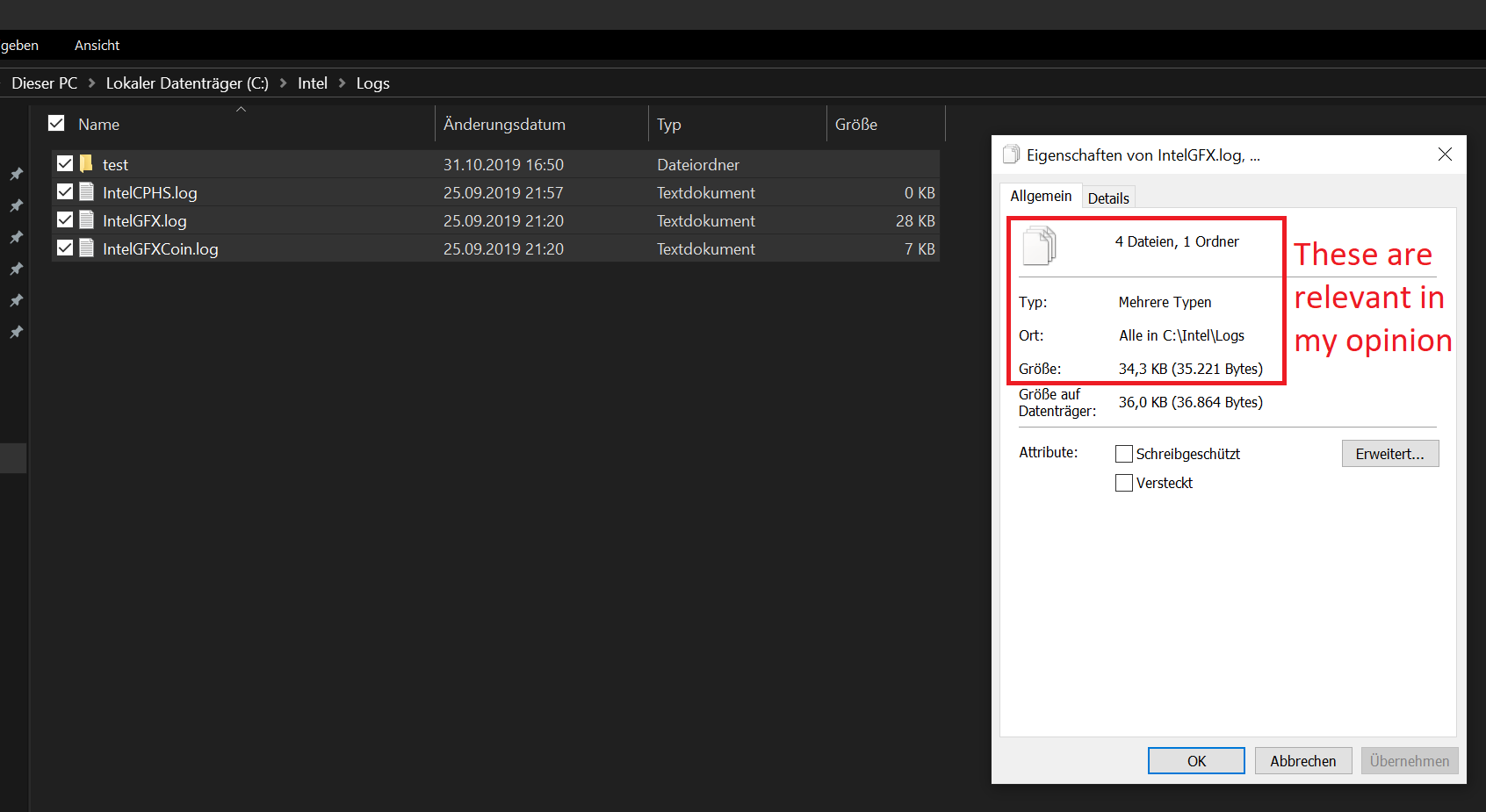
Currently I just can see the size of one file but not for folders and or when selecting more than on folder/file.
Describe the solution you'd like
I would like to see the overall size of a folder and/or files (and the count of folders and files inside this folder).
Describe alternatives you've considered
Also when choosing more than one file and/or folder, I would like to see the count of files and the overall size.
Additional context
This is how it is handled in file explorer:
 szaimen
All 6 comments
This proposal seems to include all the information we need so I will go ahead and approve this for development.
 yaichenbaum
on 8 Nov 2019
yaichenbaum
on 8 Nov 2019
Would be really nice, if you would also add an option to the right-click menu to calculate the size of current selected folders directly inside the list view (per folder) , so that you are afterwards able to sort all files and folders based on their size in the current directory.
If you change something inside these folders, or navigating away from the current directory, I imagine that it gets resetted.
szaimen
on 2 Jan 2020
Have the points brought up in this issue been resolved in the recent updates? If not please let me know which things still need to be addressed, thank you 🙂.
yaichenbaum
on 26 Apr 2020
@yaichenbaum All points are addressed for single files but they don't work for a selection of files/folders which is still very important imo.
Also the size of a folder is missing from this dialog (when showing the properties of only one folder).
szaimen
on 26 Apr 2020
@szaimen The size for folders is a different issue, #645 that we will work on in the future. I will keep this issue open since you mentioned you still need it to support showing the properties with the total size of all the selected items.
yaichenbaum
on 26 Apr 2020
This issue has been resolved with recent pull requests.
yaichenbaum
on 21 Jun 2020
Related issues
 TyJOrtiz
·
36Comments
TyJOrtiz
·
36Comments
 XPoppyX
·
18Comments
XPoppyX
·
18Comments
 ghost
·
50Comments
ghost
·
50Comments
 Jaiganeshkumaran
·
24Comments
Jaiganeshkumaran
·
24Comments
 SOI7
·
22Comments
SOI7
·
22Comments
Most helpful comment
This issue has been resolved with recent pull requests.