Files: This PC should be available in the left section
Is your feature request related to a problem? Please describe.
A clear and concise description of what the problem is. Ex. I'm always frustrated when [...]
Describe the solution you'd like
A clear and concise description of what you want to happen.
Describe alternatives you've considered
A clear and concise description of any alternative solutions or features you've considered.
Additional context
Add any other context or screenshots about the feature request here. Ex: What device type/UI layout and app version?
 Mohsin5154
All 14 comments
Hello. Thanks for this feedback. It would help us if you described exactly what features you need from "This PC"
 duke7553
on 7 Aug 2019
duke7553
on 7 Aug 2019
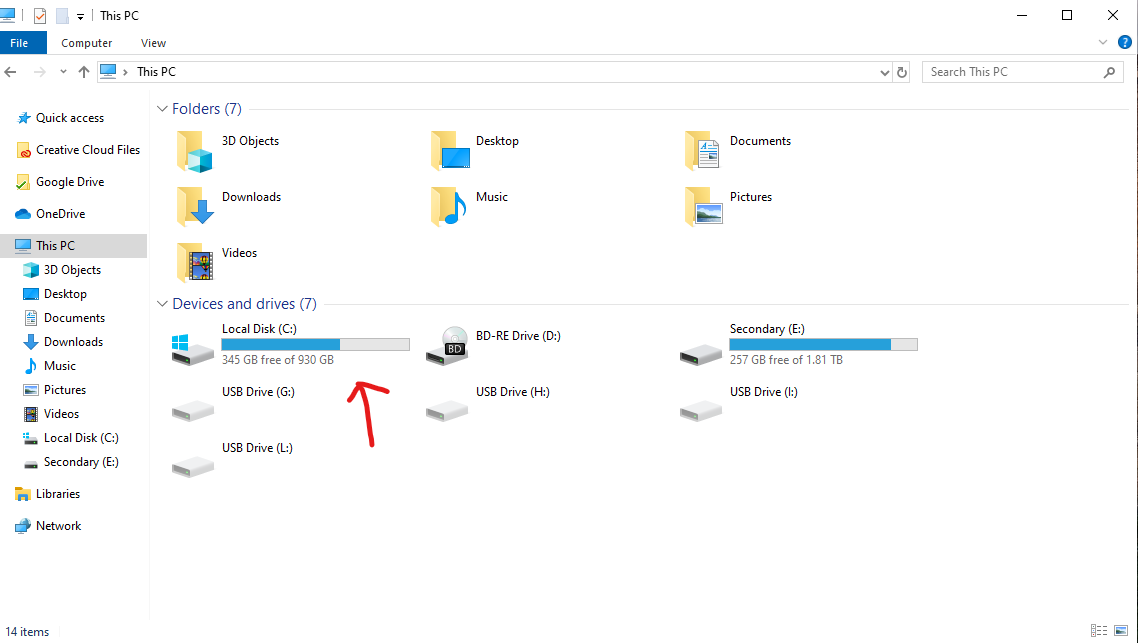
This PC should display all the drives as in File Explorer on Windows 10
Sent from Mailhttps://go.microsoft.com/fwlink/?LinkId=550986 for Windows 10
From: Luke Blevins notifications@github.com
Sent: Thursday, August 8, 2019 1:25:00 AM
To: duke7553/files-uwp files-uwp@noreply.github.com
Cc: Mohsin Nazir mohsin2851@outlook.com; Author author@noreply.github.com
Subject: Re: [duke7553/files-uwp] This PC should be available in the left section (#210)
Hello. Thanks for this feedback. It would help us if you described exactly what features you need from "This PC"
—
You are receiving this because you authored the thread.
Reply to this email directly, view it on GitHubhttps://github.com/duke7553/files-uwp/issues/210?email_source=notifications&email_token=AJ22TM5P3LGXXD32PU2NS23QDMVRZA5CNFSM4IJH67WKYY3PNVWWK3TUL52HS4DFVREXG43VMVBW63LNMVXHJKTDN5WW2ZLOORPWSZGOD3ZTKVI#issuecomment-519255381, or mute the threadhttps://github.com/notifications/unsubscribe-auth/AJ22TM7GXAM6ELPYEYAI423QDMVRZANCNFSM4IJH67WA.
Mohsin5154
on 8 Aug 2019
It should also show how much storage is left in each drive
 Henboy10
on 9 Aug 2019
Henboy10
on 9 Aug 2019
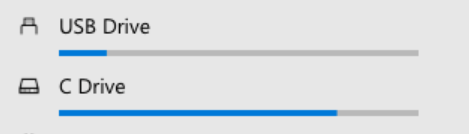
If the drive space indicator would display like the picture attached, would that solve the need for a dedicated page?
 yaichenbaum
on 29 Oct 2019
yaichenbaum
on 29 Oct 2019
Personally, I'd just like "This PC" as a home page instead of the current implementation. I don't use the favourites or the recent items, so that whole page is useless to me. Of course, that's just me.
 generalguy41
on 30 Oct 2019
generalguy41
on 30 Oct 2019
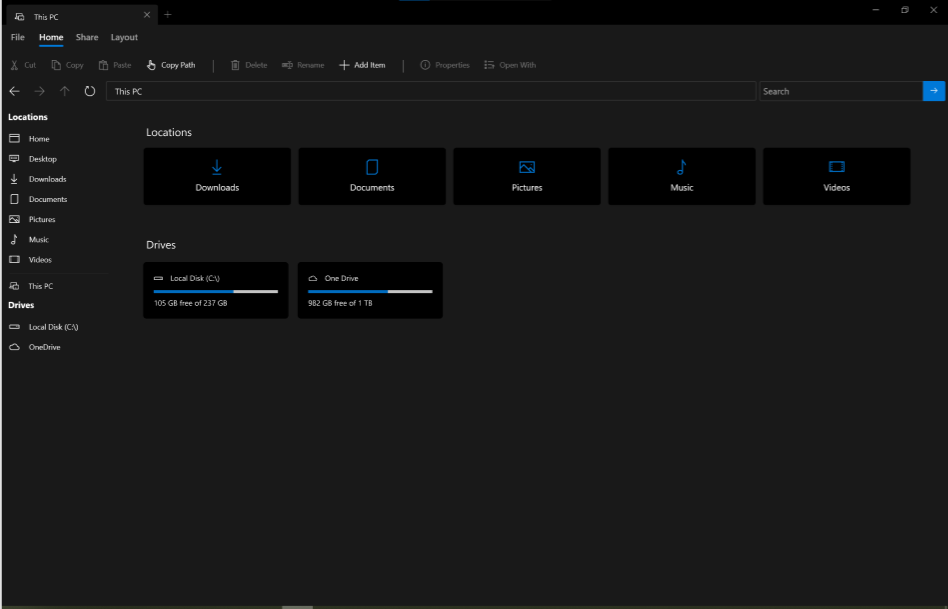
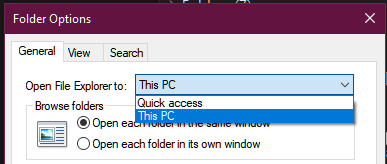
Here is a basic idea of how it could look
yaichenbaum
on 31 Oct 2019
I am interested in understanding what having a This PC homepage would do for you. From my view having the drives on the side is more then enough, however the one place I do see how having a dedicated page would be useful is for someone with a lot of network drives or just a bunch of regular drives.
Personal preference. I often keep my drives on the left hand side minimized anyway. It also helps for drives that have special names or icons, as those don't show up in the list. Hard to tell which drives are which based on "Local Disk (E:)" and "Removable Drive (D:)". (Maybe I should raise that as a bug?)
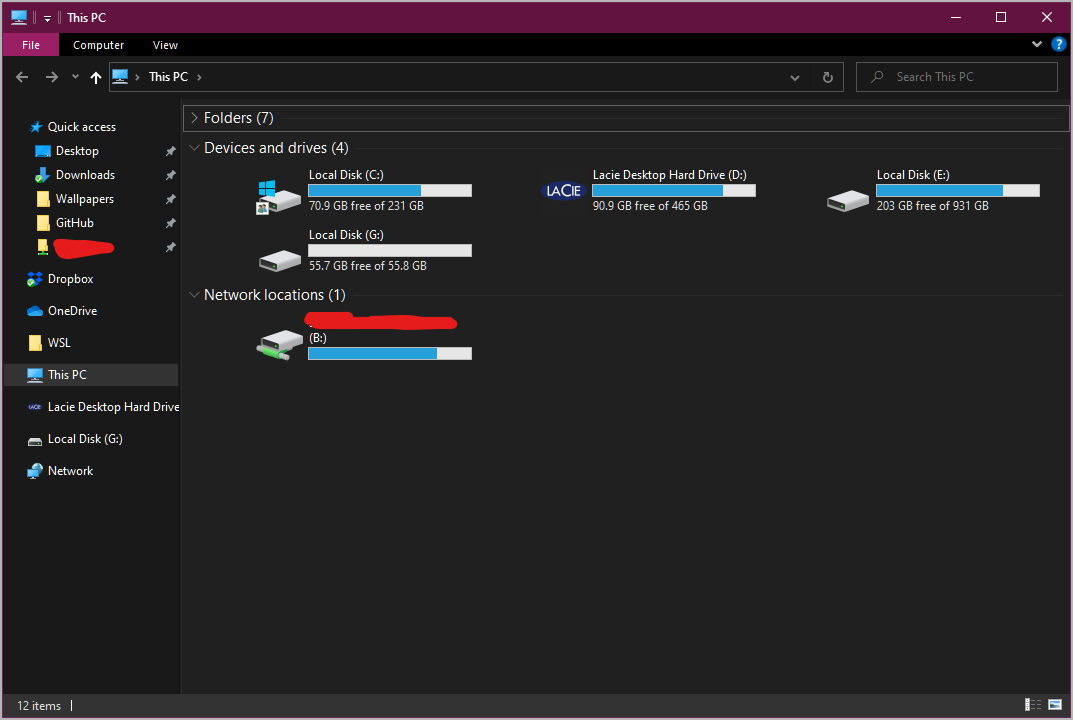
It could be made an option like it is on the default explorer.
generalguy41
on 31 Oct 2019
Sorry, I meant custom icons/images, like the Lacie drive I posted. The naming thing is more important though, as neither the external hard drive nor my network drive show their proper names (though maybe this has been addressed, I'm only on the store version).
generalguy41
on 31 Oct 2019
There were no changes to that specific area however there is a long list of other changes and bug fixes to be included in the next update.
yaichenbaum
on 31 Oct 2019
however there is a long list of other changes and bug fixes to be included in the next update.
BTW: When will the next update be available?
 szaimen
on 31 Oct 2019
szaimen
on 31 Oct 2019
@szaimen as soon as a bug stopping us from creating the release package is fixed.
yaichenbaum
on 31 Oct 2019
@yaichenbaum do you have a beta for this available yet? Would love to see this.
 chuchanpr
on 12 Jun 2020
chuchanpr
on 12 Jun 2020
@chuchanpr We are rethinking how the home page will work, the goal is to enable optional "widgets" that can be pinned to the home page, one of the possible widgets would be a drives section.
yaichenbaum
on 12 Jun 2020
We have came to the conclusion that we will not be adding a dedicated page for drives, however as part of #366 we will work on creating a widget for this much requested feature and you will be able to pin it to the home page.
yaichenbaum
on 19 Jun 2020
Related issues
 XPoppyX
·
18Comments
XPoppyX
·
18Comments
 bhupathi189
·
18Comments
bhupathi189
·
18Comments
 R3voA3
·
26Comments
R3voA3
·
26Comments
 rashil2000
·
24Comments
rashil2000
·
24Comments
 ArttuLai
·
24Comments
ArttuLai
·
24Comments
Most helpful comment
Here is a basic idea of how it could look
