Ferdi: Dark Reader settings do not follow the accent color
" are comments from us and won't be
visible in your bug report, so please don't put any text in them.
-->
Describe the bug
Darkreader settings do not follow the accent color.
To Reproduce
Steps to reproduce the behavior:
- Go to Settings and set a accent color
- Edit a service and enable dark mode
- The dark mode settings color is not changed
Screenshots
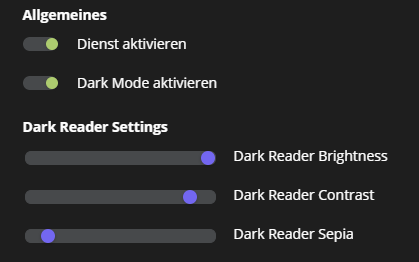
Desktop:
- OS: Windows 10
- Ferdi Version: 5.5.0-gm.2
 Sauceee
👍3
>All comments
@kytwb I can take this up.
 sampathBlam
on 25 Apr 2020
sampathBlam
on 25 Apr 2020
👍2
Was this page helpful?
0 / 5 - 0 ratings
Related issues
 Makazzz
·
35Comments
Makazzz
·
35Comments
 Ansem93
·
21Comments
Ansem93
·
21Comments
 petr-nehez
·
23Comments
petr-nehez
·
23Comments
 kytwb
·
23Comments
kytwb
·
23Comments
 webbad
·
34Comments
webbad
·
34Comments
Most helpful comment
@kytwb I can take this up.