Describe the bug
I'm trying to add whatsapp and messenger while using Ferdi without an account, when I click "save service" notrhing happen
- OS: Windows 10
- Version: 5.4.0 Beta 2
 Ansem93
All 21 comments
Just tested 5.4.0-beta.2 on my Mac and everything seems to work there.
Can you please follow the steps for us to find out why this happens:
- In Ferdi's menubar, under "View" click "Toggle Developer Tools"
- In the now opened Developer Tools, in the top row, click "Console" (you may have to click on the two arrows to see it)
- Try to create a new service in Ferdi
- Scroll down the developer console if needed and take a screenshot of the last few messages (probably red error messages)
- Upload this screenshot here
 vantezzen
on 21 Oct 2019
vantezzen
on 21 Oct 2019
I've got the same issue as @Ansem93 same OS, same Ferdi Version
The debug information does say that i've got recipes installed, but they don't show up in the services.
SERVICES IN DEBUG INFO
"installedRecipes": [
      { "id": "gmail", "version": "1.1.1" },
      { "id": "whatsapp", "version": "1.0.17" },
      {}
SERVICES IN GUI
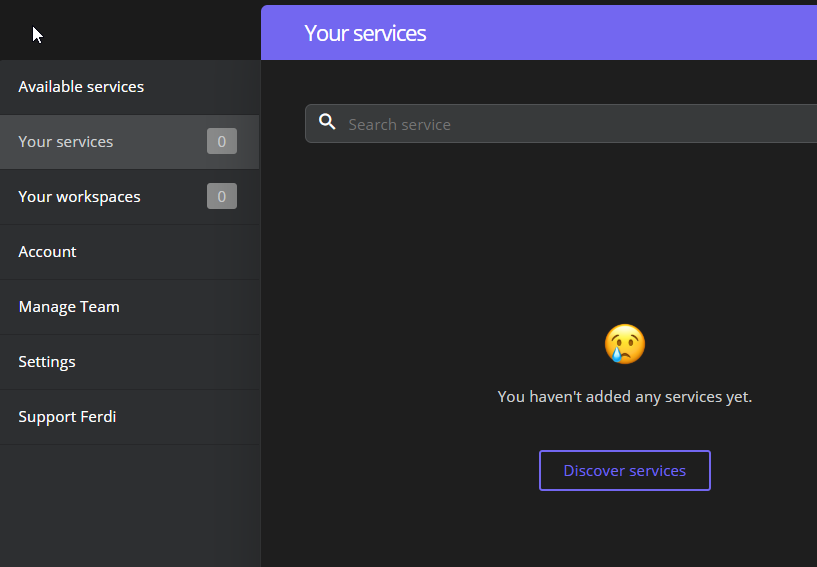
CONSOLE OUTPUT OF ATTEMPTED SERVICE CREATION
I followed the steps suggested by @vantezzen and got the following results, which are provided in a text file for convenient searching / reading.
console_error_log.txt
 JordyScript
on 24 Oct 2019
JordyScript
on 24 Oct 2019
Thank you. What server are you using? You can see it in Ferdi's settings.
Edit: Ok, you are using Ferdi without an account as I can see from the logs. It looks like the internal server is throwing an error when trying to list the services.
I can't find out what the exact error is via the error log you send. Could you please send the full responses from the server send A) when creating a new service and B) when reloading Ferdi.
Follow this video for more information: https://youtu.be/h0FsXR88MDY
When reloading Ferdi, you'll get two (or more) requests with the name "services". Choose the latest one - the response preview should not be "
vantezzen
on 24 Oct 2019
Sorry, I didn't had time to answer until now.
I tried again now on a different PC, now it work without an account!
You did something server side? Tomorrow I'll check on the other computer
Ansem93
on 24 Oct 2019
I'm having the same problem where i can't add a new service in the without an account mode, I get this error about the sqlite database being read only
insert into `services` (`created_at`, `name`, `recipeId`, `serviceId`, `settings`, `updated_at`) values ('2019-10-27 00:59:56', 'Discord', 'discord', '0d5a75b2-4e2b-4b3f-9726-d60cca9962eb', '{"recipeId":"discord","name":"Discord","isEnabled":true,"isNotificationEnabled":true,"isBadgeEnabled":true,"isMuted":false,"customIcon":false,"isDarkModeEnabled":true,"spellcheckerLanguage":null,"proxy":{"isEnabled":false,"host":"","port":"","user":"","password":""}}', '2019-10-27 00:59:56') - SQLITE_READONLY: attempt to write a readonly database
 Deanosim
on 26 Oct 2019
Deanosim
on 26 Oct 2019
@Deanosim What Operating system are you on?
vantezzen
on 26 Oct 2019
Oh sorry, I'm on Windows 10, using version 5.4.0-beta.4 of Ferdi
Deanosim
on 26 Oct 2019
I found a work around, turns out the server.sqlite file and the Ferdi folder in AppData/Local are both set to read only for whatever reason, to fix this I just changed the properties on the Ferdi folder, and sever.sqlite file and unchecked the read-only box.
I got this idea from this thread on stackoverflow
Deanosim
on 26 Oct 2019
You did something server side?
No, this is all client-side.
It looks like the Ferdi AppData somehow gets set to readonly mode on Windows. If anyone has any ideas on why this could happen: The server database file is located inside %appdata%/Ferdi/server.sqlite and gets copied there from inside the application file.
@Deanosim did I understand correct that the whole Ferdi folder was set to readonly? I would understand if somehow the server.sqlite file got set to readonly mode but if it's the whole folder gets set to readonly mode there might be another issue.
vantezzen
on 26 Oct 2019
I have never had this issue before using Franz (which i stopped using) so maybe some code was introduced in this fork that caused the installation of Ferdi to break in this way (by making the appdata folder read only).
JordyScript
on 30 Oct 2019
We have introduced the internal-server with this fork and version, but I don't understand how and why this could would make the AppData folder readonly.
vantezzen
on 30 Oct 2019
@vantezzen Okay I checked and yes you're correct it was just the server.sqlite file (Windows 10 permissions are confusing sometimes) All I had to do was untick the readonly box on the files properties and everything is working fine now. So I'm not sure how that happened.
Deanosim
on 5 Nov 2019
Just installed the new 5.4.0 version.
Can confirm that the issue is in server.sqlite that is set as read-only. In my case the correct file was in AppData/Roaming and not local.
Ansem93
on 25 Nov 2019
Hmm, this issue could be due to Ferdi copying a database template from inside the *.exe file to this folder which may result in this the copied file being readonly.
Unfortunately, I am developing on a mac so I can't really develop and test a fix for this but PRs are welcome.
vantezzen
on 25 Nov 2019
Mmm is there any way to change the permissions after that file has been copied ?
 keplerk
on 25 Nov 2019
keplerk
on 25 Nov 2019
Hmm, this issue could be due to Ferdi copying a database template from inside the *.exe file to this folder which may result in this the copied file being readonly.
Unfortunately, I am developing on a mac so I can't really develop and test a fix for this but PRs are welcome.
Thanks for suggesting this. Maybe the database template can be dynamically created from an initialization script? That might solve the permission problem.
I'm putting my thoughts here, cuz at this point in time i can't implement it myself, but someone else may be able to.
I did notice however that the entire folder had become read-only, so maybe this might not do the trick. We won't know for sure until we try though.
JordyScript
on 26 Nov 2019
I have seen this in the Sentry error logs quite a bit (for Windows only).
I will try to debug the permission issue.
 kytwb
on 29 Nov 2019
kytwb
on 29 Nov 2019
Yeey, that helped. (setting "C:\Users\username\AppData\Roaming\Ferdiserver.sqlite" not be read-only).
Thanks @Deanosim!
 keunes
on 19 Dec 2019
keunes
on 19 Dec 2019
Closing in favor of https://github.com/getferdi/ferdi/issues/149.
kytwb
on 19 Dec 2019
Excuse me but, you are closing this issue in favor of this issue ?
Regards.
keplerk
on 19 Dec 2019
Went a bit too fast, meant in favor of https://github.com/getferdi/ferdi/issues/253 😅
kytwb
on 19 Dec 2019
Related issues
 AP-Hunt
·
3Comments
AP-Hunt
·
3Comments
 yourcontact
·
3Comments
yourcontact
·
3Comments
 PeSader
·
3Comments
PeSader
·
3Comments
 idonthaveanametoday
·
3Comments
idonthaveanametoday
·
3Comments
 alegiglio
·
3Comments
alegiglio
·
3Comments
Most helpful comment
I found a work around, turns out the server.sqlite file and the Ferdi folder in AppData/Local are both set to read only for whatever reason, to fix this I just changed the properties on the Ferdi folder, and sever.sqlite file and unchecked the read-only box.
I got this idea from this thread on stackoverflow