Ferdi: Can't login to Gmail when service was already created
Describe the bug
It's impossible to log in to Gmail account for already existing services. After creating a new service, everything works OK, I'm redirected to the login page and I can log in without problems. But, when I want to login to existing Gmail service (or I reload a new one) I'm redirected to Gmail's home page, where clicking on Login redirects me to an external browser, therefore it's impossible to log in.
To Reproduce
Steps to reproduce the behavior:
- Create a Gmail service
- Open it. Login window should be visible
- Right-click on a service icon and click Reload
- Click Login link to redirect to login
Expected behavior
I should be redirected to Gmail's login page inside Ferdi app, not in an external browser
Screenshots
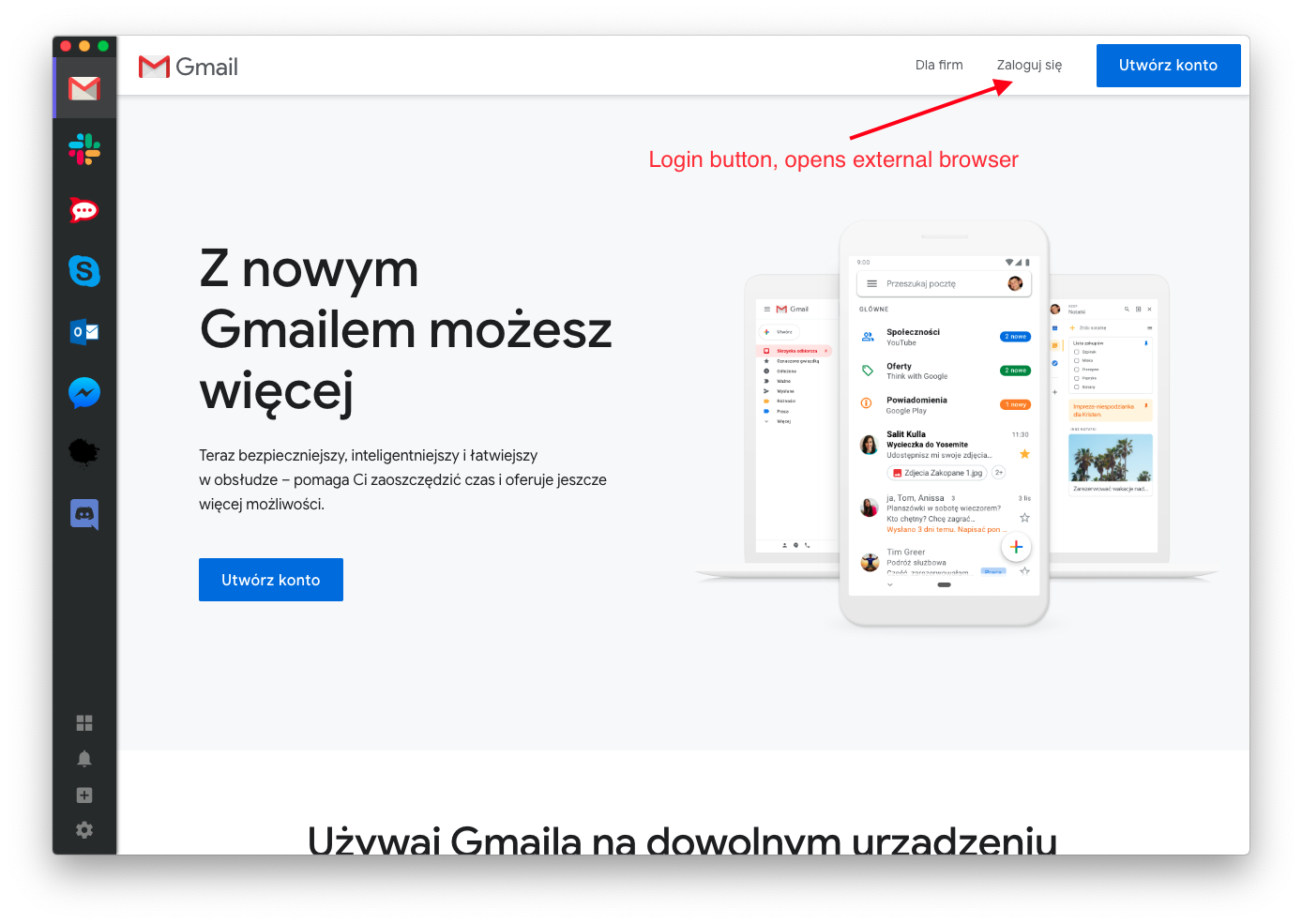
Desktop (please complete the following information):
- OS: macOS 10.14.6 (I was also able to reproduce it on Windows 10)
Additional context
I don't know whether this bug appears also in Franz. I haven't seen it in their Issues list.
 tswistak
All 9 comments
What is the version of Ferdi?
 Makazzz
on 10 Oct 2019
Makazzz
on 10 Oct 2019
5.3.3.157
tswistak
on 10 Oct 2019
So the last stable version v5.3.3 ?
Makazzz
on 10 Oct 2019
Ok I did the test on the 5.3.3 stable release and I have the same result. The service when is reload after restarting the app become with only external link and not the same connection page.
EDIT: I tested Franz 5.3.3 and I don't have this problem. Maybe the recipe was updated on Franz team side?
Makazzz
on 10 Oct 2019
I had the same experience. I deleted my gmail service, readded it, and the account login screen showed up and I was able to login. Once done, I clicked and dragged it to the requisite order I wanted in the services-tabs ribbon.
 vraravam
on 14 Nov 2019
vraravam
on 14 Nov 2019
That's not exactly a solution when you're working on multiple computers with Ferdi cloud synchronization. After removing and readding on the first computer, I'll run into the same issue on a second computer.
tswistak
on 15 Nov 2019
There seems to be a new version of the gmail recipe available - will update the recipe repository
 vantezzen
on 15 Nov 2019
vantezzen
on 15 Nov 2019
For anyone who doesn't want to delete and re-add their service, you can click View > Open Service Developer Tools and type this into the console:
location.replace('https://accounts.google.com/AccountChooser?service=mail&continue=https://mail.google.com/mail/')
 probablykasper
on 26 Nov 2019
probablykasper
on 26 Nov 2019
Alternatively, v5.4.0 comes with a settings option to show the address bar in services. This can be used to temporarily remediate this kind of issues.
 kytwb
on 27 Nov 2019
kytwb
on 27 Nov 2019
Related issues
 paulwaldmann
·
21Comments
paulwaldmann
·
21Comments
 VOOM108
·
34Comments
VOOM108
·
34Comments
 keunes
·
38Comments
keunes
·
38Comments
 webbad
·
34Comments
webbad
·
34Comments
 petr-nehez
·
23Comments
petr-nehez
·
23Comments