Describe the bug
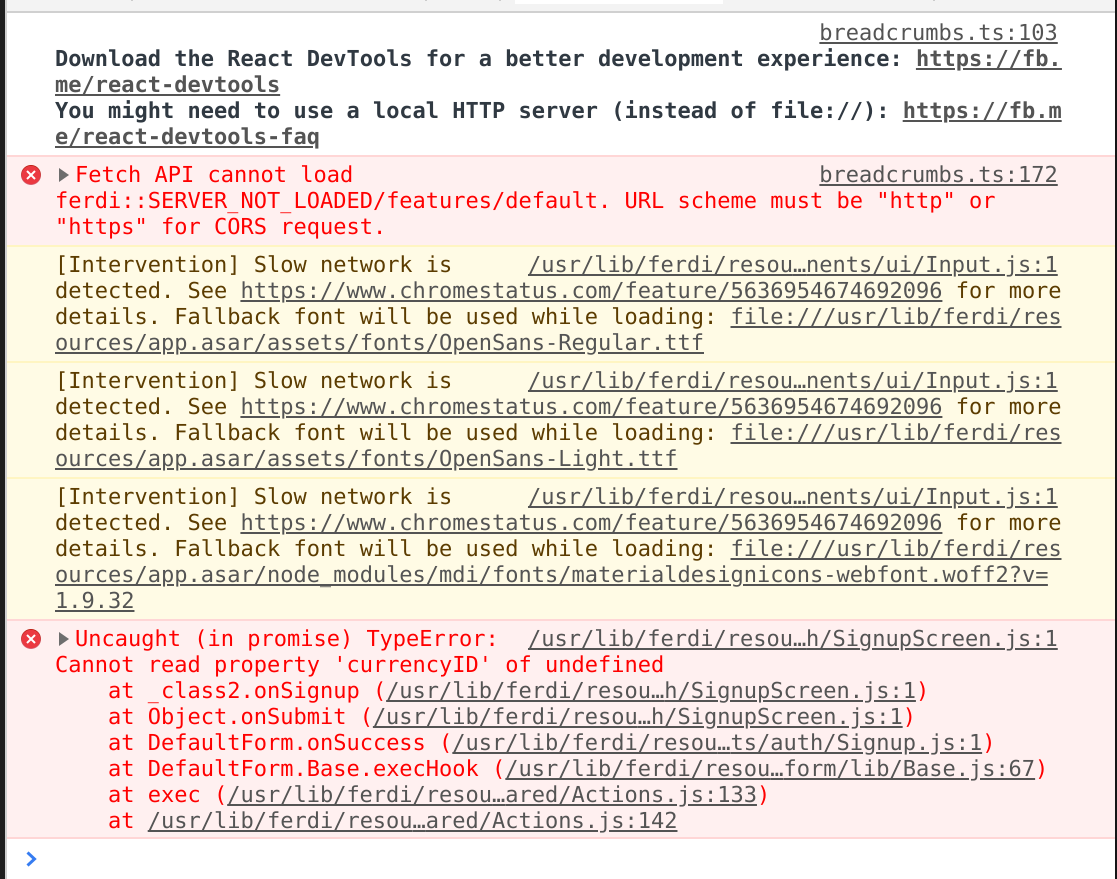
Sign up doesn't work. No error is shown and no effect when clicking 'Create account'
To Reproduce
Steps to reproduce the behavior:
- Go to 'Sign Up Form'
- Fill out Form
- Press 'Create account'
Expected behavior
Execute Sign Up process
Screenshots
Desktop (please complete the following information):
- OS: Manjaro Linux
- Browser: Brave
- Version 1.1.23
Additional context
The screenshot is from Developer Tools inside Ferdi
 paulwaldmann
All 21 comments
Looks like Ferdi couldn't load any server configuration. Could you please execute the following command in the console and post its output here:
console.log("Stores:", window.ferdi.stores, "\nSettings:", window.ferdi.stores.settings, "\nAll settings:", window.ferdi.stores.settings.all, "\nServer:", window.ferdi.stores.settings.all.app.server);
 vantezzen
on 30 Dec 2019
vantezzen
on 30 Dec 2019
Stores: {router: RouterStore, app: _temp, user: _temp, features: _temp, settings: _temp, …}
Settings: _temp {stores: {…}, api: {…}, actions: {…}, _reactions: Array(0), fileSystemSettingsTypes: Array(2), …}
All settings: {app: Proxy, proxy: Proxy, service: {…}, stats: {…}, migration: {…}}
Server: You are using Ferdi without a server
Since i couldn't sign up, I selected the Use Ferdi without an Account option. Therefore the Server field displays "You are using Ferdi without a server".
If I return to the Login and click "Change server", it will add https://api.getferdi.com to the Server input, but will immediately respond with a warning on the bottom saying There were errors while trying to perform an authenticated request. Please try logging out and back in if this error persists. and the Try again button doesn't work/clicking takes no effect.
I've to Reload Ferdi in order to get back into the Login page, and after selecting again Use Ferdi without an Account the Server input reverts back to You are using Ferdi without a server
paulwaldmann
on 30 Dec 2019
Hmm ok, would have been interesting what it was before selecting the option as that overwrote whatever has been there.
When changing the server you will have to log out as Ferdi's current Auth token won't be valid on the new server - so the error you are getting is expected.
vantezzen
on 30 Dec 2019
Okay, edited my previous reply tho. How to proceed? If you want I can reinstall Ferdi and follow a step by step guide to help you reproduce the error. Alternatively, you can join my desktop via AnyDesk or such and take a look for yourself. Ready to help!
paulwaldmann
on 30 Dec 2019
Have you changed any settings before you tried creating an account? Can you please open Ferdi's settings, in the bottom left corner click on "Login" or "Logout" (depending on what button you have there) and try signing up again?
vantezzen
on 30 Dec 2019
Got a "Login" button there, upon clicking it, Ferdi reloads saying "logging you out" and loads the "Sign in" page. I clicked "Create a free account", filled out the form and clicked "Create account". Problem persists.
And no, I've not made any changes whatsoever to Ferdi, Just downloaded it from AUR using pamac and went straight for the sign up.
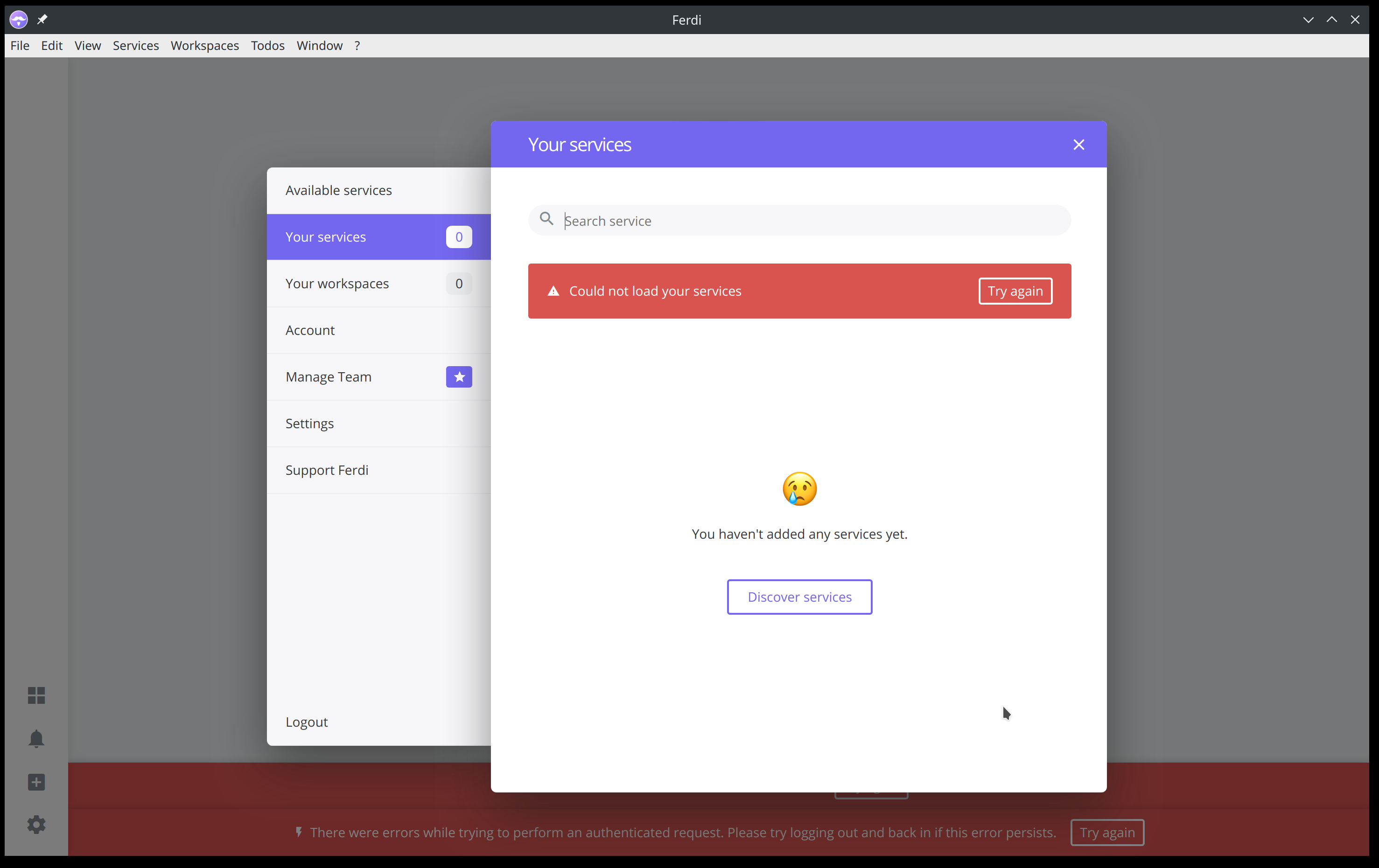
I reinstalled Ferdi and it loaded as expected the default startup screen (Login, Sign up, etc.) but I also encountered the There were errors while trying to perform an authenticated request. Please try logging out and back in if this error persists. error right after launching the app (before it even finished loading the startup screen).
paulwaldmann
on 30 Dec 2019
Could you try deleting Ferdi's config folder in ~/.config/ferdi?
vantezzen
on 30 Dec 2019
Now, nothing works any more lulz
I went on Logout and tried to sign up again, error persists.
paulwaldmann
on 30 Dec 2019
I believe I am encountering the same issue on Windows 10 and Ferdi 5.4.0.

 eyriewow
on 31 Dec 2019
eyriewow
on 31 Dec 2019
I'm encountering the same issue as @eyriewow on MacOS 10.14.6 and Ferdi 5.4.0
 smt
on 31 Dec 2019
smt
on 31 Dec 2019
same for me Windows 7 x64 and Ferdi 5.4.0
UPDATE: Uninstalled version 5.4.0 and installed 5.3.3 and it let me create an account and login, then after update was autmomatically downloaded by the app everything is working as it should.
 juanjotoronja
on 31 Dec 2019
juanjotoronja
on 31 Dec 2019
UPDATE: Uninstalled version 5.4.0 and installed 5.3.3 and it let me create an account and login, then after update was autmomatically downloaded by the app everything is working as it should.
Can confirm this also worked for me.
eyriewow
on 1 Jan 2020
Win 10 x64, 5.4.1-beta.4 had this problem since 5.4.0 with a fresh first install
 VOOM108
on 2 Jan 2020
VOOM108
on 2 Jan 2020
Could reproduce this issue myself.
It looks like the bug was that Franz/Ferdi 5.4.0 is using a different URL to fetch its feature list and is also expecting some new config parameters. I just updated the server via https://github.com/getferdi/server/commit/5aff6ab34a2f0d60d8cccdfe244e62e3256dbc15 - you should now be able to sign up and sign in to Ferdi 5.4.0 (no client update needed).
I also updated the internal server to reflect these changes so you will be able to use Ferdi without an account again with the next update.
vantezzen
on 2 Jan 2020
This worked... But my services I created locally are not reflected when logged in. Any easy way to synchronize?
VOOM108
on 2 Jan 2020
What do you mean with "that you created locally"? Have you created them while using Ferdi without an account? In this case there is currently no way to synchronize them - they are seperate accounts (maybe a feature we'll implement in the future).
Your services are however not deleted when you logged into your account on Ferdi's server. You can simply logout again and choose to use Ferdi without an account and your services should still be present.
vantezzen
on 2 Jan 2020
Ok I see.... I created a complex setup with 13 services, partly with custom darkmode.css and had hoped there was an easy way to transfer these to the online account....
VOOM108
on 2 Jan 2020
Sorry, but the Ferdi server currently only supports importing from Franz's server. Your custom darkmode.css should however still be present and not need to be "transferred" in any way as they are stored locally and not on the server.
vantezzen
on 2 Jan 2020
@VOOM108 I just implemented the account transfer for the internal server via https://github.com/getferdi/internal-server/commit/f534147e00fc889769845b9207572ce63ef3cad7 - this option will be available in the next release of Ferdi.
vantezzen
on 2 Jan 2020
Cool, I am sure that will be widely appreciated! I just finished the manual transfer, took 30 minutes all in all...
VOOM108
on 2 Jan 2020
Details on how to transfer data between servers is now also available at https://github.com/getferdi/ferdi/wiki/Transferring-data-between-servers
vantezzen
on 2 Jan 2020
Related issues
 probablykasper
·
4Comments
probablykasper
·
4Comments
 ammarmalhas
·
3Comments
ammarmalhas
·
3Comments
 sschaefa
·
3Comments
sschaefa
·
3Comments
 webworker01
·
3Comments
ammarmalhas
·
3Comments
webworker01
·
3Comments
ammarmalhas
·
3Comments