Facebook-for-woocommerce: Access Token Expires + Account get blocked (on every product sync)
First issue:
Every time Woocommerce updates or create a product, Facebook-for-Woocommerce try to sync it but it fails. A message appears that our token has expired.
So every time this happens we need to update the token.
Second issue:
Each time we update the token, our FB account gets blocked. We are on Spain and our server is in France, so FB blocks our account because of the origin of the server connection. So we need to manually unblock the account.
Facebook page URL: https://www.facebook.com/visualopticoscoruna
Page URL: https://visualopticos.com
Facebook-for-Woocommerce: v 1.9.15
Wordpress: v 5.2.2
Woocommerce: v 3.6.5
PHP: v 7.2.20
 danielcharrua
All 20 comments
I can confirm this is happening to me as well. I am seriously tired of being locked out of Facebook, having to change password and then updating the tokens once or twice a week. This happens even though I confirm to FB that the suspicious login is me.
 orjansteffensen
on 5 Aug 2019
orjansteffensen
on 5 Aug 2019
Today I have reviewed the plugin on Wordpress repository and Woocommerce.
I've also created a support ticket on Woocommerce asking why they are offering this plugin without any support, I'll post the answer later.
I've also sent a "report an issue" request on facebook telling them that they are offering this without any support.
Maybe if we all make some pressure on reviewing and reporting someone will get this.
danielcharrua
on 5 Aug 2019
This is the answer from Woocommerce:
Hi there!
Thanks for contacting WooCommerce.com support.We have a really great relationship with Facebook, and, as part of that, they’ve developed the extension you are using themselves. They’re also supporting the extension, providing help with getting it up and working the best way possible on your store.
You can get help with Facebook by using their support page on GitHub
You also can also find extensive documentation at the Facebook Adviser Help Center.
danielcharrua
on 5 Aug 2019
Woocommerce again,
Thanks for your feedback, I know it's frustrating, and it's the same for us, Facebook is slow in responding and supporting their products, which is really annoying for everyone. I'd be upset too.
We're doing our best to "motivate" Facebook" to actually their part of the job, and I hope they'll come back to you as soon as possible. On our side we try to all we can.
Thanks for your patience, and sorry for the trouble.
At least this is more promising.
danielcharrua
on 5 Aug 2019
Experiencing the same issue as well. Hope to hear something soon from them!
 isaacyakl
on 6 Aug 2019
isaacyakl
on 6 Aug 2019
I have same issue.
 masato-igarashi
on 8 Aug 2019
masato-igarashi
on 8 Aug 2019
I have the same problems.
https://github.com/facebookincubator/facebook-for-woocommerce/issues/1074
 budje88
on 8 Aug 2019
budje88
on 8 Aug 2019
I think today I've discovered a new pattern on this issue, on the facebook-for-woocommerce options page on Woocommerce, I was getting the "access token expire" message, then an email arrived from FB, saying that somebody (my server) was trying to get into my account and they have blocked the account.
So I have manually entered to FB from my browser and I was asked if I recognize the location from the server has logged in, in my case the server is in France and I'm in Spain.
Then I returned to facebook-for-woocommerce options page and voila, the token was restored automatically and the "access token expire" message was gone.
I think that when you access to the plugin options page, a connection to FB is created, in my case, as my server is on other location different than me, FB blocks the account. I have already talked with FB support if there is some place to enter "secure locations" or to whitelist this connections but they don't have any options.
Maybe, after FB asked us if the log in from the remote location (server) is done by us, it can whitelist those connections automatically. They even have the IP of the server. I think this is not hard to implement.
danielcharrua
on 8 Aug 2019
Confirming I have the exact same issue.
Also confirming that the connection works great until new products are published in WooCommerce. Then it blocks my personal FB account.
I'm from Denmark and our webservers are located in Germany.
Facebook must have made som kind of update to their security, as I was actually able to whitelist my webserver IP's before (at least I could confirm that it was actually me logging in from i.e Germany). This is apparently no longer an option.
Has anyone found a quickfix?
 jbaekz
on 16 Aug 2019
jbaekz
on 16 Aug 2019
@jbaekz I have confirmed multiple times that "it was me" logging from the servers location. But FB keeps blocking my account.. Each time adds more difficulty to unblock...
The last time I have to call 3 friends and ask them for a security code FB sent to them to unblock my personal account. I don't want to se what would be the next unblock step...
danielcharrua
on 16 Aug 2019
Automated Support Message
Hello,
Thanks for your interest in our plugin! Our developer team tries to provide personal support on GitHub whenever possible.
If you have a feature request or feedback for the developers, reply with Feature Request or Feedback.
If you are a developer or have a question for the developers related to code, reply with Developer Question.
If you are running ads with us, reply with Advertiser.
If you have encountered a bug or a problem with the plugin, keep reading for information that can help you resolve the issue yourself or provide us details we need to help you.
Search Existing Issues
First, please search our issues to see if your problem has been reported before.
There may already be a workaround or a solution to your problem. You can use the search bar near the top of our issues page. Be sure to search both _open_ and _closed_ issues.
If you do find a similar issue, leave a comment on that issue instead of creating a new one. Your comment helps us prioritize which existing issues are important and urgent.
Common Resolution Methods
If you are experiencing a problem or bug and have not found any similar issue, please try the following:
- Upgrade to the latest version of the plugin
- Try to
Resyncproducts using the button on the plugin config page - Reset the plugin by selecting
Manage Settings > Advanced Options > Deletefrom the configuration page of the plugin and setting up again - Try deactivating other plugins that you think may be interfering, then reset and set up again
Necessary Information
If the above steps did not help, please provide the following information in your next comment in order for us to debug your problem:
- WooCommerce version
- WordPress version
- Plugin version (please note: we only support up-to-date versions of the plugin)
- A screenshot of where you see the problem (for example: if it is on Facebook, provide a screenshot of Facebook, if it is on WooCommerce, provide a screenshot of WooCommerce. You can provide multiple screenshots if the problem relates to different screens.)
- The URL of your website
- The URL of your Facebook Page
- The URL(s) of where you took your screenshot(s)
- If applicable, detailed steps you took in order to see the problem
Please include Debug Ready in your reply so our automated system can note your issue for manual review. Please be aware that due to a high volume of issues, we may not be able to respond immediately.
Response Time
We prioritize issues with the tags Advertiser or Multiple Reports.
For issues that have the tags Debug Ready, Feature Request or Developer Question, we aim to respond within 30 days.
If you have not responded to our automated message with one of the above phrases, such as Debug Ready, we may close your issue after 30 days. If a Feature Request is inactive (without new requests, messages or pull requests) for 6 months, we may close it.
Please note that we are not always able to provide support for issues related to interaction from other plugins with this plugin or related to the Facebook advertising interface. To get support related to Facebook ads, try visiting the Facebook Ads Help Center.
For more information on our response times, visit Facebook Support on GitHub.
Thank you,
The Facebook Dev Team
 yinghechen1993
on 20 Aug 2019
yinghechen1993
on 20 Aug 2019
I am also having this issue. Have created a new ticket for this as well. Completely unusable at this point.
 adriannees
on 27 Aug 2019
adriannees
on 27 Aug 2019
Facebook page URL: https://www.facebook.com/visualopticoscoruna
Page URL: https://visualopticos.com
Facebook-for-Woocommerce: v 1.9.15
Wordpress: v 5.2.2
Woocommerce: v 3.6.5
PHP: v 7.2.20
Screenshot URL 1: https://visualopticos.com/wp-admin/admin.php?page=wc-settings&tab=integration§ion=facebookcommerce
Screenshot URL 2: https://www.facebook.com/ads/dia?origin=https%3A%2F%2Fvisualopticos.com+&merchant_settings_id=2202872913337895&resurrect_cookie=1#_=_
Screenshot URL 3 & 4: couldn't get URL (is when my account is blocked and I'm trying to log onto facebook)
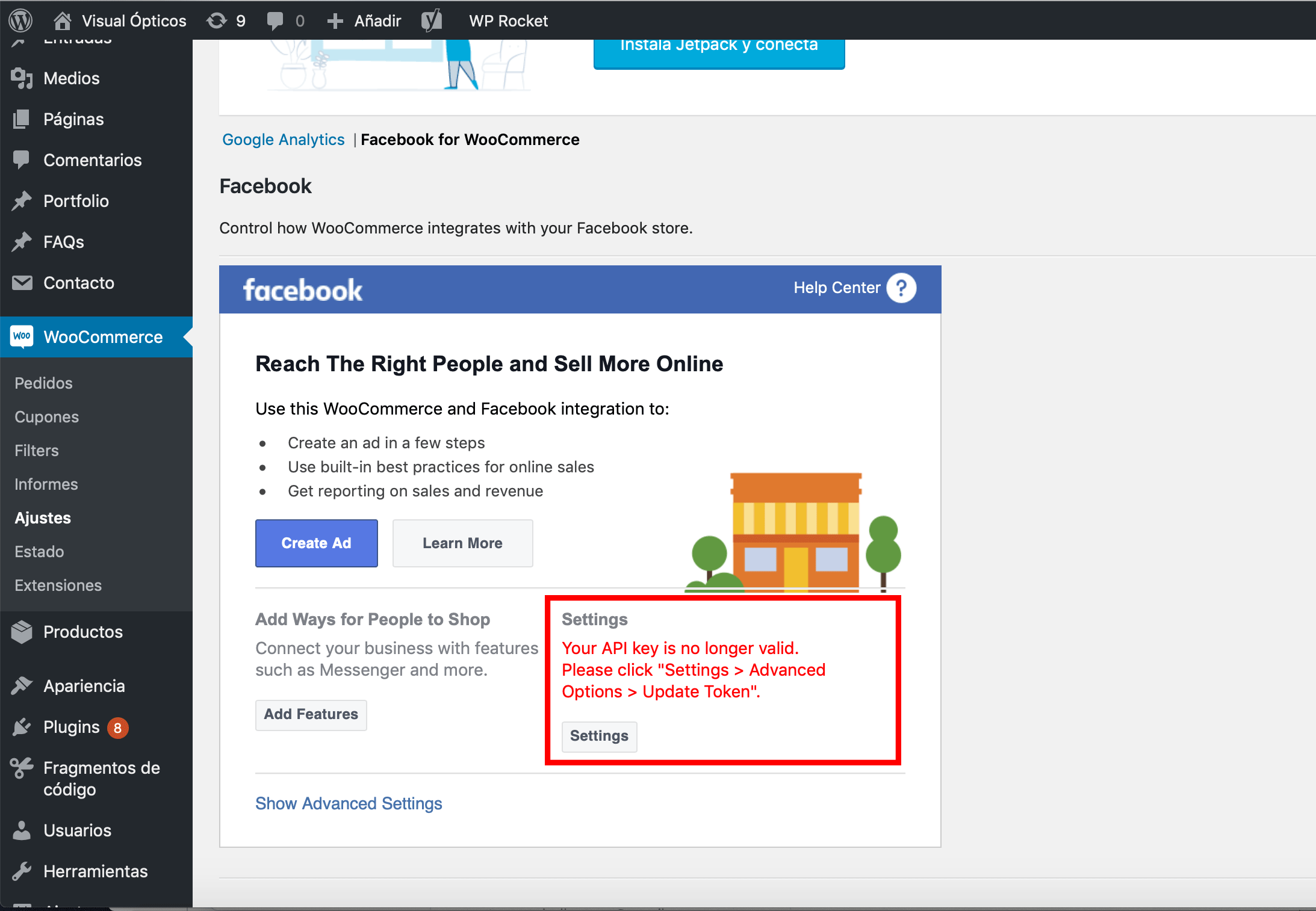
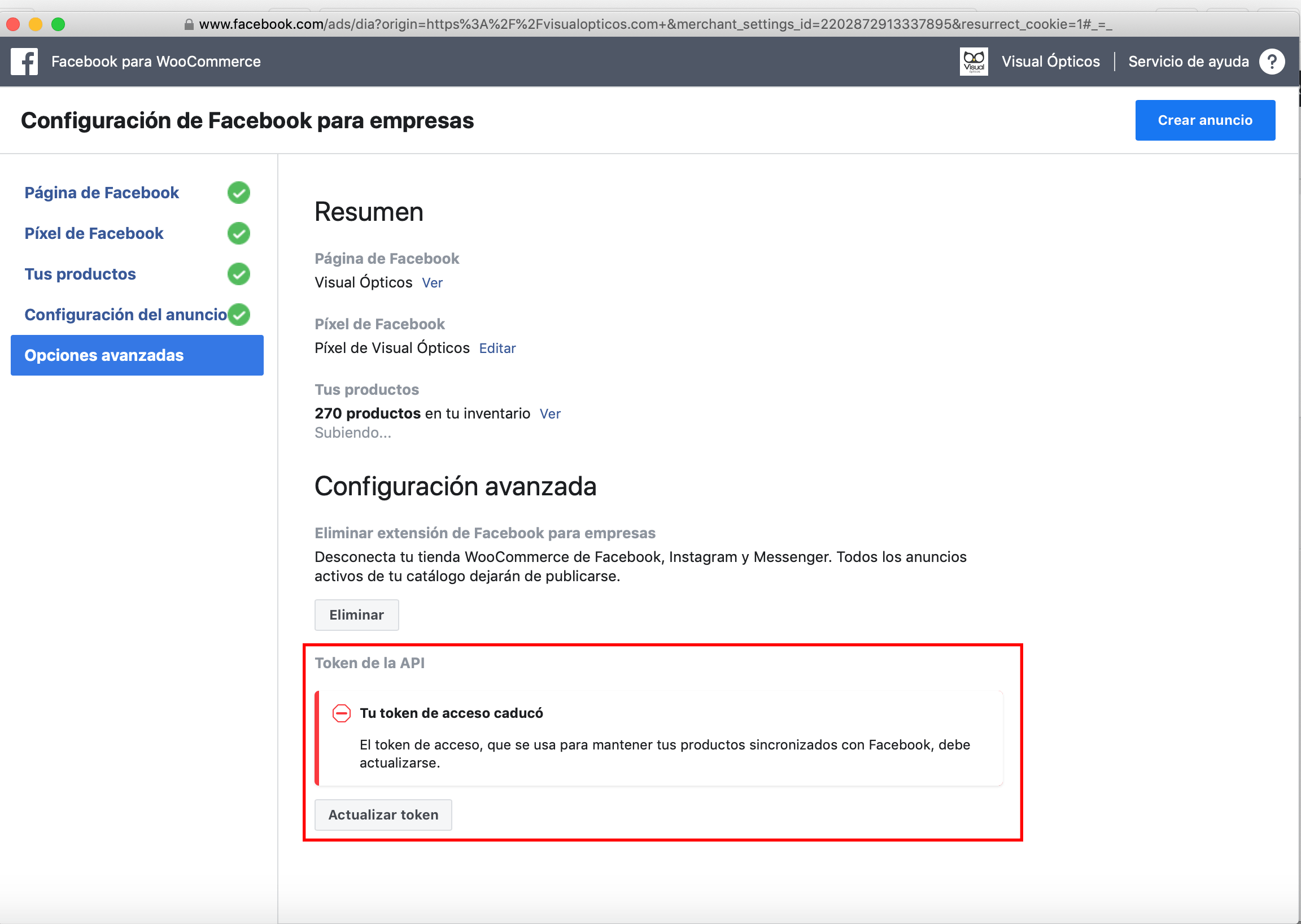


Debug Ready
danielcharrua
on 27 Aug 2019
+1
 markovanderpuil
on 28 Aug 2019
markovanderpuil
on 28 Aug 2019
Sadly, this is what happens when a company stops caring...
markovanderpuil
on 28 Aug 2019
I've given up on Facebook fixing this. I've used Pixel Caffeine instead for two weeks now without being blocked, so that is my recommendation. https://wordpress.org/plugins/pixel-caffeine/
orjansteffensen
on 9 Sep 2019
@orjansteffensen thank you so much for pointing out this alternative! I needed one...
isaacyakl
on 9 Sep 2019
I'm facing the same problem. But thanks to @danielcharrua, this patterns work. Reset the token, then open facebook.com/, apply for the connection from nowhere (lol), and tada.
But everyday, i need to do this, so come'on Facebook! Stop shine the trunk, and please write some code to freaking debug this. :)
 mkubdev
on 12 Sep 2019
mkubdev
on 12 Sep 2019
Hey there! 👋
Lindsey here, from the SkyVerge product team! We recently took over development and support for the Facebook for WooCommerce extension.
In our recent 1.10 releases, we've fixed many issues impacting the store connection, pixel tracking, and product sync. Could you please update to the latest version of Facebook for WooCommerce and see if that resolves this issue?
If not, could you please contact our support team or open a new issue here? We'd be happy to help troubleshoot further with you.
Thank you!
 lgfogle
on 7 Apr 2020
lgfogle
on 7 Apr 2020
Hi Lindsey,
What a great thing to hear! I did notice that updates starting coming
through for the Facebook for WooCommerce plugin, and I have updated it on
several sites.
Right now I have connected 2 different sites (on completely different
servers) and so far no connection problems to the Facebook API.
So it seems like this particular problem with connection problems is fixed.
Very good job! :)
Keep the updates coming. ;)
Kind regards
Jacob
Den tir. 7. apr. 2020 kl. 01.25 skrev Lindsey Fogle <
[email protected]>:
Hey there! 👋
Lindsey here, from the SkyVerge product team! We recently took over
development and support for the Facebook for WooCommerce extension.In our recent 1.10 releases, we've fixed many issues impacting the store
connection, pixel tracking, and product sync. Could you please update to
the latest version of Facebook for WooCommerce and see if that resolves
this issue?If not, could you please contact our support team
https://woocommerce.com/my-account/create-a-ticket/ or open a new issue
here? We'd be happy to help troubleshoot further with you.Thank you!
—
You are receiving this because you were mentioned.
Reply to this email directly, view it on GitHub
https://github.com/facebookincubator/facebook-for-woocommerce/issues/1095#issuecomment-610087458,
or unsubscribe
https://github.com/notifications/unsubscribe-auth/AH4CLASLUAMJLOXBOF7QLQ3RLJQGVANCNFSM4IIQNOMA
.
jbaekz
on 8 Apr 2020
Related issues
 StefsterNYC
·
28Comments
StefsterNYC
·
28Comments
 binnythap
·
29Comments
binnythap
·
29Comments
 Hashtag1975
·
46Comments
Hashtag1975
·
46Comments
 aluxh
·
48Comments
aluxh
·
48Comments
 sm7uge
·
37Comments
sm7uge
·
37Comments
Most helpful comment
I've given up on Facebook fixing this. I've used Pixel Caffeine instead for two weeks now without being blocked, so that is my recommendation. https://wordpress.org/plugins/pixel-caffeine/