Facebook-for-woocommerce: Repeated api token not working
Hi i installed the plugin yesterday went through the intergration and made sure i clicked add shop bit ,i constantly get errors varying from api token invalid or expired ,your catalogue could not be imported please reconfigure settings ( i have deleted the settings and reconfigured numerous times) and if i even try and link something on my website via a normal link i get wordpress error ive deleted the plugin and reinstalled twice and gone through every setting i can find to try and fix it please help https://www.facebook.com/The-Creature-Shop-381649672427562/?modal=admin_todo_tour
 cerri1001
All 22 comments
Update i thought it might be to do with facebook pixel as i realised i had made a facebook page with the same name before but never did anything with it so i deleted old page and remade a new page just as Creature shop hoping that may start everything off from scratch i deleted the plugin and refreshed the page but even doing that when i reinstall it its now saying page not available when i go to settings like its holding onto the old deleted page i cant get far enough to get to delete settings now as a were fixing it page comes up when i click update api token however i can now link to facebook direct without wordpress error coming up
cerri1001
on 21 Apr 2019
Hey,
I posted on this very subject yesterday. See the link below. Lots of others suffering with the same issue. Please update this thread if you find a solution although given by the number of posts on the subject, I feel the only way it'll get resolved is if Facebook pull their finger out and invest some time into resolving this issue.
https://github.com/facebookincubator/facebook-for-woocommerce/issues/962
Regards
Chris
 Hashtag1975
on 21 Apr 2019
Hashtag1975
on 21 Apr 2019
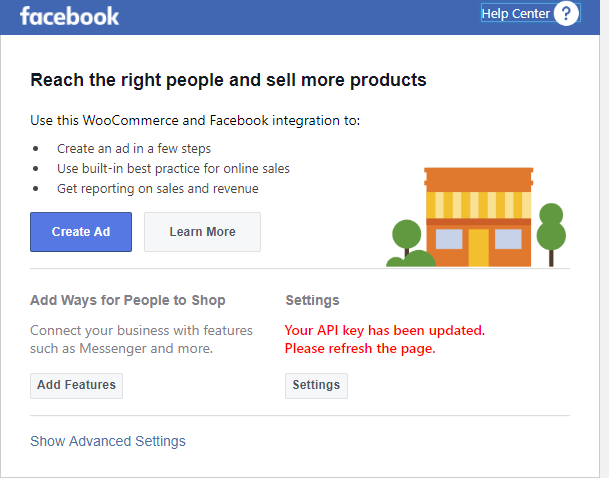
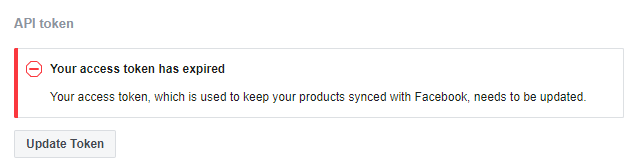
https://www.gottemall.com/wp-admin/admin.php?page=wc-settings&tab=integration#
Please advise too, try recreating API but it's keep expiring..
 ignonoviano
on 22 Apr 2019
ignonoviano
on 22 Apr 2019
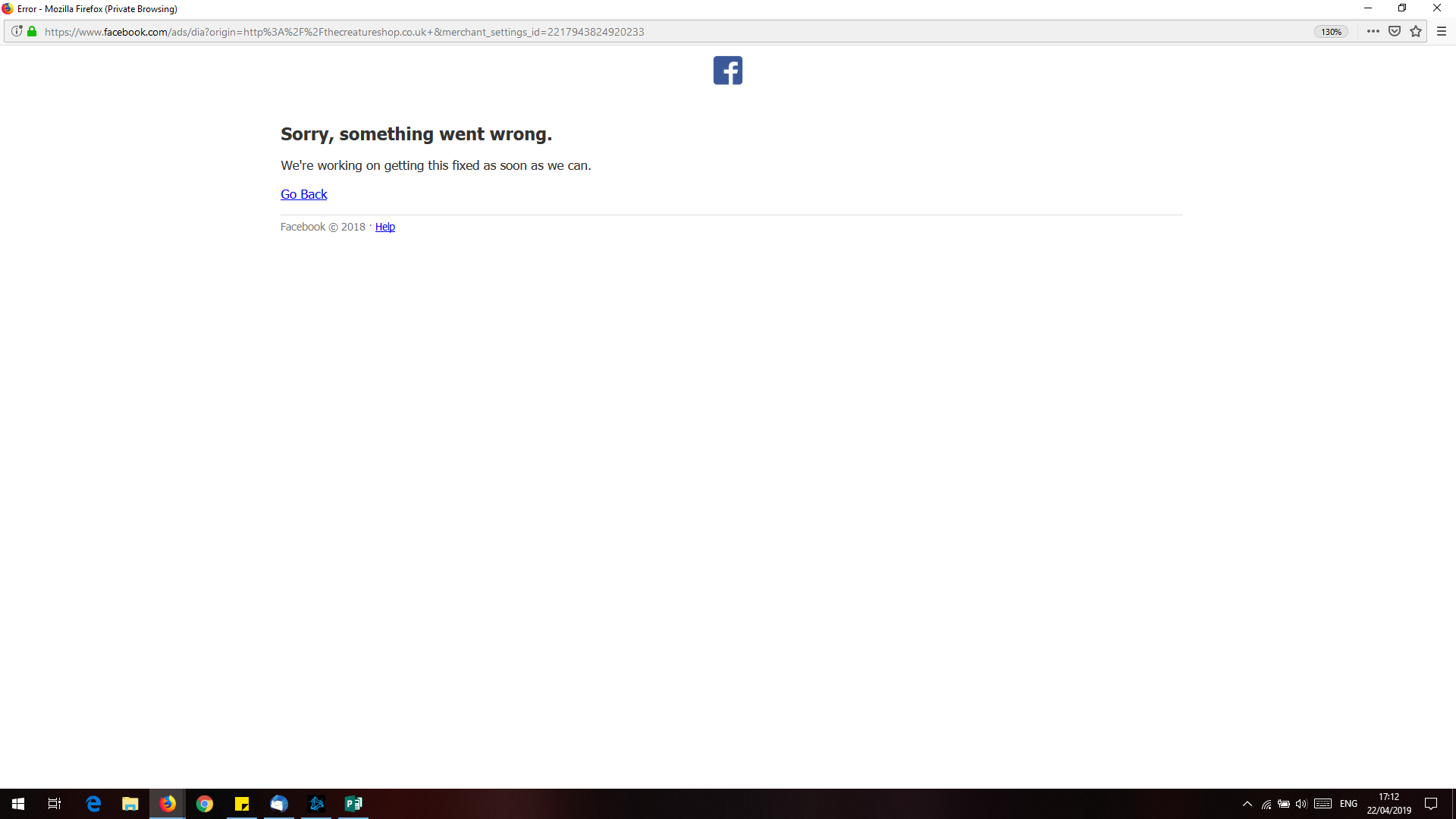
This is exactly what im seeing but now i cant even acess the settings i just get a page saying facebook is fixing it
cerri1001
on 22 Apr 2019
Same issue here
 ursuad
on 22 Apr 2019
ursuad
on 22 Apr 2019
https://www.gottemall.com/wp-admin/admin.php?page=wc-settings&tab=integration#
Please advise too, try recreating API but it's keep expiring..
Log in your site using a private window ( incognito). Then request your token.
 foxrip
on 22 Apr 2019
foxrip
on 22 Apr 2019
For me the private window didnt work i still got the same error page sorry something went wrong facebook are working on fixing the issue its like for me its trying to use the old facebook page and wont ask me about a new one:(
cerri1001
on 22 Apr 2019
Automated Support Message
Hello,
Thanks for your interest in our plugin! Our developer team tries to provide personal support on GitHub whenever possible.
If you have a feature request or feedback for the developers, reply with Feature Request or Feedback.
If you are a developer or have a question for the developers related to code, reply with Developer Question.
If you are running ads with us, reply with Advertiser.
If you have encountered a bug or a problem with the plugin, keep reading for information that can help you resolve the issue yourself or provide us details we need to help you.
Search Existing Issues
First, please search our issues to see if your problem has been reported before.
There may already be a workaround or a solution to your problem. You can use the search bar near the top of our issues page. Be sure to search both _open_ and _closed_ issues.
If you do find a similar issue, leave a comment on that issue instead of creating a new one. Your comment helps us prioritize which existing issues are important and urgent.
Common Resolution Methods
If you are experiencing a problem or bug and have not found any similar issue, please try the following:
- Upgrade to the latest version of the plugin
- Try to
Resyncproducts using the button on the plugin config page - Reset the plugin by selecting
Manage Settings > Advanced Options > Deletefrom the configuration page of the plugin and setting up again - Try deactivating other plugins that you think may be interfering, then reset and set up again
Necessary Information
If the above steps did not help, please provide the following information in your next comment in order for us to debug your problem:
- WooCommerce version
- WordPress version
- Plugin version (please note: we only support up-to-date versions of the plugin)
- A screenshot of where you see the problem (for example: if it is on Facebook, provide a screenshot of Facebook, if it is on WooCommerce, provide a screenshot of WooCommerce. You can provide multiple screenshots if the problem relates to different screens.)
- The URL of your website
- The URL of your Facebook Page
- The URL(s) of where you took your screenshot(s)
- If applicable, detailed steps you took in order to see the problem
Please include Debug Ready in your reply so our automated system can note your issue for manual review. Please be aware that due to a high volume of issues, we may not be able to respond immediately.
Response Time
We prioritize issues with the tags Advertiser or Multiple Reports.
For issues that have the tags Debug Ready, Feature Request or Developer Question, we aim to respond within 30 days.
If you have not responded to our automated message with one of the above phrases, such as Debug Ready, we may close your issue after 30 days. If a Feature Request is inactive (without new requests, messages or pull requests) for 6 months, we may close it.
Please note that we are not always able to provide support for issues related to interaction from other plugins with this plugin or related to the Facebook advertising interface. To get support related to Facebook ads, try visiting the Facebook Ads Help Center.
For more information on our response times, visit Facebook Support on GitHub.
Thank you,
The Facebook Dev Team
 jameskim0903
on 22 Apr 2019
jameskim0903
on 22 Apr 2019
For me the private window didnt work i still got the same error page sorry something went wrong facebook are working on fixing the issue its like for me its trying to use the old facebook page and wont ask me about a new one:(
i mean you need to log in wordpress using private mode. then request request the token on the plugin settings.
foxrip
on 22 Apr 2019
Multiple Reports
Debug Ready
Hi,
I have installed the Facebook for WooCommerce plugin however, it is not working as expected.
I have just 103 products that need to be synced with Facebook and Instagram but I can't get this to work. I am therefore unable to display my products and take advantage of all that Instagram shopping has to offer.
Steps taken to install the Facebook for WooCommerce plugin as follows:
Navigate to https://hashtagdeals.co.uk/wp-admin/plugins.php and locate the plugin.
Click on the settings link and navigate to the Facebook for WooCommerce Business Settings PopUp box.
Work my way through the setup procedure (Facebook Page, Facebook Pixel, Your Products, and Ad Setup). Some of the information seems to populate automatically as I am logged into my Facebook account on another browser tab. The 103 products are also displayed in the background of the Your Products page.
I return to the plugin on the WooCommerce page here https://hashtagdeals.co.uk/wp-admin/admin.php?page=wc-settings&tab=integration§ion=facebookcommerce# and I am shown a message that reads as follows:
Your API key is no longer valid. Please click "Settings > Advanced Options > Update Token".
I goto settings as instructed and see the following message:
Your access token, which is used to keep your products synced with Facebook, needs to be updated.
I then press the update token button and am then show the following message:
Your access token has been updated
I return to the Plugin at https://hashtagdeals.co.uk/wp-admin/admin.php?page=wc-settings&tab=integration§ion=facebookcommerce# and am shown a message that says as follows:
Your API key has been updated.
Please refresh the page.
I do as instructed and refresh the page. I am then shown the following message:
Your API key is no longer valid. Please click "Settings > Advanced Options > Update Token".
I then enter a loop of repeating the above steps until I have no hair left !!!
I have been advised by the WooCommerce support team that you require the following:
Facebook Page: https://www.facebook.com/hashtagoffers/
Wordpress version: 5.1.1
PHP Version: 7.2.17
WooCommerce Version: 3.6.1
Facebook for WooCommerce Version: 1.9.10
Product count: 103
Product type: Trainers / Sneaker (nothing too complicated)
There are no duplicate SKU's in my system.
A list of other plugins as follows:
Akismet Anti-Spam Version: 4.1.1 (NOT ACTIVATED)
Contact Form 7 Version: 5.1.1
Datafeedr API Version: 1.0.98
Datafeedr Comparison Sets Version: 0.9.26
Datafeedr Product Sets Version: 1.2.34
Datafeedr WooCommerce Importer Version: 1.2.35
Facebook for WooCommerce Version 1.9.10
GDPR Cookie Consent Version: 1.7.6
Hello Dolly Version 1.7.1 (NOT ACTIVATED)
Jetpack by Wordpress.com Version 7.2.1
Limit Login Attempts Reloaded Version: 2.7.4
Woo Title Limit Version: 1.4.4
WooCommerce Version: 3.6.1
WooCommerce Menu Cart Version: 2.7.4
WooCommerce Services Version: 1.19.0
WooCommerce Square Version: 1.0.37
WooCommerce Stripe Gateway Version: 4.1.16
WP Super Cache Version: 1.6.4
Yoast SEO Version: 11.0
Please advise further.
Regards
Chris
On 22 Apr 2019, at 19:09, jameskim0903 notifications@github.com wrote:
Automated Support Message
Hello,
Thanks for your interest in our plugin! Our developer team tries to provide personal support on GitHub whenever possible.
If you have a feature request or feedback for the developers, reply with Feature Request or Feedback.
If you are a developer or have a question for the developers related to code, reply with Developer Question.
If you are running ads with us, reply with Advertiser.If you have encountered a bug or a problem with the plugin, keep reading for information that can help you resolve the issue yourself or provide us details we need to help you.
Search Existing Issues
First, please search our issues https://github.com/facebookincubator/facebook-for-woocommerce/issues?q= to see if your problem has been reported before.
There may already be a workaround or a solution to your problem. You can use the search bar https://github.com/facebookincubator/facebook-for-woocommerce/issues?q= near the top of our issues page. Be sure to search both open and closed issues.
If you do find a similar issue, leave a comment on that issue instead of creating a new one. Your comment helps us prioritize which existing issues are important and urgent.Common Resolution Methods
If you are experiencing a problem or bug and have not found any similar issue, please try the following:
Upgrade to the latest version of the plugin
Try to Resync products using the button on the plugin config page
Reset the plugin by selecting Manage Settings > Advanced Options > Delete from the configuration page of the plugin and setting up again
Try deactivating other plugins that you think may be interfering, then reset and set up again
Necessary InformationIf the above steps did not help, please provide the following information in your next comment in order for us to debug your problem:
WooCommerce version
WordPress version
Plugin version (please note: we only support up-to-date versions of the plugin)
A screenshot of where you see the problem (for example: if it is on Facebook, provide a screenshot of Facebook, if it is on WooCommerce, provide a screenshot of WooCommerce. You can provide multiple screenshots if the problem relates to different screens.)
The URL of your website
The URL of your Facebook Page
The URL(s) of where you took your screenshot(s)
If applicable, detailed steps you took in order to see the problem
Please include Debug Ready in your reply so our automated system can note your issue for manual review. Please be aware that due to a high volume of issues, we may not be able to respond immediately.Response Time
We prioritize issues with the tags Advertiser or Multiple Reports.
For issues that have the tags Debug Ready, Feature Request or Developer Question, we aim to respond within 30 days.If you have not responded to our automated message with one of the above phrases, such as Debug Ready, we may close your issue after 30 days. If a Feature Request is inactive (without new requests, messages or pull requests) for 6 months, we may close it.
Please note that we are not always able to provide support for issues related to interaction from other plugins with this plugin or related to the Facebook advertising interface. To get support related to Facebook ads, try visiting the Facebook Ads Help Center https://www.facebook.com/business/help.
For more information on our response times, visit Facebook Support on GitHub https://github.com/facebookincubator/facebook-for-woocommerce/wiki/Facebook-Support-on-GitHub.
Thank you,
The Facebook Dev Team—
You are receiving this because you commented.
Reply to this email directly, view it on GitHub https://github.com/facebookincubator/facebook-for-woocommerce/issues/964#issuecomment-485498045, or mute the thread https://github.com/notifications/unsubscribe-auth/AL4BWREMXIG6DFJIAZGHUEDPRX5MDANCNFSM4HHLHOPQ.
Hashtag1975
on 22 Apr 2019
This morning the sorry the something went wrong page has gone and i have the api token problem back like the rest of you so hoping this gets fixed as we all want to get our products on facebook :)
cerri1001
on 23 Apr 2019
Getting the same API issue too:
"Your API key is no longer valid. Please click "Settings > Advanced Options > Update Token."
- I update the token and get the following message: Your Access Token Has Been Updated
- I close out of the settings pop up window
- The following message appears "Your API key has been updated. Please refresh the page."
- I refresh the page, and the same old message is back... "Your API key is no longer valid. Please click "Settings > Advanced Options > Update Token".
:(
 jesscee
on 23 Apr 2019
jesscee
on 23 Apr 2019
I've got the same problem. Fresh Setup, but always the message "Your API key is no longer valid."
:(
 DBMUD-MM
on 23 Apr 2019
DBMUD-MM
on 23 Apr 2019
Same problem since last week Thursday
 HypeHenry
on 23 Apr 2019
HypeHenry
on 23 Apr 2019
Aren't they getting all the reports about this issue? It's the same issue for those people who uses this plugin.
The best bet you have is to create a product feed manually using Facebook's product feed template and upload it manually on your product catalog.
Note: Please make sure the ID's on your feed matches the content_id in your Pixels
 usourcejacob
on 24 Apr 2019
usourcejacob
on 24 Apr 2019
Yes i too have a shop full of products with facebook a major part of my advertising :(
cerri1001
on 24 Apr 2019
The WooCommerce developers seem to have a way of speaking to the Facebook development team so it might be worth dropping them an email at this address [email protected]
Good luck !!
Chris
Hashtag1975
on 24 Apr 2019
Ive messages them and linked this page so they can see the issues we are having
cerri1001
on 24 Apr 2019
Same problem:(
 vinodinisekar
on 24 Apr 2019
vinodinisekar
on 24 Apr 2019
Hi had this reply from woocommerce this morning
Stephanie (Automattic)
Apr 24, 22:33 UTC
Hi Cerri,
Thank you for contacting WooCommerce. We are sorry about the trouble here and would like to help.
We've been in touch with our contact at Facebook who said they are actively working on this issue, which has affected integrations with multiple platforms.
We have followed up with them requesting an update, and I've added the Github Bug link you provided to the conversation for visibility.
I appreciate the frustration caused by the issue and thank you for your patience while their developers work on the fix. Hopefully they're able to implement it very soon.
Kind regards,
Stephanie
Happiness Engineer
WooCommerce | WordPress | Automattic
So they are Working on it and they have the link here but just not replied yet Cross fingers
cerri1001
on 25 Apr 2019
Same issue, nice!
Following thread/will update if applicable
 robwonka
on 25 Apr 2019
robwonka
on 25 Apr 2019
Hello everyone,
We have made a fix and now merging this task to the one task #944
Make sure your plugins are up to date, and try re-generating the key in "Manage Settings -> Advanced Options".
Thanks,
James
jameskim0903
on 26 Apr 2019
Related issues
 DeeJ
·
32Comments
DeeJ
·
32Comments
 MillenniumJim
·
32Comments
MillenniumJim
·
32Comments
 Copterview
·
44Comments
Copterview
·
44Comments
 StefsterNYC
·
28Comments
StefsterNYC
·
28Comments
 aluxh
·
48Comments
aluxh
·
48Comments
Most helpful comment
Hi had this reply from woocommerce this morning
Stephanie (Automattic)
Apr 24, 22:33 UTC
Hi Cerri,
Thank you for contacting WooCommerce. We are sorry about the trouble here and would like to help.
We've been in touch with our contact at Facebook who said they are actively working on this issue, which has affected integrations with multiple platforms.
We have followed up with them requesting an update, and I've added the Github Bug link you provided to the conversation for visibility.
I appreciate the frustration caused by the issue and thank you for your patience while their developers work on the fix. Hopefully they're able to implement it very soon.
Kind regards,
Stephanie
Happiness Engineer
WooCommerce | WordPress | Automattic
So they are Working on it and they have the link here but just not replied yet Cross fingers