Facebook-for-woocommerce: Cannot complete Woocommerce setup
Despite that I have disabled ad blockers, while beginning the Integration setup process from WooCommerce I get this notice:
"Facebook's advertising tools might not work as expected when an ad blocker is enabled in a web browser. Turn off the ad blocker or add this web page's URL as an exception so you can create ads without any problems. After you turn off the ad blocker, you'll need to refresh your screen."
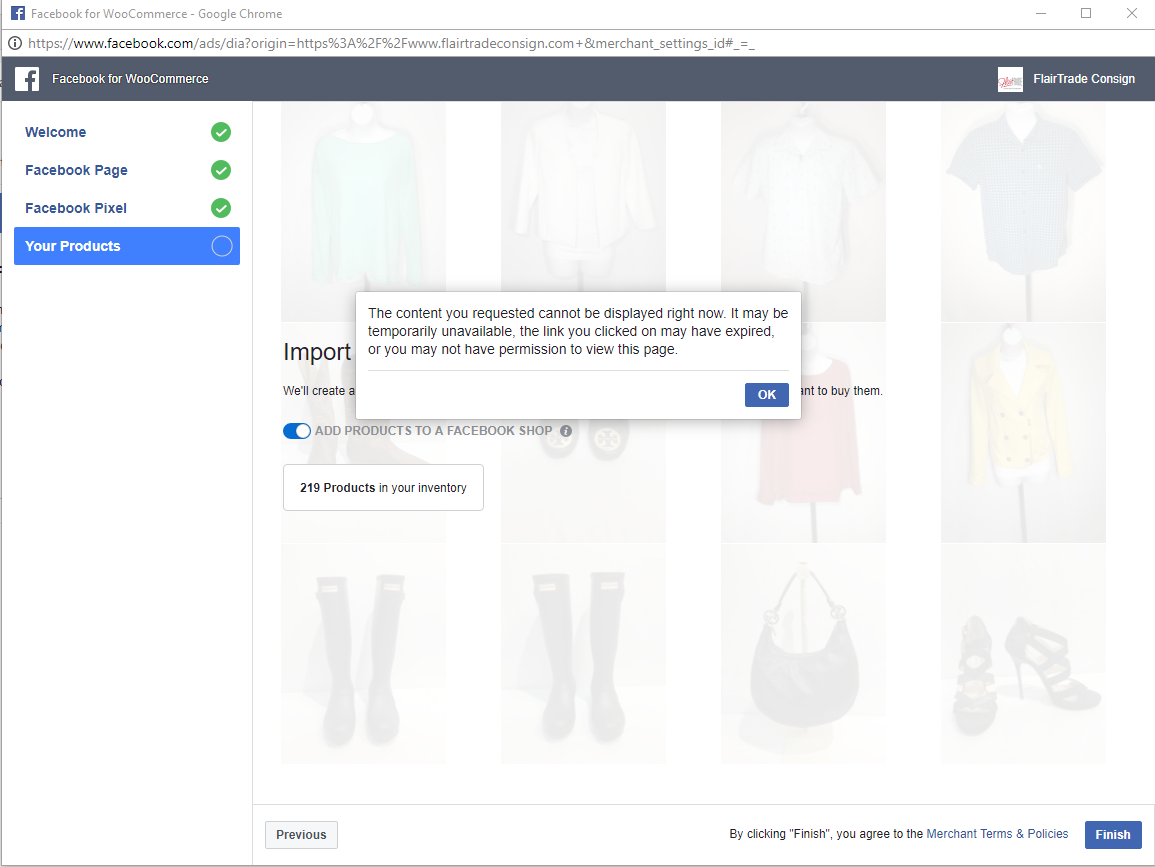
I can move past the four pages of the pop-up dialogue window: "Welcome", "Facebook Page", "Facebook Pixel" and finally "Your Products"; but when clicking "Finish" to conclude the process I get this error:
"The content you requested cannot be displayed right now. It may be temporarily unavailable, the link you clicked on may have expired, or you may not have permission to view this page."
 robertross-net
All 19 comments
Just had the exact same issue happen. I've uninstalled the plugin, reinstalled, and get all the way to the end of the setup process to finish and get the same message.
"The content you requested cannot be displayed right now. It may be temporarily unavailable, the link you clicked on may have expired, or you may not have permission to view this page."
 FlairTrade
on 19 Feb 2018
FlairTrade
on 19 Feb 2018
Same issue here. This is huge problem.
 jjclinton
on 20 Feb 2018
jjclinton
on 20 Feb 2018
I have the same problem. I hope that you give us a solution because it's very important
 emyabdel
on 20 Feb 2018
emyabdel
on 20 Feb 2018
Same problem here, please - any solution or expectations for resolution via upcoming release? Also tried this in incognito mode with no lock whatsoever.
 mbohanon
on 21 Feb 2018
mbohanon
on 21 Feb 2018
I have also the same problem. It doesn't help after uninstall and install again.
 larryyw
on 22 Feb 2018
larryyw
on 22 Feb 2018
@robertross-net @FlairTrade @emyabdel @mbohanon @larryyw @jjclinton
Sorry for this everyone. Seems we are indeed seeing some spike of failure. I'll look into this deeper with our team. Thanks for reporting.
If you guys can try 1.7.10 to see if it works, that would be very helpful for us to find out the root cause. Appreciate the help.
 sammul
on 23 Feb 2018
sammul
on 23 Feb 2018
@sammul I can confirm that reverting back to 1.7.10 does NOT fix the issue.
FlairTrade
on 24 Feb 2018
FYI
I tried every release on a fresh WP/WC install down to 1.7, and to no avail. I have added a dummy account to my FB Business Manager with admin privileges, I've made other people admin, while removing my personal account from the Business Manager, tried every possible browser at my disposal, tried from my phone, my linux desktop, my chromebook ... and the result is the same: I keep getting this error, for every page I manage.
 onckelinx
on 26 Feb 2018
onckelinx
on 26 Feb 2018
@onckelinx Thanks for trying out the other versions. We are aware of this issue and will address asap in next week. Apologize for the inconvenience.
sammul
on 26 Feb 2018
Hi @robertross-net @FlairTrade @onckelinx @emyabdel @jjclinton @mbohanon @larryyw,
Thanks for your report and sorry for this inconvenience. We have figured out this was caused by pixel permission change and had a fix. It should be available soon. To clarify, the fix is on Facebook side, so no changes in our plugin. Can you try sometime later tomorrow? Thanks for all of your understanding and patience!
 mengyingdu
on 26 Feb 2018
mengyingdu
on 26 Feb 2018
Hi,
I confirmed that this bug has been fixed. We didn't see any submit failure after pushing the fix into production.
mengyingdu
on 27 Feb 2018
Some feedback for what it's worth: currently syncing 2 pages with FB for Woocommerce 1.7.11:
- Page A had an existing pixel that I now replaced with a newly created one and had no products in the shop yet. ~30 simple products seem to sync as expected
- Page B had no pixel and no FB shop (fresh page that is replacing an old one): 10 products with a total of 144 variations. Been at it for 3 hours now (as soon as I saw the bug fix announcement) and some attributes of the variations are not showing in the FB shop. Still early morning here, so I'll let it run it's course. If by late afternoon nothing has changed I'll force a resynch and update you accordingly.
Meanwhile, thanks a bunch of the fix. The plugin is as important as toiletpaper is to me, now that might sound weird but both are mandatory tools to get through the day without problems!
onckelinx
on 27 Feb 2018
I was able to get past the error, catalog was created and successfully synced but now my Shop is not populating with my catalog items as it had before. I don't know if I broke something in trying to figure out the error issue but I've double checked that my pixel is active and all assets are associated. What am I missing???
FlairTrade
on 27 Feb 2018
Hi @FlairTrade,
- I checked your website: your pixel is active
- I checked our logging, it's optional to set up a shop, the options we received : set up shop: false
I think you may not drag the button when you set up.
Let me know if you need more help.
Thanks.
mengyingdu
on 28 Feb 2018
Meanwhile I promised an update on my end:
I just let Page B (144 variations) run for the remainder of the day (to be fair I forgot about it due to pressing other business), and everything seems fine now. Actually I woke up at this ungodly hour (7h45 am) because I had a panic attack thinking about the feedback I promised. Hopped on my desktop to check things just 10 minutes ago, even before I had my morning coffee!
Or in other words: seems like what was broken is now fixed, thank you ladies and gents. Everything is great now. Well except for my sleep and coffee.
onckelinx
on 28 Feb 2018
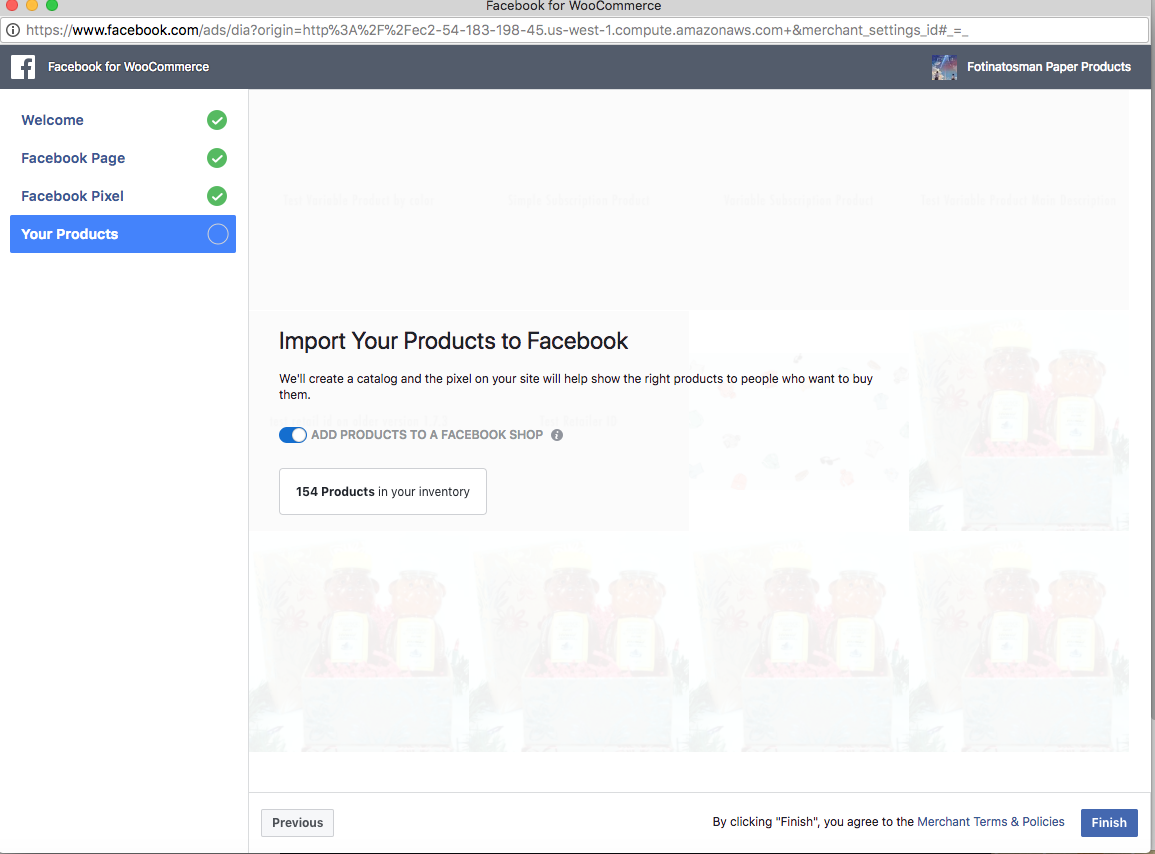
@mengyingdu Thank you for looking! I don't see a option to select shop in the setup process. In which step an I missing that opportunity? https://www.facebook.com/business/help/900699293402826
Also, I've accepted and turned on this option on our page just no products populating.
https://www.facebook.com/pg/flairtradeconsign/shop/
FlairTrade
on 28 Feb 2018
Hi @FlairTrade ,
It's in the last step.
mengyingdu
on 28 Feb 2018
@mengyingdu don't I feel like the fool! Thank you. I guess the slider defaulted back to off since the shop had been setup once before. I've deleted the settings in the past and never noticed the slider to add to Facebook Shop and everything had sync. Anyways thank you!
FlairTrade
on 28 Feb 2018
Everything should be working now, thanks everyone for reporting, especially @onckelinx for the thoroughly testing on different versions! We were delighted to hear your comment 'the plugin is as important as toiletpaper is to me'.
If similar issue happens again, please file another issue.
sammul
on 2 Mar 2018
Related issues
 t9fdservices
·
37Comments
t9fdservices
·
37Comments
 aluxh
·
48Comments
aluxh
·
48Comments
 dragad
·
47Comments
dragad
·
47Comments
 JEJSD
·
53Comments
JEJSD
·
53Comments
 AVTMBijouterieNomade
·
24Comments
AVTMBijouterieNomade
·
24Comments
Most helpful comment
Some feedback for what it's worth: currently syncing 2 pages with FB for Woocommerce 1.7.11:
Meanwhile, thanks a bunch of the fix. The plugin is as important as toiletpaper is to me, now that might sound weird but both are mandatory tools to get through the day without problems!