Espeasy: [BUG] no webinterface access from different subnet
Hi,
I am facing a strange issue: I have three units installed remotely that control some relays.
They have installed 20181020 or 20181019 firmware.
Starting from yesterday I cannot access those units through webserver interfacce, but I can ping them, they work, the rules work and they communicate with MQTT.
So it's only the webinterface that stopped working in ALL three units at the same time.
I restarted the router but nothing changed.
I cannot restart the units as they do not respond to http commands (as I said thay are remotely installed in a holiday home).
How could this be?
 giig1967g
All 49 comments
One more info: when I try to access the units from the webserver, I do't get any error message; the browser just stays there waiting forever.
giig1967g
on 23 Oct 2018
These are pre-built ones or self-compiled builds?
Is it possible the web-IP filter is set to an incorrect range?
Can you log into another computer on the same network and try command-line http commands like wget?
 TD-er
on 24 Oct 2018
TD-er
on 24 Oct 2018
Hi,
I don't remember. It could be a mix of prebuilt and self compiled.
web-IP filter was not set as I could access them until Tuesday.
I tested wget from a remote and a local computer and it WORKS perfectly.
Regarding HTTP API's. It's even more strange:
FROM browser:
WORKS: http://192.168.88.202/control?cmd=taskvalueset,12,2,1
DOESN'T WORK: http://192.168.88.202/?cmd=reboot
FROM wget:
WORKS: http://192.168.88.202/control?cmd=taskvalueset,12,2,1
WORK: http://192.168.88.202/?cmd=reboot
It seems that the web interface is not accessible, but in all 3 units at the same time.
giig1967g
on 24 Oct 2018
Given it happend just about at the same moment, I would think the wifi connection was interrupted and not all services were restarted as they should.
But at least you were able to restart the nodes, that's good to hear.
Maybe you can add a system plugin which will report the uptime and log that?
And for such remote applications maybe you should think about the option to reboot periodically? This can already be done using rules.
I have yet no idea why the browser will not allow the line without 'control' in the URL.
TD-er
on 24 Oct 2018
The node restarted but I have still no access... Very weird.
In the weekend will go to the remote location and try to discover what happened.
giig1967g
on 24 Oct 2018
@giig1967g may I ask what esp core / lwip version you use on the self-built units?
I do have similar issues and probably that's related to the core libraries as tehre have been a number of things changed in lwip2..
 clumsy-stefan
on 25 Oct 2018
clumsy-stefan
on 25 Oct 2018
@clumsy-stefan I just rebase my local version with upstream/mega and compile locally.
But in this specific issue I think that I have installed mega-20181020 in all of them.
I cannot check but will check tonight when I reach the remote site.
As soon as I have an answer will post it here.
giig1967g
on 25 Oct 2018
@TD-er
I just arrived in my holiday home and the web interface of all units work perfectly from local network.
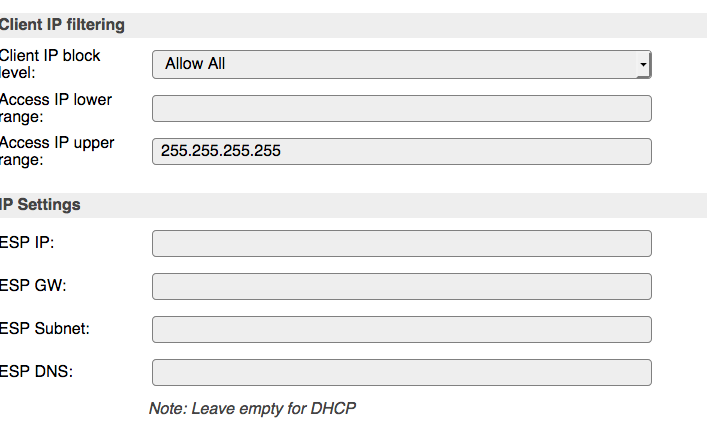
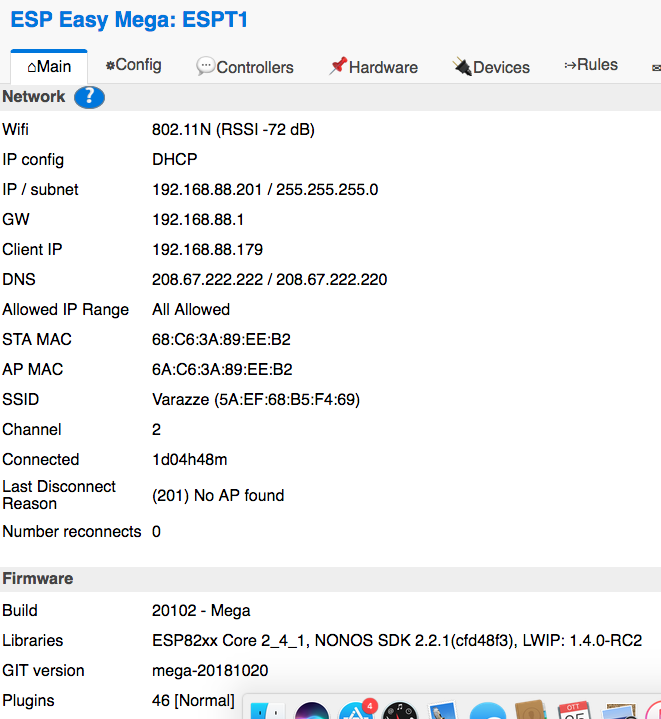
I have no IP filtering set in all units.
Firmware is mega-20181020 from github.
Resuming the problem:
connecting from outside (from VPN 192.168.1.x), I cannot open the web interface, but the units respond to ping and to wget.
I was able to access in the previous versions (I would say a week before)
Please see configuration screenshot:
giig1967g
on 25 Oct 2018
Just to be sure, remove the line of the upper limit.
Can you also connect via your VPN when inside your vacation house? Just to check if it is still inaccessible.
TD-er
on 25 Oct 2018
@TD-er
I tried to remove the upper limit, but as soon as I press Save the upper limit is restored by itself.
I also tried to set the lower limit to 1.1.1.1 leaving "Allow All" and now I cannot access to the web page even from local network...
I tried on two units...
giig1967g
on 26 Oct 2018
EDIT: after 2 minutes I was able to access to the units but only from local network.
giig1967g
on 26 Oct 2018
That's very strange.
I will look at the code to see if I can come up with an explanation.
TD-er
on 26 Oct 2018
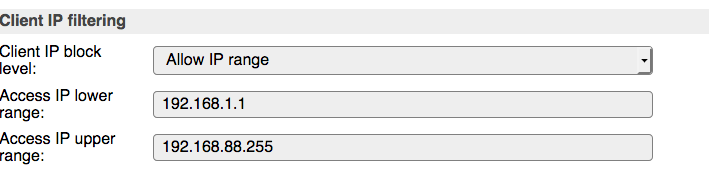
EDIT2: added "Allow IP range" as per screenshot, but still no remote access:
giig1967g
on 26 Oct 2018
EDIT3: I noticed that after changing the settings of IP filtering, it takes a couple of minutes for the unit to open the web intergìface (from local).
giig1967g
on 26 Oct 2018
I am sure that it was working a week/10 days ago...
giig1967g
on 26 Oct 2018
@giig1967g what AP are you using?
And probably what's the signal strength roughly?
clumsy-stefan
on 30 Oct 2018
Hi,
My AP is Linksys WRT-1200AC
Regarding signal strength, from here I cannot access it now, I can only see it in the weekends when I physically go there. But the units are 5 meters away from tha AP and in the same room. No channel interference.
giig1967g
on 30 Oct 2018
ok, I don't know this specific AP. but you can look if you find some settings that suggest "distance" or similar which affects signal power, gain and frame timings, if you can set this to something higher that could be an option to try especially for the "web page shows no error and keeps loading" issue... (lost wifi frames on layer 1/2).... just a guess though...
clumsy-stefan
on 30 Oct 2018
Hi @clumsy-stefan
the signal level is not the issue.
What happens is that from local network I can access the web interface. Frm remote network (VPN) I can't. But I can access the unit calling wget from both local and remote networks. And I can successfully ping the unit from both local and remote networks.
So in my opinion, the networking routing works. While there is something filtering the web interface access from remote IPs.
Maybe @Grovkillen could help?
giig1967g
on 30 Oct 2018
@giig1967g completely agree it's not a range/level issue, but an issue in the esp wifi stack probably that hits, which affects wifi frame timing. If you're interested in more details (another issue) see my comment here which probably helps to understand a possible underlying issue (still t.b.c.)...
clumsy-stefan
on 30 Oct 2018
Hi @clumsy-stefan
very interesting the link that you posted.
giig1967g
on 30 Oct 2018
But the remote access was working until few weeks ago...
That is the strange part.
giig1967g
on 30 Oct 2018
same for me, everything worked until about a month ago...
however there could be a number of reasons, the esp being a bit more busy and therefore missing some timeouts in the wifi stack, a neighbour installing an AP and generating some overlaps, a new transmitter somewhere which generates some HF noise, all of it could mean that some frames get lost or the ESP is noch able to resend/confirm fast enough...
I can't tell you the underlying issue really, I just can say, that I had similar phenomena's as you're describing, up to nodes freezing completely or rebooting...
changeinsg the timing (in Mikrotik's language "distance") in the wireless settings solved the issues at once (today, still making some tests though)....
that's why I said, it's just a wild guess, but worth a try probably...
EDIT: the weird thing I had was also that it affected nodes randomly independet of distance, signal level or type.... some of them ran for hours without issues some of them rebooted after 3min. some of them were not accessible at all anymore and did not reconnect...
that said, it could be that your issue is a complete different cause though...
clumsy-stefan
on 30 Oct 2018
Hi @clumsy-stefan
i had a lot of problems with mikrotik and I had to swap it with Linksys.
Wuth mikrotik I was experiencing reboots and freezes without any reason.
With Linksys it works perfectly.
(Apart the impossibility to access from another subnetwork)
In my opinion my problem is not related to wifi because the link is up and running correctly (using ping and wget it works from both local and remote). It's only the web interface that is not accessible from remote.
BTW, what are the settings of "distance" in your mikrotik? In mine it says "indoors".
I couldn't make it working.
giig1967g
on 30 Oct 2018
Since I changed the distance settings to 50km and HW retries to 10 all my freezes and reboots are gone until now.. I'll feedback tomorrow in the other thread how it looks after 24h!
clumsy-stefan
on 30 Oct 2018
Just curious, what is the 'distance' setting changing, when the parameter can be set to 50 km?
Is it a max. timeout for a reply?
TD-er
on 30 Oct 2018
Yes, from the manual
How long to wait for confirmation of unicast frames before considering transmission unsuccessful. Value 'dynamic' causes AP to detect and use smallest timeout that works with all connected clients.
Can't say why this is measured in km though..
clumsy-stefan
on 30 Oct 2018
At the speed of light, a distance is also closely related to a time.
It all comes together at the "lightyear" unit ;)
But that's a bit impractical for this purpose I guess ;)
TD-er
on 30 Oct 2018
@clumsy-stefan I will try your settings and see if I can restore my mikrotik
giig1967g
on 30 Oct 2018
@TD-er but this doesn't explain why I can't access my units' web interface from another subnet...
giig1967g
on 30 Oct 2018
@giig1967g That's true.
Routing doesn't have anything to do with it.
TD-er
on 30 Oct 2018
I changed the title for sake of clarity
giig1967g
on 30 Oct 2018
@TD-er 😀 never looked at it that way...
I tried to increase to 100(km) however then the nodes are not able to authenticate at all anymore...
typically (in dynamic setting) the distance calculated from the MT is between 5 and 35, that's why I thought 50 is a safe value... but it seems it shouldn't be too high either... I'm still testing...
at least nearly all my units have now uptimes over 10h... except 3 or 4 that rebooted (some of them due to HW WD) but reconnected directly afterwards... so currently I'm really happy again as everything is kind of stable! I'll report romorrow (in the other thread) if they survived the night..
@giig1967g I'd be interested if this changes something in your environment and if you can use the MT again... but I also think your web-issue is probably not related to this... however you never know (packet sizes etc. are different in web than wget or ping)...
if the browser just keeps waiting it's not really a routing issue, then it would say "unreachable" (that's why ping etc. still works I guess)... again just IMHO...
clumsy-stefan
on 30 Oct 2018
If there is some problem related to MTU's, then wget would also be giving an issue when running from the "remote location" (compared to the ESP nodes)
If it is being rejected due to the "IP filtering" then there should be a log record of it.
TD-er
on 30 Oct 2018
can anyone one test to access a unit from another subnet just to see if it is a general problem or it's "just me"?
giig1967g
on 30 Oct 2018
I can do some tests using the VPN of my modem and call in via my phone.
TD-er
on 30 Oct 2018
I usually access my nodes from all different kind of networks including VPN, SSH tunnels and routed networks.. never had an issue so far..
Just as an idea, is the (correct) default router set on the Nodes?
clumsy-stefan
on 31 Oct 2018
When I access my nodes via a VPN, the client IP shown on the sysinfo page (the IP of my own phone) is in the same subnet as the rest of the nodes.
Fritzbox VPN assigns a 'local' IP for my VPN connection.
Just make sure you have set the subnet to cover the entire range.
Maybe you can also get the sysinfo page using wget from your 'home' location, so you are on the remote side of the VPN, as seen from the ESP node.
Then show the content of that page.
Maybe we can see something there?
TD-er
on 31 Oct 2018
When I access my nodes via a VPN, the client IP shown on the sysinfo page (the IP of my own phone) is in the same subnet as the rest of the nodes.
Fritzbox VPN assigns a 'local' IP for my VPN connection.
I can't test it, as I don't have access to the nodes remotely.
I will try to go back in time until I find the release that was working.
Then I try to find what did change.
giig1967g
on 31 Oct 2018
You could access the node via wget from your home, right?
So then you could retrieve the sysinfo page.
TD-er
on 31 Oct 2018
that's a good idea!
So, I connected from 192.168.1.5 to 192.168.88.201 using putty sending the following command:
wget http://192.168.88.201/sysinfo
The result was:
<TD>Wifi:<TD>802.11N (RSSI -64 dB)<TR>
<TD>IP config:<TD>DHCP<TR>
<TD>IP / subnet:<TD>192.168.88.201 / 255.255.255.0<TR>
<TD>GW:<TD>192.168.88.1<TR>
<TD>Client IP:<TD>192.168.1.5<TR>
<TD>DNS:<TD>208.67.222.222 / 208.67.222.220<TR>
<TD>Allowed IP Range:<TD>All Allowed<TR>
<TD>STA MAC:<TD>68:C6:3A:89:EE:B2<TR>
<TD>AP MAC:<TD>6A:C6:3A:89:EE:B2<TR>
<TD>SSID:<TD>Varazze (5A:EF:68:B5:F4:69)<TR>
<TD>Channel:<TD>2<TR>
<TD>Connected:<TD>1d15h07m<TR>
<TD>Last Disconnect Reason:<TD>(201) No AP found<TR>
<TD>Number reconnects:<TD>0<TR>
<TD colspan=2><H3>Firmware</H3>
</TD></TR><TR>
<TD id='copyText_1'>Build:⋄<TD id='copyText_2'>20102 - Mega<TR>
<TD id='copyText_3'>Libraries:⋄<TD id='copyText_4'>ESP82xx Core 2_4_1, NONOS SDK 2.2.1(cfd48f3), LWIP: 1.4.0-RC2<TR>
<TD id='copyText_5'>GIT version:⋄<TD id='copyText_6'>mega-20181027<TR>
<TD id='copyText_7'>Plugins:⋄<TD id='copyText_8'>46 [Normal]<TR>
Can you check in your browser (looking at the console) if the browser reports something about the connection?
Do you run the wget from the same host as when you try using the browser?
What browser do you use?
Can you send the logs from the ESP to some syslog server?
TD-er
on 31 Oct 2018
Hi,
here the screenshot:
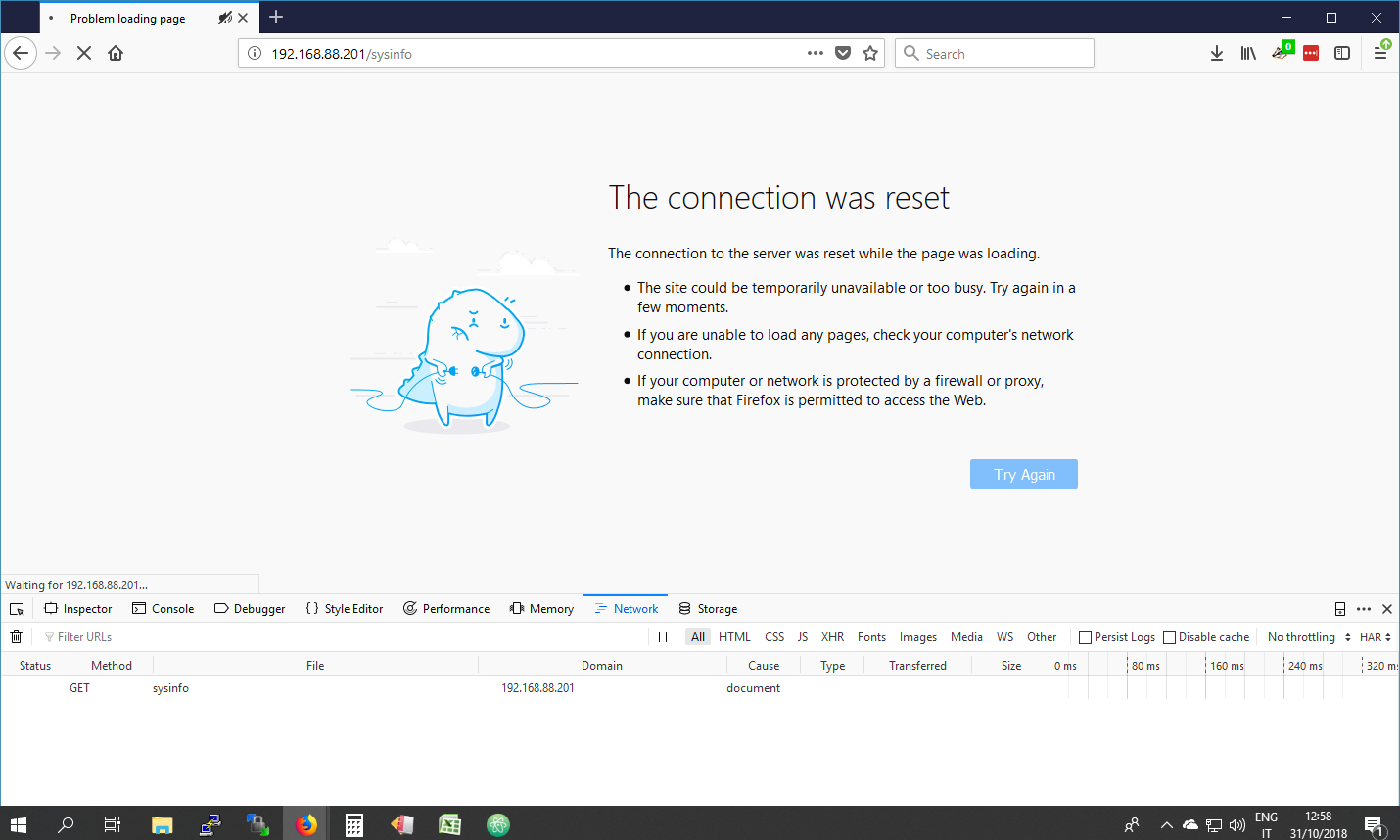
wget is run from a different machine. The browser is on W10 (ip=192.168.1.79), I run wget from a raspberry (192.168.1.5)
Browser = firefox
I can send the syslogs, but I have to configure it when I reach the unit.
giig1967g
on 31 Oct 2018
OK, a connection reset may be related to some timeout in the wificlient.
Do you have any idea on the load time?
Wget also gives some statistics when loading a page, but the browser also shows some network timing statistics. (Chrome does)
TD-er
on 31 Oct 2018
Connection reset can also happen if layer 2 has issues... See comments above about layer 2 problems... As said I had similar issue before changing the distance setting... (Eg reaithenticatin and packet loss)
clumsy-stefan
on 31 Oct 2018
Just tested from the remote site:
Until version mega-20181008 the remote access was working.
Starting from mega-20181011 it stopped working.
In between there are 2 versions (20181009 e 20181010) that have not been compiled.
Could this be the cause (from 20181009)?:
[LWIP1.4] Move back to LWIP1.4
giig1967g
on 1 Nov 2018
ok. Tested today with version mega-20181101 and the problem seems solved.
Resuming:
Until version mega-20181008 the remote access from a different subnet was working.
Starting from mega-20181011 it stopped working.
Version mega-20181027 still not working
Version mega-20181101 WORKS AGAIN
giig1967g
on 1 Nov 2018
So the culprit seems to be LWIP1.4, since we're now back at LWIP 2.0
TD-er
on 1 Nov 2018
yes. very likely.
giig1967g
on 1 Nov 2018
Related issues
 megamarco833
·
187Comments
megamarco833
·
187Comments
 micropet
·
199Comments
TD-er
·
388Comments
TD-er
·
79Comments
micropet
·
199Comments
TD-er
·
388Comments
TD-er
·
79Comments
 kristi5
·
111Comments
kristi5
·
111Comments