Espeasy: flash sonoff basic r2 after connect to wifi net, is impossible to see online
Checklist
- [x] The title of this issue is "to the point" and descriptive.
- [x] This issue describes what is happening.
i have some sonoff basic R2 V1 and i try to flash with new version of espeasy.
i used DOUT
and i succeeed. i see the ESP_Easy net, i connect to it ad i give my password and SSID of internal net.
when ESP reboot it's impossible to ping and open the sonoff on the internal net and ESP_Easy net desappear.
I try to use fw:
ESP_Easy_mega-20200204_normal_ESP8266_1M_VCC
ESP_Easy_mega-20200204_normal_ESP8266_1M
ESP_Easy_mega-20200204_normal_sdk3_ESP8266_1M
all same issue: after connecting ESP_Easy net and give internal SSID and password, is impossible to see on internal net the sonoff and ESP_Easy net desapper
the only way of became it working is using old version of EspEasy where there was PUYAversion:
ESP_Easy_mega-20181023_dev_ESP8266PUYA_1024_VCC.bin
in this case no problems
how it can be solved?
thanks
 megamarco833
All 187 comments
I installed ESP_Easy_mega-20200222_normal_ESP8285_1M.bin on a couple Sonoff Basic R2's without issue. So if this bin does not work for you then more information would be helpful.
Flash again and connect using AP mode. After you enter the credentials, and before the reboot, go to the _Tools=>Advanced=>Serial Log Level_ and set the serial log to debug. Submit (save).
The serial log will provide messages that may explain the problem. So launch your favorite serial terminal, reboot, and review all the messages from ESPEasy.
BTW, whenever problems occur from a firmware update it is wise to flash with the _blank_1MB.bin_ file to clear out the Flash memory (removes old settings). Then flash the Mega Release.
- Thomas
 thomastech
on 10 Mar 2020
thomastech
on 10 Mar 2020
The last nightly build has the board_build.flash_mode set to dout, where in some builds it may still have been set to dio.
There is a difference between flashing mode (dout/dio/etc) and the build settings.
Flashing mode is used to actually write the sketch and maybe also switching some flag in the bootloader (depending on the used flash tool).
The build flag is used at run time to determine the possible flash mode.
Do you see the node connecting to the WiFi?
Does the ESP react to network activity after a few minutes?
 TD-er
on 10 Mar 2020
TD-er
on 10 Mar 2020
I installed ESP_Easy_mega-20200222_normal_ESP8285_1M.bin on a couple Sonoff Basic R2's without issue. So if this bin does not work for you then more information would be helpful.
Flash again and connect using AP mode. After you enter the credentials, and before the reboot, go to the _Tools=>Advanced=>Serial Log Level_ and set the serial log to debug. Submit (save).
The serial log will provide messages that may explain the problem. So launch your favorite serial terminal, reboot, and review all the messages from ESPEasy.
BTW, whenever problems occur from a firmware update it is wise to flash with the _blank_1MB.bin_ file to clear out the Flash memory (removes old settings). Then flash the Mega Release.
* Thomas
hi, sure i always perfomr a blank_1MB.bin flash to eresa esp before flashing any fw
i used as tool ESP8266Flasher.exe under windows with DOUT and 1mb falsh size, budrate 115200

my sonoff is a sonoff basic and on pcb si written R2 v1.0 2017-10-11
i also a sonoff basic where is written on pcb sonoff TH (only one, the other three have on pcb the write R2)
al all sonoff is written on esp chip esp8266X
why you use as firmware: XXX_normall_ESP8285_1M.bin ? and not XXX_normall_ESP8266_1M.bin ?
anyway with XXX_normall_ESP8266_1M.bin the issue was that after flash, when i connect using AP mode to my internal newtwork,, after reboot i'm not able to see the sonoff on my network.
and when i'm in this situation the only solution is to flash again a new fw otherwise it's stuck because i can't find on my network and ESP_0 net desappear.
the only way to have sonoff visible on my network is only if i use the very old fw:
ESP_Easy_mega-20181023_dev_ESP8266PUYA_1024_VCC.bin
now i flash again with
Easy_mega-20200204_normal_ESP8266_1M.bin
but the problem is that when i enter on AP (http://192.168.4.1) and set my network, i can only click apply and then it reboot. so no way to activated the debug mode: Tools=>Advanced=>Serial Log Level
as i explain after the reboot i can not see on my internal network the new IP DHCP of the sonoff so i can't open web page Tools=>Advanced=>Serial Log Level
megamarco833
on 10 Mar 2020
Do you see the node connecting to the WiFi?
no, unfortunatly, after connecting to AP mode: 192.168.4.1 selecting my network SSID and enterin the password, the sonoff reboots and i can't see on my network
Does the ESP react to network activity after a few minutes?
no, i wait many minutes but i can't see it inside my network
EDIT: sorry, i add a note, when i connect to AP mode, the esp reboot and ESP_0 net disappear, and as i wrote it's no possible to have any IP inside my netword of this sonoff.
but if i power off and on after that, the ESP_0 network become visible (after many minutes) but at this time if i try to connect again on ESP_0 it connect but it's not possible to see web page 192.168.4.1
i receive an error on loading that page
megamarco833
on 10 Mar 2020
i have also try to flash:
ESP_Easy_mega-20200204_normal_ESP8285_1M.bin
in this case, after flashin appear ESP_Easy_0 network, i connect to that AP , i give credentianl of my network, it show the countdown, but after that sonoff remain connected at ESP_Easy_0
if i reboot sonoff the ESP_Easy_0 net become visible again, i can connect to that AP again but if i try to load 192.168.4.1 at this time it can not load the webpage and i receive a connection error.
latest attempts was done using:
ESP_Easy_mega-20200310_normal_ESP8266_1M.bin
and
ESP_Easy_mega-20200310_normal_ESP8285_1M.bin
nothing difference on behaviour except name of SSID that is now become ESP_Easy
megamarco833
on 10 Mar 2020
@megamarco833:
why you use as firmware: XXX_normall_ESP8285_1M.bin ? and not XXX_normall_ESP8266_1M.bin ?
I made a bad assumption on which ESP chip was in your Sonoff Basic. Currently sold Sonoff Basics use ESP8285 (internal Flash). Older versions used ESP8266 (external Flash chip).
So no way to activated the debug mode: Tools=>Advanced=>Serial Log Level
as i explain after the reboot
Unfortunately it does not appear that you can enable the log using serial commands. As a workaround, try this: reload the working firmware, set the log level to debug, save, and confirm the log is running. Then load the new firmware (without blank bin file). With a bit of luck the old Tool settings will still exists and provide a working serial log.
@TD-er,
The log would tell us a lot about what is going on. Especially if this problem is due to the WiFi core library compatibility issue I ran into last week. Is there a "_ALT-WIFI_" related version in the latest mega release that the OP can try?
thomastech
on 10 Mar 2020
i try also this: flash ESP_Easy_mega-20181023_dev_ESP8266PUYA_1024_VCC.bin
activate serial log as debug then flasg new fw: ESP_Easy_mega-20200204_normal_ESP8266_1M.bin
then i connect to AP ESP_Easy_0 but i can not see any log :(
megamarco833
on 10 Mar 2020
env:normal_ESP8266_1M is using the regular platform, so it should have the "latest" SDK 22x settings.
These are the current settings for the used SDK 2.2.x builds:
https://github.com/letscontrolit/ESPEasy/blob/4e7cb1e32de521f9ae8ee1fabefa27c3790d107c/platformio_core_defs.ini#L113-L132
These "new" settings are now the default since you last tested them:
https://github.com/letscontrolit/ESPEasy/blob/cde4c93ef502005c4b9aeb4fb69e26461dfeae44/platformio_esp82xx_base.ini#L7-L11
So if the regular builds do not work and builds of about a week or a month ago also do not work, then we have another issue.
Also the settings do not seem to be saved, so I guess it has nothing to do with the WiFi but more with the way how flash is being saved.
The PUYA flash code should be in the core lib and active.
TD-er
on 10 Mar 2020
@megamarco833
then i connect to AP ESP_Easy_0 but i can not see any log :(
You won't see the serial log from the browser. You need to use a serial terminal communication program (puTTY, Arduino Terminal, etc.) and connect the serial port via USB.
First confirm the serial log is working when the "good" bin (ESP_Easy_mega-20181023_dev_ESP8266PUYA_1024_VCC) is running. After you see it working you can load the new firmware.
Also, the Expressif startup messages will appear on the serial port at reboot even with serial log disabled. Post the messages that appear. They will confirm that boot was successful.
With your serial terminal connected, enter this command in the terminal window:
_settings_
then press [enter].
It will report some useful setting info, like this example:
System Info
  IP Address    : 192.168.1.1
  Build         : 20104
  Name          : ESP_Easy_0
  Unit          : 0
  WifiSSID      : YOUR SSID HERE
  WifiKey       : YOUR WIFI PASSWORD HERE
  WifiSSID2     :
  WifiKey2      :
  Free mem      : 15592
@TD-er:
Also the settings do not seem to be saved, so I guess it has nothing to do with the WiFi but more with the way how flash is being saved.
Let's not give up on that yet and wait for more feedback. BTW, too bad that the various log levels cannot be set via serial terminal.
- Thomas
thomastech
on 10 Mar 2020
Keep in mind this is a Sonoff Basic R2 so runs at mains voltage. Hooking it to USB while plugged in can be dangerous.
 dwarf2k
on 10 Mar 2020
dwarf2k
on 10 Mar 2020
Good reminder about mains voltage.
The serial terminal uses the USB port just like the flashing tool. The 3.3V power will come from USB.
Never connect Mains power when USB is connected. Otherwise prepare an updated will for the surviving family members.
- Thomas
thomastech
on 10 Mar 2020
Good reminder about mains voltage.
The serial terminal uses the USB port just like the flashing tool. The 3.3V power will come from USB.
Never connect Mains power when USB is connected. Otherwise prepare an updated will for the surviving family members.
* Thomas
i well know, but better underline :-)
megamarco833
on 10 Mar 2020
Better to underline than to undertake....
TD-er
on 10 Mar 2020
@thomastech
Also, the Expressif startup messages will appear on the serial port at reboot even with serial log disabled. Post the messages that appear. They will confirm that boot was successful.
With your serial terminal connected, enter this command in the terminal window:
_settings_
then press [enter].
i used putty with this is the log of fw with PUYA
266145 : WIFI : Set WiFi to AP+STA
336328 : WD   : Uptime 6 ConnectFailures 0 FreeMem 6336
336331 : LoopStats: shortestLoop: 60 longestLoop: 8498634 avgLoopDuration: 92.59 loopCounterMax: 500000 loopCounterLast: 343425 countFindPluginId: 0
336332 : Load File stats: Count: 2 Avg/min/max 3237.00/2267/4207 usec
336332 : Plugin call 50 p/s   stats: Count: 15634 Avg/min/max 120.05/77/327 usec
336333 : Plugin call 10 p/s   stats: Count: 3133 Avg/min/max 99.24/82/275 usec
336333 : Plugin call 10 p/s U stats: Count: 3133 Avg/min/max 1358.69/874/2807 usec
336334 : Plugin call  1 p/s   stats: Count: 318 Avg/min/max 392.87/184/35543 usec
336334 : setNewTimerAt()      stats: Count: 19709 Avg/min/max 118.82/51/329 usec
336335 : timeDiff()           stats: Count: 13574573 - CPU cycles per call: 8.37
336335 : Scheduler stats: (called/tasks/max_length/idle%) 4377321/19690/6/95.20
363799 : LoopStats: shortestLoop: 60 longestLoop: 8498634 avgLoopDuration: 78.16 loopCounterMax: 500000 loopCounterLast: 342260 countFindPluginId: 0
363800 : Plugin call 50 p/s   stats: Count: 1363 Avg/min/max 137.63/94/315 usec
363801 : Plugin call 10 p/s   stats: Count: 273 Avg/min/max 112.51/98/282 usec
363801 : Plugin call 10 p/s U stats: Count: 273 Avg/min/max 1719.42/1034/2764 usec
363802 : Plugin call  1 p/s   stats: Count: 27 Avg/min/max 475.22/442/531 usec
363802 : setNewTimerAt()      stats: Count: 1938 Avg/min/max 130.92/100/296 usec
363803 : timeDiff()           stats: Count: 1071406 - CPU cycles per call: 8.50
363803 : Scheduler stats: (called/tasks/max_length/idle%) 342260/1938/6/93.70
393799 : LoopStats: shortestLoop: 60 longestLoop: 8498634 avgLoopDuration: 76.62 loopCounterMax: 500000 loopCounterLast: 381230 countFindPluginId: 0
393800 : Plugin call 50 p/s   stats: Count: 1500 Avg/min/max 134.11/98/311 usec
393801 : Plugin call 10 p/s   stats: Count: 300 Avg/min/max 116.71/98/268 usec
393801 : Plugin call 10 p/s U stats: Count: 300 Avg/min/max 1643.16/1040/2049 usec
393802 : Plugin call  1 p/s   stats: Count: 30 Avg/min/max 463.80/391/566 usec
393802 : setNewTimerAt()      stats: Count: 2132 Avg/min/max 130.07/101/239 usec
393802 : timeDiff()           stats: Count: 1192814 - CPU cycles per call: 8.45
393803 : Scheduler stats: (called/tasks/max_length/idle%) 381230/2132/6/94.60
423799 : LoopStats: shortestLoop: 60 longestLoop: 8498634 avgLoopDuration: 76.62 loopCounterMax: 500000 loopCounterLast: 381252 countFindPluginId: 0
423800 : Plugin call 50 p/s   stats: Count: 1500 Avg/min/max 133.71/98/311 usec
423800 : Plugin call 10 p/s   stats: Count: 300 Avg/min/max 116.91/98/300 usec
423801 : Plugin call 10 p/s U stats: Count: 300 Avg/min/max 1648.86/1050/2063 usec
423801 : Plugin call  1 p/s   stats: Count: 30 Avg/min/max 465.87/413/552 usec
423802 : setNewTimerAt()      stats: Count: 2132 Avg/min/max 130.00/101/238 usec
423802 : timeDiff()           stats: Count: 1192879 - CPU cycles per call: 8.46
423803 : Scheduler stats: (called/tasks/max_length/idle%) 381252/2132/6/94.60
i can't write "settings" inside the command propt because it's not allow to write nothing.
this is the parameter that i used:

what's the next steps?
EDIT: this log is simply generated only connecting to AP, giving my network credentials, activate the serial log inside tools=>advanced=> serial log as debug
nothing else
megamarco833
on 10 Mar 2020
i used putty with this is the log of fw with PUYA
So far so good.
i can't write "settings" inside the command propt because it's not allow to write nothing.
this is the parameter that i used:
Your PuTTY settings seem valid, but I suggest setting Flow Control to None.
Maybe the "settings" command did not exist in your old bin version? Here are some other commands to try out to help confirm that you can fully communicate with the device (each command must be followed by [Enter]).
ip
dns
wifiscan
reboot
If you do not have success then try the _Serial Monitor_ feature that is provided in the ESP.Easy.Flasher.exe program (included in the ESPEasy firmware zip bundle).
After you are able to communicate, load the new firmware (do not use the blank bin).
Launch the serial terminal and confirm you have log messages.
Type the reboot command and capture all the messages (starting with the warm reboot).
Collect messages for a couple minutes. Then post the log, but obscure any private information.
- Thomas
thomastech
on 10 Mar 2020
2283801 : LoopStats: shortestLoop: 60 longestLoop: 8498634 avgLoopDuration: 78.44 loopCounterMax: 500000 loopCounterLast: 372502 countFindPluginId: 0
2283802 : Plugin call 50 p/s   stats: Count: 1492 Avg/min/max 136.84/97/312 usec
2283802 : Plugin call 10 p/s   stats: Count: 299 Avg/min/max 112.09/98/287 usec
2283803 : Plugin call 10 p/s U stats: Count: 299 Avg/min/max 1670.76/1059/2764 usec
2283803 : Plugin call  1 p/s   stats: Count: 30 Avg/min/max 420.67/332/553 usec
2283804 : setNewTimerAt()      stats: Count: 2122 Avg/min/max 133.37/103/300 usec
2283804 : timeDiff()           stats: Count: 1166407 - CPU cycles per call: 8.46
2283805 : Scheduler stats: (called/tasks/max_length/idle%) 372502/2122/6/94.60
>ip

IP:192.168.0.26(DHCP)

Ok
2288653 : Command: ip
>dns

DNS:192.168.0.8(DHCP)

Ok
2312910 : WD   : Uptime 39 ConnectFailures 0 FreeMem 9144
>wifiscan
WIFI : SSID Scan start
WIFI : 4 networks found
WIFI : 1: NETGEAR xx:xx:xx:xx:xx:xx Ch:13 (-62dBm) WPA2/PSK
WIFI : 2: VodafoneASUS xx:xx:xx:xx:xx:xx Ch:13 (-79dBm) WPA2/PSK
WIFI : 3: Vodafone-WiFi xx:xx:xx:xx:xx:xx Ch:13 (-77dBm) open
WIFI : 4: DIRECT-a5M2070 Series xx:xx:xx:xx:xx:xx Ch:13 (-87dBm) WPA2/PSK


Ok
2312998 : Command: wifiscan
2314661 : LoopStats: shortestLoop: 60 longestLoop: 8498634 avgLoopDuration: 82.25 loopCounterMax: 500000 loopCounterLast: 365811 countFindPluginId: 0
2314662 : Plugin call 50 p/s   stats: Count: 1461 Avg/min/max 133.77/97/304 usec
2314663 : Plugin call 10 p/s   stats: Count: 293 Avg/min/max 120.09/98/289 usec
2314663 : Plugin call 10 p/s U stats: Count: 293 Avg/min/max 1629.55/1040/2570 usec
2314664 : Plugin call  1 p/s   stats: Count: 30 Avg/min/max 421.37/338/500 usec
2314664 : setNewTimerAt()      stats: Count: 2079 Avg/min/max 133.49/103/306 usec
2314665 : timeDiff()           stats: Count: 1145359 - CPU cycles per call: 8.50
2314665 : Scheduler stats: (called/tasks/max_length/idle%) 365811/2079/6/94.90
these are commands for ESP with puya
now i will flash new FW directly without blank
megamarco833
on 10 Mar 2020
>reboot

 ets Jan  8 2013,rst cause:1, boot mode:(3,7)

load 0x4010f000, len 1384, room 16
tail 8
chksum 0x2d
csum 0x2d
v614f7c32
~ld
   ▒U138 :

INIT : Booting version: mega-20181008 (ESP82xx Core 2_4_1, NONOS SDK 2.2.1(cfd48f3), LWIP: 2.0.3)
139 : INIT : Warm boot #2 - Restart Reason: Software/System restart
141 : FS   : Mounting...
148 : FS   : Mount successful, used 75802 bytes of 113201
589 : CRC  : program checksum       ...OK
603 : CRC  : SecuritySettings CRC   ...OK
625 : INIT : Free RAM:16488
626 : INIT : I2C
627 : INIT : SPI not enabled
644 : INFO : Plugins: 74 [Normal] [Testing] [Development] (ESP82xx Core 2_4_1, NONOS SDK 2.2.1(cfd48f3), LWIP: 2.0.3)
646 : WIFI : Set WiFi to STA
679 : WIFI : Connecting NETGEAR attempt #0
2016 : WD   : Uptime 0 ConnectFailures 0 FreeMem 13544
4582 : WIFI : Connected! AP: NETGEAR (xx:xx:xx:xx:xx:xx) Ch: 13 Duration: 3902 ms
7178 : WIFI : DHCP IP: 192.168.0.26 (ESP-Easy-0) GW: 192.168.0.1 SN: 255.255.255.0   duration: 2595 ms
7184 : Webserver: start
now i flashed directly: ESP_Easy_mega-20200204_normal_ESP8266_1M.bin
eset button if you've justed flashed the firmware)

 ets Jan  8 2013,rst cause:1, boot mode:(3,7)

load 0x4010f000, len 1392, room 16
tail 0
chksum 0xd0
csum 0xd0
v3d128e5c
~ld
   ▒U106 : Info  :

INIT : Booting version: mega-20200204 (ESP82xx Core 3d128e5c, NONOS SDK 2.2.2-dev(38a443e), LWIP: 2.1.2 PUYA support)
107 : Info  : INIT : Free RAM:32632
108 : Info  : INIT : Warm boot #1 Last Task: Background Task - Restart Reason: Software/System restart
110 : Info  : FS   : Mounting...
118 : Info  : FS   : Mount successful, used 75802 bytes of 113201
590 : Info  : CRC  : program checksum       ...OK
609 : Info  : CRC  : SecuritySettings CRC   ...OK
610 : Info  : CRC  : binary has changed since last save of Settings
612 : Info  : WIFI  : Start network scan
2829 : Info  : INIT : Free RAM:28664
2831 : Info  : INIT : I2C
2831 : Info  : INIT : SPI not enabled
2926 : Info  : INFO : Plugins: 46 [Normal] (ESP82xx Core 3d128e5c, NONOS SDK 2.2.2-dev(38a443e), LWIP: 2.1.2 PUYA support)
2940 : Info  : WIFI  : Scan finished, found: 4
2947 : Error : WIFI : No valid wifi settings
3049 : Info  : WIFI : Set WiFi to AP+STA
3975 : Info  : WIFI : AP Mode ssid will be ESP_Easy_0 with address 192.168.4.1
3977 : Error : WIFI : Could not prepare WiFi!
4273 : Info  : WD   : Uptime 0 ConnectFailures 0 FreeMem 22352 WiFiStatus 0
18849 : Info  : AP Mode: Client connected: XX:XX:XX:XX:XX Connected devices: 1
18853 : Info  : Webserver: start
33716 : Info  : WIFI : Credentials Changed, retry connection. SSID: NETGEAR
33751 : Info  : WIFI  : Start network scan
33754 : Info  : WIFI : Connecting NETGEAR attempt #0
34477 : Info  : WD   : Uptime 1 ConnectFailures 0 FreeMem 17072 WiFiStatus 6
37580 : Info  : WIFI : Connected! AP: NETGEAR (XX:XX:XX:XX:XX:XX) Ch: 13 Duration: 3614 ms
39718 : Info  : WIFI : DHCP IP: 192.168.0.26 (ESP-Easy-0) GW: 192.168.0.1 SN: 255.255.255.0   duration: 2304 ms
39722 : Info  : SaveToFile: free stack: 3584
40320 : Info  : FILE : Saved config.dat
40321 : Info  : SaveToFile: free stack after: 3584
40323 : Info  : SaveToFile: free stack: 3584
40657 : Info  : FILE : Saved security.dat
40658 : Info  : SaveToFile: free stack after: 3584
40718 : Info  : firstLoopConnectionsEstablished
64262 : Info  : WD   : Uptime 1 ConnectFailures 0 FreeMem 16352 WiFiStatus 3
94261 : Info  : WD   : Uptime 2 ConnectFailures 0 FreeMem 15152 WiFiStatus 3
124262 : Info  : WD   : Uptime 2 ConnectFailures 0 FreeMem 9000 WiFiStatus 3
127221 : Info  :  Webserver args: 0: 'oldrulesengine' length: 2 1: 'messagedelay' length: 3 2: 'ntphost' length: 0 3: 'dststartweek' length: 1 4:
127228 : Info  : SaveToFile: free stack: 3248
127813 : Info  : FILE : Saved config.dat
127814 : Info  : SaveToFile: free stack after: 3248
144954 : Info  :  Webserver args: 0: 'cmd' length: 6
144956 : Info  :      : Rebooting...

 ets Jan  8 2013,rst cause:1, boot mode:(3,7)

load 0x4010f000, len 1392, room 16
tail 0
chksum 0xd0
csum 0xd0
v3d128e5c
~ld
   ▒U107 : Info  :

INIT : Booting version: mega-20200204 (ESP82xx Core 3d128e5c, NONOS SDK 2.2.2-dev(38a443e), LWIP: 2.1.2 PUYA support)
108 : Info  : INIT : Free RAM:32632
110 : Info  : INIT : Warm boot #2 Last Task: Const Interval timer, id: 3 - Restart Reason: Software/System restart
112 : Info  : FS   : Mounting...
119 : Info  : FS   : Mount successful, used 75802 bytes of 113201
587 : Info  : CRC  : program checksum       ...OK
605 : Info  : CRC  : SecuritySettings CRC   ...OK
630 : Info  : INIT : Free RAM:29456
632 : Info  : INIT : I2C
632 : Info  : INIT : SPI not enabled
728 : Info  : INFO : Plugins: 46 [Normal] (ESP82xx Core 3d128e5c, NONOS SDK 2.2.2-dev(38a443e), LWIP: 2.1.2 PUYA support)
835 : Info  : WIFI : Set WiFi to STA
870 : Info  : WIFI : Connecting NETGEAR attempt #0
2098 : Info  : WIFI : Connected! AP: NETGEAR (XX:XX:XX:XX:XX:XX) Ch: 13 Duration: 1125 ms
2749 : Info  : WD   : Uptime 0 ConnectFailures 0 FreeMem 24712 WiFiStatus 6
4648 : Info  : WIFI : DHCP IP: 192.168.0.26 (ESP-Easy-0) GW: 192.168.0.1 SN: 255.255.255.0   duration: 2559 ms
4653 : Info  : Webserver: start
4656 : Info  : firstLoopConnectionsEstablished
32209 : Info  : WD   : Uptime 1 ConnectFailures 0 FreeMem 21680 WiFiStatus 3
62209 : Info  : WD   : Uptime 1 ConnectFailures 0 FreeMem 21680 WiFiStatus 3
92209 : Info  : WD   : Uptime 2 ConnectFailures 0 FreeMem 21680 WiFiStatus 3
122209 : Info  : WD   : Uptime 2 ConnectFailures 0 FreeMem 21032 WiFiStatus 3
152210 : Info  : WD   : Uptime 3 ConnectFailures 0 FreeMem 21680 WiFiStatus 3
212210 : Info  : WD   : Uptime 4 ConnectFailures 0 FreeMem 21680 WiFiStatus 3
242210 : Info  : WD   : Uptime 4 ConnectFailures 0 FreeMem 21680 WiFiStatus 3
272209 : Info  : WD   : Uptime 5 ConnectFailures 0 FreeMem 21680 WiFiStatus 3
302210 : Info  : WD   : Uptime 5 ConnectFailures 0 FreeMem 21680 WiFiStatus 3
the serial log was setted to "info"
i entered inside Easy_0 AP and set to debug, then reboot
it was connected for i while at NETGEAR network (my local network) with IP 192.168.0.26 but afterthat it disconnect and never become visible
megamarco833
on 10 Mar 2020
From reviewing your logs I believe you have a WiFi library compatibility issue that is related to the hardware. I experienced that last week on a Sonoff Basic that was the exact same vintage as your hardware.
@TD-er:
If not too much trouble, it would be a useful experiment to try a build using the _ALT_WIFI_ library (PIO_FRAMEWORK_ARDUINO_ESPRESSIF_SDK22x_191122). But if the latest Mega Release branch has this in it then please recommend the bin file name that should be used.
- Thomas
thomastech
on 10 Mar 2020
32203 : Info  : WD   : Uptime 1 ConnectFailures 0 FreeMem 21824 WiFiStatus 3
62204 : Info  : WD   : Uptime 1 ConnectFailures 0 FreeMem 20576 WiFiStatus 3
92203 : Info  : WD   : Uptime 2 ConnectFailures 0 FreeMem 18672 WiFiStatus 3
>rebooyt
110890 : Info  : Command: rebooyt
110897 : Info  : Command unknown: "rebooyt"
Command unknown: "rebooyt"
>reboot
113605 : Info  : Command: reboot

 ets Jan  8 2013,rst cause:1, boot mode:(3,7)

load 0x4010f000, len 1392, room 16
tail 0
chksum 0xd0
csum 0xd0
v3d128e5c
~ld
   ▒U105 : Info  :

INIT : Booting version: mega-20200204 (ESP82xx Core 3d128e5c, NONOS SDK 2.2.2-dev(38a443e), LWIP: 2.1.2 PUYA support)
107 : Info  : INIT : Free RAM:32632
108 : Info  : INIT : Warm boot #1 Last Task: Background Task - Restart Reason: Software/System restart
110 : Info  : FS   : Mounting...
118 : Info  : FS   : Mount successful, used 75802 bytes of 113201
585 : Info  : CRC  : program checksum       ...OK
603 : Info  : CRC  : SecuritySettings CRC   ...OK
628 : Info  : INIT : Free RAM:29472
630 : Info  : INIT : I2C
630 : Info  : INIT : SPI not enabled
727 : Info  : INFO : Plugins: 46 [Normal] (ESP82xx Core 3d128e5c, NONOS SDK 2.2.2-dev(38a443e), LWIP: 2.1.2 PUYA support)
833 : Info  : WIFI : Set WiFi to STA
869 : Info  : WIFI : Connecting NETGEAR attempt #0
2208 : Info  : WIFI : Connected! AP: NETGEAR  Ch: 13 Duration: 1126 ms
2753 : Info  : WD   : Uptime 0 ConnectFailures 0 FreeMem 24728 WiFiStatus 6
4968 : Info  : WIFI : DHCP IP: 192.168.0.26 (ESP-Easy-0) GW: 192.168.0.1 SN: 255.255.255.0   duration: 2956 ms
4974 : Info  : Webserver: start
4977 : Info  : firstLoopConnectionsEstablished
32208 : Info  : WD   : Uptime 1 ConnectFailures 0 FreeMem 17576 WiFiStatus 3
62207 : Info  : WD   : Uptime 1 ConnectFailures 0 FreeMem 17936 WiFiStatus 3
92208 : Info  : WD   : Uptime 2 ConnectFailures 0 FreeMem 17312 WiFiStatus 3
122208 : Info  : WD   : Uptime 2 ConnectFailures 0 FreeMem 18248 WiFiStatus 3
152208 : Info  : WD   : Uptime 3 ConnectFailures 0 FreeMem 18248 WiFiStatus 3
182207 : Info  : WD   : Uptime 3 ConnectFailures 0 FreeMem 19760 WiFiStatus 3
212207 : Info  : WD   : Uptime 4 ConnectFailures 0 FreeMem 19760 WiFiStatus 3
242208 : Info  : WD   : Uptime 4 ConnectFailures 0 FreeMem 19760 WiFiStatus 3
after many trial i succeed on having for a while the web page using a reboot inside serial monitor.
but as you can see there are many disconnecting, and in a while the sonoff will be not visible on the network
megamarco833
on 10 Mar 2020
after many trial i succeed on having for a while the web page using a reboot inside serial monitor.
but as you can see there are many disconnecting, and in a while the sonoff will be not visible on the network
Just more symptoms of the WiFi library issue I mentioned. So far it seems to involve Sonoff Basic V1 modules made 2-3 years ago. But the sample size is very small (one of mine and maybe this one of yours). So consider my conclusion to be a gut feeling.
I think you'll need @TD-er to assist with this. If the latest Mega release does not have the special WiFi library then a custom build will be needed to test things out.
- Thomas
thomastech
on 10 Mar 2020
I created 2 different 1M test builds, based on different SDK builds.
1M_wifi_testbuilds_issue2931.zip
They both are based on the current HEAD of the mega branch.
TD-er
on 10 Mar 2020
I created 2 different 1M test builds, based on different SDK builds.
Thanks. Fingers are crossed. Place your bets now.
- Thomas
thomastech
on 10 Mar 2020
I think his network may have gotten one of those very swiftly rolled out security patches which we have not yet implemented in ESPEasy.
Those patches do disable all TCP/IP traffic and switch over completely to UDP.
This is meant to prevent all handshakes, to protect their users.
TD-er
on 10 Mar 2020
I created 2 different 1M test builds, based on different SDK builds.
1M_wifi_testbuilds_issue2931.zipThey both are based on the current HEAD of the mega branch.
I think his network may have gotten one of those very swiftly rolled out security patches which we have not yet implemented in ESPEasy.
Those patches do disable all TCP/IP traffic and switch over completely to UDP.
This is meant to prevent all handshakes, to protect their users.
hi TD-er i do not think that is related to my home network because i have for example nodemcu, wemoss and ESP12 breadbord where i use espeasy and i do not find issue.
i think that the issue is related to this combination hardware+firmware: sonoff + espeasy
anyway i'm testing the two versions
in a while a came back with feedbacks
thanks
p.s. but i would like to update the fw from a sonoff like this, what i have to do, if i would like to use OTA?
thanks
megamarco833
on 10 Mar 2020
i flashed first this:
normal_ESP8266_1M_SDK22x_190703
i do not see any improvemts. it's very unstable
the connection was lost many times and the time respond on web pages are very long
then i tested normal_ESP8266_1M_SDK22x_191122
same situation, very slow and unstable with continue lost of connection where i need to power off and power on
what i notice is that with 2018 version of PUYA when i connected to AP Easy_0 and give my credentials after countdown the web page show me the internal IP address that was given to sonoff
with new version from github never. after the countdown the web page was unable to load and i have to manully search the ip that was assignet at sonoff
with first test version tested (normal_ESP8266_1M_SDK22x_190703) after the countdown it show all parameters of web page (main, config, controller, hardware etc..) but inside AP network (192.168.4.1) and inside main page i can see the internal IP given.
same also with second test version tested, but with a different graphics
megamarco833
on 10 Mar 2020
@megamarco833:
That's a let down. Was hoping for better news.
@TD-er :
The special wifi build that is working for me has these details:
Build: 20104 - Mega
System Libraries: ESP82xx Core 2_6_3, NONOS SDK 2.2.2-dev(a58da79), LWIP: 2.1.2 PUYA support
Plugin Count: 80 [Normal] [Testing]
Build Time: Mar  4 2020 20:43:39
Note: This version was for 4MB Flash, not 1MB.
BTW, I didn't try out your two new 1MB test builds. The Sonoff node is in-use and not a good time to take it offline.
- Thomas
thomastech
on 11 Mar 2020
what i notice is that with 2018 version of PUYA when i connected to AP Easy_0 and give my credentials after countdown the web page show me the internal IP address that was given to sonoff
with new version from github never. after the countdown the web page was unable to load and i have to manully search the ip that was assignet at sonoff
with first test version tested (normal_ESP8266_1M_SDK22x_190703) after the countdown it show all parameters of web page (main, config, controller, hardware etc..) but inside AP network (192.168.4.1) and inside main page i can see the internal IP given.
same also with second test version tested, but with a different graphics
OK, that's something I must look into as that is a bad user experience.
I also got the feeling something has changed regarding WiFi (maybe in the core?) as it also takes a while on some specific nodes I have to get the first network traffic flowing after a cold boot.
It only happens on some nodes and I have no clue why.
@megamarco833 My remark here was a (failed?) attempt to make a nerdy joke referring to the Corona virus.
TD-er
on 11 Mar 2020
what i notice is that with 2018 version of PUYA when i connected to AP Easy_0 and give my credentials after countdown the web page show me the internal IP address that was given to sonoff
with new version from github never. after the countdown the web page was unable to load and i have to manully search the ip that was assignet at sonoff
with first test version tested (normal_ESP8266_1M_SDK22x_190703) after the countdown it show all parameters of web page (main, config, controller, hardware etc..) but inside AP network (192.168.4.1) and inside main page i can see the internal IP given.
same also with second test version tested, but with a different graphicsOK, that's something I must look into as that is a bad user experience.
I also got the feeling something has changed regarding WiFi (maybe in the core?) as it also takes a while on some specific nodes I have to get the first network traffic flowing after a cold boot.
It only happens on some nodes and I have no clue why.@megamarco833 My remark here was a (failed?) attempt to make a nerdy joke referring to the Corona virus.
ahahah no no, the joke was understand, but behind that i was thinking if some settings of internal net could make this happened, but i have others ESP without issue.
anyway i think that the problem could be linked also for first early version in 2019
because the versions marked as PUYA works well, the versions that are coming after that not.
i tested some mega version of firts months of 2019 and i got issue with this hardware
just to make a double check using a different firmware, to avoid hardware problems, i tested tasmota, last version, on this sonoff and it works.
so i think that to see what's is affecting only this hardware we can have a look on very old versions, but i could imagine that in more than 1year a lot of works/changing was implemented!
Last question about sonoff or hardware that has only 1Mb, if i would like to update the fw from a sonoff like this, what i have to do, if i would like to use OTA?
i tried 2step and minimal OTA but both failed due to a not enouh free space
thanks
megamarco833
on 11 Mar 2020
Tasmota does not use SPIFFS filesystem, so it may not be affected by PUYA chips.
I will look at the used flags to build the binaries, but as far as I know the current core libs should support PUYA chips (as I made the commit myself to the core libs)
TD-er
on 11 Mar 2020
I will look at the used flags to build the binaries, but as far as I know the current core libs should support PUYA chips (as I made the commit myself to the core libs)
Assuming it is a valid tag, the _Firmware System Library_ line item on the /sysinfo page shows "PUYA support" on all my various ESPEasy nodes. So it appears the build flags are working.
I pulled my Sonoff Basic V1 offline and tested the two new 1MB bins.
- The normal_ESP8266_1M_SDK22x_190703 bin had slow refresh, some browser page hangs, and timeouts. Sometimes it would not respond for awhile, then randomly partially work again.
- The normal_ESP8266_1M_SDK22x_191122 bin worked well, but occasionally a page would momentarily hang for a second or two during refresh. Also, web log had intermittent "resource" errors. But overall, I would say it is "working."
I don't experience any browser issues with the "secrete sauce" bin that was created last week for my Sonoff Basic V1. All page refresh is fast and reliable. But this file is a 4MB [TESTING] build since I upgraded all my Sonoff 1MB Flash chips to 4MB so I could do OTA. For reference, here's the file:
https://www.dropbox.com/s/2q0g9w6xbub6lfp/test_ESP8266_4M1M_VCC_secret_ingredient.bin?dl=0
EDIT: In case it is important info, the bad Sonoff received a couple modifications to reduce noise. They appeared to have an affect on the WiFi performance, but not enough to solve the page hangs. The mods are still in place and I don't know if they are part of my success. The details were posted here: https://www.letscontrolit.com/forum/viewtopic.php?f=6&t=7474
Since I notice a subtle differences in the two "working" builds it seems that there is some hidden clue that is being overlooked. Maybe the issue is related to PUYA and/or the WiFi library that affects RF calibration. Or maybe it's something else.
@TD-er: It would be ideal if you had a Sonoff Basic V1 mfg'd in 2017 - 2018. If by chance you have one then consider testing it out with the latest firmware.
- Thomas
thomastech
on 11 Mar 2020
I do have them.... somewhere.
I even should have a batch of 4M flash chips and a proper soldering iron.
So in theory I should be able to recreate your setup.
Only thing is, I have moved here very recently and my "lab" is now not the most well sorted one.

As I'm in this temporary house now, I only have a room of roughly 3x3 meter and as you can see it is a bit in "still sorting things" mode.
At least one of the Basic nodes is hanging on the DIN rails under my Astron cap.
TD-er
on 11 Mar 2020
I don't experience any browser issues with the "secrete sauce" bin that was created last week for my Sonoff Basic V1. All page refresh is fast and reliable. But this file is a 4MB [TESTING] build since I upgraded all my Sonoff 1MB Flash chips to 4MB so I could do OTA. For reference, here's the file:
https://www.dropbox.com/s/2q0g9w6xbub6lfp/test_ESP8266_4M1M_VCC_secret_ingredient.bin?dl=0
without manually change the chip from 1mb to 4mb is not possible to use OTA upgrade?
megamarco833
on 11 Mar 2020
As I'm in this temporary house now, I only have a room of roughly 3x3 meter and as you can see it is a bit in "still sorting things" mode.
Your lab has a ways to go before it reaches the notoriety of Bob Pease's office. And by the time you get it the way you like you'll be packing up to move back into your rebuilt house.
without manually change the chip from 1mb to 4mb is not possible to use OTA upgrade?
From what I understand this requires flashing with a recent "minimal_core" that is smaller than 599 kB (614384 bytes). After that, OTA would be possible with another minimal build that meets the size constraints.
TD-er has been busy getting the size small enough to do this. I believe there are some bin files available in the latest MEGA release that meet the size limitation. For the record, I've never tried it.
- Thomas
thomastech
on 11 Mar 2020
I do have them.... somewhere.
I even should have a batch of 4M flash chips and a proper soldering iron.
So in theory I should be able to recreate your setup.Only thing is, I have moved here very recently and my "lab" is now not the most well sorted one.
As I'm in this temporary house now, I only have a room of roughly 3x3 meter and as you can see it is a bit in "still sorting things" mode.
At least one of the Basic nodes is hanging on the DIN rails under my Astron cap.
hi TD-er did you find time and a sonoff basic to verify the issue bug on flashing it?
thanks so much
megamarco833
on 24 Mar 2020
Not yet as last week was a bit normal, but mostly chaotic.
Well today we learned people are forbidden to be with more than 2 persons within 1.5m (400 euro fine) for the next few months.
This also means I will have to take care of my daughter during the day when my better half is working in the hospital (for more hours than contracted).
So I hope we will get some more structure in the days here.
TD-er
on 24 Mar 2020
Please extend my warmest Thank You to your wife for being on the front lines.
And it's nice to hear that the Noorlander coding team has doubled in size. Just be sure to allow for juice breaks so you don't violate any child labor laws.
- Thomas
thomastech
on 24 Mar 2020
Well Lilly is now learning to read, write and to calculate, so she could indeed do the code review. (read: trying to break it)
At least she has a big interest of dad's projects (she calls them "pruts projectjes" in Dutch), so you will never know.
She is no longer accepting 3D prints without electronics in them.
TD-er
on 24 Mar 2020
hi TD-er, first of all I hope that you and your family still safe!
secondary thing, did you get some time to spend over this bug on sonoff basic that's not possible to flash with latest buld of espeasy after end 2018 (ESP_Easy_mega-20181023_dev_ESP8266PUYA_1024_VCC.bin)
i would like to update to improve wifi stability of early versiond and to avoid some wifi disconnection that i still have on this old version :-)
thanks so much
megamarco833
on 1 Apr 2020
What is the reported sketch size of this build you're running?
If it is too big to allow for 2-step OTA, then I'm afraid only a manual update is possible.
TD-er
on 1 Apr 2020
Storage
--
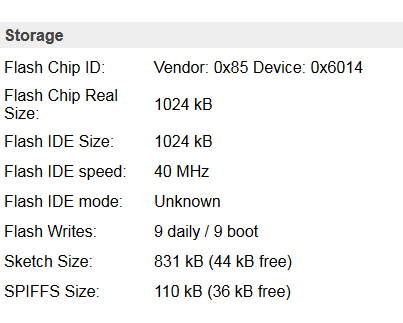
Flash Chip ID | Vendor: 0x85 Device: 0x6014
Flash Chip Real Size: | 1024 kB
Flash IDE Size: | 1024 kB
Flash IDE speed: | 40 MHz
Flash IDE mode: | Unknown
Flash Writes | 0 daily / 2 boot
Sketch Size | 814 kB (60 kB free)
SPIFFS Size | 110 kB (35 kB free)
i think there is no way to OTA right?
but anyway, no metter to flasj manually...the problem is that if i flash manually, after connecting to ESP_Easy net and select the internal SSID and password, is impossible to see on internal net the sonoff and ESP_Easy net desapper
the only way to have it working is manual flashin an old version of EspEasy where there was PUYAversion:
ESP_Easy_mega-20181023_dev_ESP8266PUYA_1024_VCC.bin
in this case no problems.
do you remember many trial that we did following this post here ? :-)
megamarco833
on 1 Apr 2020
do you remember many trial that we did following this post here ? :-)
I think those memories are put away somewhere very deep, locked behind very thick doors...
TD-er
on 1 Apr 2020
ahahahah....
gooooood :-)
.....anyway, my short summary at the end of last post has descrived the issue?....or wake up some memories?
megamarco833
on 2 Apr 2020
another small issue is that when i connect the first time after falsh to ESPeasy SSID, my smartphone asked if i want to be redicted at configuration page, i click yes, but it not load the webpage, i must go manually at 192.168.4.1
it never happened....always worked the automatical redict.
and last point, after config the internal network and submit, after the countdown of page 192.168.4.1 the web page become not responding and i need to find manually the IP of esp device
megamarco833
on 2 Apr 2020
Just to sum things up from the previous forum discussion:
Like megamarco833, this strange WiFi connectivity problem only affects my old Sonoff Basic V1 Module (ESP8266). My three Sonoff Basic V2 (ESP8255) modules don't have the problem.
So there's something evil about the old Sonoff Basic. I believe it will require a special person with vast coding talents and a generous spirit to solve the problem. Cough, @TD-er, cough.
- Thomas
thomastech
on 3 Apr 2020
Maybe this also has something to do with switching SDK builds (like we did on some other topic as well)
TD-er
on 3 Apr 2020
Maybe this also has something to do with switching SDK builds
Affirmative. The problem goes away with a special [TESTING] build config you prepared for me 4 weeks ago. Its libraries are:
ESP82xx Core 2_6_3, NONOS SDK 2.2.2-dev(a58da79), LWIP: 2.1.2 PUYA support
See: https://www.letscontrolit.com/forum/viewtopic.php?f=6&t=7474#p42804
Ideally a developer would flash a Sonoff Basic V1 and do some debugging on it to see why WiFi fails. Maybe this will identify the reason for the poor connectivity and help with a workaround that allows all libraries to work.
- Thomas
thomastech
on 3 Apr 2020
i tryed the version at post linked, but after flashing, i can't see the network SSID ESPeasy
:(
i flashed DOUT as usual for Sonoff basic R2
megamarco833
on 4 Apr 2020
i tryed the version at post linked, but after flashing, i can't see the network SSID ESPeasy
My Sonoff Basic has been upgraded to 4MB Flash, so the linked bin file is a 4MB release. It won't work in a stock Sonoff Basic.
- Thomas
thomastech
on 4 Apr 2020
I will prepare a test build using that SDK for a Sonoff Basic.
TD-er
on 4 Apr 2020
I checked the current platformio.ini config and the last buils should be using the PIO_FRAMEWORK_ARDUINO_ESPRESSIF_SDK22x_191122 that was working well on Thomas' units.
So the last nightly builds should have these for core 2.6.3 builds (default core)
The builds marked with "beta" have a different SDK build PIO_FRAMEWORK_ARDUINO_ESPRESSIF_SDK22x_191105
TD-er
on 4 Apr 2020
sorry, where is the link for nightly build? i can't find it...
megamarco833
on 4 Apr 2020
See: nightly builds
TD-er
on 4 Apr 2020
thanks i thought that there was another version :-)
i tested:
20200328_normal_ESP8266_1M_VCC.bin
and
20200328_normal_ESP8266_1M.bin
but when it connect, the IP 192.168.4.1 and i set my internal SSID and give the password, after the countdown, i can't see ESP on my internal network, and i continue to see ESP_easy network also after reboot. So i think that it means that the confiuration was not saved.
megamarco833
on 4 Apr 2020
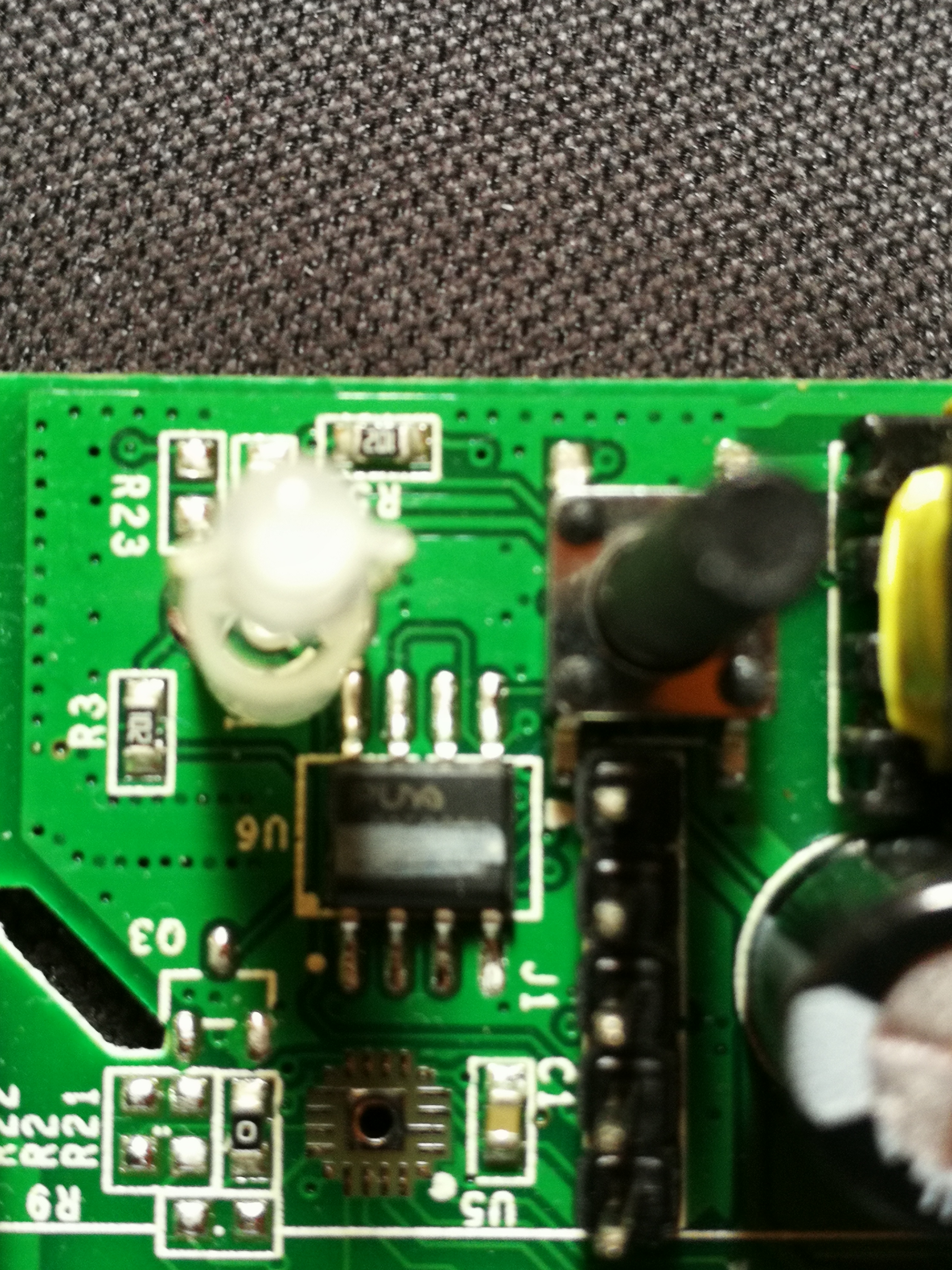
What brand of flash chips does this node have? PUYA?
TD-er
on 5 Apr 2020
yes, i see that the chip labeled on pcb as U6 is marked PUYA
megamarco833
on 5 Apr 2020
OK, that's strange.
The library we use should have PUYA support enabled.
TD-er
on 5 Apr 2020
hi TD-er
i bougt a sonoff brand new, same hardware: sonoff basic R2
tested with:
20200328_normal_ESP8266_1M_VCC.bin
and
20200328_normal_ESP8266_1M.bin
but also in this case, when it is flashed i connect to IP 192.168.4.1 and i set my internal SSID and give the password, after the countdown, i can't see the DHCP ip gived to ESP on my internal network,.
And after some minutes, i continue to see ESP_easy network, also after reboot.
So i think that it means that the confiuration was not saved.
if you have some test buld i can check.
having a brand new sonoff basic R2 i think that we can exclude issue from my own hardware.
megamarco833
on 9 Apr 2020
That new one, does have PUYA flash?
TD-er
on 9 Apr 2020
That new one, does have PUYA flash?
Yes it is identical
megamarco833
on 9 Apr 2020
OK, then I will for sure have a look at the possible changes in the Arduino core libs to see if we still support PUYA, or that we may need to use a different define due to recent changes.
TD-er
on 9 Apr 2020
Can you check with the esptool.py what it has to say about the flash chip?
Or if you connect to it while it has an access point active, can you go to the sysinfo page and look for the reported flash information?
Maybe they are now using a different vendor ID?
I looked at the code and I cannot find anything strange. It should all use the PUYA code.
TD-er
on 9 Apr 2020
Maybe you can also test with a build of at least 6 months old?
TD-er
on 9 Apr 2020
sure, do you want a specific date and bin that i should test?
with VCC or without?
if you can select one specific bin, i will test that.
for vendor ok, i will flash 20200328_normal_ESP8266_1M.bin
and then i will write here
megamarco833
on 9 Apr 2020
VCC does not matter.
I would suggest to use some build of somewhere in September 2019 to see if that's still working with PUYA.
Any build will do to see what flash vendor ID it has.
TD-er
on 9 Apr 2020
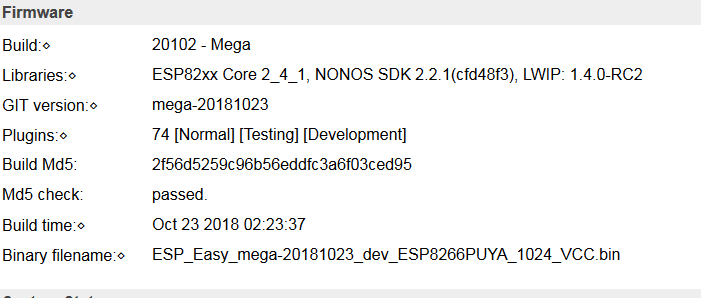
i used this one and work perfectly, responding speed is fantastic....the only probem is that is very old :)
megamarco833
on 9 Apr 2020
i try as suggested this version:
ESP_Easy_mega-20190925_normal_core_242_ESP8266_1M.bin
in this case i see ESP_Easy_0 i connect to that SSID but when i insert my credential and reboot i can't find ESP inside my network
so also this revision is not working
megamarco833
on 9 Apr 2020
very strange.
Can you connect to it while in AP mode, then navigate manually to the /config page, enter the credentials there, save and wait a while before rebooting?
Perhaps even change something else and save it before rebooting.
Maybe the data is not really flushed to the flash?
TD-er
on 9 Apr 2020
Sorry for asking, but how to go inside /config web page when i'm in AP mode (it means connect to SSID esp_easy and 192.168.4)??
Thanks
megamarco833
on 9 Apr 2020
yes, 192.168.4.1
how to configure please go to - >wiki
 uzi18
on 9 Apr 2020
uzi18
on 9 Apr 2020
If you are connected to the AP, then you can also use your browser to open the url.
http://192.168.4.1/config
TD-er
on 9 Apr 2020
hi, i flashed again latest version:
20200328_normal_ESP8266_1M.bin
after that i go directly at 192.168.4.1/config
i set manually my network
the i went to /device to create one device just before reboot as you suggested.
but when i submit /config page, and i click on /device, ESP was disconnected.
i reboot (power off and on) and after that i do not see anymore SSID ESP_Easy network.
i submitted IP 192.168.0.222
but if i try con connect to this IP i'm not able to see the web page, i receive not responding.
i try many times, and only one time just for a while was loaded the front header of ESP easy web page, but the web page was not loaded completly and after some second i receive again connection error
EDIT:
i confirm, navigating from menu:
/config
/device
/advanced
is normal when in AP mode and connected to 192.168.4.1
immediatly after submit the parameters inside /config the ESP reboot automatically
and when boot up, is impossible to open the assigned IP
and sometime it connect to home page, but it's very very very unstable, almost impossible usage....it respond 1 times vs 20 tentatives
megamarco833
on 9 Apr 2020
yes, 192.168.4.1
how to configure please go to - >wiki
i know.....but, it was not a question how to configure, but how to make the test that TD-er requested :-)
megamarco833
on 9 Apr 2020
Can you test a build with "beta" in the name, at least I hope there is one for 1M builds...
I do have the feeling this is not a PUYA/storage issue, but more a WiFi issue and the builds with "beta" in the name do use different SDK build for WiFi.
TD-er
on 10 Apr 2020
unofrtunatly not, there isn't
the only one is for 4M
ESP_Easy_mega-20200328_test_ESP8266_4M1M_VCC
maybe when you have time can you compile a test for this scope?
thanks!
megamarco833
on 10 Apr 2020
{snip} and sometime it connect to home page, but it's very very very unstable, almost impossible usage....it respond 1 times vs 20 tentatives
For reference, this is the same behavior I experienced with this issue. I also noticed that immediately after using the _erase_ (erasesdkwifi) command there would be a very short period of improved WiFi connectivity, but the problem would quickly return.
{snip} I do have the feeling this is not a PUYA/storage issue, but more a WiFi issue {snip}
I think that is a good conclusion. It seems to me that the Sonoff Basic hardware is temperamental and WiFi connection is fussy with some firmware builds. Maybe it's caused by a poor component choice that is used on the board. Or possibly local EMI/RFI noise related due to the board layout.
For example, I noticed a slight improvement after adding the missing pull-up resistor and installing another decoupling cap (as outlined in the forum discussion). So I'm leaning towards a noise issue that is affecting RF calibration.
@TD-er, since you're actively involved in troubleshooting this I bug, I think it would serve you best to flash an old Sonoff Basic R2 and do some first-person debugging. This should save you a lot of time in the long run since you'll be able to debug in real-time. Just be sure to use the version with the ESP8266 chip, not the new ESP8255 V2 design (which doesn't experience the problem).
- Thomas
thomastech
on 10 Apr 2020
@thomastech
That's the second time you mention the ESP8255. The first time I assumed a typo, but it seems there really is such a version, or at least a lot of others make the same typo.
Never heard of it and I can't find it on Espressif's site.
Is that number read on the chip?
If so, then we may also have other (new) issues as there may be counterfeit units at hand?
I will take out an old ESP8266 based Sonoff basic and start experimenting.
@thomastech Maybe you can also read through this blog and try to see if there is some similarity in behavior possible?
It also refers to RF interference, but only a bit worse as it does inject its own RF noise due to a misplaced capacitor at the antenna.
TD-er
on 10 Apr 2020
Hi, i do not know if this could help, but just to test i flash tasmota. It works and web pages are responding quickly. With this test we can exclude hardware defects?
And we can exclude esp8255?
megamarco833
on 10 Apr 2020
Is it a recent version of Tasmota?
I can always have a look at what SDK they use.
TD-er
on 10 Apr 2020
They do seem to use PIO_FRAMEWORK_ARDUINO_ESPRESSIF_SDK22x_190703, where we use PIO_FRAMEWORK_ARDUINO_ESPRESSIF_SDK22x_191122
I will make a build for you with the same SDK as they use.
TD-er
on 10 Apr 2020
yes, the latest one.
but i also test some old version and all of them works.
this is the report of latest version:
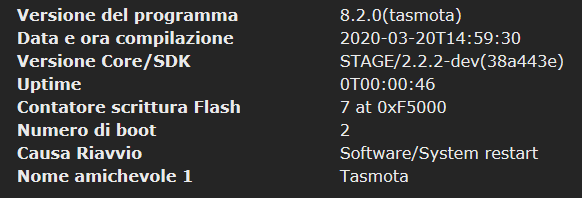
maybe you catch the point, different sdk
if you have time we can test a different build with same SDK?
megamarco833
on 10 Apr 2020
I made a quick test build: issue_2931_SDK_190703.zip
TD-er
on 10 Apr 2020
i used this one and work perfectly, responding speed is fantastic....the only probem is that is very old :)
if ((flash_chip_id & 0x000000ff) == 0x85) { // 0x146085 PUYA

manufacturer id = 85 and flash type 6014 also confirms
uzi18
on 10 Apr 2020
i used this one and work perfectly, responding speed is fantastic....the only probem is that is very old :)if ((flash_chip_id & 0x000000ff) == 0x85) { // 0x146085 PUYAmanufacturer id = 85 and flash type 6014 also confirms
yes, correct!
but the version on print scren: 20180223 is the only one that works
now i'm flashing th eTD-er test, in while i come back with result
megamarco833
on 10 Apr 2020
I made a quick test build: issue_2931_SDK_190703.zip
firtst test made with:
\issue_2931_SDK_190703\normal_ESP8266_1M.bin
i used the /setup web page to insert my network credential.
after reboot i can't see again my ESP with DHCP inside my network and AP SSID desappear
second test: again with \issue_2931_SDK_190703\normal_ESP8266_1M.bin
in this case i used /config web page and i set manually static IP as 192.168.0.222
after that i submit /config page and reboot
in this case no i can go at web page 192.168.0.222 and see the ESP but with many many many lost connection and very very very low speed of navigation trough web pages
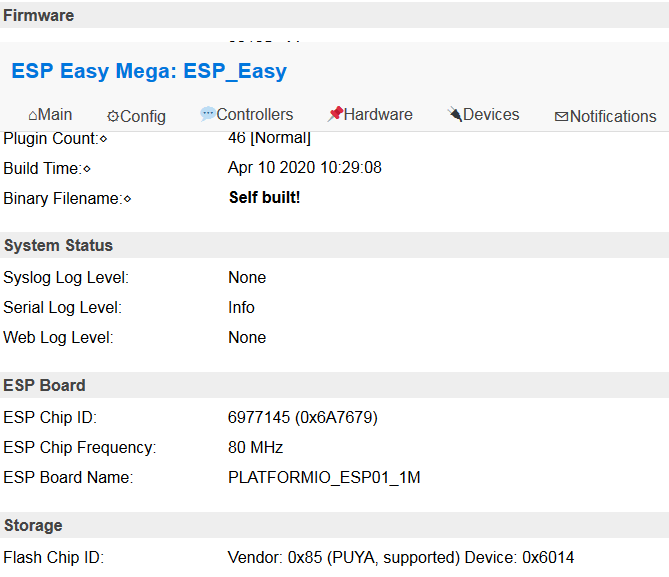
so summarizing we have 3 issue:
1) using /setup webpage is not possible to see esp ip after reboot => dhcp problem??
2) using /config webpage is ok to set static ip but
2.1 issue => very slow navigation trought web page
2.2 issue => many disconnections
EDIT:
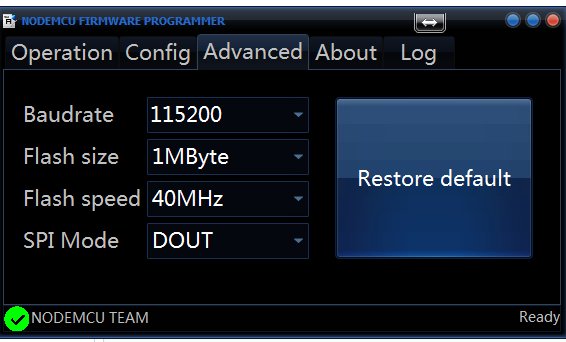
p.s flash mode is was made with this parameters, like the tasmota test that i reported:
megamarco833
on 10 Apr 2020
i tested also
\issue_2931_SDK_190703\normal_ESP8285_1M.bin
i used /config webpage directly but after reboot i can't see web page of esp at static ip that i give 192.168.0.222.
ps. between flashing a version to another one i perform a blank1M.bin flash, is it correct or i can avoid this?
megamarco833
on 10 Apr 2020
ps. between flashing a version to another one i perform a blank1M.bin flash, is it correct or i can avoid this?
To make sure we only test the things used in the ESPEasy firmware, I think that's the best way to test it.
Or else we may draw incorrect conclusions.
By the way, have you also tested non-static IP?
TD-er
on 10 Apr 2020
By the way, have you also tested non-static IP?
you mean go to /config web page and just put SSID without static IP ?
no this is not tested because i thought that using /config is the only way to have result because i assign a static ip an then i ping that one.
because as i write using /setup (that i think is using dhcp) and giving credential make esp not reponding and i can't find the dhcp assigned (i guess because of many disconnections, so it's impossible discover the IP gived)
but if you want i can make another test using /config and live blank tha IP assignement.
just let me know
megamarco833
on 10 Apr 2020
If connected via AP mode, then the ESP is running a DHCP server itself to give your mobile/computer an IP in the range 192.168.4.x.
When in station mode (STA) the ESP does connect to another access point and should run a DHCP client. (if no static IP is set)
If you have trouble finding the assigned IP, you may try to use a Network Analyzer app on your phone to look what nodes are active in the network.
You can also set UDP port on the ESP and on another node.
Then you can also see what other ESPEasy nodes are present in the network.
The preferred port is UDP port 8266.
N.B. if you set this port, you may need to reboot the node or else it will not show other nodes present in the network.
For the issue regarding ESP32 with static IP you suggested, I did come across some logic errors.
So if that's fixed, I will build a new version to test.
TD-er
on 10 Apr 2020
Hi
I am also a user of pretty old Sonoff Basic with ESPEasy firmware and I have been struggling trying to find a firware that works
Thanks to this post I finally found a version that is working perfectly compared to recent ones taht were making unit unresponsive, webpage really slow or not responding, ....
Latest one I flashed today 👍
Libraries:⋄ | ESP82xx Core 2_4_1, NONOS SDK 2.2.1(cfd48f3), LWIP: 1.4.0-RC2
GIT version:⋄ | mega-20181023
Plugins:⋄ | 74 [Normal] [Testing] [Development]
Build Md5: | 2f56d5259c96b56eddfc3a6f03ced95
Md5 check: | passed.
Build time:⋄ | Oct 23 2018 02:23:37
Binary filename:⋄ | ESP_Easy_mega-20181023_dev_ESP8266PUYA_1024_VCC.bin
for both chipsets :
Flash Chip ID: | Vendor: 0x5E Device: 0x4014
Flash Chip ID: | Vendor: 0x85 Device: 0x6014
not sure the problem is really PUYA related
 jujuinparis
on 10 Apr 2020
jujuinparis
on 10 Apr 2020
If connected via AP mode, then the ESP is running a DHCP server itself to give your mobile/computer an IP in the range 192.168.4.x.
When in station mode (STA) the ESP does connect to another access point and should run a DHCP client. (if no static IP is set)
If you have trouble finding the assigned IP, you may try to use a Network Analyzer app on your phone to look what nodes are active in the network.
understand, but i use finger (app for android to find inside a networkd the IP connected)
and when i use /setup web page, where i can only set mu SSID and passw.
so here i used dhcp of course.
when ESP reboot, is impossible to find the ip assigned to ESP, and i guess that's because ESP is instable and reboot many times or stuck, so for any network analyzer (like fing that i use) is ipossible to discovere the IP.
that's my assumption to explain why ESP AP mode desappear but i can find esp on my network.
using /config, where i tested setting an IP i'm aware of course of what IP i have to ping, so after some tenative to ping 192.168.0.222 (ip that i choose in /config) i succeed on open web page...but as i wrote, it's instable, very instable.
so if from code point of view for you make sense to test also:
1) flash esp with your bin of today
2) go in /config and just put my SSID and passw. and reboot without assign IP address
i will do.
but i didn't make this file because i thought that using /setup or /config without assign an IP was the same thing :-)
You can also set UDP port on the ESP and on another node.
Then you can also see what other ESPEasy nodes are present in the network.
The preferred port is UDP port 8266.
N.B. if you set this port, you may need to reboot the node or else it will not show other nodes present in the network.
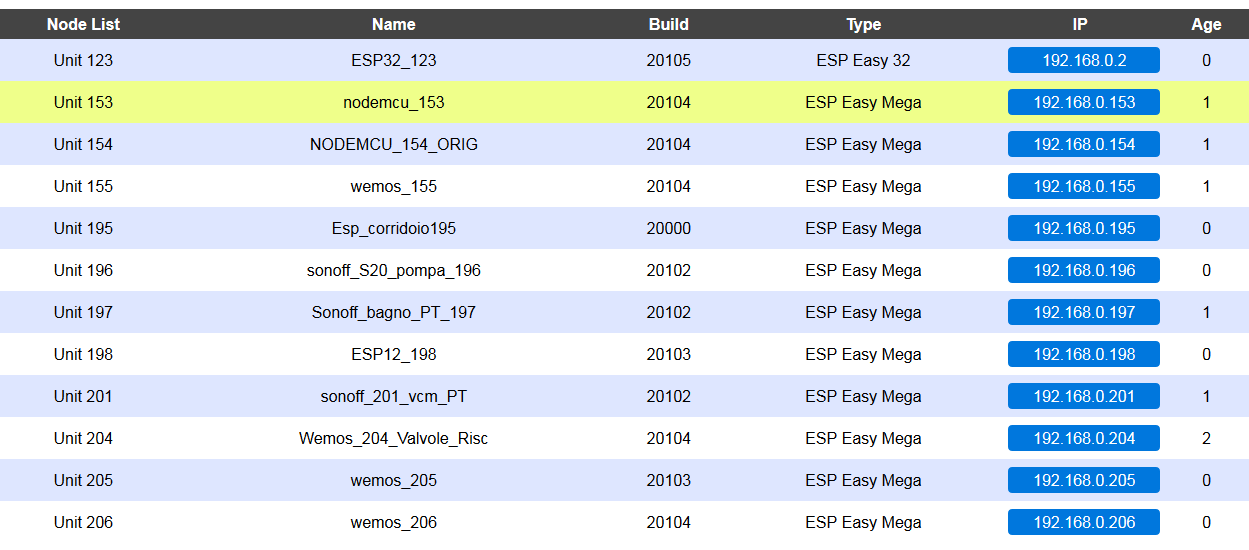
yes, i use UDP port 65500
and i have many esp connected :)
For the issue regarding ESP32 with static IP you suggested, I did come across some logic errors.
So if that's fixed, I will build a new version to test.
can you please give me the bin file for ESP32 wroom so i can test?
i'm lost on modification that uou and uzi did...so i do not want to make confusion choosing the wrong file to test :)
megamarco833
on 10 Apr 2020
Libraries:⋄ | ESP82xx Core 2_4_1, NONOS SDK 2.2.1(cfd48f3), LWIP: 1.4.0-RC2
GIT version:⋄ | mega-20181023
Plugins:⋄ | 74 [Normal] [Testing] [Development]
Build Md5: | 2f56d5259c96b56eddfc3a6f03ced95
Md5 check: | passed.
Build time:⋄ | Oct 23 2018 02:23:37
Binary filename:⋄ | ESP_Easy_mega-20181023_dev_ESP8266PUYA_1024_VCC.bin
yes, also for me this is the only bin version that works for sonoff basic R2:
ESP_Easy_mega-20181023_dev_ESP8266PUYA_1024_VCC.bin
for both chipsets :
Flash Chip ID: | Vendor: 0x5E Device: 0x4014
Flash Chip ID: | Vendor: 0x85 Device: 0x6014
mine is 0x85 device 0x6014
that uzi18 confirm as PUYA:
if ((flash_chip_id & 0x000000ff) == 0x85) { // 0x146085 PUYA
manufacturer id = 85 and flash type 6014 also confirms
i do not know about 0x5E device 0x4014
megamarco833
on 10 Apr 2020
Flash Chip ID: | Vendor: 0x5E Device: 0x4014
Isn't that the ESP8285 ?
Otherwise it is SPI_FLASH_VENDOR_TENX = 0x5E, /* Tenx Technologies */
TD-er
on 10 Apr 2020
all my sonoff basic are 8266 based (or I never paid attention and always flash esp8266 version of espeasy :) )
jujuinparis
on 10 Apr 2020
hello
on a Sonoff Touch with esp8285
Flash Chip ID | Vendor: 0x51 Device: 0x4014
-- | --
jujuinparis
on 10 Apr 2020
A new test build: issue_2931_SDK_190703 (2).zip
TD-er
on 10 Apr 2020
Flash Chip ID: | Vendor: 0x5E Device: 0x4014
Isn't that the ESP8285 ?
Otherwise it isSPI_FLASH_VENDOR_TENX = 0x5E, /* Tenx Technologies */
i can give to you a confirmation.
on all my sooff basic R2 i received only one that not work with:
ESP_Easy_mega-20181023_dev_ESP8266PUYA_1024_VCC.bin
but you have to use:
ESP_Easy_mega-20180923_normal_ESP8285_1024.bin
also here no new version but only this one, but esp8285
is not possible to recognize beceuse the hardware is similar.
i have only one sonoff basic r2 that has this vendor.
megamarco833
on 10 Apr 2020
ESP8285 does not have an external flash chip, so you have to open the unit to have a look at the PCB to see the difference.
TD-er
on 10 Apr 2020
A new test build: issue_2931_SDK_190703 (2).zip
thanks first of all!
i tested for my sonoff that has vendor PUYA, i used:
normal_ESP8266_1M
using /setup (dhcp) is not working, i'm not able to detect the esp on my internal network
sing /config and use static IP 192.168.0.222 after submit it and reboot the responding is very slow...
i see that it's connected by 3minutes, but quite impossible navita trough web pages....
for esp32 what i should test?
test_ESP32_4M316k-factory or test_ESP32_4M316k ?
or both? :-)
i need only to flash this without the other three files?
thanks
megamarco833
on 10 Apr 2020
A new test build: issue_2931_SDK_190703 (2).zip
i teste ESP32 with this:
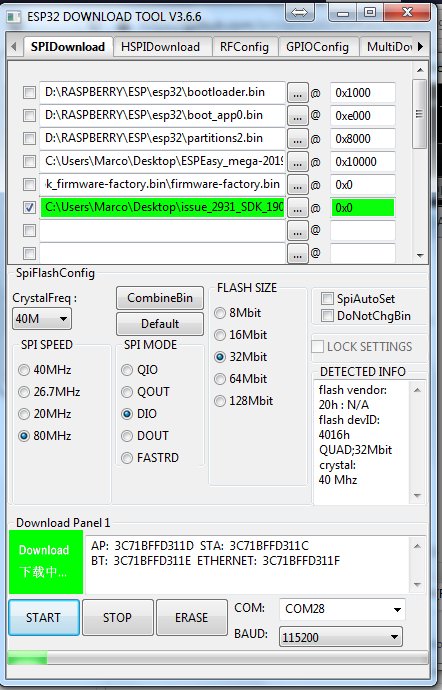
i use build_ESP32_staticIP_fix\test_ESP32_4M316k-factory.bin
in this case it work!!!!!
i use /setup web page then reboot
find what ip assigned by dhcp, change to favourite mine static if and then reboot
i connect to that IP and it is very fast responding...so first response is very good!
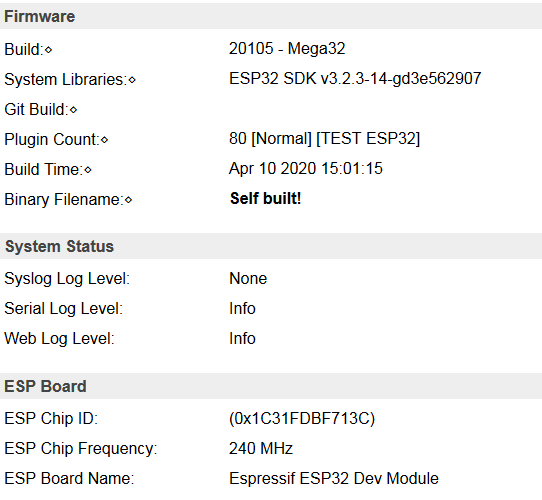
this is what i have in /sysinfo
what's about the vendor here? :)
i can get some information?
last question what's the difference between: test_ESP32_4M316k-factory or test_ESP32_4M316k ?
i used for this test: test_ESP32_4M316k-factory.bin
megamarco833
on 10 Apr 2020
if you flash espeasy first time - use factory.bin, next time you can update from webinterface with standard bin file
uzi18
on 10 Apr 2020
if you flash espeasy first time - use factory.bin, next time you can update from webinterface with standard bin file
wow fantastic that's there is also this opportunity!!!
thanks for explanation.
so factory is just for firts time, if i want to update from webgui i can just use the other file.
and information about vendor?
i see that's there are many version of ESP32
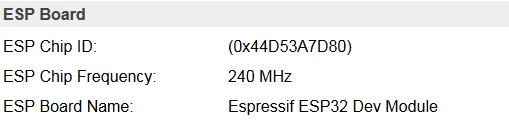
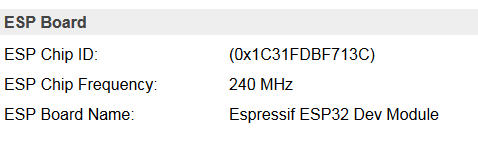
i have for example 3 esp32 all marked as wroom32 but two with yellow pin and one with black pin.
i do not understand the differences beetwing this two...but i can say that black pin is more stable.
but with this last version of firmware yellow pin seams gain stability
yellow pin:
black pin:
megamarco833
on 10 Apr 2020
That's the second time you mention the ESP8255. The first time I assumed a typo, but it seems there really is such a version, or at least a lot of others make the same typo.
My apologies, it's a typo. I meant ESP8285.
Maybe you can also read through this blog and try to see if there is some similarity in behavior possible? It also refers to RF interference, but only a bit worse as it does inject its own RF noise due to a misplaced capacitor at the antenna.
Fortunately the Sonoff Basic does not have the RF snubber cap that was found on those Wemos clones. So Sonoff avoided that reported mistake.
all my sonoff basic are 8266 based (or I never paid attention and always flash esp8266 version of espeasy :) )
I found that ESPEasy's ESP8266 1M firmware will run on a ESP8285 based Sonoff. So you'll need to open up the Sonoff to determine its hardware release. Keep in mind that the Sonoff Basic switched to the ESP8285 a couple years ago.
- Thomas
thomastech
on 10 Apr 2020
I found that ESPEasy's ESP8266 1M firmware will run on a ESP8285 based Sonoff. So you'll need to open up the Sonoff to determine its hardware release. Keep in mind that the Sonoff Basic switched to the ESP8285 a couple years ago.
but how to recognize if it's 8285 or 8266 ?
what's difference in hardware i have to see?
megamarco833
on 10 Apr 2020
but how to recognize if it's 8285 or 8266 ?
Use a magnifying lens and read the part number printed on the microcontroller. Or take good top/bottom photos of the PCB and post the images here for our review.
what's difference in hardware i have to see?
The ESP8266 board has a Flash memory chip, the ESP8285 does not. So that is another way to determine which ESP chip variant is being used.
For example, here are top/bottom images of the old ESP8266 Sonoff Basic PCB:
https://www.itead.cc/wiki/images/e/e4/Sonoff_parts_without_433.jpg
The 1M Flash chip is the component mistakenly labeled "Serial-TTL."
- Thomas
thomastech
on 10 Apr 2020
if you flash espeasy first time - use factory.bin, next time you can update from webinterface with standard bin file
Oh? Did you implement OTA for ESP32? :)
That's still on my to-do and it is bothering me more and more, so it is moving up the list even more :)
TD-er
on 10 Apr 2020
if you flash espeasy first time - use factory.bin, next time you can update from webinterface with standard bin file
Oh? Did you implement OTA for ESP32? :)
That's still on my to-do and it is bothering me more and more, so it is moving up the list even more :)
ok in fact ota still not work, so was wrong
uzi18
on 10 Apr 2020
I found that ESPEasy's ESP8266 1M firmware will run on a ESP8285 based Sonoff. So you'll need to open up the Sonoff to determine its hardware release. Keep in mind that the Sonoff Basic switched to the ESP8285 a couple years ago.
but how to recognize if it's 8285 or 8266 ?
what's difference in hardware i have to see?
Strictly speaking, the ESP8285 and ESP8266 + 1M flash do not differ that much.
- ESP8285 does have 1M flash embedded in the same chip.
- ESP8285 does not use GPIO-9 and -10, as those are used for external flash
So an ESP8266 build may work on ESP8285, but the other way around is probably not going to work.
TD-er
on 10 Apr 2020
ok in fact ota still not work, so was wrong
Please note the ;)
And you've been so busy last few days/weeks, maybe you were preparing a very nice surprise PR :)
TD-er
on 10 Apr 2020
ok in fact ota still not work, so was wrong
Please note the ;)
And you've been so busy last few days/weeks, maybe you were preparing a very nice surprise PR :)
just had more time than usual and platformio and git works as expected
uzi18
on 10 Apr 2020
but how to recognize if it's 8285 or 8266 ?
Use a magnifying lens and read the part number printed on the microcontroller. Or take good top/bottom photos of the PCB and post the images here for our review.
what's difference in hardware i have to see?
The ESP8266 board has a Flash memory chip, the ESP8285 does not. So that is another way to determine which ESP chip variant is being used.
For example, here are top/bottom images of the old ESP8266 Sonoff Basic PCB:
https://www.itead.cc/wiki/images/e/e4/Sonoff_parts_without_433.jpg
The 1M Flash chip is the component mistakenly labeled "Serial-TTL."* Thomas
i verify and all my sonoff basic (except one) are esp8266, all of them has vendor 0x85 device 0x6014 and the only bin that works is:
ESP_Easy_mega-20181023_dev_ESP8266PUYA_1024_VCC.bin
only one sonoff basic has Vendor: 0x5E Device: 0x4014 and in this one the bin above not workin so i have to use this bin:
ESP_Easy_mega-20180923_normal_ESP8285_1024.bin
also here no new version but only this one.
megamarco833
on 11 Apr 2020
A new test build: issue_2931_SDK_190703 (2).zip
TD-er summarizing:
Esp32 now are ok with static IP,
sonoff we still have same issue: sonoff very slow on respondig that make it impossible to use. This become worst when you use /setup because it assign a dhcp ip, and due to instability of firmware it make impossible to discover/see the sonoff on internal network
megamarco833
on 11 Apr 2020
@megamarco833 I don't think static IP is an issue anymore due to the changes I made yesterday.
So if you can't define a fixed IP per MAC address in your router, then please use static IP.
I have to test with some actual Sonoff units to see what's happening here.
TD-er
on 11 Apr 2020
only one sonoff basic has Vendor: _0x5E Device: 0x4014_ and in this one the bin above not workin so i have to use this bin: ESP_Easy_mega-20180923_normal_ESP8285_1024.bin
Are you sure that Sonoff has a ESP8285? Which Sonoff model is it? The reason I ask is because the vendor code seems to suggest it has an external Flash chip. So I would expect it to have an ESP8266.
For reference, I have several Sonoffs Basics with the ESP8285 chip. All are happy with the recent firmware releases. Every one of them report _Vendor: 0x51 Device: 0x4014_
I have to test with some actual Sonoff units to see what's happening here.
It will be interesting to hear what you find. Hopefully you are successful in taming the demons.
- Thomas
thomastech
on 11 Apr 2020
hi i confirm that all my sonoff basic R2 has esp8266
all has PUYA except one,
the only one that has not PUYA, has another external flash chip, but i can not read what's written, it's very rotten the stamp on it.
anyway, only on this one, that has vendor: 0x5E Device: 0x4014
the ESP_Easy_mega-20181023_dev_ESP8266PUYA_1024_VCC.bin is not working: many disconnection and very slow navigation. so i used: ESP_Easy_mega-20180923_normal_ESP8285_1024.bin and in this case all works fine and it's very stabe.
an all other sonff basic R2 that has vendor 0x85 device 0x6014 i must use the very old version ESP_Easy_mega-20181023_dev_ESP8266PUYA_1024_VCC.bin otherwise it's become unstable and i can flow thrught the page, and it become disconnected frequently
if i flash using tasmota, i do not have any issue, as reported some post above with sdk used by tasmota (tasmota flashed with latest version)
i tested also the test buld that @TD-er send to me, but same issue: system instable, very slow on navigation and (i think that it is a consequence of this things, using /setup (dhcp) it make impossible to discover IP assigned due to unstable system that make it not visible on internal network)
megamarco833
on 12 Apr 2020
hi
@megamarco833 I don't think static IP is an issue anymore due to the changes I made yesterday.
So if you can't define a fixed IP per MAC address in your router, then please use static IP.I have to test with some actual Sonoff units to see what's happening here.
hi @TD-er did you perfrom some tests with sonoff to discover where the issue of stability come from?
thanks
megamarco833
on 14 Apr 2020
@megamarco833 Nope, not yet.
Last few days I had to watch my daughter as Witske had to work night shifts at the hospital.
This means I only could do stuff that required no longer than 5 - 10 minutes of concentration and also not near my office where I have my "pruts projectjes" as my daughter tends to call them.
TD-er
on 15 Apr 2020
hey no problem @TD-er :-)
and thanks for your time and effort in this!
keep in touch when you will be comfortable with your time :+1:
megamarco833
on 15 Apr 2020
A new test build: issue_2931_SDK_190703 (2).zip
hi, i warmup a bit the issue.
i download the latest espeasy nightly avaliable.
@TD-er for ESP32 i tested on my wromm32 the version complied above by you and it was working with fixed IP (previous only with DHCP)
i used: C:\issue_2931_SDK_190703 (2)\issue_2931_SDK_190703\build_ESP32_staticIP_fix\test_ESP32_4M316k-factory.bin at address 0x0
and not flashed bootloader.bin
boot_app0.bin
partitions2.bin
now with C:\ESPEasy_mega-20200410\bin\ESP_Easy_mega-20200410_test_ESP32_4M316k.bin
after flash with esp32 download tool and also here not using the other 3 bin files
i can't see ESP32_TEST AP
so i can't connect the esp32 at my internal network.
i made another try also using the other 3 files, but it not working
i also made another try: after flash the bin file using esp32 download tool, before disconnecting esp32, i used ESP easy flasher, using "program only" and giving serial comands with IP, Network credential an so on, but also with this trial is it not working.
i try to flash again the bin: \build_ESP32_staticIP_fix\test_ESP32_4M316k-factory.bin
and the AP network ESP32_Test become visible.
i try also to flash sonoff basic R2 with the latest espeasy firmware:
ESP_Easy_mega-20200410_normal_ESP8266_1M
now after entering in /setup and giving credential of internal network and static ip it working, but after the reboot, entering in webpage of IP address that i choosed the loading of webpages are very very slow, and many times it disconnect. so little improvement, but again big issue of stability
thans
megamarco833
on 24 Apr 2020
The ESP32 build with "factory" in the name should be flashed from address 0.
Probably not yet present in that test build, but now we have the possibility to OTA ESP32 builds, so then you should use the one without "Factory" in the name.
Regarding the Sonoff Basic R2, do you have a build for the 1M with "beta" in the name? That one uses a different SDK build, which helped with @thomastech for his unstable Sonoff units. (but with replaced flash chip)
TD-er
on 24 Apr 2020
for ESP32, correct inside the version that you give me to fix the static IP address there wasn't the possibility to update firmware using OTA (inside /tools i do not see firmware upgrade)
anyway the version that you give me (factory) i flashed in address 0x0
now the
C:\ESPEasy_mega-20200410\bin\ESP_Easy_mega-20200410_test_ESP32_4M316k.bin
i think that should be flasde in 0x0
but i guess that it also required
bootloader.bin 0x1000
boot_app0.bin 0xe000
partitions2.bin 0x8000
becuase if i look at dimension of the file, the factory is bigger (so i guess it contain the other bins) and the ESP_Easy_mega-20200410_test_ESP32_4M316k.bin is small so i guess it not contain the others bin.
so what i should do? :)
in the new nightly bin i can't see the AP network after flashed...
so maybe i'm doing something wrong on flashing procedure?
Sonoff basic R2 ....no, inside the nightly build "beta" is only ESP_Easy_mega-20200410_test_beta_ESP8266_4M1M.bin that can not fit the sonoff 1M
megamarco833
on 24 Apr 2020
If you flash from serial it is best to use the "factory" build, as it indeed has all other bins included at the correct offset.
Not entirely sure what offset is needed for the bin without "factory" in the name, so chance of doing it wrong is high :)
TD-er
on 24 Apr 2020
mmmm ok so i need to wait the next nightly build to flash esp32 with "factory" bin.
related to sonoff basic r2 will be also included on next nightly build the "beta" for 1M devices?
thanks
megamarco833
on 25 Apr 2020
We have (again) issues with Travis, so that's the reason I didn't toggle a build last week.
It seems Travis is messing up roughly every 2 weeks now.
I can add one build for 1M with the 'beta' core set. It probably will not fit into a "minimal OTA" build though.
TD-er
on 25 Apr 2020
hi @TD-er
i look inside the latest nightly build but i do not find the test for 1M for sonoff basic R2...do you forgot about it? :D
megamarco833
on 29 Apr 2020
hi @TD-er
i look inside the latest nightly build but i do not find the test for 1M for sonoff basic R2...do you forgot about it? :D
Yep, I forgot.
Was too much involved in getting Travis to work again and also the hours I can now do stuff is a bit irregular right now :(
TD-er
on 29 Apr 2020
hi @TD-er
i look inside the latest nightly build but i do not find the test for 1M for sonoff basic R2...do you forgot about it? :DYep, I forgot.
Was too much involved in getting Travis to work again and also the hours I can now do stuff is a bit irregular right now :(
hey, no matter, when you'll be free just put here, if you are confortable doing this here, the test firmware for sonoff basic r2 1M so i will test :)
megamarco833
on 29 Apr 2020
Can you try this test build ?
Edit:
As a warning: this is NOT an OTA update.
It is too large for OTA on an 1M unit.
TD-er
on 2 May 2020
TD-er,
It looks faster on my Basic R1 (comparable with my old version sefl build 20191206).
Only observation I have: page for firmware load does not show a page, only this:
URI: /update
Method: GET
Arguments: 0
Tried to update the other life one, but that one is not capable of going for a FW update.
Must likely have to take it from the wall to use the flasher. But I will do this when I have good working version capab le of OTA.
Some extra information:
I saw that this test firmware was 8266; I tried both the 8266 and 8285 versions of 20200426, but for that one the 8285 was the only one that worked on my Basic R1. The 8266 version kept booting after accessing the web page. How can I detect what version my Basics are? And why does this 8266 looks stable?
 2bontb
on 2 May 2020
2bontb
on 2 May 2020
The build is way too large for OTA update.
So whatever one you try to update, it should be done via USB..
TD-er
on 2 May 2020
Ok, that explains. Also I tried to read all of above, and I started to open all my assumed basic R1's
And here it comes.
My test sonoff Basic is an R2 v1.0 2017-10-11 Chip is unreadable
My other flashed sonof basic TH_v1.1 2017-5-5 Chip is ESP8266EX
So they are different, but both had same problem with 20200426
2bontb
on 2 May 2020
Can you see what flash chip is used (also what esp_tool.py reports when trying to flash over USB)?
TD-er
on 2 May 2020
The TH 1.1:
esptool.py v2.8
Serial port COM7
Connecting....
Detecting chip type... ESP8266
Chip is ESP8266EX
Features: WiFi
Crystal is 26MHz
MAC: 60:01:94:3e:ff:c5
Uploading stub...
Running stub...
Stub running...
Manufacturer: 5e
Device: 4014
Detected flash size: 1MB
Hard resetting via RTS pin...
The R2
esptool.py v2.8
Serial port COM7
Connecting....
Detecting chip type... ESP8266
Chip is ESP8266EX
Features: WiFi
Crystal is 26MHz
MAC: 60:01:94:3e:ff:c5
Uploading stub...
Running stub...
Stub running...
Manufacturer: 5e
Device: 4014
Detected flash size: 1MB
Hard resetting via RTS pin...
2bontb
on 2 May 2020
Flash of the R2:
esptool.py v2.8
Serial port COM7
Connecting....
Detecting chip type... ESP8266
Chip is ESP8266EX
Features: WiFi
Crystal is 26MHz
MAC: 84:f3:eb:a7:5e:db
Uploading stub...
Running stub...
Stub running...
Configuring flash size...
Flash params set to 0x0220
Compressed 864544 bytes to 573465...
Wrote 864544 bytes (573465 compressed) at 0x00000000 in 51.0 seconds (effective 135.6 kbit/s)...
Hash of data verified.
Leaving...
Hard resetting via RTS pin...
2bontb
on 2 May 2020
Oops that flash does not work... What are the flash parameters for a Basic? I normally use ESPeasyflasher.
2bontb
on 2 May 2020
This one did work:
esptool --port COM7 --baud 115200 write_flash -fs 1MB -fm dout 0x0 SonoffBasic_WiFi_test_custom_beta_ESP8266_1M.bin
esptool.py v2.8
Serial port COM7
Connecting....
Detecting chip type... ESP8266
Chip is ESP8266EX
Features: WiFi
Crystal is 26MHz
MAC: 84:f3:eb:a7:5e:db
Uploading stub...
Running stub...
Stub running...
Configuring flash size...
Compressed 864544 bytes to 573465...
Wrote 864544 bytes (573465 compressed) at 0x00000000 in 51.0 seconds (effective 135.6 kbit/s)...
Hash of data verified.
Leaving...
Hard resetting via RTS pin...
2bontb
on 2 May 2020
I flashed all back to: ESP_Easy_mega-20200222_minimal_core_242_ESP8266_1M_OTA.bin
Waiting for new release that supports OTA.
If I can help with anything to debug let me know.
2bontb
on 2 May 2020
The build is way too large for OTA update.
So whatever one you try to update, it should be done via USB..
hi @TD-er
i tested your build in a fresh installation, over USB
now when i'm conneced to Sonoff using AP the navitagion ad response is very fast.
i enter inside menu /confing throught AP and set static IP
then i reboot the unit and here start again the issue: i give as static ip 192.168.0.222 and when i try to enter on that IP web page 9 times on 10 it disconnect.
after some seconds after a boot i see the webpage, but immediatly after if i click someting inside web page just loaded, it will not respond any more.
so it respond only immediatly after a boot
megamarco833
on 3 May 2020
What happens when you do a cold boot?
TD-er
on 3 May 2020
What do you mean? Sorry..
megamarco833
on 3 May 2020
Power off, power on.
A warm boot is just calling a reboot without disconnecting power.
TD-er
on 3 May 2020
The same.. I tested but i do not see any improve / change :-(
megamarco833
on 4 May 2020
OK, I will later this week setup an old Sonoff basic to see what's happening here.
I just unpacked the Sonoff units last week and have now a nice box labelled "Sonoff" and it appears I do have plenty of those to test.
TD-er
on 4 May 2020
Ahahah... Ok, thanks for that
megamarco833
on 4 May 2020
OK, I will later this week setup an old Sonoff basic to see what's happening here.
I just unpacked the Sonoff units last week and have now a nice box labelled "Sonoff" and it appears I do have plenty of those to test.
hey @TD-er did you succeed on testing the plenty Sonoff basic on your boxes? :-)
did you find something interesting? :+1:
thanks!
megamarco833
on 12 May 2020
Not yet, as I've been way too busy on the projects that have a deadline (which 'they' did move forward to help me out...)
TD-er
on 12 May 2020
Hey @TD-er not problem, it's an open source, nothing is mandatory. Take your time please :)
megamarco833
on 12 May 2020
hi @TD-er do you performed the test with your sonoff ?
thanks
megamarco833
on 16 Jun 2020
Nope not yet, but I will mark this one as unread for me so tomorrow I will see it again.
My mind is hopeless these days :(
TD-er
on 17 Jun 2020
OK, I have been working on these WiFi issues for the past week and I am pretty sure I have found the cause of issues like this one.
See PR #3148
It is not done yet, as it appears to be caused by the WiFi status being incorrect in the core library.
See: https://github.com/esp8266/Arduino/issues/7432
This does not happen on all nodes and not always. But at least I now have a node where it is happening almost always, or at least very well reproducible.
TD-er
on 10 Jul 2020
Hey @TD-er thanks to not forget about my issue. I'm on vacation since today. I'll be back in 20 july and will for sure test. Thanks again!
megamarco833
on 10 Jul 2020
OK, so I have a deadline to make it work :)
TD-er
on 10 Jul 2020
OK, so I have a deadline to make it work :)
Ahahah... Was not the intent of my message :) :)
... But ok, it is :) :)
megamarco833
on 10 Jul 2020
Thanks for the new release. I tried it in my Sonoff Basic R2 that has a 4MB Flash upgrade. The browser issues returned (overall slow page refresh, some page timeouts, many long hangs).
I used this bin: ESP_Easy_mega_20200720_test_ESP8266_4M1M_VCC.bin
I reverted back to the working bin and Web operation was restored. The working bin is the one you created during our WiFi debugging last March. File Details:
Build: 20104 - Mega
System Libraries: ESP82xx Core 2_6_3, NONOS SDK 2.2.2-dev(a58da79), LWIP: 2.1.2 PUYA support
Plugin Count: 80 [Normal] [Testing]
Build Time: Mar  4 2020 20:43:39
I assumed that this closed issue was related to the discussion we had last March. But maybe not?
Follow this link if you would like to refresh the details:
https://www.letscontrolit.com/forum/viewtopic.php?f=6&t=7474&p=42817
- Thomas
thomastech
on 21 Jul 2020
Just for your information...
I made a build last night to get a clear separation between the "before" and "after" of PR #3148
I did already merge it, but it is not yet included in that build.
I will start a new build now so you can test it.
TD-er
on 21 Jul 2020
Just as a heads up, the build including #3148 is now published.
TD-er
on 21 Jul 2020
@TD-er , More feedback:
I installed ESP_Easy_mega_20200721_test_ESP8266_4M1M_VCC.bin. The WiFi problems returned. Browser problems are worse on this release when compared to yesterday's release (ESP_Easy_mega_20200720_test_ESP8266_4M1M_VCC.bin). That is to say, I could not get any pages to load.
Serial log shows the board is running and rule events are working. But I see WiFi disconnect messages. Here's an example:
341993 : Error : MQTT : Connection lost, state: Disconnected
342062 : Info  : MQTT : Connected to broker with client ID: ESPEZ_TEST_0
342066 : Info  : Subscribed to: ESPEZ_TEST/#
342091 : Info  : EVENT: MQTT#Disconnected
342191 : Info  : EVENT: MQTT#Connected
346034 : Info  : WD   : Uptime 6 ConnectFailures 0 FreeMem 14112 WiFiStatus WL_CONNECTED
350966 : Info  : WIFI : Disconnected! Reason: '(200) Beacon timeout' Connected for 24 s
350992 : Error : MQTT : Connection lost, state: Connection lost
350998 : Info  : IP   : Static IP : 192.168.1.254 GW: 192.168.1.1 SN: 255.255.255.0 DNS: 192.168.1.1
350999 : Info  : WIFI : Connecting Wizard1_2G4 attempt # 14
351042 : Info  : EVENT: WiFi#Disconnected
351330 : Info  : EVENT: MQTT#Disconnected
354143 : Info  : WIFI : Connected! AP: Wizard1_2G4 (C4:E9:84:43:52:19) Ch: 6 Duration: 3134 ms
354145 : Info  : WIFI : Static IP: 192.168.1.254 (ESPEZ-TEST) GW: 192.168.1.1 SN: 255.255.255.0   duration: 11 ms
354157 : Debug : WiFi : WiFi services initialized
354158 : Info  : EVENT: WiFi#Connected
354282 : Error : MQTT : Intentional reconnect
354338 : Info  : MQTT : Connected to broker with client ID: ESPEZ_TEST_0
354341 : Info  : Subscribed to: ESPEZ_TEST/#
354346 : Info  : EVENT: MQTT#Connected
369137 : Error : MQTT : Connection lost, state: Disconnected
369213 : Info  : MQTT : Connected to broker with client ID: ESPEZ_TEST_0
369216 : Info  : Subscribed to: ESPEZ_TEST/#
369221 : Info  : EVENT: MQTT#Disconnected
369285 : Info  : EVENT: MQTT#Connected
- Thomas
thomastech
on 21 Jul 2020
OK, I have absolutely no idea at all what may be happening there.
The only thing I can see from your logs is that is is roughly 15 seconds give or take a few msec, when the node gets disconnected again.
Have you also tried with DHCP?
I tried using static IP here, so it should work, but just to be sure it has nothing to do with this.
TD-er
on 21 Jul 2020
I made a test build on my machine, which only has the pending PR with the floating point compare functions.
All other should be the same as the last build you tested.
Only difference is.... it is made in Windows
TD-er
on 21 Jul 2020
@TD-er: Feedback
I configured the Sonoff to use DHCP, plus rebooted the WiFi router. Confirmed DHCP in the serial logs. New IP was assigned. No improvement to web access.
I flashed the "Windows" test build bin. A couple times I was able to get some device web pages to load. But mostly hangs and timeouts. Very similar behavior to the release I installed yesterday.
I used serial command "EraseSDKwifi" and rebooted to see if a fresh RF calibration would help. No improvement.
- Thomas
thomastech
on 21 Jul 2020
OK thanks for testing.
I will test on a basic r2 unit (and probably upgrade its flash too if I can find those flash chips I have laying around somewhere...) tomorrow.
TD-er
on 21 Jul 2020
@TD-er
i flased a sonoff basic R2 with SPI mode = DOUT and latest fw: ESP_Easy_mega_20200721_normal_ESP8266_4M1M
but unfortunatly if doesn't work
ith this bin i'm not able to see the wifi AP espEasy net :(
megamarco833
on 22 Jul 2020
i flased a sonoff basic R2 with SPI mode = DOUT and latest fw: ESP_Easy_mega_20200721_normal_ESP8266_4M1M
FWIW, I see that you tried the "4M1M" bin for the test. That bin will require a Sonoff Basic that has been DiY upgraded with a 4MB Flash chip. The factory default Flash size is only 1MB.
Also, this odd WiFi bug only affects the Sonoff Basic R2 with the ESP8266 chip (external Flash). The newer version with the ESP8255 (internal Flash) works fine.
- Thomas
thomastech
on 22 Jul 2020
hey Thomas, you are 110% right i wrongly selected the correct bin, sorry
now i tried with correct one: ESP_Easy_mega_20200721_normal_ESP8266_1M.bin
it seams working, but when i try to go at:
192.168.4.1/setup
and enter the credentials and reboot, i can't see the sonoff inside my network (dhcp)
if after flash i go at;
192.168.4.1/config
and i manually setup static IP it works, but's slow in refresh and update web pages
after some minutes the sonoff is not responding at all.... :(
megamarco833
on 22 Jul 2020
@megamarco833: Those symptoms are related to the WiFi issue discussed in this issue ticket. Hopefully TD-er can replicate the bug using his Sonoff Basic R2 (with ESP8266) and find a solution.
- Thomas
thomastech
on 23 Jul 2020
I was thinking about this (when not...) and came across a warning and discussion I had a while ago with Theo Arends (the one behind Tasmota) and one of the points he made back then was to be as easy as possible on the Sonoff basic units during WiFi connection as possible.
This suggests -from an electrical point of view- that the power supply may not be as constant as we need during RF calibration.
So could you try to add a few capacitors to the 3v3 lines?
I know it is hard to add them as close as possible to the ESP itself, but I guess the flash chip is also quite close and has gigantic pads compared to the solder pads on the ESP.
So I was thinking about 22 - 100 uF capacitor over the power lines of the flash chip could help here.
I will try to make a test build which does do only calls to delay() during wifi connection and nothing else.
I'm a bit out of options here to what may be the issue here.
In the last nightly build, I have fixed an issue where the reported WiFi status is incorrect sometimes. (made an issue about it, but nobody replied to it yet) Well it is not really fixed, but more like a work-around.
So that would at least fix it for a number of nodes that may run into some very timing specific issues. I could only reproduce it with 1 node I have here, but what I saw was very similar to lots and lots of reported issues.
This may be a different one I guess, which could be related to badly tuned RF calibration.
RF calibration may go wrong on these occasions:
- Fluctuating voltage (proof: turn off RF calibration on battery powered unit and it will run fine until its battery voltage drops)
- Incorrect tuned antenna (bad PCB design)
- Too much disturbances during calibration.
The last one, I think, we can rule out as it has been tested over and over again by you guys.
The incorrect tuned antenna is a possibility, but then I really must know what differences the "SDK" binaries make here and the Espressif guys aren't that forthcoming with information on that.
Here is the same build as last time, but now with SDK22x_191122: ESP_Easy_mega_20200723_test_ESP8266_4M1M_VCC.bin
That is the same SDK as was then used to create the "magic" working version.
TD-er
on 23 Jul 2020
So I was thinking about 22 - 100 uF capacitor over the power lines of the flash chip could help here.
I added a 47uF across Vcc. This is in addition to the 0.1uF decoupling cap I added during my previous troubleshooting. No improvement, browser problems remain.
Here is the same build as last time, but now with SDK22x_191122: {snip}
That special bin is a winner. Browser access works great.
- Thomas
thomastech
on 23 Jul 2020
OK, I will make an entry in the platformIO.ini file to have an "alternative WiFi" build included.
TD-er
on 23 Jul 2020
OK, thanks for the workaround. But I have a feeling that this issue will return.
Did you have a chance to flash your Sonoff Basic R2? Perhaps you will notice something that leads to a holy grail fix.
- Thomas
thomastech
on 23 Jul 2020
Can you try the "_alt_wifi" builds in this test build?
https://github.com/letscontrolit/ESPEasy/pull/3179#issuecomment-663773294
TD-er
on 25 Jul 2020
Can you try the "_alt_wifi" builds in this test build?
I flashed ESP_Easy_mega_20200725_test_alt_wifi_ESP8266_4M1M_VCC and it works well. System build info:
```Build: 20109 - Mega
System Libraries: ESP82xx Core a5432625, NONOS SDK 2.2.2-dev(a58da79), LWIP: 2.1.2 PUYA support
Git Build:
Plugin Count: 83 [Normal] [Testing]
Build Origin: Travis
Build Time: Jul 25 2020 00:54:54
Binary Filename: ESP_Easy_mega_20200725_test_alt_wifi_ESP8266_4M1M_VCC
Build Platform: Linux-4.4.0-19041-Microsoft-x86_64-with-glibc2.27
I also flashed ESP_Easy_mega_20200725_test_ESP8266_4M1M_VCC and it works too. System build info:
```Build: 20109  - Mega
System Libraries:⋄ | ESP82xx Core a5432625, NONOS SDK 2.2.2-dev(38a443e), LWIP: 2.1.2 PUYA support
Git Build:
Plugin Count: 83 [Normal] [Testing]
Build Origin: Travis
Build Time: Jul 25 2020 00:51:32
Binary Filename: ESP_Easy_mega_20200725_test_ESP8266_4M1M_VCC
Build Platform: Linux-4.4.0-19041-Microsoft-x86_64-with-glibc2.27
It looks to me like both bins were built with the same core. But bin file sizes are different, so they are definitely not the exact same build. Both have special sauce, but overall taste satisfaction is the same.
- Thomas
thomastech
on 25 Jul 2020
Thanks for testing and I will forward the compliments to the Chef.
TD-er
on 25 Jul 2020
Bon appétit.
thomastech
on 26 Jul 2020
I updated the test build. ( https://github.com/letscontrolit/ESPEasy/pull/3179#issuecomment-663773294 )
It now no longer has a specific "alt-wifi" build, but all builds are using SDK22x_191122.
So the "problematic" units should work just fine as the previous "alt-wifi" builds were, but now also using a newer core version.
Would be nice if they could be tested on all kinds of nodes (both problematic and 'regular' ones)
TD-er
on 30 Jul 2020
Would be nice if they could be tested on all kinds of nodes (both problematic and 'regular' ones)
Where can I download the test build's bins?
- Thomas
thomastech
on 30 Jul 2020
In the same post I linked, I updated the links.
TD-er
on 30 Jul 2020
I flashed a NodeMCU board with ESP_Easy_mega_20200730_test_ESP8266_4M1M_VCC. Seems to be working normally.
Then I flashed my Sonoff Basic R2 V1.0 board (with 4MB flash upgrade) with the same file. The browser issues returned (no access). But rules, MQTT, and email notification were working.
- Thomas
thomastech
on 30 Jul 2020
OK, then I really have no clue what makes that unit work and what doesn't.
Absolutely no clue, whatsoever.
Really the only explanation I can think of, is that there is somewhere, somehow, a bug (no idea where) what may cause issues when object files are linked in a very specific order.
Such things can be related to a string that's not properly 0-terminated, but it can also be some other bug.
Like I said, I have no clue anymore.
For over 2 years working on these WiFi issues, leaving all other development just to fix these non-reproducible WiFi issues.
TD-er
on 30 Jul 2020
Can you test this one?
TD-er
on 30 Jul 2020
For over 2 years working on these WiFi issues, leaving all other development just to fix these non-reproducible WiFi issues.
I fully understand the frustration. It's unfortunate that you can't duplicate the issue on your Sonoff hardware.
It may appear that I've been hanging around because I want a fix for my Sonoff Basic modules. But that's not my intent. My involvement was as a volunteer tester to help provide some relief from the development workload. That is to say, I joined this Sonoff WiFi bug crusade last Feb/Mar after a ESPEasy forum user posted the problem.
I've been following along all this time, trying to help where I can. And looking back, my involvement hasn't helped solve this cruel bug at all. Probably best I get out of the picture before I cause us more hair loss and/or head banging injuries.
- Thomas
thomastech
on 31 Jul 2020
No, don't stop.
You've been a great help here and we will get into finding it.
As far as I know, you have one of the very few units that actually can reproduce the error almost immediately many users appear to experience and you do know how to interpret the things you're observing.
This issue has been closed automatically as I merged the PR (as it was marked to fix it)
TD-er
on 31 Jul 2020
hi, on my sonoff R2 basic i tested the:
ESPEasy_ESP82xx_mega-20200721-95-PR_3179
with bin:
ESP_Easy_mega_20200730_normal_alt_wifi_ESP8266_1M
and also this bin:
ESP_Easy_mega_20200730_normal_ESP8266_1M
and i have the same issue of first topic :(
i get a try to flash on same device a tasmota bin and with this i have no issue on wifi connect / instability / can't reach the IP of device
megamarco833
on 31 Jul 2020
Thanks for testing too.
Please let me know if you found anything else.
In the mean time, I will have a look at removing all WiFi code and have a look at the existing WiFimanager projects out there to see if those may be working better.
TD-er
on 31 Jul 2020
Thanks for testing too.
Please let me know if you found anything else.In the mean time, I will have a look at removing all WiFi code and have a look at the existing WiFimanager projects out there to see if those may be working better.
hi @TD-er
do you have planned other fix to solve this issure?
it is still present on Sonoff basic R2 (old devices)....
if i remember well you found that hardware on your house, so you can also reproduce this issue, right?
did you find something?
thanks
megamarco833
on 3 Sep 2020
"planned" is maybe not the correct term here.
As soon as it is clear what's happening here, I will fix it.
Maybe even skip a night's sleep to get it fixed.
But until now, I simply cannot reproduce it here and it seems like those units that were able to somewhat reliably reproduce the issue were again showing the issue when making a new build with just the same "fix" that seemingly worked fine on those units.
So what we thought to be a fix, apparently isn't. (or simply isn't the only issue)
TD-er
on 3 Sep 2020
understand, but the term "planned" is not intended like schedule, i know very well that's not a job that pay the bill !!
the term planned was to know if you have in mind a possible solution, or it still be a ghost 👍
anyway, on all my old units sonoff R2 basic, the issue is still present:
when flash with espeasy, it show the AP wifi, i'm connect at web page, give the net and password, but after the reboot the unit can't be visible on the net.
if i use ESP_Easy_mega-20181023_dev_ESP8266PUYA_1024_VCC.bin
so a build of 2018 it works
i get a try also with tasmota and also in that case it works
megamarco833
on 3 Sep 2020
I experienced a similar problem the other day. Flashed the blank file and flashed the image I needed again and things worked as expected. This may not be related at all and I am new to this environment but my two cents tor the take anyway.
 grodansparadis
on 10 Sep 2020
grodansparadis
on 10 Sep 2020
Related issues
 Budman1758
·
90Comments
TD-er
·
79Comments
Budman1758
·
90Comments
TD-er
·
79Comments
 ferazambuja
·
129Comments
ferazambuja
·
129Comments
 ymoona
·
103Comments
ymoona
·
103Comments
 micropet
·
199Comments
micropet
·
199Comments