Elfinder: Custom checkbox column does not show tick on mobile/Safari
@nao-pon
Hi, I completed my implementation of these checkbox (input.elfinder-cwd-list-chk) and they works ok on PC. But testing on mobile they are not showing the tick (checked symbol) when checked (it looks like they are disabled, but in reality the bootCallback works).
Can you fix it?
thanks
 ghigio2000
All 15 comments
@ghigio2000 This is related with https://github.com/Studio-42/elFinder/issues/2653#issuecomment-427359505. I'll fix it. Thanks! 👍
 nao-pon
on 6 Oct 2018
nao-pon
on 6 Oct 2018
thanks so I will close this
ghigio2000
on 6 Oct 2018
I thought this was fixed but it is not.
I have downloaded the last nightly build but I still see this problem using safari both on mobile as well as in the desktop.
Please let me know, thanks.
ghigio2000
on 12 Oct 2018
@ghigio2000 I tried it on iPhone 6s + iOS 12.0, but there is nothing wrong with it. However, since the touch point is sensitive, I think it would be better to take measures such as setting a margin in the check box.
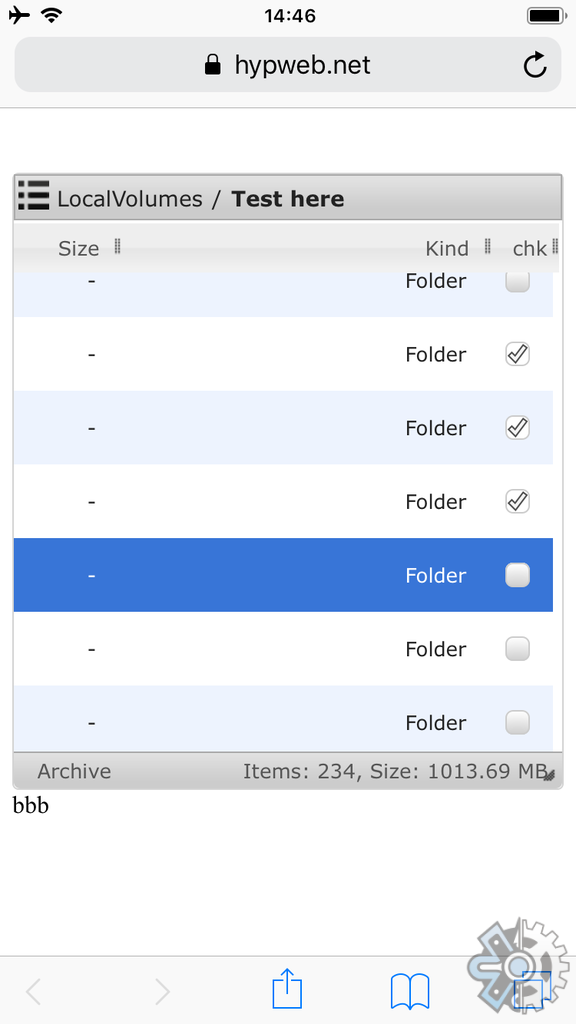
nao-pon
on 14 Oct 2018
I updated using the last night library, but I am still having the same problem using Safari (not only with the touch but also on the PC using the mouse).
The callback works but it is not showing the tick on the square.
If I use Firefox everything is ok.
Could you please give a try to this:
http://globalterramaps.com/TerraVENEW.html?GEC=5
thanks.
ghigio2000
on 15 Oct 2018
I checked on iPhone 6s iOS 12.0.1 Safari. Column size are strange a little but display and operation are no problems.
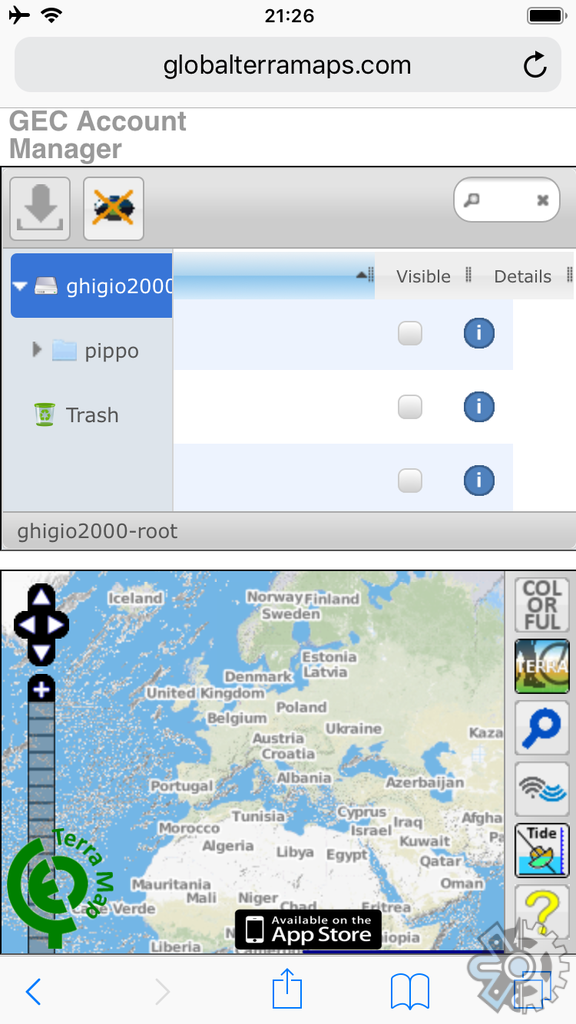
nao-pon
on 15 Oct 2018
@nao-pon
I am sorry to reply so late, but I did not get any notification about your answer above.
I am still having the same problem.
In the screen shot above I do not see any checkbox ticked.
Can you please tick one and resend me the screen shot?
We use iPhone 7, iPad, iPad Pro, iPhone 8 with different iOS version, including 12.0.1 and also we used Safari from PC Mac, but NONE of them are able to tick these checkboxs. The operation work but the checkbox is not ticked.
Please let me know, I am really sorry having completed my project and I cannot publish it for this reason.
Thanks as usual for your help.
ghigio2000
on 23 Oct 2018
First item (pippo folder) checked
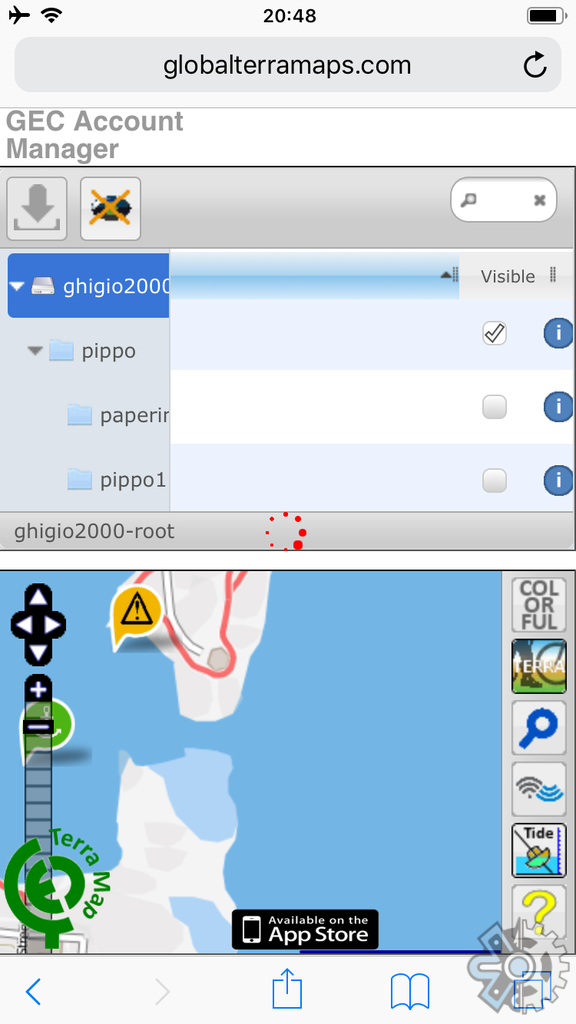
Second item (BHavCove.gpx)
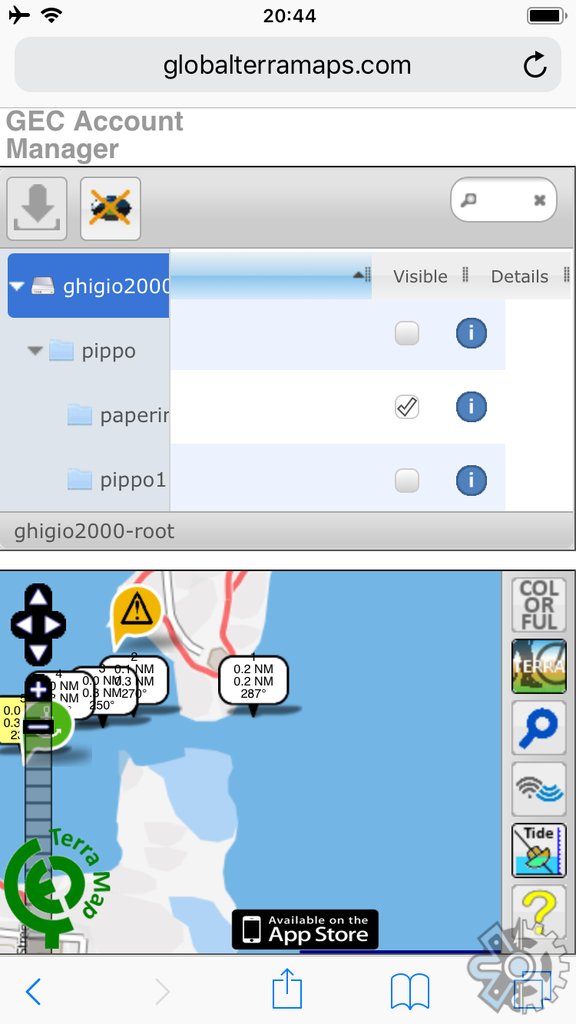
nao-pon
on 23 Oct 2018
@nao-pon
At this point I do not understand anymore how can this be possible.
Do you think it is a matter of our Safari configuration?
Are you using Safari? I am asking just to be sure.
ghigio2000
on 23 Oct 2018
Sorry, I am able to reproduce your situation. I am sure I can fix it now.
Sorry again.
ghigio2000
on 23 Oct 2018
@ghigio2000 Perhaps by increasing the padding size of the checkbox on touch devices I think that erroneous touch can be prevented. For touch devices, elFinder nodes are given the "elfinder-touch" class.
nao-pon
on 23 Oct 2018
@nao-pon mine seems to be a Safari checkbox problem.
In a particular situation I check/uncheck programmatically those checkbox.
It works in Firefox works this command
checkbox.checked=true or false
With Safari it is not working.
ghigio2000
on 23 Oct 2018
In you comments above you mentioned there are strange column size, how can I set a column size programmatically?
ghigio2000
on 23 Oct 2018
There is no problem in my test environment, so CSS of your environment may be affecting. Usually the column size will not be shifted. Since the column size is calculated according to the header line, there is a possibility that a problem may have occurred in acquiring the header size.
nao-pon
on 23 Oct 2018
I now fixed all about the checkbox thanks a lot.
You mean I cannot change column size programmatically?
ghigio2000
on 23 Oct 2018
Related issues
 lab21gr
·
24Comments
lab21gr
·
24Comments
 isreehari
·
12Comments
isreehari
·
12Comments
 gadangmadhulika
·
16Comments
gadangmadhulika
·
16Comments
 ExtremeYu
·
11Comments
ExtremeYu
·
11Comments
 richard100589
·
13Comments
richard100589
·
13Comments