Elfinder: Multi Level directory creation when uploading
My Root Folder is : spfiles
I am in spfiles folder and upload a image then preUpload method saved the image in spfiles/2018/05/file.ext but it's not generating the thumbnail in spfiles/.tmb/ but MyLocalFileSystem class is creating folder structure in spfiles/.tmb/2018/05/.
- If I remove the preUpload method it's creating the thumbnail without any issue with sub folders.
- if preUpload method is on, then the thumbnails will creating only when we refresh the spflies/.tmb/2018/05 folder.
- It seems like there is a problem with my preUpload function if so please let me know.
Please find the following code.
public function preUpload(&$path, &$name, $src, $elfinder, $volume){

            $currentYear = date("Y");
            $currentMonth = date("m");

            $realpath = $elfinder->realpath($path);
            $realpath =  $realpath. '/' .$currentYear;

            if(!file_exists($realpath) || !is_dir($realpath)){
                $args = array('target' => $path, 'name' => $currentYear, 'reqid' => '' );
                $result = $elfinder->exec('mkdir', $args);
                if($result && $result["added"]){
                    $path = $result['added'][0]['hash'];

                    $realpath = $realpath . '/' .  $currentMonth;
                    $args = array('target' => $path, 'name' => $currentMonth, 'reqid' => '' );
                    $result = $elfinder->exec('mkdir', $args);
                    if($result && $result["added"]){
                        $path = $result['added'][0]['hash'];
                    }else{
                        return false;
                    }
                }else{
                    return false;
                }
            }else{
                $realpath = $realpath . '/' .  $currentMonth;
                if(!file_exists($realpath) || !is_dir($realpath)){
                    $args = array('target' => $path, 'name' => $currentMonth, 'reqid' => '' );
                    $result = $elfinder->exec('mkdir', $args);
                    if($result && $result["added"]){
                        $path = $result['added'][0]['hash'];
                    }else{
                        $path = $volume->getHash($path, $currentMonth);
                        return true;
                    }
                }

            }

            $path = $volume->getHash($realpath, '');

            return true;
    }


class elFinderVolumeMyLocalFileSystem extends elFinderVolumeLocalFileSystem
{
    protected function tmbname($stat) {
        $dir = $this->relpathCE($this->decode($stat['phash']));
        if (! is_dir($this->tmbPath.DIRECTORY_SEPARATOR.$dir)) {
            $dirs = explode(DIRECTORY_SEPARATOR, $dir);
            $target = $this->tmbPath;
            foreach($dirs as $_dir) {
                if (! is_dir($target . DIRECTORY_SEPARATOR . $_dir)) {
                    mkdir($target . DIRECTORY_SEPARATOR . $_dir);
                }
                $target = $target . DIRECTORY_SEPARATOR . $_dir;
            }
        }
        return $dir . DIRECTORY_SEPARATOR . $stat['name'] . '.png';
    }

    protected function gettmb($path, $stat) {
        if ($name = parent::gettmb($path, $stat)) {
            $name = str_replace('\\', '/', $name); // For windows server
            $name = str_replace('%2F', '/', rawurlencode($name));
        }
        return $name;
    }

    public function tmb($hash) {
        if ($name = parent::tmb($hash)) {
            $name = str_replace('\\', '/', $name); // For windows server
            $name = str_replace('%2F', '/', rawurlencode($name));
        }
        return $name;
    }
}
 isreehari
All 12 comments
@isreehari This issue related from #1795. The elFinder's php class "elFinder" does not support multi-level directory creation when uploading. So I'll fix this issue.
By the way, thumbnails are created when the file is displayed on the client side. Is that OK?
Thanks!
 nao-pon
on 25 May 2018
nao-pon
on 25 May 2018
Yes
By the way, thumbnails are created when the file is displayed on the client side. Is that OK?
Thank you so much.
Hari
isreehari
on 25 May 2018
@nao-pon I tried to do some Donation to elFinder (nao-pon) through paypal but it does not go through please check it once.
Thanks,
Hari
isreehari
on 25 May 2018
@isreehari Thanks!
I tried to do some Donation to elFinder (nao-pon) through paypal but it does not go through please check it once.
I updated "Donate" section of https://studio-42.github.io/elFinder/ . Please send e-mail to me ( [email protected] ), If you got any problems yet.
nao-pon
on 25 May 2018
It worked.
Thanks,
Hari
isreehari
on 25 May 2018
@isreehari I received it. Thank you!
I fixed this issue. Please check with the nightly build.
nao-pon
on 25 May 2018
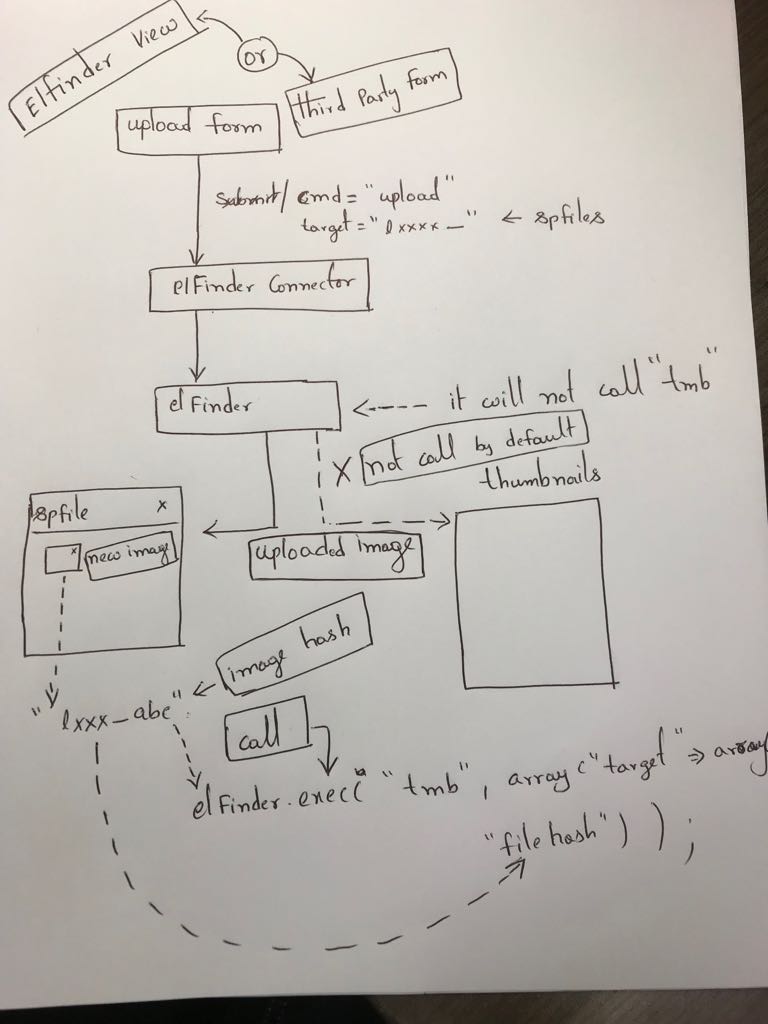
@nao-pon oh yeah, now it's creating multi level directories but it's not solve the origin problem. Upload command ( cmd="upload") is not calling the create thumbnail command by default ( cmd ="tmb" ) for image uploads. Thumbnail creating command is issuing only when we refresh or reload the original image's folder ( if the user enabled the thumbnails in configuration file).
isreehari
on 25 May 2018
@vahidalvandi this might help your problem #671. I am calling the following function in postSaveFile method for temporarly till "nao-pon" fix the issue or new feature in elFinder.
/**
     * postUpload will be called after the file has been uploaded
     *
     * @param  string   $cmd       command name
     * @param  array    $result    command result
     * @param  array    $args      command arguments from client
     * @param  elFinder $elfinder  elFinder instance
     * @param  elFinderVolume   $volume    elFinderVolume instance
     * @return void|true
     * @author isreehari <[email protected]>
     **/
    public function postUpload($cmd, &$result, $args, $elfinder, $volume) {
        if(!empty($result['added'])){
            foreach($result['added'] as $file){
                if($file && strpos($file['mime'], 'image') === 0 ) {
                    $result['sync'] = 1;
                    $createThumbnail = array('targets' => array($file['hash'], 'reqid'=>'', 'debug'=>''));
                    $elfinder->exec('tmb',$createThumbnail);
                }
            }
        }
    }
@isreehari Thumbnails are created according to the instructions of the client as necessary. That is the specification of elFinder. If you need to create thumbnails at the same time as uploading, you need to respond like the code you presented.
nao-pon
on 26 May 2018
But some people like me who are started to use the elFinder felt that the thumbnails will create automatically when we upload the image. Anyhow, thank you so much for your very quick support. It's very nice and best tools to use. All the best.
Thanks,
Hari
isreehari
on 30 May 2018
@isreehari Can i ask you, how you added public function preUpload()?
There elfinder api allowing append pre upload action or you just inject execution this function to raw source?
 sashsvamir
on 29 Jun 2019
sashsvamir
on 29 Jun 2019
I did this long ago and need to check it.
Thanks,
Sree
Sent from my iPhone, please ignore if there are any typos.
On Jun 29, 2019, at 4:39 AM, Alexander Shchukin <[email protected]notifications@github.com> wrote:
@isreeharihttps://github.com/isreehari Can i ask you, how you added public function preUpload()?
There elfinder api allowing append pre upload action or you just inject execution this function to raw source?
—
You are receiving this because you were mentioned.
Reply to this email directly, view it on GitHubhttps://github.com/Studio-42/elFinder/issues/2515?email_source=notifications&email_token=AA23GEQ4NWGABH2EIHHTHL3P44UU3A5CNFSM4FBVFCZ2YY3PNVWWK3TUL52HS4DFVREXG43VMVBW63LNMVXHJKTDN5WW2ZLOORPWSZGODY3VSZI#issuecomment-506943845, or mute the threadhttps://github.com/notifications/unsubscribe-auth/AA23GERH6UB3NM2VGESWCL3P44UU3ANCNFSM4FBVFCZQ.
isreehari
on 29 Jun 2019
Related issues
 bitbybit
·
13Comments
bitbybit
·
13Comments
 jacceko
·
17Comments
jacceko
·
17Comments
 ghost
·
11Comments
ghost
·
11Comments
 ghigio2000
·
12Comments
ghigio2000
·
12Comments
 hayes-seyah09354085977
·
17Comments
hayes-seyah09354085977
·
17Comments