Elfinder: Thumbnail preview not showing
Hello i searched the other issues but i could not find an answer.
When i open elfinder, i see all my files & images but without preview

On my config i have tried setting
'tmbPath' => '',
and also:
'tmbURL'        => $websiteURL.'uploaded/.tmb/',
'tmbPath'        => $websiteFolder.'uploaded/.tmb/',
both with no success.
my config:
$opts = array(
    'debug' => true,
    'modal' => true,
    'locale' => 'en_US.UTF-8',
    'roots' => array(
        // Items volume
        array(
            'driver'        => 'LocalFileSystem',           // driver for accessing file system (REQUIRED)
            'path'          => $websiteFolder.'uploaded/',                 // path to files (REQUIRED)
            'URL'           => $websiteURL.'uploaded/',   // URL to files (REQUIRED)
                        'tmbPath' => '',

            'winHashFix'    => DIRECTORY_SEPARATOR !== '/', // to make hash same to Linux one on windows too
            'uploadDeny'    => array('all'),                // All Mimetypes not allowed to upload
            'uploadAllow'   => array('image', 'text/plain'),// Mimetype `image` and `text/plain` allowed to upload
            'uploadOrder'   => array('deny', 'allow'),      // allowed Mimetype `image` and `text/plain` only
            'accessControl' => 'access',                     // disable and hide dot starting files (OPTIONAL)

        )
    )
);
What am i missing?
 lab21gr
All 24 comments
@lab21gr
'tmbURL'        => $websiteURL.'uploaded/.tmb/',
'tmbPath'        => $websiteFolder.'uploaded/.tmb/',
If there is no mistake in path and url, there is no ".tmb" directory or no write permission for the PHP execution account.
 nao-pon
on 28 Nov 2017
nao-pon
on 28 Nov 2017
Hello and thanks for the quick reply. No the folder is there with permissions 777. I can see the thumbs created in it. I just do not get a preview as you can see on the screenshot on my previous post.
If i inspect the code from the developer tools on my browser i do not see any background image applied to "elfinder-cwd-icon" class, as i see it on the online demo.
lab21gr
on 28 Nov 2017
Please check your server responce of cmd open. Can you see tmb data of each item in files array?
nao-pon
on 28 Nov 2017
I enabled the debug mode. On my console i see
elfinder debug: [event-open] []
{…}
api: "2.1029"
cwd: Object { isowner: false, ts: 1475567554, mime: "directory", … }
debug: Object { connector: "php", phpver: "7.1.8", time: 0.2116680145263672, … }
files: […]
0: Object { isowner: false, ts: 1509978996, mime: "directory", … }
1: {…}
hash: "l1_ZG93bmxvYWQtaWNvbnMvZG93bmxvYWRzX2F1dG9jYWQucG5n"
isowner: false
mime: "image/png"
name: "downloads_autocad.png"
phash: "l1_ZG93bmxvYWQtaWNvbnM"
read: 1
size: "2600"
tmb: "l1_ZG93bmxvYWQtaWNvbnMvZG93bmxvYWRzX2F1dG9jYWQucG5n1432189488.png"
ts: 1432189488
write: 1
....
If this is what you wanted, then yes i do see contents in the file array inside event-open.
event-request.open and event-opendone are empty.
I open elfinder as a dialog:
$('<div></div>').dialogelfinder({
            debug: true,
            url: cmslink + 'vendor/elFinder/php/connector.minimal.php',
            commandsOptions: {
                getfile: {
                    oncomplete: 'destroy'
                }
            },
            getFileCallback: function(file, fm) {
                $("#"+inputId).val(file.url.replace(uploadedFolder, ''));
            },
            closeOnEditorCallback : true,
            width: 880,
            height: 590
});
OK, What value of cwd ? (detail of cwd: Object { isowner: false, ts: 1475567554, mime: "directory", … })
nao-pon
on 28 Nov 2017
You mean what is the value of cwd?
cwd: {…}
hash: "l1_ZG93bmxvYWQtaWNvbnM"
isowner: false
mime: "directory"
name: "download-icons"
phash: "l1_Lw"
read: 1
root: "l1_Lw"
size: 0
ts: 1475567554
volumeid: "l1_"
write: 1
lab21gr
on 28 Nov 2017
No, I want see value of cwd: {…}.
nao-pon
on 28 Nov 2017
sorry. here it is:
cwd: {…}
csscls: "elfinder-navbar-root-local"
dirs: 1
disabled: […]
0: "chmod"
length: 1
__proto__: Array []
hash: "l1_Lw"
isowner: false
isroot: 1
locked: 1
mime: "directory"
name: "uploaded"
phash: ""
read: 1
root: "l1_Lw"
rootRev: ""
size: 0
tmbUrl: "https://www.someurl/uploaded/.tmb/"
ts: 1510310897
volumeid: "l1_"
write: 1
lab21gr
on 28 Nov 2017
Well. . . If it's that data thumbnail URL should be set. Does the same problem occur even with nightly builds?
nao-pon
on 28 Nov 2017
I will check...it works locally but not online. I will check and let you know.
thank you
lab21gr
on 28 Nov 2017
For now, I will close this. Please reopen if elFinder finds something to fix.
nao-pon
on 1 Dec 2017
Hello again
i have tried both the latest release and the nightly build as you suggested with no results.
On my localhost everything works fine.
However, online it does not.
The ONLY difference is that online i do not see the inline background image on the 'elfinder-cwd-icon' class as you can see below:
Locally:
<div class="elfinder-cwd-icon elfinder-cwd-icon-image elfinder-cwd-icon-jpeg ui-corner-all elfinder-cwd-bgurl elfinder-cwd-bgurl-crop" unselectable="on" style="background-image: url("http://localhost/project/uploaded/.tmb/l1_bW9iaWxlX3Njcm9sbF90ZXN0LmpwZw1431677494.png?_t=1431677494");"></div>
Online:
<div class="elfinder-cwd-icon elfinder-cwd-icon-image elfinder-cwd-icon-jpeg ui-corner-all" unselectable="on"></div>
Any ideas? I have tried everything...
lab21gr
on 21 Dec 2017
@lab21gr If thumbnails are correctly created on the connector side, each file data should contain the value of tmb. Is there a problem with that value?
e.g
{
  "isowner": false,
  "mime": "image/jpeg",
  "ts": 1448205671,
  "read": 1,
  "write": 0,
  "locked": 1,
  "size": "284800",
  "hash": "l1_SW1hZ2VzL2NvbG91cnNvZmZhbGwuanBn",
  "name": "coloursoffall.jpg",
  "phash": "l1_SW1hZ2Vz",
  "tmb": "l1_SW1hZ2VzL2NvbG91cnNvZmZhbGwuanBn1448205671.png"
}
Could you explain a bit more? where do i find this value?
lab21gr
on 21 Dec 2017
In results of open request. It in files array.
nao-pon
on 21 Dec 2017
The value for the first element is:
files: […]
0: {…}
csscls: "elfinder-navbar-root-local"
dirs: 1
disabled: Array [ "chmod" ]
hash: "l1_Lw"
isowner: false
isroot: 1
locked: 1
mime: "directory"
name: "uploaded"
phash: ""
read: 1
rootRev: ""
size: 0
tmbUrl: "https://www.domain.com/uploaded/.tmb/"
ts: 1513849201
volumeid: "l1_"
write: 1
lab21gr
on 21 Dec 2017
It is the stat data of the directory. Look for the stat data of the file of the type in which the thumbnail is displayed.
nao-pon
on 21 Dec 2017
I am sorry i do not understand what you need....can you be more specific?
I have the debug enabled so i looked into
elfinder debug: [event-open] -> files array
and sent you the value for the first file.
lab21gr
on 21 Dec 2017
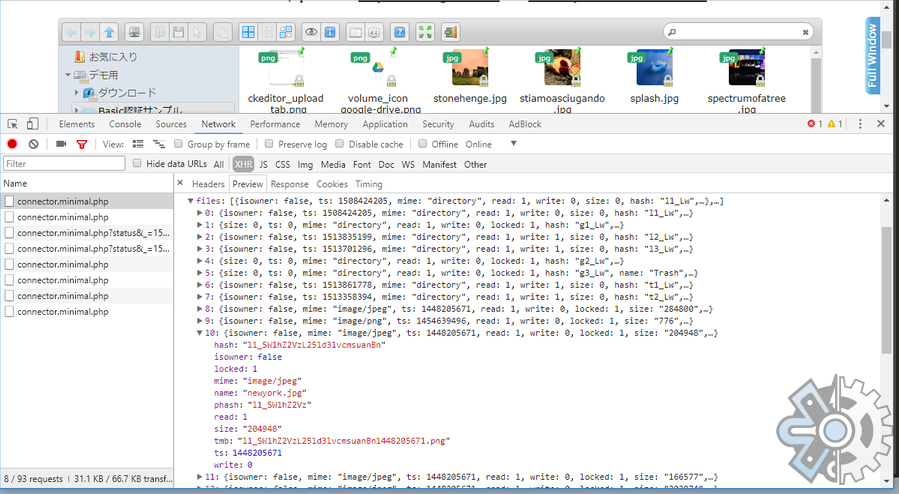
OK, Please check server responce in browser developper tool's Network tab(XHR).
nao-pon
on 21 Dec 2017
Great now i got it!
so for a file the value is
isowner: false
mime: image/jpeg
ts: 1431706296
read: 1
write :1
size: 280375
hash: l1_bW9iaWxlX3Njcm9sbF90ZXN0Mi5qcGc
name: mobile_scroll_test2.jpg
phash: l1_Lw
tmb: l1_bW9iaWxlX3Njcm9sbF90ZXN0Mi5qcGc1431706296.png
lab21gr
on 21 Dec 2017
OK, can you access to "https://www.domain.com/uploaded/.tmb/l1_bW9iaWxlX3Njcm9sbF90ZXN0Mi5qcGc1431706296.png" with the browser and thumbnail image is displayed?
nao-pon
on 21 Dec 2017
No, i get 404 error.
However, if i go to the physical folder i can see the file.
lab21gr
on 21 Dec 2017
I removed the dot from the begging of the folder .tmb and now it works!! it must be some server configuration...
Thanks for pointing me to the right direction!
Have a nice day!
lab21gr
on 21 Dec 2017
Congrats! :+1:
nao-pon
on 21 Dec 2017
Related issues
 hayes-seyah09354085977
·
17Comments
hayes-seyah09354085977
·
17Comments
 CodeLyokoXtEAM
·
10Comments
CodeLyokoXtEAM
·
10Comments
 wzfjesun
·
13Comments
wzfjesun
·
13Comments
 ghigio2000
·
15Comments
ghigio2000
·
15Comments
 ghost
·
11Comments
ghost
·
11Comments