Elfinder: How do I make the php connector work without JSON errors? Even setting options as per documentation doesn't work.
I've had to add in options for client's to have their uploaded images automatically resize if they are larger than set width in my CMS's options, but I haven't been able to work out if there are options to force that resize maintain the original images Aspect Ratio. Does anyone know how to do this?
 DiemenDesign
All 9 comments
@DiemenDesign There isn't JavaScript option fot that. but, however there is a PHP plugin "AutoResize".
 nao-pon
on 11 May 2018
nao-pon
on 11 May 2018
@nao-pon thanks for responding. Using the latest version and the below configuration:
php
<?php
error_reporting(0);
define('DS',DIRECTORY_SEPARATOR);
include_once dirname(__FILE__).DS.'elFinderConnector.class.php';
include_once dirname(__FILE__).DS.'elFinder.class.php';
include_once dirname(__FILE__).DS.'elFinderVolumeDriver.class.php';
include_once dirname(__FILE__).DS.'elFinderVolumeLocalFileSystem.class.php';
$settings=parse_ini_file('..'.DS.'..'.DS.'..'.DS.'core'.DS.'config.ini',TRUE);
if((!empty($_SERVER['HTTPS'])&&$_SERVER['HTTPS']!=='off')||$_SERVER['SERVER_PORT']==443)
  define('PROTOCOL','https://');
else
  define('PROTOCOL','http://');
define('URL',PROTOCOL.$_SERVER['HTTP_HOST'].$settings['system']['url'].'/');
function access($attr,$path,$data,$volume){
  return strpos(basename($path),'.')===0?!($attr=='read'||$attr=='write'):null;
}
$opts=array(
  'bind' => array(
    'upload.presave' => array(
      'Plugin.AutoResize.onUpLoadPreSave'
    )
  ),
  'plugin' => array(
    'AutoResize' => array(
      'enable' => true,
      'maxWidth' => 500,
      'maxHeight' => 500,
      'quality' => 95,
      'preserveExif' => false,
      'forceEffect' => false,
      'targetType' => IMG_GIF|IMG_JPG|IMG_PNG|IMG_WBMP,
      'offDropWith' => null,
      'onDropWith' => null
    )
  ),
  'roots'=>array(
    array(
      'imgLib'=>'gd',
      'driver'=>'LocalFileSystem',
      'path'=>$_SERVER["DOCUMENT_ROOT"].DS.$settings['system']['url'].DS.'media'.DS,
//      'path'=>$_SERVER["DOCUMENT_ROOT"].DS.$settings['system']['url'].DS,
      'URL'=>URL.'media/',
//      'URL'=>URL,
      'uploadDeny'=>array(
        'all'
      ),
      'uploadAllow'=>array(
        'image',
        'text/plain',
        'application/pdf'
      ),
      'uploadOrder'=>array(
        'deny',
        'allow'
      ),
      'accessControl'=>'access',
      'attributes'=>array(
        array(
          'pattern'=>'!^/core|layout|index.php!',
          'hidden'=>true
        )
      ),
    )
  )
);
$connector=new elFinderConnector(new elFinder($opts));
$connector->run();
refuses to let any uploads happen. If I remove the AutoResize options and the bind array, uploads work.
DiemenDesign
on 13 May 2018
I just noticed that Chrome throw this error when an image is selected:
Uncaught TypeError: Cannot read property 'promise' of null
    at v (elfinder.min.js:11)
    at XMLHttpRequest.<anonymous> (elfinder.min.js:11)
v @ elfinder.min.js:11
(anonymous) @ elfinder.min.js:11
load (async)
xhr @ elfinder.min.js:11
f @ jquery-2.1.3.min.js:1
upload @ elfinder.min.js:9
g @ elfinder.min.js:23
v @ elfinder.min.js:23
(anonymous) @ elfinder.min.js:23
dispatch @ jquery-2.1.3.min.js:1
r.handle @ jquery-2.1.3.min.js:1
DiemenDesign
on 13 May 2018
Silly me, I commented out the error_reporting() function, now when selecting an image I get:
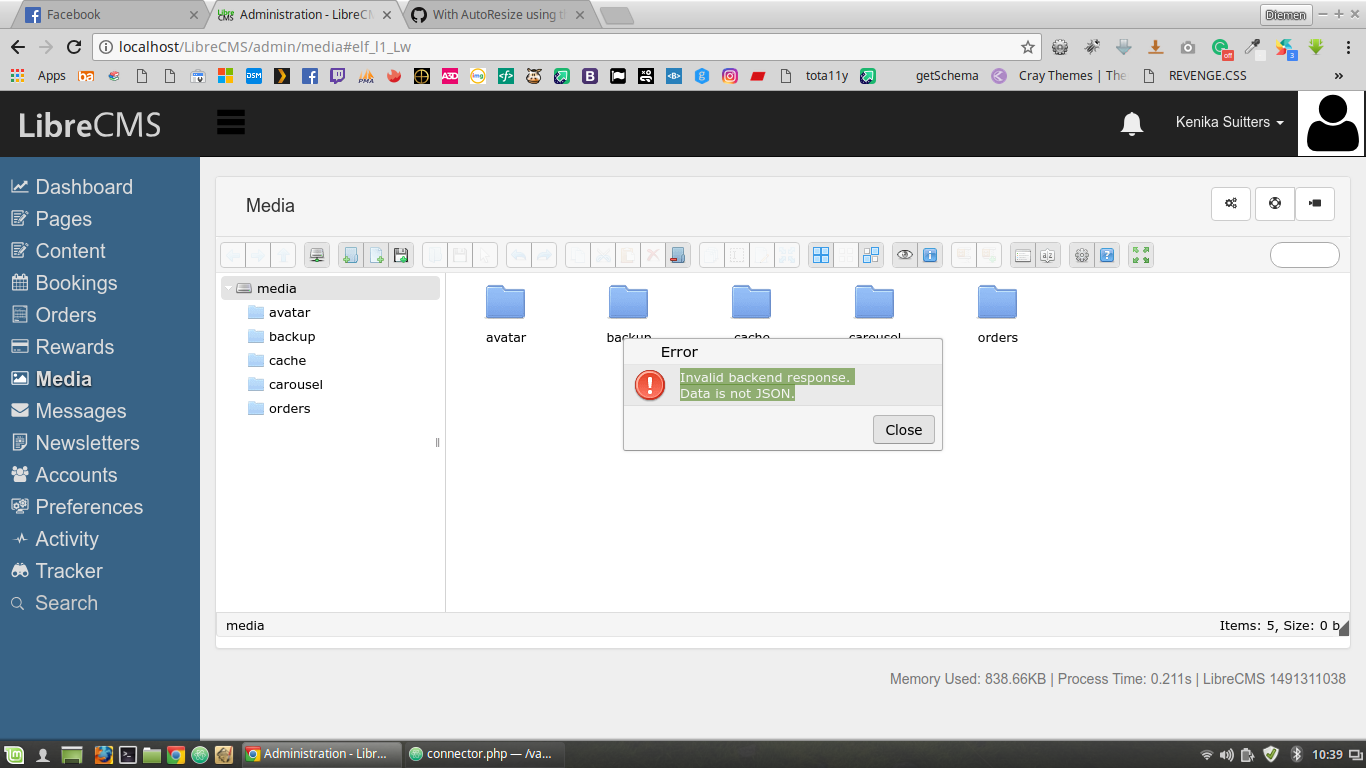
DiemenDesign
on 14 May 2018
@DiemenDesign Please try an option debug to get server error messages.
$opts=array(
  'debug' => true,
  'bind' => array(
    'upload.presave' => array(
      'Plugin.AutoResize.onUpLoadPreSave'
    )
  ),
...
Sorry I didn't see this sooner, I've been sick away from my computer, will have a look into it.
DiemenDesign
on 18 May 2018
In the log file I get:
text
[18-May-2018 19:44:20 Australia/Melbourne] PHP Fatal error:  Class 'elFinderPlugin' not found in /var/www/LibreCMS/core/elfinder/php/plugins/AutoResize/plugin.php on line 63
DiemenDesign
on 18 May 2018
It seems autoload.php has not been loaded or php directory placement is incomplete.
nao-pon
on 18 May 2018
It was the autoload.php. I wasn't sure if it was being loaded elsewhere when the php is being called on the backend. I added it to the top of the includes area, now it works fine. Thanks for your help.
DiemenDesign
on 18 May 2018
Related issues
 ghigio2000
·
12Comments
ghigio2000
·
12Comments
 richard100589
·
13Comments
ghigio2000
·
15Comments
richard100589
·
13Comments
ghigio2000
·
15Comments
 hayes-seyah09354085977
·
17Comments
hayes-seyah09354085977
·
17Comments
 flack
·
13Comments
flack
·
13Comments
Most helpful comment
It was the
autoload.php. I wasn't sure if it was being loaded elsewhere when the php is being called on the backend. I added it to the top of the includes area, now it works fine. Thanks for your help.