I have issues with this in 0.7, as I can't achieve to transform a bounding box. I managed to do this in 0.6.3, but node was quite different, as it was using Tranform. I looked on github and didn't find a test file for this in 0.7. anyone from team to provide an example on how to do this?
here's what I have in 0.7: https://drive.google.com/file/d/0BxqX_gXj6OzEWllPckRBeDFoWGs/edit?usp=sharing
my goal (almost achieved in 0.6.3) is to set a correct BBox to create section views from elements like walls.
 jbenoit44
All 59 comments
I don't believe you can transform a bounding box as it is not geometry. You should be able to just transform the geometry, and recalculate the bounding box. Does this not work for your current goal?
 mjkkirschner
on 27 Aug 2014
mjkkirschner
on 27 Aug 2014
That´s what I did but it doesn't work. The new BBox has the same properties for the api method viewsection, meaning forward is along Z axis. In 0.6.3 it was possible. What does the node bbox from geometry and CS?? It is described as what I need in the popup.
Julien BENOIT
Le 27 août 2014 à 22:34, holyjewsus [email protected] a écrit :
I don't believe you can transform a bounding box as it is not geometry. You should be able to just transform the geometry, and recalculate the bounding box. Does this not work for your current goal?
—
Reply to this email directly or view it on GitHub.
jbenoit44
on 27 Aug 2014
I have not used this other overload for BB, but what it says is that it allows you to create a bounding box which bounds the input geometry and is aligned to some coordinate system. If you create a bounding box with the other overload(just geometry) the bounding box will always be axis aligned to the global X,Y,Z.
mjkkirschner
on 27 Aug 2014
Hmmm. I fight hard with CS. Not really easy to manage. A tutorial on those CS nodes to transform things I miss. Will investigate further.
Julien BENOIT
Le 27 août 2014 à 22:47, holyjewsus [email protected] a écrit :
I have not used this other overload for BB, but what it says is that it allows you to create a bounding box which bounds the input geometry and is aligned to some coordinate system. If you create a bounding box with the other overload the bounding box will always be axis aligned to the global X,Y,Z.
—
Reply to this email directly or view it on GitHub.
jbenoit44
on 27 Aug 2014
I confirm that if you transform a geometry, and define a modified CS, BBox node from Geo&CS doesn't seems to work as expected.

jbenoit44
on 28 Aug 2014
I managed to get the result I want with 0.6.3.

can you please verify that the bbox node behavior is correct in 0.7? I really want to migrate this workflow.thanks.
jbenoit44
on 29 Aug 2014
I could not create a non axis aligned bounding box from a rotated cube. I will try to verify this works, and if not file a bug internally.
mjkkirschner
on 29 Aug 2014
thanks!
jbenoit44
on 29 Aug 2014
any update on this?
jbenoit44
on 7 Sep 2014
Hi Julien,
Would you mind attaching your Dynamo graph from your above workflow. I'm having trouble understanding the bug.
Thanks
 ptierney
on 10 Sep 2014
ptierney
on 10 Sep 2014

not sure I can do that, but here's the dyn as jpg
jbenoit44
on 10 Sep 2014
I'm having trouble viewing your image. Feel free to email me: patrick.[email protected]
ptierney
on 10 Sep 2014
@hlp I'm not sure of the extent of the bug, but when I tried to create a non axis aligned bounding box, (bb from geometry of a rotated cube) I got an axis aligned one. I'm not sure if that was what @jbenoit44 was commenting on but it may cause his issue.
mjkkirschner
on 10 Sep 2014
file sent. @holyjewsus yep that is the issue. I want to create section views from BBox, but need to get a transformed BBox first, and it doesn't work....
jbenoit44
on 10 Sep 2014
Thanks. I've received the file. I'll take a look.
ptierney
on 10 Sep 2014
Hi @jbenoit44 @holyjewsus -- I didn't realize the only issue with this was the inability to create an axis-aligned bounding box. Unfortunately, the BoundingBox node in Dynamo 0.7 and later are axis-aligned only. I've added this as a feature.
In the meantime, is it not just possible to transform the Cuboid, and then extract out the Faces with Topology.Faces ?
ptierney
on 11 Sep 2014
Hey @hlp The tooltip for some of the bounding box overloads says it will create non axis aligned bbs
mjkkirschner
on 11 Sep 2014
@holyjewsus yes there are two constructors which will construct an axis-aligned bounding box in a particular coordinate system (it's axis-aligned to that coordinate system, non-axis-aligned to the world coordinate system).
We don't have functionality yet to construct a non-axis aligned bounding box from geometry, in whatever coordinate system gives it the "tightest fit".
ptierney
on 11 Sep 2014
@hlp what do you mean by "We don't have functionality", it is node related, right? as it was possible in 0.6.3, and if 0.7 is an upgrade, it has to be there.
jbenoit44
on 11 Sep 2014
@jbenoit44 I looked into the code just now. It appears that we after 6.3, we are ignoring the transform information from a Revit bounding box. This is a bug. Sorry about that. Hopefully I'll have a fix by the end of the day.
ptierney
on 11 Sep 2014
I got the latest daily available, and I don't think fix is there yet? can you confirm?

jbenoit44
on 18 Sep 2014
nope, not merged yet, sitting in pull requests until tests are made, you can merge it and test it though into your fork if you're interested.
mjkkirschner
on 18 Sep 2014
Hi @jbenoit44
As we investigated this bug more, it became apparent that Revit and the core Dynamo Bounding Box classes work in fundamentally different ways. Since your goal is to simply create a section view, I've added a new method, SectionView.ByCoordinateSystemMinPointMaxPoint, allowing you to explicitly specify the parameters of a SectionView. It's just been pushed into master, so you'll soon be able to use this functionality in the daily build.
Let me know if this works for you.
Best,
Patrick
ptierney
on 22 Sep 2014
Cool. Will test asap and let you know. Awesome way to collaborate BTW!!
Julien BENOIT
Le 22 sept. 2014 à 22:44, Patrick Tierney [email protected] a écrit :
Hi @jbenoit44
As we investigated this bug more, it became apparent that Revit and the core Dynamo Bounding Box classes work in fundamentally different ways. Since you're goal is to just create a section view, I've added a new method, SectionView.ByCoordinateSystemMinPointMaxPoint, allowing you to explicitly specify the parameters of a SectionView. It's just been pushed into master, so you'll soon be able to use this functionality in the daily build.
Let me know if this works for you.
Best,
Patrick
—
Reply to this email directly or view it on GitHub.
jbenoit44
on 22 Sep 2014
Just ran into this issue, any updates?
 jrandersen
on 2 Nov 2014
jrandersen
on 2 Nov 2014
@jrandersen the change described by Patrick should be in the latest daily builds. Very soon we'll also be posting a 0.7.3 build as our next stable release that will also contain the change. As always, you can see the latest builds at http://dynamobim.org/download/
 RodRecker
on 3 Nov 2014
RodRecker
on 3 Nov 2014
Any status on getting a bounding box of rotated elements?
 revitj0hnp
on 6 Feb 2015
revitj0hnp
on 6 Feb 2015
Hi @revitj0hnp : rotated bounding boxes are still not supported in our underlying geometry kernel, ASM, so it may be a while...
ptierney
on 6 Feb 2015
Thank you. Would there be any suggestions how I can get a cuboid from the overall size of a rotated item? Or maybe RevitBounding box to cuboid?
revitj0hnp
on 6 Feb 2015
If you get the bounding box for a rotated item, it _should_ return a correct bounding box, only it will be axis-aligned. Finding the bounding box that is rotated in space to enclose the minimum volume is a bit more tricky: http://en.wikipedia.org/wiki/Minimum_bounding_box_algorithms, and I don't have any direct experience calculating this.
ptierney
on 6 Feb 2015
I see.. Perhaps I need to find a better way to subtract my built in casework from my room calcs..

revitj0hnp
on 6 Feb 2015
I see. Could you elaborate a bit more about your problem, and how you're trying to solve it? (My hunch is that might nob be a bounding box issue)
ptierney
on 6 Feb 2015
I was trying to get the maximum extents of my casework and create an
extrusion from them to subtract from room area. I misunderstood the
bounding boxes function. I also tried intersection and perimeter curves.
But depending on the complexity of the casework the results are strange.
On Friday, February 6, 2015, Patrick Tierney [email protected]
wrote:
I see. Could you elaborate a bit more about your problem, and how you're
trying to solve it? (My hunch is that might nob be a bounding box issue)—
Reply to this email directly or view it on GitHub
https://github.com/DynamoDS/Dynamo/issues/2243#issuecomment-73293829.
revitj0hnp
on 6 Feb 2015
I would love to be able to get a cuboid from the outermost pieces of an element's geometry
revitj0hnp
on 6 Feb 2015
Can you not extract out the Revit geometry, and create a bounding box from geometry?

ptierney
on 7 Feb 2015
That was my exact goal initially. But some of the geometry was on an
angled wall and the bounding box remains orthogonal.
On Friday, February 6, 2015, Patrick Tierney [email protected]
wrote:
Can you not extract out the Revit geometry, and create a bounding box from
geometry?[image: bbox]
https://cloud.githubusercontent.com/assets/289141/6091196/ec3e3f36-ae52-11e4-8fec-6f9acd68d93a.png—
Reply to this email directly or view it on GitHub
https://github.com/DynamoDS/Dynamo/issues/2243#issuecomment-73352977.
revitj0hnp
on 7 Feb 2015
@revitj0hnp - The other day I needed a "rotated" bounding box as well. Here's how I solved it.
The key was to basically project all vertices of the geometry on a horizontal plane and find the convex hull of those points. Be aware that this technique will only work for objects that do not have any protruding geometry, though.

 andydandy74
on 8 Feb 2015
andydandy74
on 8 Feb 2015
@andydandy74 thanks a lot man! I am trying it out now, but I worry because the items I am running this on are casework with handles.
revitj0hnp
on 9 Feb 2015
So far so good, but it seems to take the convex hull of the entire selection of objects. *Edit- that's what it's meant to do though, i'll research better ways of getting the maximum shape of my casework.
Thanks guys!
revitj0hnp
on 9 Feb 2015
@andydandy74 are you able to create a convex hull for each instance of geometry chosen? Like if I select all of my casework on Level one. Can i have that generate the convex hull per instance of casework?
revitj0hnp
on 9 Feb 2015
@revitj0hnp - Of course. You just have to add a bit of logic to process the list of elements correctly, mainly a few List.Map nodes:

andydandy74
on 10 Feb 2015
@andydandy74 Thank you so much for your help and your awesome Clockwork nodes man! I was able to get the results I wanted by changing the very end of what you provided
. I basically made a polygon and "thickened" the surface with a list map node.
Not only did you help me out, but you taught me how a list map node works. Thanks again!
-John

revitj0hnp
on 10 Feb 2015
is there still an issue with the BoundingBox.ByGeometryCoordinateSystem node? I am inputting a coordinate system (rotating arbitrarily around the z axis) and geometry, but it still seems to just align with the World axis.

 kvwxyz
on 5 Aug 2015
kvwxyz
on 5 Aug 2015
This is tracked in http://adsk-oss.myjetbrains.com/youtrack/issue/MAGN-7718
 aparajit-pratap
on 29 Mar 2016
aparajit-pratap
on 29 Mar 2016
Still broken in 0.9.2. There are actually two nodes with the exact same name but different graphic thumbnail. If this isn't getting fixed any time soon, why not pull them please? It's very frustrating for us to try learn how to use a node on our own and then figure out this has been broken for years. Could have saved us valuable time to work on other approaches instead. Thanks.


 dbaldacchino
on 19 Apr 2016
dbaldacchino
on 19 Apr 2016
@dbaldacchino sorry for the frustration. Believe it or not, this is in the pipeline for right after 1.0 release. Didn't quite make the cut this time.
 kronz
on 20 Apr 2016
kronz
on 20 Apr 2016
Awesome, thanks @kronz ! Sorry for sounding harsh, but I think issues such as this would help accelerate learning. Thanks for listening :)
dbaldacchino
on 20 Apr 2016
@dbaldacchino not at all, it's silly we hav not gotten this right or, as you say, removed it until such time. I think we've been hopeful for a long time that the fix is right around the corner.
kronz
on 20 Apr 2016
@aparajit-pratap Just to be curious, is this still an issue with the new 1.2 version?
 ejnaren
on 14 Sep 2016
ejnaren
on 14 Sep 2016
@ejnaren unfortunately we have not found a quick and easy way to get bounding boxes to align with arbitrary coordinate systems (this is not supported by the geometry kernel we are using). For the time being therefore we have simply removed the BB nodes using CS (since they were not working anyway) so as to not confuse users. We have however kept this issue open in the hope of returning to it later and implementing those nodes correctly, just can't say when right now.
aparajit-pratap
on 15 Sep 2016
@aparajit-pratap Alright. An idea for an intermediate solution: In grasshopper it is possible to optionally specify a plane that the BB node should use when calculating the bounding box.
Say for instance you need a BB around a window instance would it not be possible then to get the reference plane of the window and feed that into the BB node?
ejnaren
on 15 Sep 2016
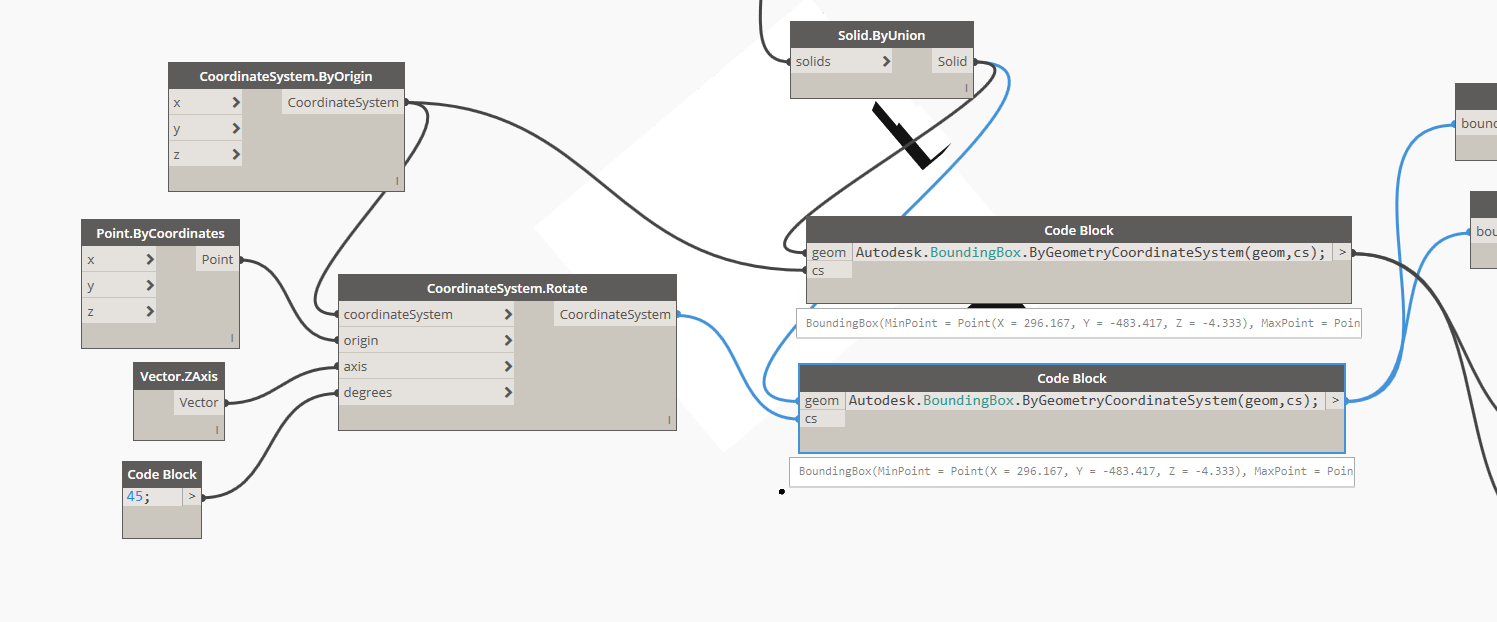
Any progress on the BoundingBox.ByGeometryCoordinateSystem? I noticed the Node is no longer available in 1.3.1, but the method still works in DesignScript, and it still seems to not be fixed (regardless of Coordinate system the exact same BB oriented to World XYZ is returned).
 rbosborne
on 25 Aug 2017
rbosborne
on 25 Aug 2017
@rbosborne we are still not providing any support for BoundingBox.ByGeometryCoordinateSystem. The method is not meant to be discoverable at the moment. If it is thanks for highlighting it; we'll turn it off for good and let you know if and when we address this.
aparajit-pratap
on 28 Aug 2017
to add my 2C
If this could be addressed in a future release, I would find it very useful.
andrew
 barney2074
on 6 Sep 2017
barney2074
on 6 Sep 2017
@ejnaren @aparajit-pratap I recently made a node in the Ampersand package that will return a rectangle that describes the minimum bounding box for a planar polyCurve. It will grab the plane from the vertices of the polycurve, so you don't have to supply them. It returns a Rectangle type, not a proper BoundingBox. It's a limited implementation--it needs a better algorithm to find the convex hull in the case of very complex shapes, and it only works for polycurves made of straight lines. So for example, it will work for Nevada with a jagged line for the Colorado River, but not for California. I hope it helps you get over a hurdle for now.

 mccrone
on 30 Oct 2017
mccrone
on 30 Oct 2017
@ejnaren @aparajit-pratap @kronz @dbaldacchino OK, so I figured out how to do this for complex shapes too. Just uploaded.

mccrone
on 31 Oct 2017
@mccrone that's awesome! Will check it out.
aparajit-pratap
on 31 Oct 2017
Thanks a lot Colin!
On Tue, Oct 31, 2017 at 12:06 PM aparajit-pratap notifications@github.com
wrote:
@mccrone https://github.com/mccrone that's awesome! Will check it out.
—
You are receiving this because you were mentioned.
Reply to this email directly, view it on GitHub
https://github.com/DynamoDS/Dynamo/issues/2243#issuecomment-340832347,
or mute the thread
https://github.com/notifications/unsubscribe-auth/AEcMP1rir6wRp6lwVNFL4MRYoyYf7dSnks5sx1N-gaJpZM4Cb5PZ
.
dbaldacchino
on 31 Oct 2017
This issue has been moved to the DynamoRevit repo (DynamoDS/DynamoRevit#2191).
 ColinDayOrg
on 12 Oct 2018
ColinDayOrg
on 12 Oct 2018
Related issues
 Amoursol
·
8Comments
Amoursol
·
8Comments
 vykrum
·
6Comments
vykrum
·
6Comments
 ThomasMahon
·
3Comments
ThomasMahon
·
3Comments
 erfajo
·
3Comments
andydandy74
·
8Comments
erfajo
·
3Comments
andydandy74
·
8Comments