Dynamo: [BUG] Node failing downstream causes Null's upstream
If this issue is with Dynamo for Revit, please post your issue on the Dynamo for Revit Issues page.
If this issue is not a bug report or improvement request, please check the Dynamo forum, and start a thread there to discuss your issue.
Dynamo version
Dynamo Core 2.0.1.5055
Dynamo Revit 2.0.1.5065
Operating system
Windows 10
What did you do?
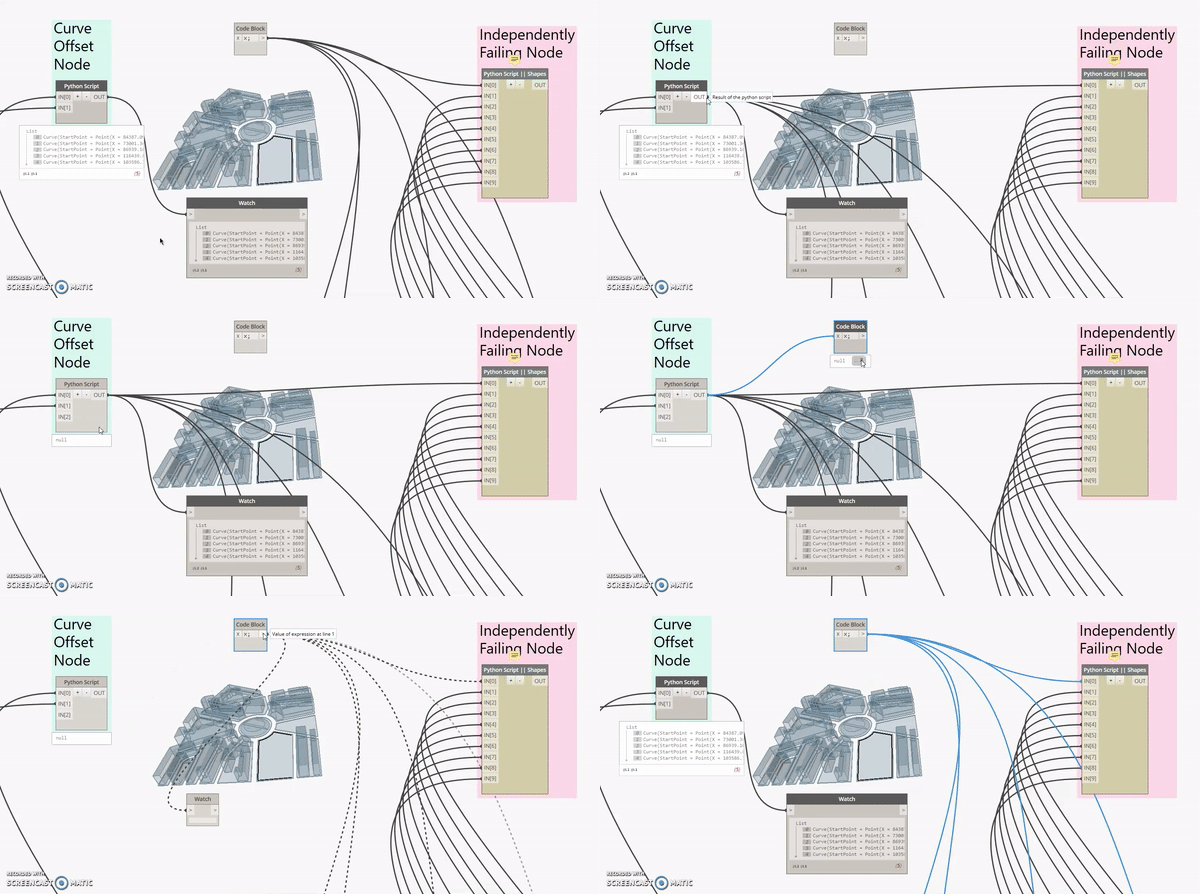
I have broken some of my Python code downstream (Causing the node to error out). This resulted in prior Python nodes breaking (Refer to the attached GIF).
What did you expect to see?
All upstream Python code executing correctly. An error message on the failing node to simply point out the error at that point.
What did you see instead?
Downstream Python node failure causes 'null' returns upstream.
1) Execute Graph containing Python node [Curve Offset Node] returns Curves. Correctly functioning.
2) Plug in results of Python node [Curve Offset Node] to another Python node [Independently Failing Node] which fails independently.
3) [Result] Python node [Curve Offset Node] now returns Null. Any additional output has a 'hover' return of a List with the correct item count, but a 'pinned' return of Null.
4) Unplug Python node [Curve Offset Node] from Python node [Independently Failing Node] results in Curves returning again.
 Amoursol
All 8 comments
@aparajit-pratap @mjkkirschner @Racel This is some funky behaviour :)
Amoursol
on 28 Aug 2018
It depends what your two python nodes do - most of our libraries are immutable, but you could do anything in python(including disposing geometry that another node produced). Can you share the .dyn or a smaller sample that reproduces the issue?
 mjkkirschner
on 28 Aug 2018
mjkkirschner
on 28 Aug 2018
Hi Mike,
We found the issue and its related to disposing of geometry that was created outside of the python node, that is to be used upstream in the graph. We assumed disposing of geometry in a python node was only relative to the python node but it seems it disposes of the geometry from the entire graph memory. Video to follow
 MarkThorley
on 29 Aug 2018
MarkThorley
on 29 Aug 2018
MarkThorley
on 29 Aug 2018
MarkThorley
on 29 Aug 2018
Nope, if you pass in geometry to your python node and call dispose on it - you're disposing it.
You must be careful not to dispose objects that are referenced in other places.
When you create geometry with our library you usually get a new piece of geometry back, as protogeometry is designed to return immutable objects. If you want to avoid modifying geometry objects you pass into your code you can keep track of those objects and use reference equality to avoid them or you our can copy all the geometry objects at the start of your code - you can do this by translating them by (0,0,0).
mjkkirschner
on 29 Aug 2018
Thanks for clarifying. Would be worth adding these notes to the documentation around disposing in the primer etc
MarkThorley
on 30 Aug 2018
Seconding @MarkThorley 's suggestion - this sounds like a messaging issue. Assumptions were that downstream graphs couldn't affect upstream nodes. In retrospect very obvious but not so at the time.
Amoursol
on 30 Aug 2018
Thanks for clarifying. Would be worth adding these notes to the documentation around disposing in the primer etc
I would say that it should get added to the wiki. This sounds like a rather advanced concept for the primer?
The ZeroTouch section already mentions some of the considerations with Disposing as well.
https://github.com/DynamoDS/Dynamo/wiki/Zero-Touch-Plugin-Development
 johnpierson
on 27 Sep 2018
johnpierson
on 27 Sep 2018
Related issues
 dimven
·
6Comments
dimven
·
6Comments
 mccrone
·
8Comments
mccrone
·
8Comments
 vykrum
·
6Comments
vykrum
·
6Comments
 erfajo
·
3Comments
johnpierson
·
10Comments
erfajo
·
3Comments
johnpierson
·
10Comments
Most helpful comment
Nope, if you pass in geometry to your python node and call dispose on it - you're disposing it.
You must be careful not to dispose objects that are referenced in other places.
When you create geometry with our library you usually get a new piece of geometry back, as protogeometry is designed to return immutable objects. If you want to avoid modifying geometry objects you pass into your code you can keep track of those objects and use reference equality to avoid them or you our can copy all the geometry objects at the start of your code - you can do this by translating them by (0,0,0).