Dynamo: Bug: Background preview adversely affected by geometry scaling settings
Dynamo version
2.0.2 / 1.3.4
Operating system
Win 10
What did you do?
Tried to create coordinate systems along a nurbs curve
What did you expect to see?
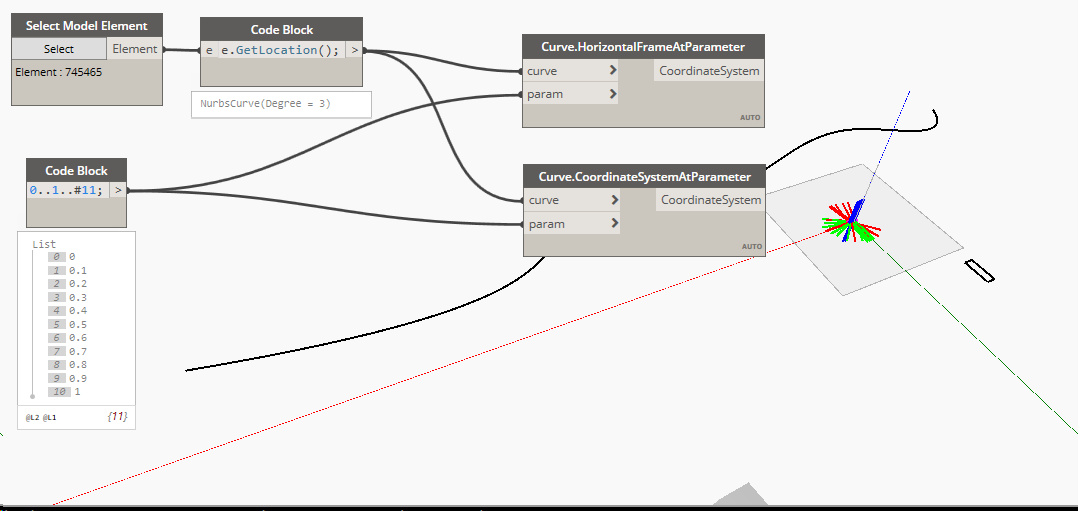
the coordinate systems at the correct location along the curve
What did you see instead?
the coordinate systems all bunched up near the origin
Same thing happens with the Curve.HorizontalFrameAtParameter node:
 dimven
All 6 comments
Edit: Hmm, there seems to be something funnier happening than originally expected. Even if I attempt to build the coordinate systems manually and set them at the supposedly correct origin, the CS preview in the background preview still appears wrong?
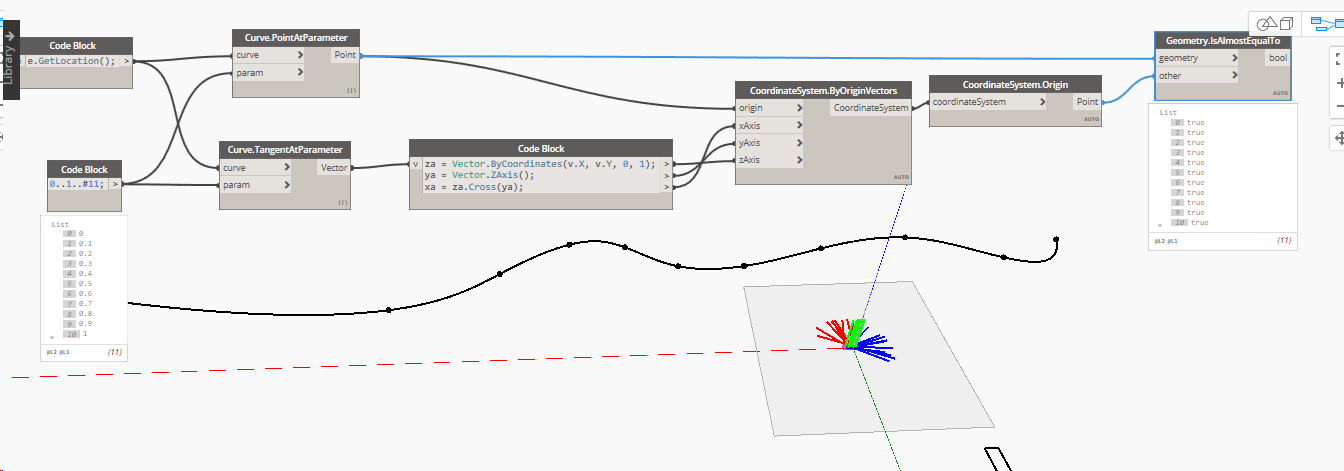
However the extracted origin is indeed reported correctly. When I use the coordinate systems to transform some geometry, it ends up in the correct place. So that confirms that just the preview is broken.
dimven
on 19 Feb 2019
I believe this is correct - they're in the affine space which is unitless, like Revit (well, it uses a vector space so a units system is applied). You'll see the same phenomenon with vectors.
 ThomasMahon
on 20 Feb 2019
ThomasMahon
on 20 Feb 2019
Do you see this with all curves, or only those extracted from revit locations curves?
 mjkkirschner
on 20 Feb 2019
mjkkirschner
on 20 Feb 2019
This is happening to all curves and I managed no narrow down the cause - switching the Geometry Scaling to anything else than the default Medium setting interferes with the background preview:
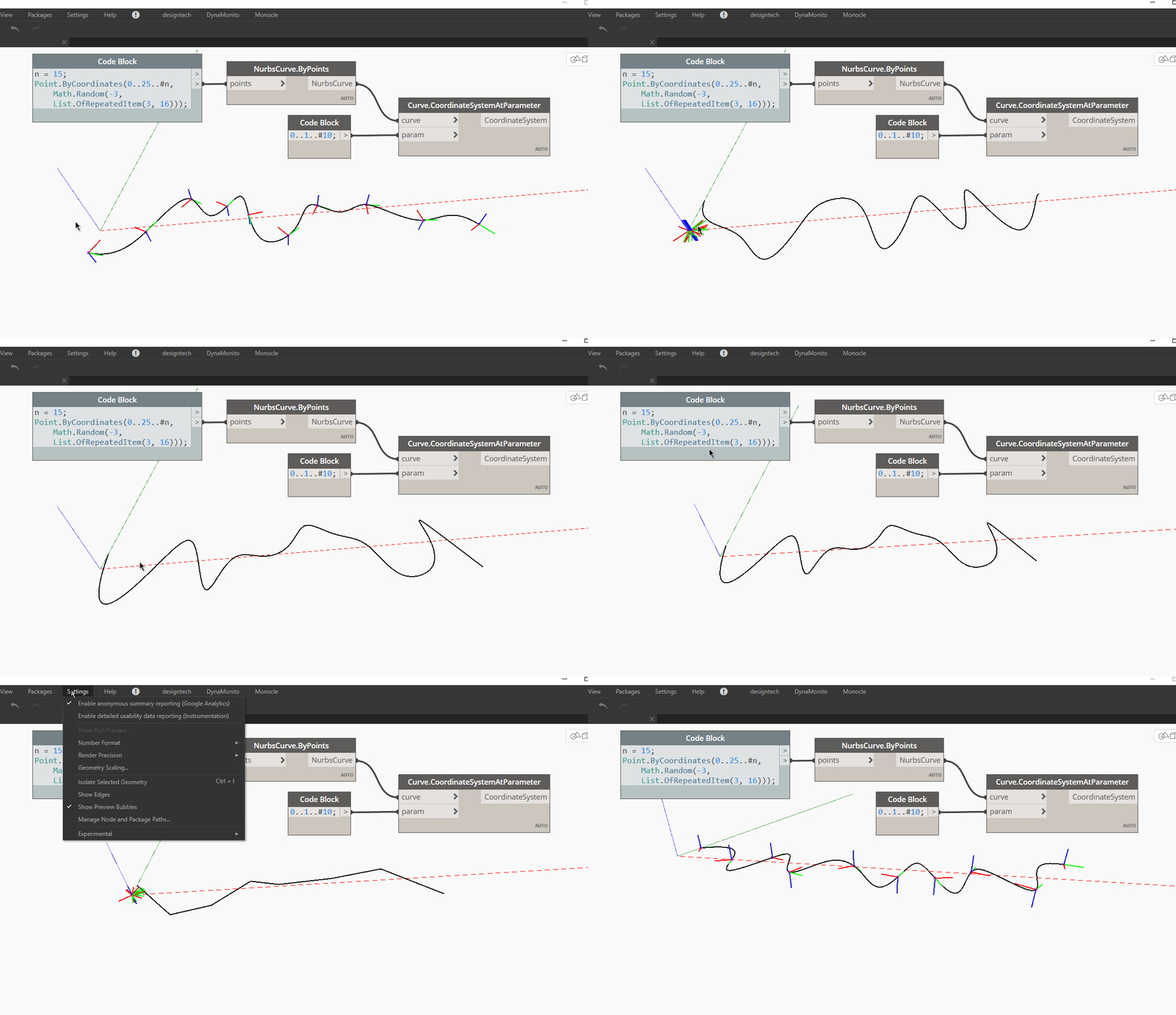
Just tested this on 1.3.4 and I'm seeing the same behavior, not sure about previous versions. While this is possibly not a regression, it's still an annoying bug.
What's more concerning is that the preview of the nurbs curve is all over the place too.
dimven
on 20 Feb 2019
@dimven thanks for investigating - @smangarole @aparajit-pratap @saintentropy - this should be in libG yes?
mjkkirschner
on 20 Feb 2019
This is happening to all curves and I managed no narrow down the cause - switching the
Geometry Scalingto anything else than the defaultMediumsetting interferes with the background preview:
Just tested this on 1.3.4 and I'm seeing the same behavior, not sure about previous versions. While this is possibly not a regression, it's still an annoying bug.
What's more concerning is that the preview of the nurbs curve is all over the place too.
This fix will be available in 2.3. The curve is changing because each time you change the geometry scale setting, the graph is made to re-execute and due to the Math.Random, a new curve is generated each time. FYI @QilongTang
 aparajit-pratap
on 24 Apr 2019
aparajit-pratap
on 24 Apr 2019
Related issues
 JarodSchultz
·
5Comments
dimven
·
10Comments
ThomasMahon
·
9Comments
JarodSchultz
·
5Comments
dimven
·
10Comments
ThomasMahon
·
9Comments
 askgrkumar
·
4Comments
askgrkumar
·
4Comments
 erfajo
·
3Comments
erfajo
·
3Comments