Dynamo version
2.0.0
Operating system
Windows
What did you do?
Wanted to limit visibility of graphics in Watch 3D node
What did you expect to see?
_Preview Upstream_ in the node right click menu
What did you see instead?
No such option anymore
 vykrum
All 6 comments
@vykrum Please check out our release note for daily builds here at http://dynamobim.org/resuming-pre-release-builds/, Preview Upstream is deprecated
 QilongTang
on 4 Nov 2017
QilongTang
on 4 Nov 2017
@QilongTang So Dynamo lost the ability to do something like this? ....
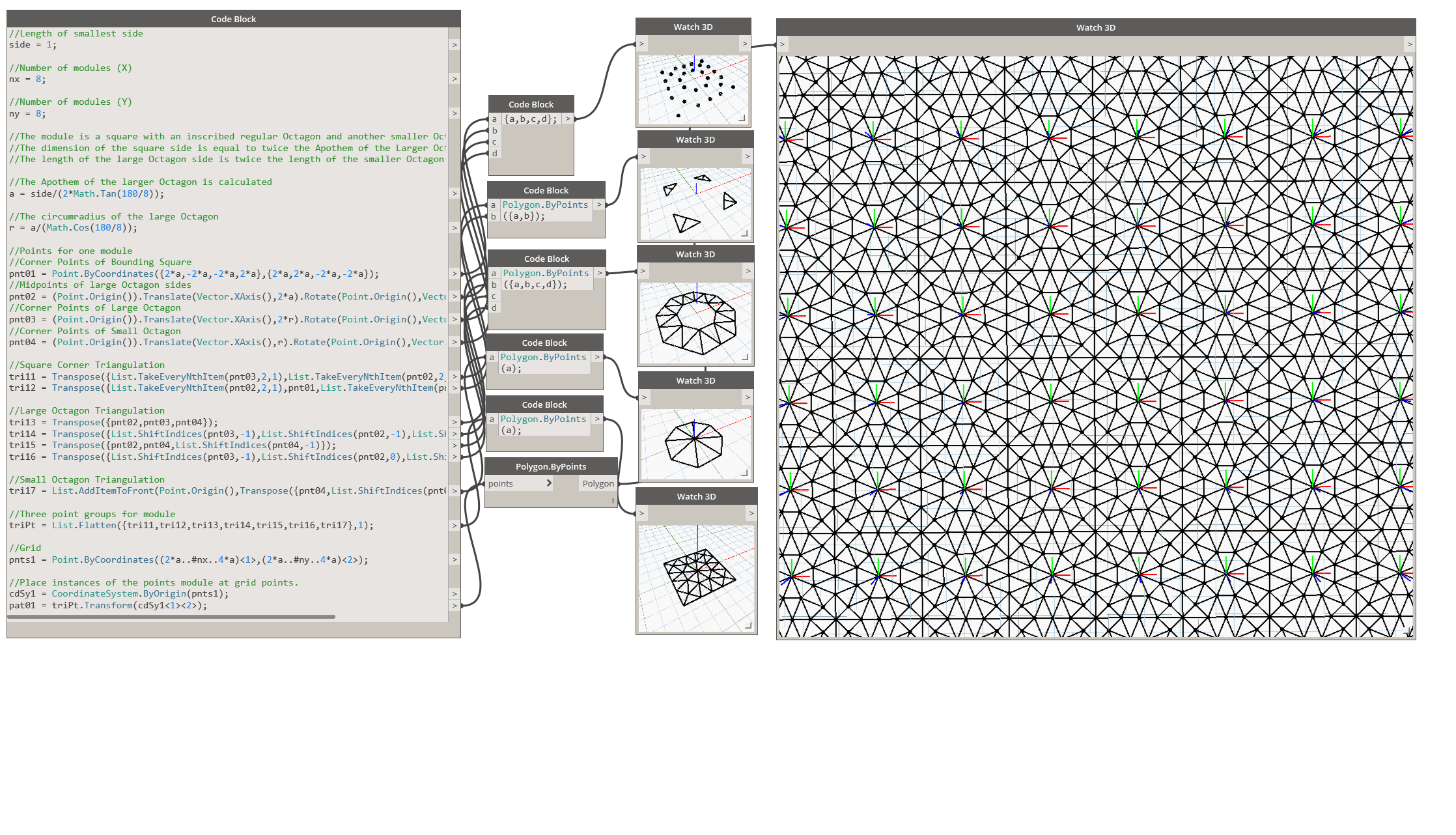
vykrum
on 5 Nov 2017
@QilongTang @Racel I think we need another discussion around this - it looks like in the current implementation turning regular preview on and off also effects all downstream watch3d nodes, making them useless for isolating geometry.
I think we need to investigate if we can turn preview off for a specific node - for instance, a point.byCoorinates() node, but then when attaching a watch3d, the points should still show up in that watch3d node. This does not currently happen and is not what we discussed when we talked about removal of previewUpstream. Either it's a change in behavior or we had a misunderstanding of the previous behavior.
 mjkkirschner
on 6 Nov 2017
mjkkirschner
on 6 Nov 2017
Also, codeblocks have odd behavior in my opinion when using watch 3d nodes - the entire codeblock output value is displayed, but I would assume just the port actually plugged into the watch3d node would be displayed - even when using an intermediate node.
mjkkirschner
on 6 Nov 2017
tracked:
https://jira.autodesk.com/browse/QNTM-2631
most likely will not bring preview upstream back but modify watch3d behavior to make it unnecessary.
mjkkirschner
on 6 Nov 2017
@mjkkirschner _Preview Upstream_, in any case was relevant only while using _Watch 3D_, so makes sense modifying _Watch 3D_ instead of having _Preview Upstream_ on every node.
While _Watch 3D_ probbly isn't used much anymore, since we now have Background Preview, it is still needed to capture graphics with _Export Workspace As Image_
vykrum
on 8 Nov 2017
Related issues
 DrLicor
·
4Comments
DrLicor
·
4Comments
 ksobon
·
8Comments
ksobon
·
8Comments
 AndersDeleuran
·
6Comments
AndersDeleuran
·
6Comments
 dbaldacchino
·
7Comments
dbaldacchino
·
7Comments
 dimven
·
10Comments
dimven
·
10Comments
Most helpful comment
tracked:
https://jira.autodesk.com/browse/QNTM-2631
most likely will not bring preview upstream back but modify watch3d behavior to make it unnecessary.