Docksal: More "cannot start service" - Windows 10 in Native Mode
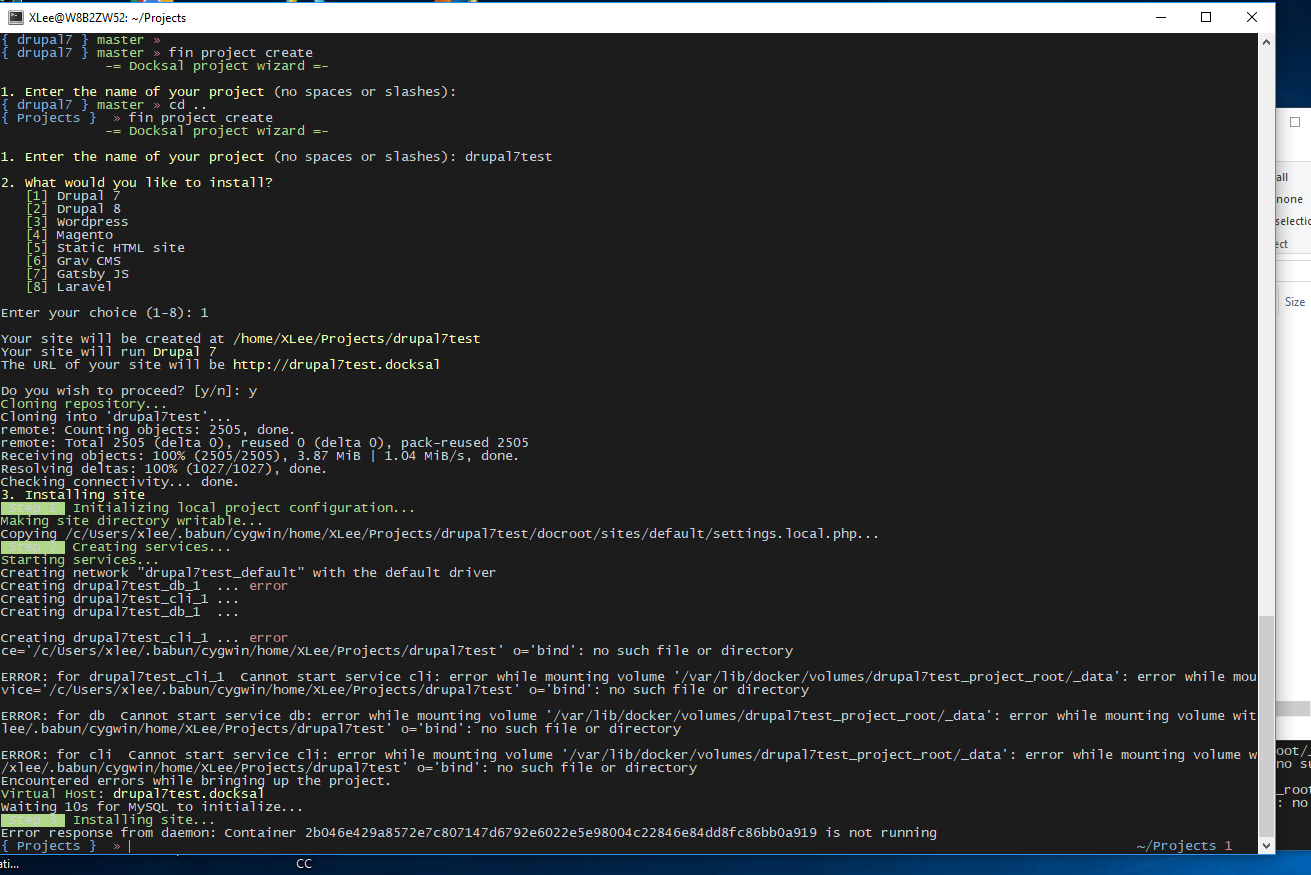
I've followed several issues down multiple rabbit holes here in the documentation regarding the whole "cannot start service" and "no such file or directory" error track and I don't see how any of those pertain to the issue we are having. We are running in Native Mode, so I don't see how it's a VM issue and the errors are totally different from those listed on the SMB troubleshooting page.
I did try adding /c/Users/xlee/.babun/cygwin/home/XLee/Projects/drupal7test as the "DOCKSAL_NFS_PATH" in the ~/.docksal/docksal.env , but I have a feeling it isn't supposed to be the fully qualified path because .babun is an emulated environment. I've also tried starting it after the /home folder, but that didn't seem to work either.
 loopy3025
All 30 comments
Interestingly, I had to run Babun in administrator mode in order to get cygwin installed. Could that be related to our issues? Could there be some kind of oddness going on with the permissions on this computer?
loopy3025
on 23 Jan 2018
We are running in Native Mode
So Docker for Windows. What version? (DOCKSAL_NFS_PATH is not applicable for Windows or Native mode and does nothing)
I had to run Babun in administrator mode in order to get cygwin installed
Issues you experience are 100% related to this fact. Babun should be installed as a regular user that will use it later on. Otherwise it will not work properly.
https://docs.docksal.io/en/master/getting-started/env-setup/#windows
You will need to uninstall babun as Administrator and install as a regular user.
 achekulaev
on 23 Jan 2018
achekulaev
on 23 Jan 2018
@achekulaev And I take it the resolution for not being able to install cygwin is to simply have my user granted the permissions necessary to perform this task?
loopy3025
on 23 Jan 2018
@loopy3025 No special permissions are required to install Babun as a regular user.
achekulaev
on 23 Jan 2018
Please note it's exactly http://babun.github.io/. Not just any cygwin
achekulaev
on 23 Jan 2018
Hey, @achekulaev I'm sorry. I mislead you. It wasn't babun/cygwin. It was when I tried to install Docksal. Screengrabs incoming.
loopy3025
on 23 Jan 2018
I removed babun and reinstalled it. When I installed it, I just used the regular installer. I did not use "run as administrator".
Then, I tried running the Docksal install without Run as Administrator:
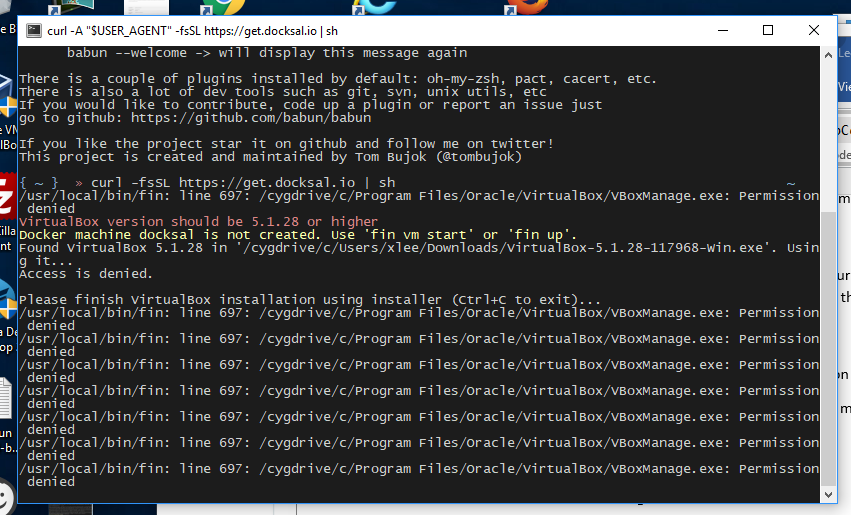
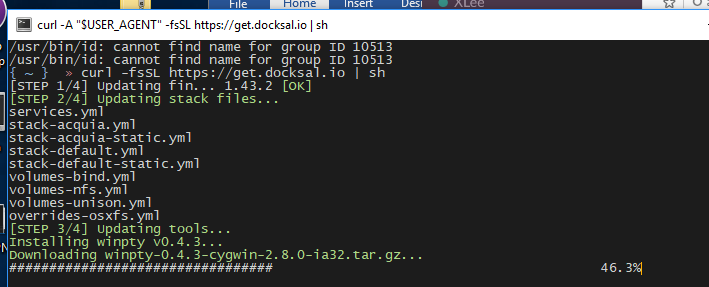
With Run as Administrator:
loopy3025
on 23 Jan 2018
I'm super curious as to why it tried to download VirtualBox, too. Very strange.
loopy3025
on 23 Jan 2018
There is a file c:\Program files\Oracle\VirtualBox\VBoxManage.exe which is a command line utility to manage virtual boxes. For some reason you do not have permission to access/execute this file.
fin thought that your VirtualBox installation is broken (which looks to be the truth) hence it tried to reinstall it (but I guess it didn't help).
You need to check permissions for this file specifically and for the whole c:\Program files\Oracle\VirtualBox directory. It should be accessible/executable by a regular user.
UPDATE: as far as I see fin could not run another exe file (VirtualBox installation). This is very weird and should not happen. Do you have some software (antivirus?) preventing fin from running those files?
achekulaev
on 23 Jan 2018
Great. Thanks. I will do that and report back.
loopy3025
on 23 Jan 2018
@loopy3025 also you said We are running in Native Mode. It does not look to be the case though. In Native Mode you use Docker for Windows and you do not need VirtualBox.
Are we talking about the same thing?
achekulaev
on 23 Jan 2018
@achekulaev Exactly. That's why it was so weird that it tried to install VirtualBox. I did not run a fin vm start.
loopy3025
on 23 Jan 2018
@achekulaev Are you saying that you can't use Native Mode on Windows?
loopy3025
on 23 Jan 2018
Sure you can. Please show fin sysinfo output (when regular user, and when admin).
achekulaev
on 23 Jan 2018
fin sysinfo when regular user:
███  OS
 Microsoft Windows [Version 10.0.15063]
CYGWIN_NT-10.0-WOW W8B2ZW52 1.7.35(0.287/5/3) 2015-03-04 12:07 i686 Cygwin
Mode: VirtualBox VM
███  FIN
fin version: 1.43.2
███  ENVIRONMENT
DOCKER_HOST             |
 WARNING:  Non-default DOCKER_HOST
███  DOCKER
EXPECTED VERSION: 17.09.0-ce
Client:
 Version:       17.12.0-ce
 API version:   1.35
 Go version:    go1.9.2
 Git commit:    c97c6d6
 Built: Wed Dec 27 20:05:22 2017
 OS/Arch:       windows/amd64
Server:
 Engine:
  Version:      17.12.0-ce
  API version:  1.35 (minimum version 1.12)
  Go version:   go1.9.2
  Git commit:   c97c6d6
  Built:        Wed Dec 27 20:12:29 2017
  OS/Arch:      linux/amd64
  Experimental: true
███  DOCKER INFO
Containers: 7
 Running: 3
 Paused: 0
 Stopped: 4
Images: 6
Server Version: 17.12.0-ce
Storage Driver: overlay2
 Backing Filesystem: extfs
 Supports d_type: true
 Native Overlay Diff: true
Logging Driver: json-file
Cgroup Driver: cgroupfs
Plugins:
 Volume: local
 Network: bridge host ipvlan macvlan null overlay
 Log: awslogs fluentd gcplogs gelf journald json-file logentries splunk syslog
Swarm: inactive
Runtimes: runc
Default Runtime: runc
Init Binary: docker-init
containerd version: 89623f28b87a6004d4b785663257362d1658a729
runc version: b2567b37d7b75eb4cf325b77297b140ea686ce8f
init version: 949e6fa
Security Options:
 seccomp
  Profile: default
Kernel Version: 4.9.60-linuxkit-aufs
Operating System: Docker for Windows
OSType: linux
Architecture: x86_64
CPUs: 2
Total Memory: 1.934GiB
Name: linuxkit-00155d4b0100
ID: L5KL:XQJ7:5GMB:6JPU:3UI4:QOMR:2QO6:UAPS:5HT2:7DP2:YBG3:55Y2
Docker Root Dir: /var/lib/docker
Debug Mode (client): false
Debug Mode (server): true
 File Descriptors: 42
 Goroutines: 66
 System Time: 2018-01-24T13:11:47.1382992Z
 EventsListeners: 3
Registry: https://index.docker.io/v1/
Labels:
Experimental: true
Insecure Registries:
 127.0.0.0/8
Live Restore Enabled: false
███  DOCKER COMPOSE
EXPECTED VERSION: 1.17.1
docker-compose version 1.18.0, build 8dd22a96
docker-py version: 2.6.1
CPython version: 2.7.14
OpenSSL version: OpenSSL 1.0.2k  26 Jan 2017
███  DOCKER MACHINE
EXPECTED VERSION: 0.13.0
docker-machine.exe version 0.13.0, build 9ba6da9
NAME   ACTIVE   DRIVER   STATE   URL   SWARM   DOCKER   ERRORS
███  VIRTUALBOX
EXPECTED VERSION: 5.1.28
/usr/local/bin/fin: line 4249: /cygdrive/c/Program Files/Oracle/VirtualBox/VBoxManage.exe: Permission denied
███  VIRTUALBOX NETWORK INTERFACES
/usr/local/bin/fin: line 4252: /cygdrive/c/Program Files/Oracle/VirtualBox/VBoxManage.exe: Permission denied
███  HDD Usage
Docker machine docksal is not created. Use 'fin vm start' or 'fin up'.
███  RAM Usage
Docker machine docksal is not created. Use 'fin vm start' or 'fin up'.
███  RAM Usage per container
CONTAINER ID        NAME                  CPU %               MEM USAGE / LIMIT     MEM %               NET I/O             BLOCK I/O           PIDS
06b167180bae        docksal-ssh-agent     0.00%               1.262MiB / 1.934GiB   0.06%               5.39kB / 0B         0B / 0B             2
74bd8b7a2ed0        docksal-dns           0.32%               15.49MiB / 1.934GiB   0.78%               1.5MB / 1.79MB      0B / 0B             12
e589a7ce4aa9        docksal-vhost-proxy   0.29%               17.32MiB / 1.934GiB   0.87%               5.51kB / 0B         0B / 0B             14
fin sysinfo when running as admin:
███  OS
 Microsoft Windows [Version 10.0.15063]
CYGWIN_NT-10.0-WOW W8B2ZW52 1.7.35(0.287/5/3) 2015-03-04 12:07 i686 Cygwin
Mode: VirtualBox VM
███  FIN
fin version: 1.43.2
███  ENVIRONMENT
DOCKER_HOST             |
 WARNING:  Non-default DOCKER_HOST
███  DOCKER
EXPECTED VERSION: 17.09.0-ce
Client:
 Version:       17.12.0-ce
 API version:   1.35
 Go version:    go1.9.2
 Git commit:    c97c6d6
 Built: Wed Dec 27 20:05:22 2017
 OS/Arch:       windows/amd64
Server:
 Engine:
  Version:      17.12.0-ce
  API version:  1.35 (minimum version 1.12)
  Go version:   go1.9.2
  Git commit:   c97c6d6
  Built:        Wed Dec 27 20:12:29 2017
  OS/Arch:      linux/amd64
  Experimental: true
███  DOCKER INFO
Containers: 7
 Running: 3
 Paused: 0
 Stopped: 4
Images: 6
Server Version: 17.12.0-ce
Storage Driver: overlay2
 Backing Filesystem: extfs
 Supports d_type: true
 Native Overlay Diff: true
Logging Driver: json-file
Cgroup Driver: cgroupfs
Plugins:
 Volume: local
 Network: bridge host ipvlan macvlan null overlay
 Log: awslogs fluentd gcplogs gelf journald json-file logentries splunk syslog
Swarm: inactive
Runtimes: runc
Default Runtime: runc
Init Binary: docker-init
containerd version: 89623f28b87a6004d4b785663257362d1658a729
runc version: b2567b37d7b75eb4cf325b77297b140ea686ce8f
init version: 949e6fa
Security Options:
 seccomp
  Profile: default
Kernel Version: 4.9.60-linuxkit-aufs
Operating System: Docker for Windows
OSType: linux
Architecture: x86_64
CPUs: 2
Total Memory: 1.934GiB
Name: linuxkit-00155d4b0100
ID: L5KL:XQJ7:5GMB:6JPU:3UI4:QOMR:2QO6:UAPS:5HT2:7DP2:YBG3:55Y2
Docker Root Dir: /var/lib/docker
Debug Mode (client): false
Debug Mode (server): true
 File Descriptors: 42
 Goroutines: 66
 System Time: 2018-01-24T13:12:57.5505712Z
 EventsListeners: 3
Registry: https://index.docker.io/v1/
Labels:
Experimental: true
Insecure Registries:
 127.0.0.0/8
Live Restore Enabled: false
███  DOCKER COMPOSE
EXPECTED VERSION: 1.17.1
docker-compose version 1.18.0, build 8dd22a96
docker-py version: 2.6.1
CPython version: 2.7.14
OpenSSL version: OpenSSL 1.0.2k  26 Jan 2017
███  DOCKER MACHINE
EXPECTED VERSION: 0.13.0
docker-machine.exe version 0.13.0, build 9ba6da9
NAME   ACTIVE   DRIVER   STATE   URL   SWARM   DOCKER   ERRORS
███  VIRTUALBOX
EXPECTED VERSION: 5.1.28
5.2.0r118431
███  VIRTUALBOX NETWORK INTERFACES
Name:            VirtualBox Host-Only Ethernet Adapter
GUID:            74fe5103-81b6-4c01-a200-4a32155abcaf
DHCP:            Disabled
IPAddress:       192.168.56.1
NetworkMask:     255.255.255.0
IPV6Address:     fe80::d4bd:e03f:ae19:7ebd
IPV6NetworkMaskPrefixLength: 64
HardwareAddress: 0a:00:27:00:00:09
MediumType:      Ethernet
Status:          Up
VBoxNetworkName: HostInterfaceNetworking-VirtualBox Host-Only Ethernet Adapter
███  HDD Usage
Docker machine docksal is not created. Use 'fin vm start' or 'fin up'.
███  RAM Usage
Docker machine docksal is not created. Use 'fin vm start' or 'fin up'.
███  RAM Usage per container
CONTAINER ID        NAME                  CPU %               MEM USAGE / LIMIT     MEM %               NET I/O             BLOCK I/O           PIDS
06b167180bae        docksal-ssh-agent     0.00%               1.262MiB / 1.934GiB   0.06%               5.39kB / 0B         0B / 0B             2
74bd8b7a2ed0        docksal-dns           0.36%               15.5MiB / 1.934GiB    0.78%               1.51MB / 1.8MB      0B / 0B             12
e589a7ce4aa9        docksal-vhost-proxy   0.51%               17.3MiB / 1.934GiB    0.87%               5.51kB / 0B         0B / 0B             14
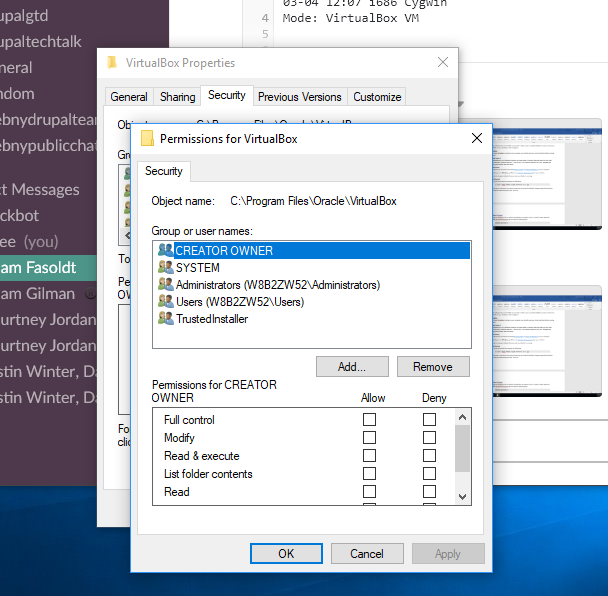
Here's the results of me changing the permissions. The regular user has full access to that folder now:
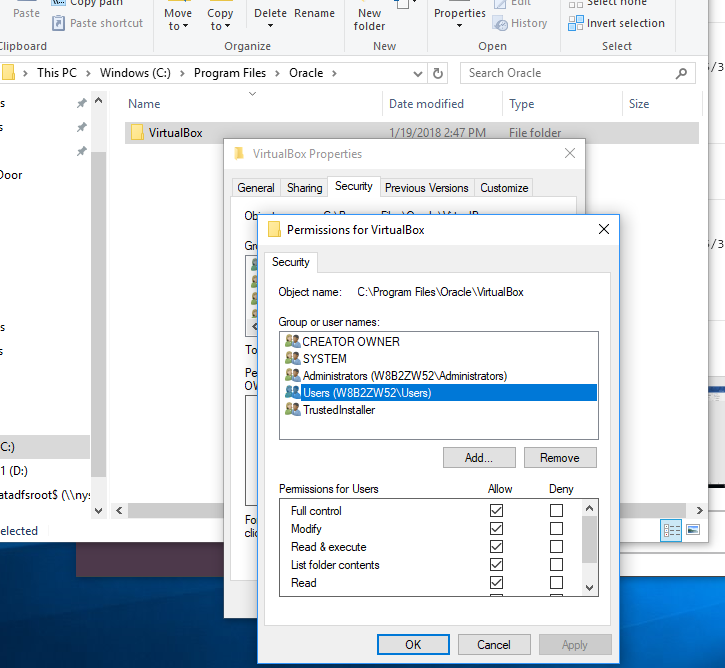
For some reason, this user can't be given access. Their access keeps getting reset. After a quick google search, this seems to be not a problem, though I could be wrong.
Initial message when I try to install Docksal...
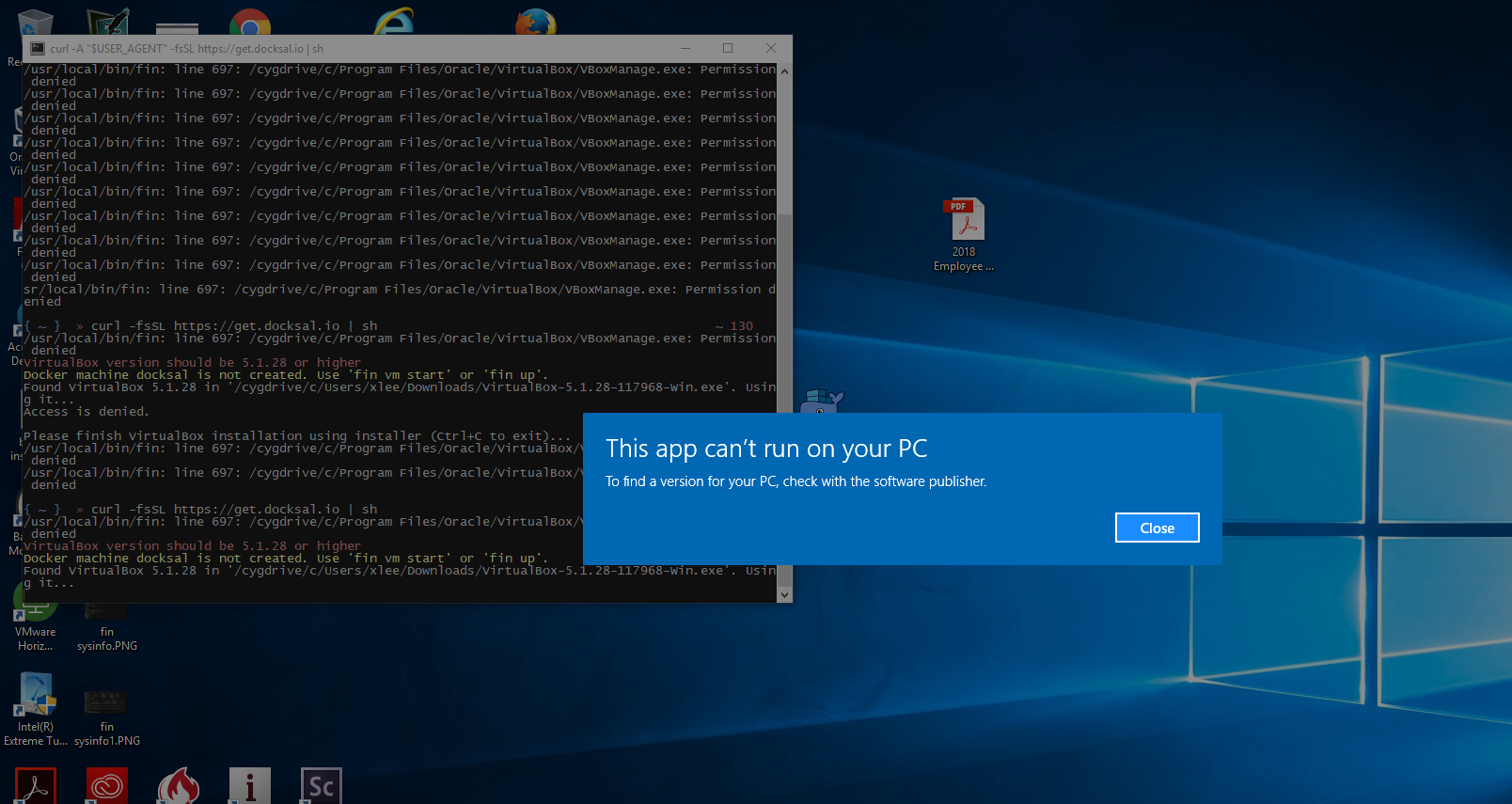
As it makes the attempt...

loopy3025
on 24 Jan 2018
I can't imagine why it is requiring VirtalBox. Is it required for Docker itself to work in the backgroud?
loopy3025
on 24 Jan 2018
Mode: VirtualBox VM
You do not have Native Mode enabled.
You need to follow the instruction in the documentation to switch to using Docker for Windows
https://docs.docksal.io/en/master/getting-started/env-setup-native/#switching-to-docker-for-macwindows
(Basically you need to add a line DOCKER_NATIVE=1 into $HOME/.docksal/docksal.env and restart Babun session)
achekulaev
on 24 Jan 2018
@achekulaev there is no .docksal folder if docksal isn't installed yet, right? Remember, we deleted everything and started the install process from scratch.
loopy3025
on 24 Jan 2018
After docksal is installed, we definitely follow those steps, but we still need to run .babun in administrator mode in order to install docksal.
loopy3025
on 24 Jan 2018
@loopy3025
there is no .docksal folder if docksal isn't installed yet, right
Yes there is no .docksal folder if docksal isn't installed. You can create a folder with mkdir command.
Alternatively you can set a variable for current session only with export DOCKER_NATIVE=1 command, then install Docksal, then add line to $HOME.docksal/docksal.env
achekulaev
on 24 Jan 2018
So part of the process is to create a ~/docksal/docksal.env file BEFORE installing docksal? The documentation is somewhat ambiguous. The step comes before installing docksal, but as the file doesn't exist, it seems somewhat impossible to add the line to the file.
Okay. I'll add the file and that one line to it. I assume the file doesn't need any other configurations?
loopy3025
on 24 Jan 2018
@loopy3025 I agree that documentation is ambiguous at that spot and should be updated. There are historical reasons for that.
The ticket to improve documentation is already created https://github.com/docksal/docksal/issues/453
Yes adding ~/docksal/docksal.env with 1 line will do the job.
achekulaev
on 24 Jan 2018
Perfect. Docksal installed without admin mode. I will update our internal documentation to reflect that step. Thank you. I will try to get a site running and report back to see if that worked.
loopy3025
on 24 Jan 2018
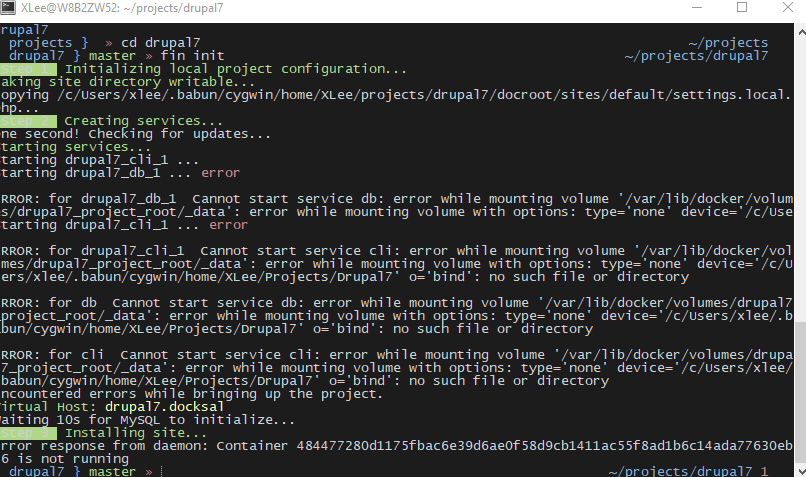
Looks like the same results.
loopy3025
on 24 Jan 2018
Co-worker of loopy3025 here.
I was also getting error messages for db and cli issues: "ERROR: for nyscertified_db_1 Cannot start service db: error while mounting volume '/var/lib/docker/volumes/nyscertified_project_root/_data': error while mounting volume with options: type='none' device='/c/Users/jakers/.babun/cygwin/home/JAkers/projects/nyscertified' o='bind': no such file or direcStarting nyscertified_cli_1 ... error" messages
I did the following:
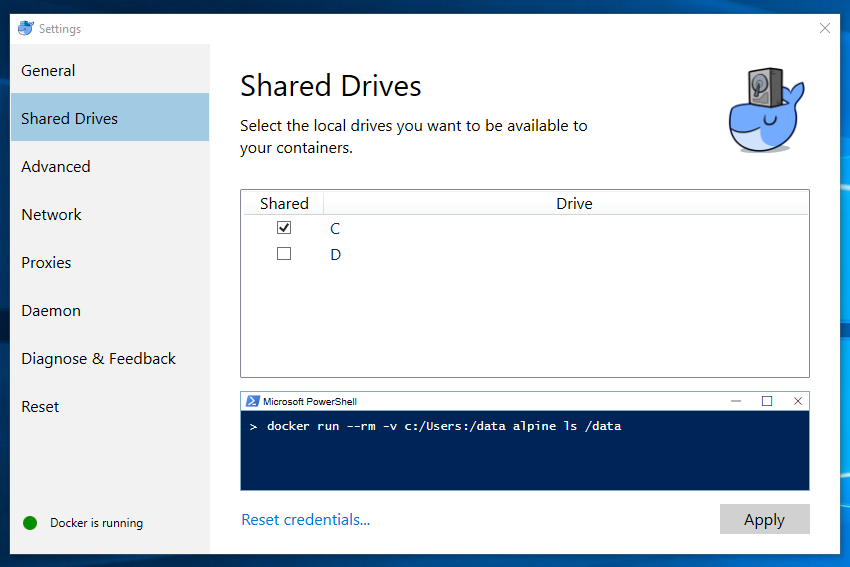
- Open Docker for Windows (icon at lower right of task bar)
- select Settings
- select Shared Drives
- make sure C: is checked
- CLICK ON THE APPLY button
When I reran the fin init - the error messages for db and cli went away.
Now to work on the other issues that I've got.
 judy-akers
on 24 Jan 2018
judy-akers
on 24 Jan 2018
Ah. We had the subfolder in there before and deleted it. Alrighty. That worked!
Mac:
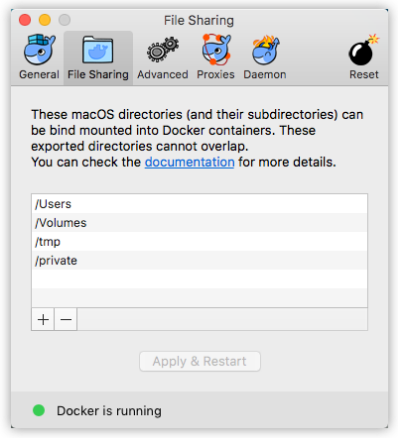
Windows:
loopy3025
on 24 Jan 2018
Thanks for all the attention and help so far @achekulaev . You rock!
loopy3025
on 24 Jan 2018
@judy-akers thanks for adding comment here. Looks like we really need to improve documentation. The part on the drives is there but is probably not jumping out at user enough and people miss it.
achekulaev
on 24 Jan 2018
We just found out that if you suddenly start getting this error again, that means you probably changed your password or something else happened with your account.
You need to do the following:
- Go to Docker -> Shared Drives
- Un-check your shared drive
- Apply
- Wait for it to restart
- Go back to Docker -> Shared Drives
- Re-check the drive you want to share
- Click Apply
loopy3025
on 27 Jun 2018
Related issues
 jajajaime
·
25Comments
jajajaime
·
25Comments
 amjad-wp
·
18Comments
amjad-wp
·
18Comments
 lmakarov
·
49Comments
lmakarov
·
49Comments
 gconry18
·
23Comments
gconry18
·
23Comments
 ygerasimov
·
33Comments
ygerasimov
·
33Comments
Most helpful comment
Co-worker of loopy3025 here.
I was also getting error messages for db and cli issues: "ERROR: for nyscertified_db_1 Cannot start service db: error while mounting volume '/var/lib/docker/volumes/nyscertified_project_root/_data': error while mounting volume with options: type='none' device='/c/Users/jakers/.babun/cygwin/home/JAkers/projects/nyscertified' o='bind': no such file or direcStarting nyscertified_cli_1 ... error" messages
I did the following:
When I reran the fin init - the error messages for db and cli went away.
Now to work on the other issues that I've got.