Docksal: Xdebug not triggering breakpoints on Docksal v1.13.0
Description
Xdebug is not triggering breakpoints on v1.13.0, at least on PhpStorm, which is the only editor where I've tested it. The same setup worked without issue on the previous version.
Removing the project and restarting it did not fix the issue, nor restarting Docker or the computer.
Steps to reproduce the issue:
- Setup PhpStorm Servers as per instructions in the docs https://docs.docksal.io/tools/xdebug/
- Enable Xdebug with XDEBUG_ENABLED=1 on the docksal.env or docksal-local.env file
- Up your project
- Add a breakpoint on code that runs on the page that load
- Start listening with PhpStorm
- Load the page
Describe the results you received:
Breakpoint doesn't trigger and page loads normally.
Describe the results you expected:
Breakpoint triggering and execution paused on that line.
Output of fin config:
fin config output
COMPOSE_PROJECT_NAME_SAFE: imprint-plus
COMPOSE_FILE:
/Users/jaime/.docksal/stacks/volumes-bind.yml
/Users/jaime/.docksal/stacks/stack-default.yml
/Users/jaime/beargroup/imprint-plus/.docksal/docksal.yml
ENV_FILE:
/Users/jaime/beargroup/imprint-plus/.docksal/docksal.env
/Users/jaime/beargroup/imprint-plus/.docksal/docksal-local.env

PROJECT_ROOT: /Users/jaime/beargroup/imprint-plus
DOCROOT: .
VIRTUAL_HOST: imprint-plus.docksal
VIRTUAL_HOST_ALIASES: *.imprint-plus.docksal
IP: 192.168.64.100
MYSQL: 192.168.64.100:33078

Docker Compose configuration
---------------------
services:
  cli:
    dns:
    - 192.168.64.100
    - 8.8.8.8
    environment:
      BLACKFIRE_CLIENT_ID: null
      BLACKFIRE_CLIENT_TOKEN: null
      COMPOSER_ALLOW_XDEBUG: '1'
      COMPOSER_DISABLE_XDEBUG_WARN: '1'
      DOCROOT: .
      DRUSH_ALLOW_XDEBUG: '1'
      DRUSH_OPTIONS_URI: imprint-plus.docksal
      GIT_USER_EMAIL: [email protected]
      GIT_USER_NAME: Jaime Lopez
      HOST_GID: '20'
      HOST_UID: '501'
      MYSQL_DATABASE: default
      MYSQL_HOST: db
      MYSQL_PASSWORD: user
      MYSQL_ROOT_PASSWORD: root
      MYSQL_USER: user
      PHP_IDE_CONFIG: serverName=imprint-plus.docksal
      SECRET_ACAPI_EMAIL: null
      SECRET_ACAPI_KEY: null
      SECRET_PLATFORMSH_CLI_TOKEN: null
      SECRET_SSH_PRIVATE_KEY: null
      SECRET_TERMINUS_TOKEN: null
      SSH_AUTH_SOCK: /.ssh-agent/proxy-socket
      VIRTUAL_HOST: imprint-plus.docksal
      XDEBUG_CONFIG: remote_host=192.168.64.1 remote_port=9000
      XDEBUG_ENABLED: '1'
    hostname: cli
    image: docksal/cli:2.6-php7.2
    volumes:
    - docksal_ssh_agent:/.ssh-agent:ro
    - cli_home:/home/docker:rw
    - project_root:/var/www:rw,nocopy,cached
  db:
    dns:
    - 192.168.64.100
    - 8.8.8.8
    environment:
      MYSQL_ALLOW_EMPTY_PASSWORD: null
      MYSQL_DATABASE: default
      MYSQL_INITDB_SKIP_TZINFO: null
      MYSQL_ONETIME_PASSWORD: null
      MYSQL_PASSWORD: user
      MYSQL_RANDOM_ROOT_PASSWORD: null
      MYSQL_ROOT_PASSWORD: root
      MYSQL_USER: user
    hostname: db
    image: docksal/db:1.3-mysql-5.6
    ports:
    - 33078:3306/tcp
    volumes:
    - db_data:/var/lib/mysql:rw
    - project_root:/var/www:ro,nocopy,cached
  elasticsearch:
    dns:
    - 192.168.64.100
    - 8.8.8.8
    - 192.168.64.100
    - 8.8.8.8
    entrypoint: /usr/share/elasticsearch/docksal/entrypoints/elasticsearch.sh
    environment:
      ES_JAVA_OPTS: -Xms512m -Xmx512m
      bootstrap.memory_lock: "true"
    hostname: elasticsearch
    image: elasticsearch:6.5.3
    ports:
    - 9200/tcp
    ulimits:
      memlock:
        hard: -1
        soft: -1
    volumes:
    - /Users/jaime/beargroup/imprint-plus/.docksal:/usr/share/elasticsearch/docksal:rw
  web:
    depends_on:
      cli:
        condition: service_started
    dns:
    - 192.168.64.100
    - 8.8.8.8
    environment:
      APACHE_BASIC_AUTH_PASS: null
      APACHE_BASIC_AUTH_USER: null
      APACHE_DOCUMENTROOT: /var/www/.
      APACHE_FCGI_HOST_PORT: cli:9000
    hostname: web
    image: docksal/apache:2.4-2.3
    labels:
      io.docksal.cert-name: none
      io.docksal.permanent: "false"
      io.docksal.project-root: /Users/jaime/beargroup/imprint-plus
      io.docksal.virtual-host: imprint-plus.docksal,*.imprint-plus.docksal,imprint-plus.docksal.*
    volumes:
    - project_root:/var/www:ro,nocopy,cached
version: '2.1'
volumes:
  cli_home: {}
  db_data: {}
  docksal_ssh_agent:
    external: true
    name: docksal_ssh_agent
  project_root:
    driver: local
    driver_opts:
      device: /Users/jaime/beargroup/imprint-plus
      o: bind
      type: none

---------------------
Output of fin sysinfo:
fin sysinfo output
```
███ OS
Darwin Mac OS X 10.14.6
Darwin Macbearth.local 18.7.0 Darwin Kernel Version 18.7.0: Tue Aug 20 16:57:14 PDT 2019; root:xnu-4903.271.2~2/RELEASE_X86_64 x86_64
███ ENVIRONMENT
MODE : Docker Desktop
███ FIN
fin version: 1.92.2
███ DOCKER COMPOSE
EXPECTED VERSION: 1.24.1
docker-compose version 1.24.1, build 4667896b
docker-py version: 3.7.3
CPython version: 3.6.8
OpenSSL version: OpenSSL 1.1.0j 20 Nov 2018
███ DOCKER
EXPECTED VERSION: 19.03.4
Client: Docker Engine - Community
Version: 19.03.4
API version: 1.40
Go version: go1.12.10
Git commit: 9013bf5
Built: Fri Oct 18 15:48:38 2019
OS/Arch: darwin/amd64
Experimental: false
Server: Docker Engine - Community
Engine:
Version: 19.03.5
API version: 1.40 (minimum version 1.12)
Go version: go1.12.12
Git commit: 633a0ea
Built: Wed Nov 13 07:29:19 2019
OS/Arch: linux/amd64
Experimental: false
containerd:
Version: v1.2.10
GitCommit: b34a5c8af56e510852c35414db4c1f4fa6172339
runc:
Version: 1.0.0-rc8+dev
GitCommit: 3e425f80a8c931f88e6d94a8c831b9d5aa481657
docker-init:
Version: 0.18.0
GitCommit: fec3683
███ DOCKSAL: PROJECTS
project STATUS virtual host project root
imprint-plus Up 25 minutes (healthy) imprint-plus.docksal,.imprint-plus.docksal,imprint-plus.docksal. /Users/jaime/beargroup/imprint-plus
███ DOCKSAL: VIRTUAL HOSTS
.imprint-plus.docksal
imprint-plus.docksal.
imprint-plus.docksal
███ DOCKSAL: DNS
Successfully requested http://dns-test.docksal
███ DOCKER: RUNNING CONTAINERS
CONTAINER ID IMAGE COMMAND CREATED STATUS PORTS NAMES
a21c2b7540b5 docksal/apache:2.4-2.3 "httpd-foreground" 25 minutes ago Up 25 minutes (healthy) 80/tcp, 443/tcp imprint-plus_web_1
3179eed80a95 docksal/cli:2.6-php7.2 "/opt/startup.sh sup…" 25 minutes ago Up 25 minutes (healthy) 22/tcp, 3000/tcp, 9000/tcp imprint-plus_cli_1
e4ae022cee0d docksal/ssh-agent:1.3 "docker-entrypoint.s…" 2 days ago Up 2 days (healthy) docksal-ssh-agent
bbc7a6d861ea docksal/dns:1.1 "docker-entrypoint.s…" 2 days ago Up 2 days (healthy) 192.168.64.100:53->53/udp docksal-dns
24de750860c0 docksal/vhost-proxy:1.5 "docker-entrypoint.s…" 2 days ago Up 2 days (healthy) 192.168.64.100:80->80/tcp, 192.168.64.100:443->443/tcp docksal-vhost-proxy
84b36c691f4e elasticsearch:6.5.3 "/usr/share/elastics…" 6 days ago Up 2 days 9300/tcp, 0.0.0.0:32768->9200/tcp imprint-plus_elasticsearch_1
d1ef8628c2d4 docksal/db:1.3-mysql-5.6 "docker-entrypoint.s…" 6 days ago Up 2 days (healthy) 0.0.0.0:33078->3306/tcp imprint-plus_db_1
███ DOCKER: NETWORKS
NETWORK ID NAME DRIVER SCOPE
596ba49a2edc _default bridge local
c808f7ae6c7c bridge bridge local
78678b4ed24a host host local
24a385d1731d imprint-plus_default bridge local
48e12c474945 none null local
c83eefef59b8 sub_default bridge local
███ DOCKER DESKTOP
EXPECTED VERSION: 2.0.0.3
2.1.0.5
███ HDD Usage
Filesystem Size Used Avail Capacity iused ifree %iused Mounted on
/dev/disk1s1 466Gi 180Gi 269Gi 41% 1630651 9223372036853145156 0% /
devfs 192Ki 192Ki 0Bi 100% 664 0 100% /dev
/dev/disk1s4 466Gi 2.0Gi 269Gi 1% 2 9223372036854775805 0% /private/var/vm
map -hosts 0Bi 0Bi 0Bi 100% 0 0 100% /net
map auto_home 0Bi 0Bi 0Bi 100% 0 0 100% /home
/dev/disk1s5 466Gi 14Gi 269Gi 5% 904055 9223372036853871752 0% /Volumes/dev
```
 jajajaime
All 25 comments
@jajajaime please try adding this to docksal.yml to cli service, up the project again, and tell if it helps:
  cli:
    environment:
      - XDEBUG_CONFIG=remote_connect_back=0 remote_host=${DOCKSAL_HOST_IP}
 achekulaev
on 4 Dec 2019
achekulaev
on 4 Dec 2019
It did not fix it, but it prompted this
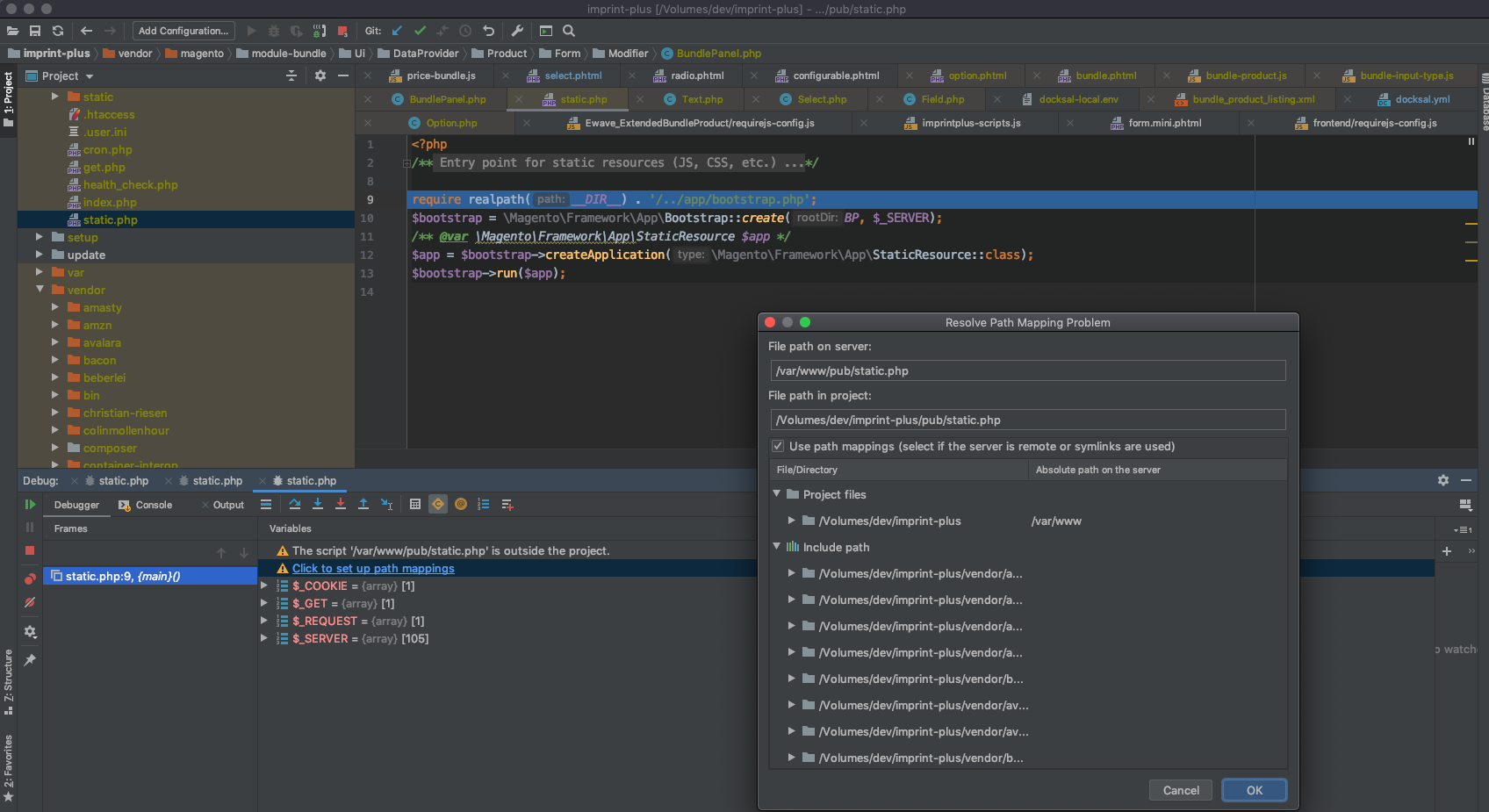
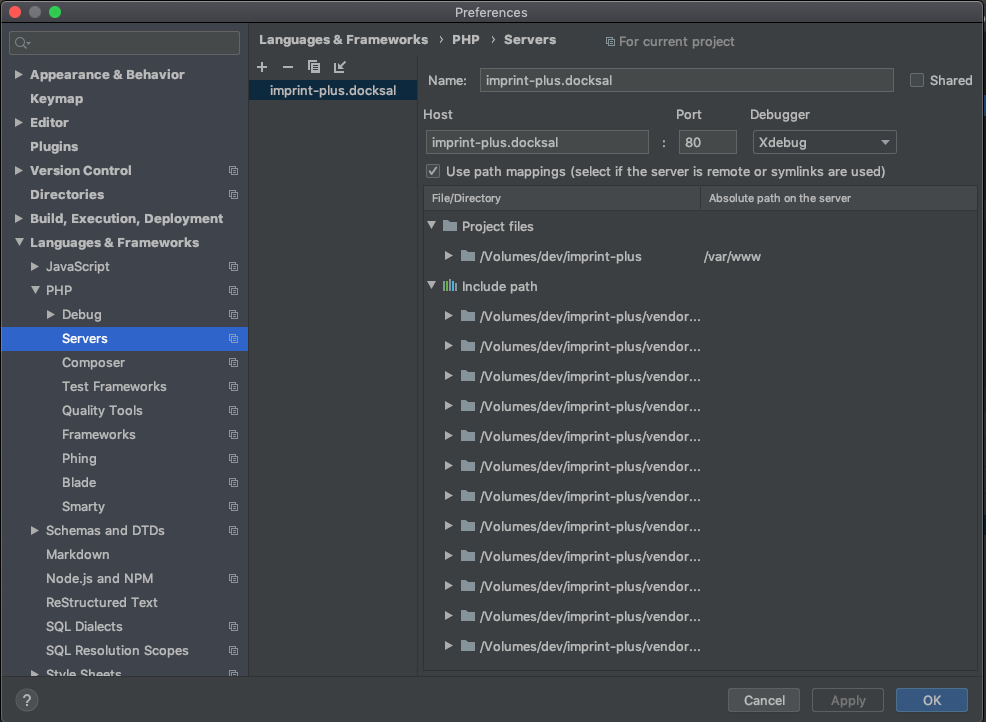
Here's the full server config, if that gives any more info
And Xdebug reporting being enabled
$ fe php -v | grep Xdebug
    with Xdebug v2.6.1, Copyright (c) 2002-2018, by Derick Rethans
Edit: This is Magento 2, btw.
jajajaime
on 4 Dec 2019
Are you sure xdebug used to work on Catalina for you?
This dialogue actually means xdebug and xdebug server started communicating.
achekulaev
on 4 Dec 2019
I'm still on Mojave, and yes, I used it all the time on the same project, or others, on the previous version.
jajajaime
on 4 Dec 2019
Ok in this case I cannot put pieces together.
In PhpStorm dialog path to your files is /Volumes/dev/imprint-plus, but in config output you have it as /Users/jaime/beargroup/imprint-plus.
Any ideas why these do not match?
achekulaev
on 4 Dec 2019
I see. It is an encrypted volume that is mounted in my home folder. I have had this setup for around 6 months now without issues. Maybe there's something now that made the path matching stricter?
jajajaime
on 4 Dec 2019
More than mounted, the volume is symlinked to my home folder.
jajajaime
on 4 Dec 2019
Could it be something that updated in PhpStorm rather than Docksal? Asking because /Users/jaime/beargroup seems more like something you would expect to have, rather than /Volumes/dev.
Do you maybe want to try VSCode and see if debug works there? It's easy to install so little commitment to try. If it doesn't work there, then I'd suppose something indeed changed in Docksal. But if it does work there, I'd rather blame Storm.
achekulaev
on 5 Dec 2019
I'll explore that route. I did in fact upgrade PhpStorm not that long ago.
Sure. I can try VSCode. I'll post my findings as soon as I get to it.
jajajaime
on 5 Dec 2019
Yup. It's PhpStorm as you said. VSCode stops at the breakpoint without issues and I can debug step by step.
I'll keep looking in PhpStorm as to what is causing this in there.
Thanks!
jajajaime
on 5 Dec 2019
@achekulaev completely deleting the server config and invalidating PhpStorm caches seems to have worked. I thought I had done this the other day, but I might have not deleted the config.
In any case, I am getting breakpoints now, so I'll be closing this. Thanks for your help!
jajajaime
on 5 Dec 2019
@achekulaev I did notice that for Xdebug to work on both VSCode and PhpStorm, the
- XDEBUG_CONFIG=remote_connect_back=0 remote_host=${DOCKSAL_HOST_IP}
line has to be present. Otherwise neither of them stop at breakpoints.
Does this grant a new issue?
jajajaime
on 5 Dec 2019
@jajajaime yes, thanks for confirming that it does not work without this line.
@lmakarov please see above. This line was changed during IDE overhaul but apparently this created a retrospective problem.
achekulaev
on 5 Dec 2019
These are the default xdebug settings for the stock stacks:
@jajajaime according to the provided fin config output, you have those correct:
XDEBUG_CONFIG: remote_host=192.168.64.1 remote_port=9000
remote_connect_back=0 should be irrelevant, as that's the default value (see xdebug docs).
I don't think there is anything else that needs to be done here.
 lmakarov
on 6 Dec 2019
lmakarov
on 6 Dec 2019
I see. Not sure what's causing the issue, then.
Just to be the devil's advocate, why does
https://github.com/docksal/docksal/blob/de33d41d6d238cc1231e55f88d1fbdf904b32f2a/stacks/services.yml#L148
have to be set on docksal.yml if it's already in services.yml? Just old Xdebug docs?
https://docs.docksal.io/tools/xdebug
jajajaime
on 6 Dec 2019
Not sure what's causing the issue, then.
@jajajaime apparently, you had some misconfiguration caused by upgrading PHPStorm.
Can you confirm that xdebug works now without the override for XDEBUG_CONFIG in your project's docksal.yml?
Just old Xdebug docs?
Yeah, outdated xdebug docs. You don't have to set PHP_IDE_CONFIG in docksal.yml since we started setting it at some point by default in services.yml.
lmakarov
on 6 Dec 2019
Sounds good.
I will test it again later today or tomorrow morning and report my findings. Not in front of the computer currently.
jajajaime
on 6 Dec 2019
I've done some testing and realized that setting PHP_IDE_CONFIG by default (in services.yml) actually causes more hassle than good for PHPStorm users.
When PHP_IDE_CONFIG is NOT set and you initiate a web debug session, you get the Incoming Connection Dialog from PHPStorm:

This dialog makes the server config and path mapping configuration a trivial effort - just click Accept.
Now, with PHP_IDE_CONFIG set (and assuming you do not have an existing server config in PHPStorm for the project), PHPStorm does not offer this convenient one-step configuration. Instead, you have to manually configure the server and mappings. That's a hassle.
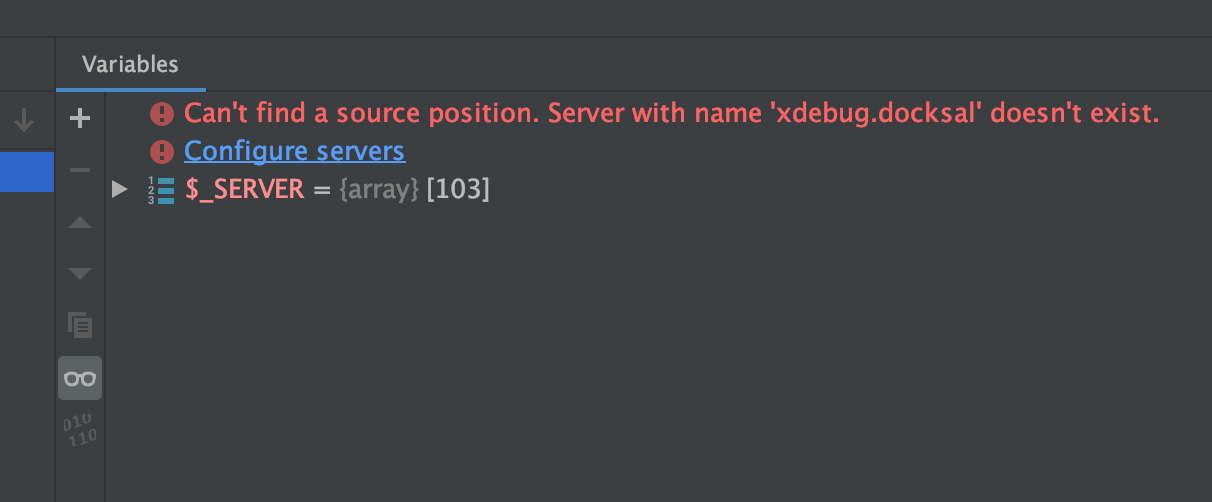
I think, we better remove PHP_IDE_CONFIG from services.yml and only have it mentioned in docs specifically for the cli scripts debugging use case.
lmakarov
on 6 Dec 2019
I tried multiple combinations with PhpStorm and VSCode, but I always get the same result.
All tests done with both with or without - PHP_IDE_CONFIG=serverName=${VIRTUAL_HOST} at the project level.
Breakpoint does not work
- No
XDEBUG_CONFIGdefinition on the project - XDEBUG_CONFIG=remote_connect_back=0- XDEBUG_CONFIG=remote_host=${DOCKSAL_HOST_IP}- XDEBUG_CONFIG=remote_host=${DOCKSAL_HOST_IP} remote_port=9000- XDEBUG_CONFIG=remote_connect_back=0 remote_port=9000
Breakpoint works
- XDEBUG_CONFIG=remote_connect_back=0 remote_host=${DOCKSAL_HOST_IP}- XDEBUG_CONFIG=remote_connect_back=0 remote_host=${DOCKSAL_HOST_IP} remote_port=9000

jajajaime
on 6 Dec 2019
@jajajaime I'm not able to reproduce this with PHPStorm and a blank project using the default stack:
mkdir test-project && cd test-project
fin init
remote_connect_back is set to Off by default:
$ fin exec 'php -i | grep xdebug.remote_connect_back'
xdebug.remote_connect_back => Off => Off
Please try this, so that we can eliminate the custom docksal.yml you have from the equation.
Your project is using docksal/cli:2.6-php7.2. You can try switching to the latest version, which is 2.10. After updating the image version, run fin project reset cli.
lmakarov
on 6 Dec 2019
Alrighty. The culprit is the CLI_IMAGE.
I tested with a Drupal8 installation (because the Magento boilerplate was erring during the installation process ¯_(ツ)_/¯ ). Boilerplate Drupal8 would stop right away at the breakpoint either if it was started on the Volumes folder or my symlinked folder to the Volume. When I switched the image to
CLI_IMAGE='docksal/cli:2.6-php7.2'
it would not stop unless I added the XDEBUG_CONFIG definitions.
Going back to my project, switching the image to cli:2.10-php7.2 or cli:2-php7.2 triggers the breakpoint no problem without XDEBUG_CONFIG.
Thank you so much for helping figure this out!
jajajaime
on 6 Dec 2019
@jajajaime good :)
Unless you really need a completely custom docksal.yml config, it's recommended to stick with the default config (+ adjustments on top of it as necessary). Take a look at the Docksal boilerplate repos.
because the Magento boilerplate was erring during the installation process ¯_(ツ)_/¯
Speaking of which... Since you have experience with Magento, we'd really appreciate help with fixing/updating those boilerplates ;)
lmakarov
on 6 Dec 2019
That makes sense. In my case, I do have to set the PHP version for projects to match what's on staging and production, to try to reduce incompatibility problems.
I can probably look over the Magento boilerplate during the weekend and do a pull request to it if I find what's wrong with it.
jajajaime
on 6 Dec 2019
I do have to set the PHP version for projects
You can do this with the default stack like this:
fin config set CLI_IMAGE=docksal/cli:php7.2
or
fin config set CLI_IMAGE=docksal/cli:2.10-php7.2
if you want to pin the image stability tag.
lmakarov
on 6 Dec 2019
Following up on why there are issues with xdebug in the latest Docksal release (1.13.0).
Older docksal/cli images (prior to v2.9.0) had this outdated configuration set in xdebug settings:
xdebug.remote_connect_back=1
As a quick fix, we used to override it via service.yml (which is updated with Docksal):
XDEBUG_CONFIG=remote_connect_back=0
In the latest Docksal release (1.13.0), xdebug settings were fixed in docksal/cli and the workaround was removed from services.yml.
As this update introduced a compatibility issue with the older docksal/cli image versions, we'll add the workaround back for the time being and release a hotfix (1.13.1).
It is still recommended that you either use a default stack config or update the pinned image versions in your project's settings after updating Docksal. See comments above.
lmakarov
on 17 Dec 2019
Related issues
 amjad-wp
·
18Comments
amjad-wp
·
18Comments
 lpeabody
·
42Comments
lpeabody
·
42Comments
 gconry18
·
23Comments
lmakarov
·
29Comments
gconry18
·
23Comments
lmakarov
·
29Comments
 mike-potter
·
18Comments
mike-potter
·
18Comments
Most helpful comment
I've done some testing and realized that setting
PHP_IDE_CONFIGby default (inservices.yml) actually causes more hassle than good for PHPStorm users.When
PHP_IDE_CONFIGis NOT set and you initiate a web debug session, you get the Incoming Connection Dialog from PHPStorm:This dialog makes the server config and path mapping configuration a trivial effort - just click Accept.
Now, with
PHP_IDE_CONFIGset (and assuming you do not have an existing server config in PHPStorm for the project), PHPStorm does not offer this convenient one-step configuration. Instead, you have to manually configure the server and mappings. That's a hassle.I think, we better remove
PHP_IDE_CONFIGfromservices.ymland only have it mentioned in docs specifically for the cli scripts debugging use case.