Docksal: Updating to Docker Desktop 2.2.0.0 breaks Docksal
I have updated my Docker Desktop to 2.2.0 and can't start docksal anymore. When I run fin up I am getting an error
Resetting Docksal system services...
 * proxy
docker: Error response from daemon: driver failed programming external connectivity on endpoint docksal-vhost-proxy (83b3ef7bafa2d27d0af784b64c635e1fff31b26803dad7bca9a4b20eb98457fb): Error starting userland proxy: listen tcp 192.168.64.100:8443: bind: cannot assign requested address.
 ERROR:  Failed starting the proxy service.
I did try to change ports but didn't help. My docksal version is
ygerasimov$ fin --version
fin version: 1.93.0
 ygerasimov
All 33 comments
Right now the solution is to downgrade Docker to 2.1.x
 achekulaev
on 22 Jan 2020
achekulaev
on 22 Jan 2020
Here are the direct links to the latest 2.1.x version (2.1.0.5):
Mac: https://download.docker.com/mac/stable/40693/Docker.dmg
Windows: https://download.docker.com/win/stable/40693/Docker%20Desktop%20Installer.exe
 lmakarov
on 22 Jan 2020
lmakarov
on 22 Jan 2020
Upstream issues:
lmakarov
on 22 Jan 2020
One gets the same error with the Windows 10 version of Docker 2.2.0.0
 kenrbnsn
on 22 Jan 2020
kenrbnsn
on 22 Jan 2020
I am also experiencing the same issue (Mac).
 tekNorah
on 22 Jan 2020
tekNorah
on 22 Jan 2020
I can confirm this bug when upgrading to Docker Desktop 2.2.0.0 on macOS resulting in:
Error starting userland proxy: listen tcp 192.168.64.100:443: bind: cannot assign requested address.
Going back to Docker Desktop Version 2.1.0.5 resolves the issue for now.
 crud42
on 27 Jan 2020
crud42
on 27 Jan 2020
+1
 rabithk
on 28 Jan 2020
rabithk
on 28 Jan 2020
+1 2
 cmodern
on 29 Jan 2020
cmodern
on 29 Jan 2020
+1
 uniquename
on 3 Feb 2020
uniquename
on 3 Feb 2020
+1 4
 akosglue
on 4 Feb 2020
akosglue
on 4 Feb 2020
I see no point of adding "+1" comments here. It is an upstream issue. We cannot fix it.
I urge you to go and leave your comments there https://github.com/docker/for-mac/issues/4209
achekulaev
on 6 Feb 2020
While it may be an upstream issue, I don't think it impacts only docker/for-mac. The same issue impacted all of our Windows users when they upgraded to 2.2.0
 nerfchicken
on 6 Feb 2020
nerfchicken
on 6 Feb 2020
While it may be an upstream issue, I don't think it impacts only docker/for-mac. The same issue impacted all of our Windows users when they upgraded to 2.2.0
You are correct, it is also an issue for windows. See: https://github.com/docker/for-win/issues/5546
tekNorah
on 6 Feb 2020
It also seems strange to upvote a "solution" that is a downgrade. It's ok that we can all downgrade to get around the issue, but it should not be considered a good solution to downgrade. If anything a downgrade "solution" should get a thumbs down. ?? anyway no big deal about emoji's/thumbs/votes.
I just confirmed that this also happens for docker for mac version 2.2.0.3 .and fin version 1.93.0
cross-ref-post: https://forums.docker.com/t/dockerdesktop-on-mac-2-2-0-0-not-able-to-bind-with-port-443/87591
 danshumaker
on 11 Feb 2020
danshumaker
on 11 Feb 2020
It also seems strange to upvote a "solution" that is a downgrade. It's ok that we can all downgrade to get around the issue, but it should not be considered a good solution to downgrade. If anything a downgrade "solution" should get a thumbs down. ??
@danshumaker Downgrading is a temporary workaround. The actual issue is upstream in Docker for Mac/Win. Chiming in there will make the most sense.
lmakarov
on 11 Feb 2020
@lmakarov Isn't Docksal using the vEthernet (DockerNAT) interface? It has been removed: https://github.com/docker/for-win/issues/5538
 phox4ever
on 11 Feb 2020
phox4ever
on 11 Feb 2020
Isn't Docksal using the vEthernet (DockerNAT) interface? It has been removed: docker/for-win#5538
@phox4ever oh wow... That's an unfortunate change and will definitely require refactoring in Docksal.
At the same time, it is a different (and additional) compatibility issue with the new Docker Desktop for Windows versions.
That's for bringing this up. I submitted a separate issue here: https://github.com/docksal/docksal/issues/1276
lmakarov
on 11 Feb 2020
Would be nice to mention a specific supported version on https://docs.docksal.io/getting-started/setup/#install-macos as it took me a while to get to this discussion.
 hugronaphor
on 6 Mar 2020
hugronaphor
on 6 Mar 2020
Has this been resolved yet? Upgrading to the latest Docker Desktop on Windows still breaks docksal.
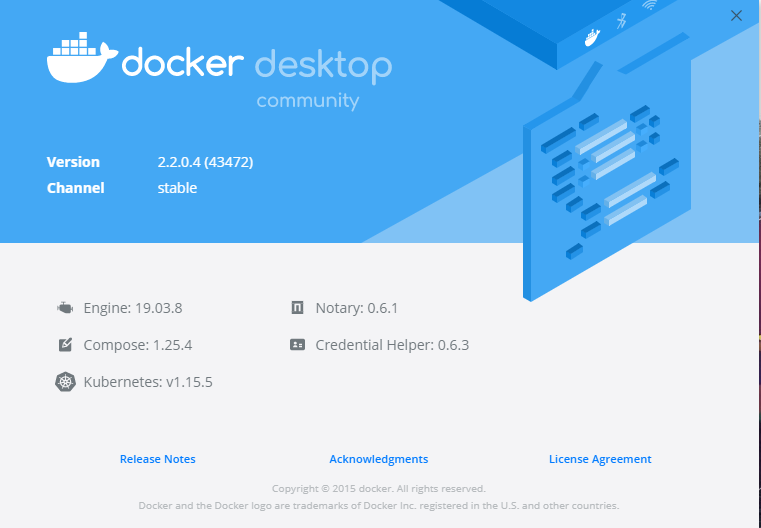
kenrbnsn
on 2 Apr 2020
@kenrbnsn it's an upstream issue with Docker Desktop. In the mac issue queue they said it's fixed in an upcoming edge release https://github.com/docker/for-mac/issues/4209#issuecomment-605991683. Don't know if there is a corresponding release for Windows, however.
 lpeabody
on 2 Apr 2020
lpeabody
on 2 Apr 2020
The upstream edge releases with the fix are now available for download - v2.2.3.0 (edge build v43965).
Mac: https://download.docker.com/mac/edge/43965/Docker.dmg
Windows: https://download.docker.com/win/edge/43965/Docker%20Desktop%20Installer.exe
Please try and report your experience.
I would still recommend waiting for a stable Docker Desktop release for most users.
lmakarov
on 2 Apr 2020
Confirmed that this issue is resolved after upgrading to edge 2.2.3.0.
 jacobsaw
on 2 Apr 2020
jacobsaw
on 2 Apr 2020
Still not working for me.
Docker:
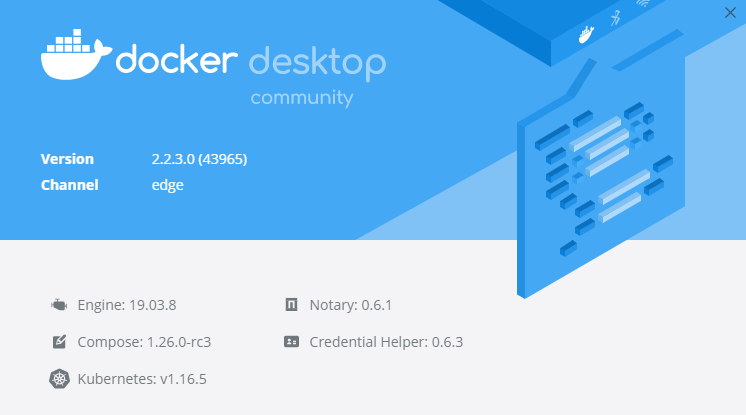
Docksal:
$ fin version
fin version: 1.93.0
$ fin start
ALERT: Some Docksal services were not running
Restarting Docksal system services...
Configuring network settings...
Resetting Docksal system services...
- proxy
docker: Error response from daemon: Ports are not available: listen tcp 192.168.64.100:443: bind: The requested address is not valid in its context.
ERROR: Failed starting the proxy service.
kenrbnsn
on 6 Apr 2020
Still not working for me.
@kenrbnsn you are on Windows, correct?
lmakarov
on 7 Apr 2020
@lmakarov Yes. Windows 10
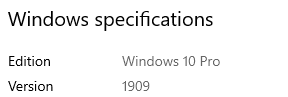
kenrbnsn
on 9 Apr 2020
On my mac with catalina (10.15.4) it works with edge 2.2.3.0 , but I have to run always "fin system reset" after "fin project start", because the dns to "whatever.docksal" is not working.
 ovangmbh
on 16 Apr 2020
ovangmbh
on 16 Apr 2020
Latest stable version of Docker for Mac (2.3.0.2) is working.
 thejoshsmith
on 11 May 2020
thejoshsmith
on 11 May 2020
The latest stable Docker Desktop versions (released today) should address this regression:
- Docker for Mac 2.3.0.2 (download) - CONFIRMED
> Fixed an issue where a container port could not be exposed on a specific host IP. See docker/for-mac#4209. - Docker for Windows 2.3.0.2 (download)
> Fixed an issue where a container port could not be exposed on a specific host IP. See docker/for-win#5546.
lmakarov
on 12 May 2020
Just tried Docker for Mac 2.3.0.2 and there still seems to be a problem. I just get "The connection was reset" when trying to visit my http://project.docksal site. I can "ping" the site, but doing a curl http://www.project.docksal returns no data.
As mentioned in the comment above, doing a "fin system reset" after doing the "fin project start" fixed the problem.
Looks like maybe the initial "fin start" doesn't work properly after doing the Docker Desktop update. But once you do a "fin system reset" (which looks like it is doing the same stuff as "fin start") then everything starts working.
 mike-potter
on 12 May 2020
mike-potter
on 12 May 2020
Also confirming that if you restart Docker Desktop and then do a fin start, the project site no longer responds. Still have to do a fin system reset to get the site to work again. Once that is done, doing fin stop and fin start seem to work fine.
So you just need to use fin system reset after rebooting or restarting Docker Desktop. Hopefully this is something that can be fixed on the Docksal side. The bug that prevented Docker Desktop 2.2 from working DOES seem to be resolved. Needing to use fin system reset is a new issue.
mike-potter
on 12 May 2020
Opened new issue #1342 to track this.
mike-potter
on 12 May 2020
Can confirm that things are working, too. See comment in #1342 if that helps to clarify.
Not sure if the need of using
fin system reset
is an issue at all ? But i cannot judge that, just interested.
crud42
on 13 May 2020
Should be fixed in v1.13.3 (just released).
lmakarov
on 15 May 2020
Related issues
lmakarov
·
49Comments
 igorlakic
·
30Comments
igorlakic
·
30Comments
 frederickjh
·
33Comments
mike-potter
·
18Comments
frederickjh
·
33Comments
mike-potter
·
18Comments
 loopy3025
·
30Comments
loopy3025
·
30Comments
Most helpful comment
Here are the direct links to the latest 2.1.x version (2.1.0.5):
Mac: https://download.docker.com/mac/stable/40693/Docker.dmg
Windows: https://download.docker.com/win/stable/40693/Docker%20Desktop%20Installer.exe