Hi,
I have been following the doc/building.rst document for building NextCloud desktop client on Windows. I tried both "Windows Development Build"as well as "Cross compile setup on OpenSuse". Both fail giving the below error:
 Could not find a package configuration file provided by
  "Qt5WebEngineWidgets" with any of the following names:

    Qt5WebEngineWidgetsConfig.cmake
    qt5webenginewidgets-config.cmake

  Add the installation prefix of "Qt5WebEngineWidgets" to CMAKE_PREFIX_PATH
  or set "Qt5WebEngineWidgets_DIR" to a directory containing one of the above
  files.  If "Qt5WebEngineWidgets" provides a separate development package or
  SDK, be sure it has been installed.
Call Stack (most recent call first):
  src/CMakeLists.txt:7 (find_package)
I tried using -DNO_SHIBBOLETH=1 but still no luck. What could be the issue. I am trying master branch as well as 2.4.0 branch, but the error persists.
Thanks for any help.
 anatekar
All 53 comments
From https://forum.qt.io/topic/74115/webengine-example-fail-with-unknown-module-s-in-qt-webengine/5
it seems QtWebEngine cant be compiled with MinGW. What options do we have?
anatekar
on 16 Jun 2018
Hi @anatekar! Cool that you are trying to compile it ;)
Do you have the Qt path in your Environment Variables?
This is my current set up on Windows 10:
- Qt 5.9.5
- Visual Studio 2017
- You need to add to your PATH also:
- OpenSSL: https://wiki.openssl.org/index.php/Binaries
- zlib: https://www.bruot.org/hp/libraries/
- qtkeychain: https://github.com/frankosterfeld/qtkeychain
- I do compile in the command line using Git Bash:
$ cd build
$ cmake -G "Visual Studio 15 2017 Win64" .. -DCMAKE_INSTALL_PREFIX=..\..\install -DCMAKE_BUILD_TYPE=Debug
$ cmake --build . --config Release --target install
I tried to use Qt Cretor but that didn't work for me.
 camilasan
on 17 Jun 2018
camilasan
on 17 Jun 2018
Hi @camilasan , thanks for your reply. Appreciate it. A day spent and I got the 2.3.3 Windows Desktop client compiled using docker image. I had to spend sometime understanding the project history and figured that the 2.3.3 client is based on the https://github.com/nextcloud/client_theming repository. I will certainly try the above steps you mentioned and let you know my findings.
Thanks much.
anatekar
on 17 Jun 2018
Like the OP of this issue, I use the docker container via Linux. Somewhere in the last month or so the Windows builds stopped working with the docker image.
 tabp0le
on 22 Jun 2018
tabp0le
on 22 Jun 2018
Has anyone used the Docker image successfully for building master branch since this issue was opened?
tabp0le
on 12 Jul 2018
@tabp0le The windows client cannot be compiled in a docker image anymore, since with #75 we use QWebEngine which needs chromium and cannot be cross-compiled.
 juliushaertl
on 13 Jul 2018
juliushaertl
on 13 Jul 2018
@juliushaertl Thanks for the info. :(
tabp0le
on 13 Jul 2018
For reference:
camilasan
on 16 Jul 2018
@camilasan I guess we can close this issue, right? Since cross-compilation is no longer supported.
juliushaertl
on 16 Jul 2018
@camilasan @juliushaertl
I'm having 2 issues when compiling on windows:
1) after compiling (with target install) I am not able to start the client, since no shared libraries (e.g. qt) are being copied to the install dir
2) how is it possible to genereate the installer? (target package doesn't work for me, it gives me "CPack error : Problem running NSIS command [...] CPack error : Problem compressing the directory"
 hiiamok
on 23 Jul 2018
hiiamok
on 23 Jul 2018
@hiiamok
- aber compiling (with target install) I am not able to start the client, since no shared libraries (e.g. qt) are being copied to the install dir
You can use the tool windeployqt. Run:
windeployqt <install-bin-dir>
Yet, it might complain about a few other libs but it should work once you copy the missing libs to the bin directory.
- how is it possible to genereate the installer? (target package doesn't work for me, it gives me "CPack error : Problem running NSIS command [...] CPack error : Problem compressing the directory"
What is on master atm is outdated.
camilasan
on 23 Jul 2018
What I want to know is, wouldn't updating the docker to use QT 5.9+ fix cross-compiling? It's just super inconvenient to not be able to cross-compile.
tabp0le
on 24 Jul 2018
@camilasan
windeployqt --release hBOX.exe
Thank you, that's working (had to copy the qt5keychain.dll to the qt bin directory; and the libcrypto and osync dll's to the install path)
I am currently compiling for 64bit windows, I had issues with the 32bit version. It seems like the QtWebEngine/QtWebEngineWidgets do not ship with the precompiled Qt 32bit version. Is this correct?
What is on master atm is outdated
Any plans when an update is coming? How are the daily builds packed? :-)
hiiamok
on 24 Jul 2018
@tabp0le
As @juliushaertl already pointed out earlier: the problem is the QtWebEngine, which is using Chromium and therefore cannot be cross-compiled.
hiiamok
on 24 Jul 2018
@hiiamok ooh, I understand now. That's too bad. :( All Google's fault then.
tabp0le
on 24 Jul 2018
@hiiamok what versions of qt, cmake, openssl, etc are you using?
tabp0le
on 24 Jul 2018
@tabp0le
Qt 5.11.1 (msvc2017_64)
cmake 3.12.0-rc3
openssl 1.1.0h
zlib 1.2.11
qtkeychain cloned master from git
currently using the 64bit version of all libraries
hiiamok
on 25 Jul 2018
Right on, thanks @hiiamok
tabp0le
on 25 Jul 2018
So using that set up, w/openssl 1.1+, I get the following errors:
` $ ./build-win64.sh
-- The C compiler identification is MSVC 19.14.26433.0
-- The CXX compiler identification is MSVC 19.14.26433.0
-- Check for working C compiler: C:/Program Files (x86)/Microsoft Visual Studio/ 2017/Community/VC/Tools/MSVC/14.14.26428/bin/Hostx86/x64/cl.exe
-- Check for working C compiler: C:/Program Files (x86)/Microsoft Visual Studio/ 2017/Community/VC/Tools/MSVC/14.14.26428/bin/Hostx86/x64/cl.exe -- works
-- Detecting C compiler ABI info
-- Detecting C compiler ABI info - done
-- Detecting C compile features
-- Detecting C compile features - done
-- Check for working CXX compiler: C:/Program Files (x86)/Microsoft Visual Studi o/2017/Community/VC/Tools/MSVC/14.14.26428/bin/Hostx86/x64/cl.exe
-- Check for working CXX compiler: C:/Program Files (x86)/Microsoft Visual Studi o/2017/Community/VC/Tools/MSVC/14.14.26428/bin/Hostx86/x64/cl.exe -- works
-- Detecting CXX compiler ABI info
-- Detecting CXX compiler ABI info - done
-- Detecting CXX compile features
-- Detecting CXX compile features - done
-- Build of crashreporter disabled.
-- GIT_SHA1 2811d4d9b11770b3a53fedf8ae29a3f0fde3c98d
Compiling without shibboleth
-- Could NOT find INOTIFY (missing: INOTIFY_INCLUDE_DIR INOTIFY_LIBRARY_DIR)
-- Could NOT find Sphinx (missing: SPHINX_EXECUTABLE)
-- Could NOT find PdfLatex (missing: PDFLATEX_EXECUTABLE)
CMake Warning at C:/Program Files/CMake/share/cmake-3.12/Modules/FindOpenSSL.cma ke:405 (message):
VERSION is not a valid OpenSSL component
Call Stack (most recent call first):
CMakeLists.txt:186 (find_package)
CMake Warning at C:/Program Files/CMake/share/cmake-3.12/Modules/FindOpenSSL.cma ke:405 (message):
1.1 is not a valid OpenSSL component
Call Stack (most recent call first):
CMakeLists.txt:186 (find_package)
CMake Error at C:/Program Files/CMake/share/cmake-3.12/Modules/FindPackageHandle StandardArgs.cmake:137 (message):
Could NOT find OpenSSL, try to set the path to OpenSSL root folder in the
system variable OPENSSL_ROOT_DIR (missing: VERSION 1.1) (found version
"1.1.0h")
Call Stack (most recent call first):
C:/Program Files/CMake/share/cmake-3.12/Modules/FindPackageHandleStandardArgs. cmake:378 (_FPHSA_FAILURE_MESSAGE)
C:/Program Files/CMake/share/cmake-3.12/Modules/FindOpenSSL.cmake:412 (find_pa ckage_handle_standard_args)
CMakeLists.txt:186 (find_package)
-- Configuring incomplete, errors occurred!
See also "C:/Users/TabFitts/SpryDev/sprycloud-client-next/build/CMakeFiles/CMake Output.log".
`
I'm using the below build command:
cmake -G "Visual Studio 15 2017 Win64" .. -DCMAKE_INSTALL_PREFIX="$installdir" -DCMAKE_BUILD_TYPE=Release -DNO_SHIBBOLETH="1" -DWITH_DOC=FALSE -DQTKEYCHAIN_LIBRARY="C:\Users\TabFitts\SpryDev\qtkeychain\Debug\qt5keychain.lib" -DQTKEYCHAIN_INCLUDE_DIR="C:\Users\TabFitts\SpryDev\qtkeychain"
tabp0le
on 25 Jul 2018
@tabp0le
For some reason OpenSSL 1.1.0h is not recognized as OpenSSL 1.1 which is required for building the client. I had the same problem and did the following:
Open the CMakeLists.txt file in the root dir and go to line 186 https://github.com/nextcloud/desktop/blob/master/CMakeLists.txt#L186
Change it from find_package(OpenSSL REQUIRED VERSION 1.1) to find_package(OpenSSL REQUIRED)
hiiamok
on 25 Jul 2018
@hiiamok Thank you so much. Been pulling my hair out over this!
tabp0le
on 25 Jul 2018
@tabp0le you're welcome
hiiamok
on 26 Jul 2018
@camilasan @hiiamok
Hi,
My configuration is
cmake 3.12.0
qt 5.10.1
zlib 1.2.8 msvc2015
open ssl 1.1.0h
My steps are:
1- I compile qtkeychain and I get the qt5keychain.dll
2- Whith cmake-gui, I add all path requieres (openssl, qt, qtchain, zlib, ...) and the result is:
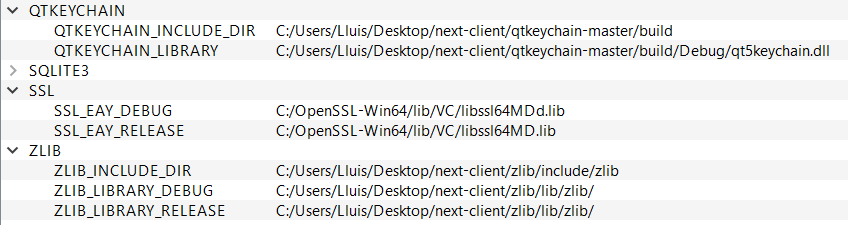
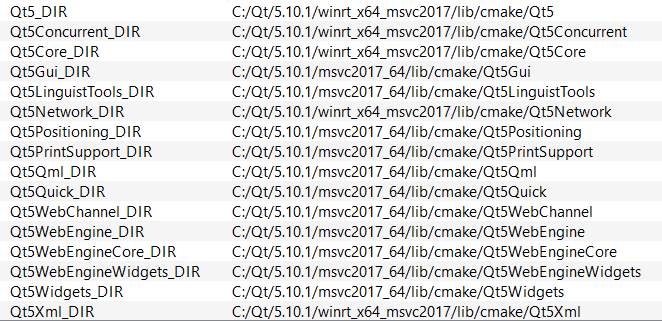
3- With the qt-cli I execute your command for generate:
cmake -G "Visual Studio 15 2017 Win64" .. -DCMAKE_INSTALL_PREFIX=C:UsersLluisDesktopnext-clientclientbuild2 -DCMAKE_BUILD_TYPE=Debug -DNO_SHIBBOLETH=1

4.- Run install, but appears differents errors:
cmake --build . --config Release --target install


Any solution?
Thanks
 luisBSBDATA
on 6 Aug 2018
luisBSBDATA
on 6 Aug 2018
@luisBSBDATA
Do you want to compile for Win RT? Some QT directories are pointing to Win RT while others point to the normal msvc2017. I don't think thats correct.
hiiamok
on 6 Aug 2018
@luisBSBDATA do you have actually have "Visual Studio 15 2017 Win64" listed under Generators when you run cmake --help?
camilasan
on 6 Aug 2018
Hi,
thanks for your replies.
@camilasan Yes, "Visual Studio 15 2017 Win64" appear on the list as generator.
@hiiamok I execute command line for qt 64-bit universal windows plataform. It's possible that get this path automatically. Now I test execute with the normal command line.
I have changed zlib and qtkeychain librarries from .dll to .lib. And now execute "cmake --build . --config Release --target install" and I compile without errors but with 51 warnings...

In my CMAKE_INSTALL_PREFIX it have been create more files.
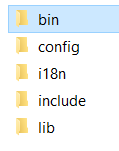
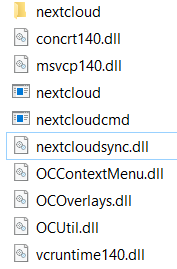
But this files are not the final installer.
And now, what is the next step?
Thanks
luisBSBDATA
on 7 Aug 2018
This step wont build an installer for you. You are compiling the source files into binaries. If you want a working binary with integrated Qt, you have to use windeployqt <install-bin-dir> as pointed out by @camilasan some posts ago.
I think the procedure for building a windows installer has not yet been adopted for the new client.
hiiamok
on 7 Aug 2018
thanks @hiiamok. whith your instructions the nextcloud software its works. But when I introduce server address, failed to connect,the host not found. With http or https the same problem, and I chek that the web server works correctly.
@camilasan You can write to the wiki a tutorial for "dummies", about cpack or visual studio to build a installer.
Thanks
luisBSBDATA
on 7 Aug 2018
@luisBSBDATA glad I could help. I am currently having the same issue. I think it could be an OpenSSL version issue. The daily builds available on github or actually using an older OpenSSL version than stated in the requirements - and with the daily build its working for me.
@camilasan +1 for a installer tutorial - still didnt get mine to work
hiiamok
on 7 Aug 2018
@hiiamok It seems there is an issue with openssl v1.1. I've not been able to get it to connect to a server with success either. If I use openssl v1.02, it will connect initially but not sync or keep the connection.
tabp0le
on 7 Aug 2018
I really have no idea how @camilasan or the build bot are producing working builds.
tabp0le
on 7 Aug 2018
@tabp0le I'm gonna try using another openSSL version by the end of the week and keep you informed.
hiiamok
on 7 Aug 2018
@hiiamok sounds good, thanks
tabp0le
on 7 Aug 2018
I see that when I try to connect to the server, it verify server.domain.comstatus.php, but this path is without slash. Is posible that the error is not for openssl if not that programation, that verify the hostname/status.php is not found.
@hiiamok @tabp0le Another question, when you generate with cmake, you detected libcloudproviders? How to donwloads this libraries?
Thanks
luisBSBDATA
on 8 Aug 2018
I found a tool to compile the client, compile_client.sh on owncloud/administration. But it works on docker. On a post I read that cross-compile on docker is not works.
@tabp0le has reason, daily are build new versions, @camilasan how they do that?
Thanks
luisBSBDATA
on 8 Aug 2018
@luisBSBDATA I don't compile libcloudproviders. It's not required. I'm not even sure it's actually implemented fully yet anyways. (I could be wrong)
In regards to the cross-compile - That tool will not work for nextcloud/v2.4.0+ client. It has to do with the new login flow, and it's dependencies. From my current understanding, it needs Chromium and Chromium cannot be cross-compiled Linux to Windows.
tabp0le
on 8 Aug 2018
@tabp0le which openSSL 1.0.2 library are you using? where did you download it?
If I use any of the libraries I find, I am not able to compile the client anymore.
@camilasan I am receiving a "Failed to connect to.. " with my compiled client

Do you have any idea how to fix this?
@luisBSBDATA I'm not using libcloudproviders since I don't need it.
hiiamok
on 9 Aug 2018
@tabp0le @hiiamok thanks for your explanation.
@hiiamok I use the version 1.1.0h from https://slproweb.com/products/Win32OpenSSL.html
I dont have error de ssl directly, but I have failed to connect with https or http.
Thanks
luisBSBDATA
on 9 Aug 2018
@hiiamok I used 1.02o from https://slproweb.com/products/Win32OpenSSL.html. However, I believe I ended up having to use QT 5.9.6. I also hacked CMAKE's SSL detection. This was before you showed me what to change in the nextcloud makefiles.
tabp0le
on 9 Aug 2018
@luisBSBDATA It won't crash, or give you a specific error when you try to add a server, but if you hit F12 and look at the logs, you'll see:
[unknown QSslSocket: cannot call unresolved function SSLv23_client_method
[unknown QSslSocket: cannot call unresolved function SSLv23_client_method
[unknown QSslSocket: cannot call unresolved function SSL_CTX_new
[unknown QSslSocket: cannot call unresolved function SSL_CTX_new
[unknown QSslSocket: cannot call unresolved function SSL_library_init
[unknown QSslSocket: cannot call unresolved function SSL_library_init
[unknown QSslSocket: cannot call unresolved function ERR_get_error
[unknown QSslSocket: cannot call unresolved function ERR_get_error
tabp0le
on 9 Aug 2018
@tabp0le @camilasan I was finally able to build a working client! I was using OpenSSL 1.1.0h during compilation. BUT: At the end I copied libeay32.dll and ssleay32.dll of OpenSSL 1.0.2o into <installdir>\bin. The client is now connecting and syncing.
It seems like for some reason the client needs OpenSSL 1.1.x for compilation, but uses functions of 1.0.* during runtime. I'm not sure why tho.
hiiamok
on 9 Aug 2018
@hiiamok So, I tried that, and I got the same issue I got when I compiled it with 1.0.2 before. It lets me add an account, choose the folders and finish setup. But it won't sync. It constantly shows disconnected. I will add though, I have disabled the new login flow, as I think it just flat out doesn't work with nginx.
tabp0le
on 9 Aug 2018
@hiiamok Holy crap! Get this: I installed the nightly edition of nextcloud to check it out. It looks like they are compiling with 1.1, but copying over the libeay32/lsslleay32 of openssl 1.0.1h. Yeah, 1.0.1 not 1.1. LOL. They also copy the libcrypto-1_1 and libssl-1_1 in there too. So they have multiple openssl versions in there. The documentation really sucks for this. And as much as I appreciate your help @camilasan (please don't take this the wrong way), it is really frustrating to not have all the information to compile. Your instructions do not cover any of these "quirks/hacks" which are needed.
tabp0le
on 9 Aug 2018
Update: Got it working, as I had been moving ocsync.dll from bin/nextcloud to bin/ rather than copying it. That was my issue. :+1:
tabp0le
on 9 Aug 2018
thanks @tabp0le and @hiiamok
copying the files thay say @hiiamok I connect successfully to the server. But although I copied ocusync.all the synchronization failed. The error is: Could not read system exclude file. On the log output appear: [OCC::WebFlowCredentials::stillValid "Unknown error"
luisBSBDATA
on 10 Aug 2018
@luisBSBDATA you need to copy sync-exclude.lst into the same directory as the .exe
tabp0le
on 10 Aug 2018
@luisBSBDATA Here's a build script I wrote. It might help you out. Just change it with your own paths. https://github.com/tabp0le/nextcloud-build-env-win/blob/master/build-win64.sh
tabp0le
on 10 Aug 2018
OK guys. I got the installer to build. The cmake/cpack stuff in the master branch does NOT work for this. I had to modify it heavily to get it to work. So you'll have to generate it with the NSIS GUI.
You'll Need:
http://nsis.sourceforge.net/Download
http://nsis.sourceforge.net/InstallOptionsEx_plug-in
http://nsis.sourceforge.net/NsProcess_plugin
http://nsis.sourceforge.net/UAC_plug-in
https://github.com/tabp0le/nextcloud-build-env-win/raw/master/NSIS.InstallOptions.ini
https://github.com/tabp0le/nextcloud-build-env-win/raw/master/project.nsi
You'll obviously have to change all the paths/vars in project.nsi to meet your specifications. Also, you MUST copy all the dlls to the proper locations and make sure to run qtdeploy first.
Example:
$ cp $installdir/bin/nextcloud/* $installdir/bin/
$ cp /c/OpenSSL-Win64/bin/libcrypto-1_1-x64.dll $installdir/bin/
$ cp /c/OpenSSL-Win64/bin/libssl-1_1-x64.dll $installdir/bin/
$ cp /c/Users/TabFitts/nextcloud-toolchain/bin/libeay32.dll $installdir/bin/
$ cp /c/Users/TabFitts/nextcloud-toolchain/bin/ssleay32.dll $installdir/bin/
$ cp $installdir/config/Nextcloud/* $installdir/bin/
$ windeployqt $installdir/bin
After you've done these steps, you can go ahead and open NSIS. (should have a desktop shortcut after installing) Click "Compile NSI Scripts". Making sure you've already edited the .nsi file appropriately, you then drag and drop the .nsi file into the MakeNSISW window that is now showing. That should build the installer.
tabp0le
on 10 Aug 2018
Hello guys,
Exist a new repository with instructions to client building.
https://github.com/nextcloud/client-building
Thanks
luisBSBDATA
on 30 Nov 2018
I followed commands to build Nextcloud for windows
General
OpenSSL 1.1.x
QtKeychain
Qt 5.x.x
zlib
Windows
OpenSSL 1.1.x binaries: https://indy.fulgan.com/SSL/
QtKeychain - compile and install from https://github.com/frankosterfeld/qtkeychain
zlib binaries: https://github.com/maxirmx/Dist_zlib
Visual Studio
Recommended: Git bash (it comes with Git)
Png2Icon - you need to use this version: https://github.com/hiiamok/png2ImageMagickICO
When i run this command
$ cmake "-GVisual Studio 15 2017 Win64" .. -DCMAKE_INSTALL_PREFIX=path-to-install-folder/ -DCMAKE_BUILD_TYPE=Debug -DNO_SHIBBOLETH=1 -DPng2Ico_EXECUTABLE=/path-to-install-png2ico/png2ico.exe -DQTKEYCHAIN_LIBRARY=/path-to-qt5keychain-folder/lib/qt5keychain.lib -DQTKEYCHAIN_INCLUDE_DIR=/path-to-qt5keychain-folder/include/qt5keychain/ -DOPENSSL_ROOT_DIR=/path-to-openssl-folder/ -DOPENSSL_INCLUDE_DIR=path-to-openssl-folder/include -DOPENSSL_LIBRARIES=path-to-openssl-folder/lib
I added proper path but unable to build client.
@luisBSBDATA Can you give some proper details how you build windows client?
 EonKid
on 6 Dec 2018
EonKid
on 6 Dec 2018
Hi @EonKid
You can to say what is the error message that you get?
Anyway you can use the GUI of CMAKE, is to easy and you can see better which library fails
luisBSBDATA
on 7 Dec 2018
Hi everyone,
I want to make my own cloud by make some customize from NextCLoud opensource. I had cloned from git and install the needed library and program to configure on cmake GUI but it has encountered "LIBCLOUDPROVIDERS_LIBRARY-NOTFOUND" error when i configure the cmake as following:
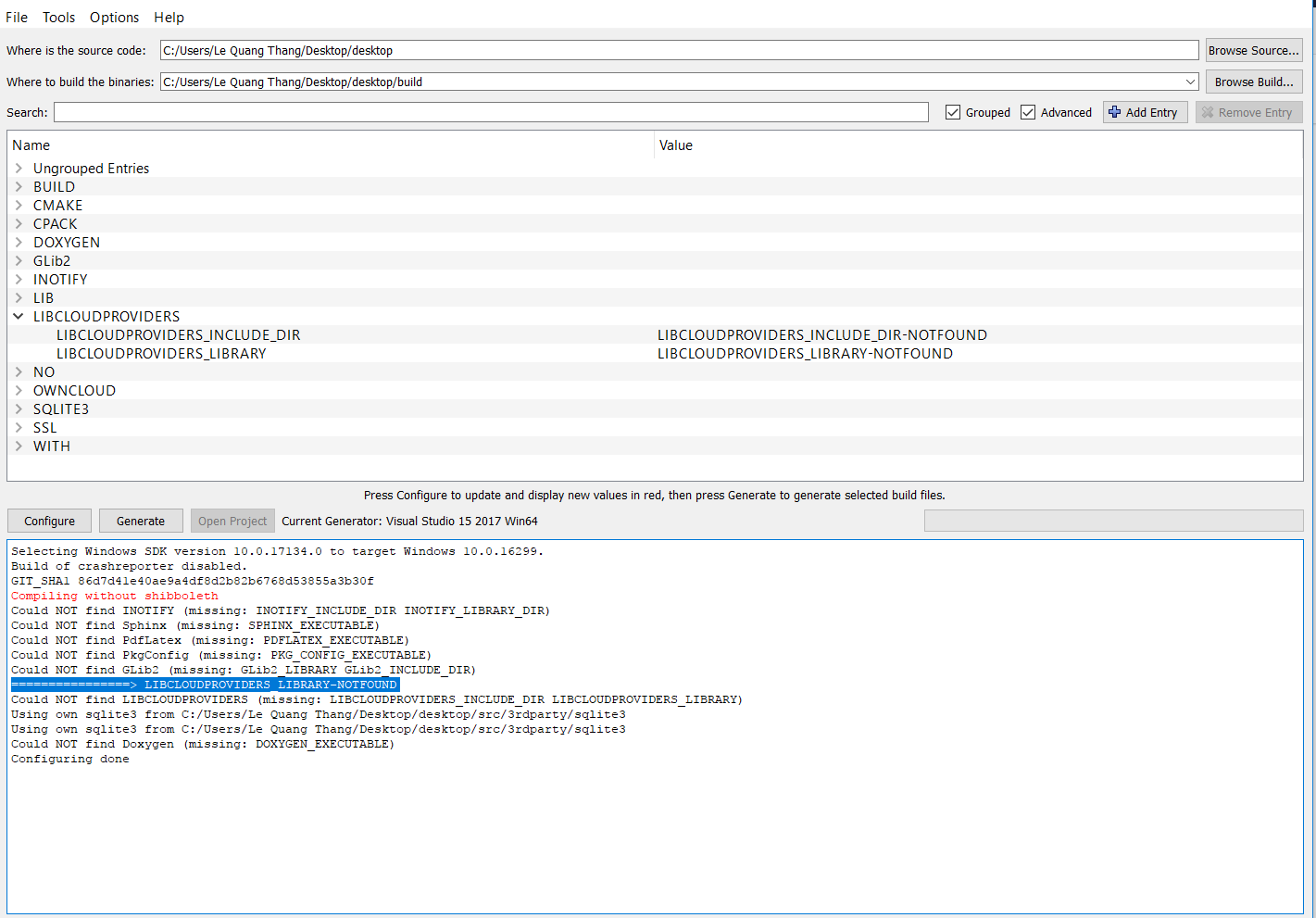
Do any one give me some advice to fixes that?
 thanglq
on 9 Jan 2019
thanglq
on 9 Jan 2019
Hi everyone,
since the issue seems to be solved and there has been no recent activity, I'm closing it.
Detailed build instructions are now available and can be found here:
https://github.com/misch7/nextcloud-client-building
In the future they will be available here too:
https://github.com/nextcloud/client-building
Kind regards,
Michael
 misch7
on 10 Aug 2019
misch7
on 10 Aug 2019
Related issues
 Valdiralita
·
3Comments
Valdiralita
·
3Comments
 Engineer-of-Stuff
·
3Comments
Engineer-of-Stuff
·
3Comments
 js-d-coder
·
3Comments
js-d-coder
·
3Comments
 Ackis
·
4Comments
Ackis
·
4Comments
 MichaIng
·
3Comments
MichaIng
·
3Comments
Most helpful comment
OK guys. I got the installer to build. The cmake/cpack stuff in the master branch does NOT work for this. I had to modify it heavily to get it to work. So you'll have to generate it with the NSIS GUI.
You'll Need:
http://nsis.sourceforge.net/Download
http://nsis.sourceforge.net/InstallOptionsEx_plug-in
http://nsis.sourceforge.net/NsProcess_plugin
http://nsis.sourceforge.net/UAC_plug-in
https://github.com/tabp0le/nextcloud-build-env-win/raw/master/NSIS.InstallOptions.ini
https://github.com/tabp0le/nextcloud-build-env-win/raw/master/project.nsi
You'll obviously have to change all the paths/vars in project.nsi to meet your specifications. Also, you MUST copy all the dlls to the proper locations and make sure to run qtdeploy first.
Example:
After you've done these steps, you can go ahead and open NSIS. (should have a desktop shortcut after installing) Click "Compile NSI Scripts". Making sure you've already edited the .nsi file appropriately, you then drag and drop the .nsi file into the MakeNSISW window that is now showing. That should build the installer.