Desktop: v 2.6.1stable macOS - GUI dark & bold & fuzzy
EDIT: re-openend for _Mac OS X / macOS Sierra 10.12.6_ and maybe more ...
Expected behaviour
Hovering the mouse pointer over an icon shows both the icon and the text below the icon on a fairly grey background.
Actual behaviour
Hovering the mouse pointer over the top four icons i.e. 'Account', 'Activity', 'General', 'Network' shows graphical issues as:
- background of the icon becomes too dark
- text below the icon becomes dark & bold & fuzzy
Please be aware the view grows darker and more fuzzy if the mouse pointer is arbitrarily moved for some time while hovering over the same icon. Presumably, the combination of either a too dark and a dark & bold & fuzzy text combined with the obervation of increrasing darkness by pointer moves could indicate to an unwanted "double picture" graphical overlay or similar coding mishap?
Steps to reproduce
- select the settings of the NC client
- hover mouse pointer over the top four icons i.e. 'Account', 'Activity', 'General', 'Network' arbitrarily
Client configuration
Client version: _Version 2.6.1rc1 (build 20191018)_
Operating system:
_MacOS X / macOS Mojave 10.14.6_- _Mac OS X / macOS HighSierra 10.13.6_
- _Mac OS X / macOS Sierra 10.12.6_
OS language:
- _German (Deutsch / DE)_
- _Dutch (Nederlands / NL)_
- _German (Deutsch / DE)_
Qt version used by client package: _Qt 5.12.5_
Server configuration
Nextcloud version: _16.0.5.1_
Brief description:
Please be aware the below screenshot shows a fairly greyed icon for 'Algemeen' i.e. 'General' and not the a.m. issue. Unfortunately, due to loss of hovering focus and the mechanisms of the Apple Screenshot App there was no apparent way to take a picture with an appropriate copy of the issues viewed in the first trial.

However, on second thought and by using the _timer option_ for a screenshot the a.m. dark view was pictured in the second trial (see below) on a different computer.

This minor issue of the version 2.6.1 RC1 GUI may be linked to Qt 5.12.5 and was identified while testing RC1 for #1501 in the a.m. (2.) OS environment. The same issue can be confirmed for the (3.) OS environment too. This issue appears independently from the OS desktop locale.
Please note the different colouring between the unselected and the selected set of icons or account areas in the second trial. The first account remains unselected and obviously stays in normal grey colouring. Only the rightmost i.e. second account was selected and got darkened & fuzzy.
However, this issue was not obeserved for the (1.) OS environment.
 TP75
TP75
All 3 comments
fixed for _2.6.1stable_
:-1:
TP75
on 8 Nov 2019
NC desktop App macOS -- Version 2.6.1stable (build 291105)
Have a fresh look at 2.6.1stable and some ugly picture at the Mac OS X / _macOS 10.12.6_ GUI.
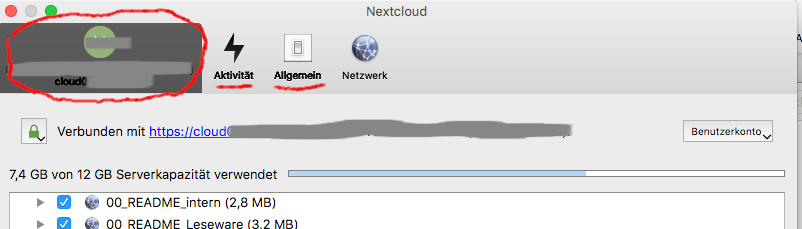
Back to work, I presume.
🚀
TP75
on 13 Nov 2019
1602
TP75
on 13 Nov 2019
Related issues
 MichaIng
·
3Comments
MichaIng
·
3Comments
 AndreyNazarchuk
·
4Comments
AndreyNazarchuk
·
4Comments
 Engineer-of-Stuff
·
3Comments
Engineer-of-Stuff
·
3Comments
 RobertZenz
·
3Comments
RobertZenz
·
3Comments
 steven-omaha
·
3Comments
steven-omaha
·
3Comments