Dbeaver: Editing column data in UI does not work when primary key is uuid
System information:
- Operating system (distribution) and version: Windows 10
- DBeaver version: 7.2.2.202010041557
Connection specification:
- Database name and verison: Postgres (tested on 9.6 and 11)
- Driver name: PostgreSQL JDBC Driver
- Do you use tunnels or proxies (SSH, SOCKS, etc): No
Describe the problem you're observing:
When editing the value of a cell, pressing "Save" will give the error Object parameter [4e3f75d2-3375-4040-9c02-3a8c15a8be87] binding not supported where 4e3f75d2-3375-4040-9c02-3a8c15a8be87 is the value of the primary key column.
The primary key column is of type uuid. The type of the edited cell it self does not seem to matter (tested with text, int and jsonb).
Doing the same on a table with primary key of type int, works fine.
Steps to reproduce, if exist:
CREATE TABLE test (
  id uuid,
  name text,
  PRIMARY KEY (id)
);
INSERT INTO test
  VALUES
    ('72644fac-9e7b-4da3-b801-ba80c1bb4fd5', 'test 1'),
    ('6b24f99a-4c58-4bac-92c3-5a756281d431', 'test 2');
SELECT * FROM test;
Mark one of the name cells and press shift+enter to open the editor.

Change the value and press "Save"
Press "Save" in the bottom left (or ctrl+s).
Gives this error:

If I do the same with a table that has an int primary key column (instead of a uuid), it works just fine.
Include any warning/errors/backtraces from the logs
!ENTRY org.jkiss.dbeaver.model 4 0 2020-10-05 08:58:29.382
!MESSAGE Object parameter [6b24f99a-4c58-4bac-92c3-5a756281d431] binding not supported
!SUBENTRY 1 org.jkiss.dbeaver.model 4 0 2020-10-05 08:58:29.382
!MESSAGE Object parameter [6b24f99a-4c58-4bac-92c3-5a756281d431] binding not supported
!STACK 0
org.jkiss.dbeaver.model.exec.DBCException: Object parameter [6b24f99a-4c58-4bac-92c3-5a756281d431] binding not supported
at org.jkiss.dbeaver.model.impl.data.DefaultValueHandler.bindValueObject(DefaultValueHandler.java:60)
at org.jkiss.dbeaver.model.impl.jdbc.struct.JDBCTable$2.bindStatement(JDBCTable.java:466)
at org.jkiss.dbeaver.model.impl.data.ExecuteBatchImpl.processBatch(ExecuteBatchImpl.java:156)
at org.jkiss.dbeaver.model.impl.data.ExecuteBatchImpl.execute(ExecuteBatchImpl.java:77)
at org.jkiss.dbeaver.ui.controls.resultset.ResultSetPersister$DataUpdaterJob.executeStatements(ResultSetPersister.java:804)
at org.jkiss.dbeaver.ui.controls.resultset.ResultSetPersister$DataUpdaterJob.lambda$1(ResultSetPersister.java:690)
at org.jkiss.dbeaver.model.exec.DBExecUtils.tryExecuteRecover(DBExecUtils.java:168)
at org.jkiss.dbeaver.ui.controls.resultset.ResultSetPersister$DataUpdaterJob.executeStatements(ResultSetPersister.java:689)
at org.jkiss.dbeaver.ui.controls.resultset.ResultSetPersister$DataUpdaterJob.run(ResultSetPersister.java:627)
at org.jkiss.dbeaver.model.runtime.AbstractJob.run(AbstractJob.java:105)
at org.eclipse.core.internal.jobs.Worker.run(Worker.java:63)
 nheilbuth
All 40 comments
thanks for the bug report
 uslss
on 5 Oct 2020
uslss
on 5 Oct 2020
Hi
same issue here (linux + java 11 + dbeaver Version 7.2.2.202010041557)
i display some data, try to delete the row and save : i get the same error
i display some data, try to edit some cell and save : i get the same error
downgraded to 7.2.1 and this works just fine
 amfine-soft-drault
on 5 Oct 2020
amfine-soft-drault
on 5 Oct 2020
+1 for this issue. Rolling back to 7.2.1.
 william00179
on 6 Oct 2020
william00179
on 6 Oct 2020
Same issue, I updated dbeaver a few hours ago and same problem, please update the eclipse update site for the fix.
 manuellp12
on 6 Oct 2020
manuellp12
on 6 Oct 2020
Same issue for several of my students :-/
Does not affects the pro version, only the CE?
 Remi-C
on 6 Oct 2020
Remi-C
on 6 Oct 2020
Also experiencing this issue. It must have started in a recent release, because I have been using DBeaver for several months and have been able to update tables with uuid primary keys successfully until just recently.
 jbrawnjr
on 6 Oct 2020
jbrawnjr
on 6 Oct 2020
If that helps, having composite types in primary keys is also creating a mess
Remi-C
on 6 Oct 2020
I just uninstalled 7.2.2 and installed 7.2.1 and I can confirm that the issue is not present in 7.2.1.
jbrawnjr
on 6 Oct 2020
+1 same issue
 josh-tracey
on 7 Oct 2020
josh-tracey
on 7 Oct 2020
Same issue here, while editing/deleting/creating rows using the Data Editor in tables that use UUID as their primary key OR with composite primary keys. No issues with a written script.
Adding to this, it is also not possible to generate the INSERT/UPDATE/DELETE statement from the Data Editor after editing the data as desired, as it shows the same "binding not supported" error.
Rolling back to 7.2.1 until this is resolved.
 felipeamsv
on 7 Oct 2020
felipeamsv
on 7 Oct 2020
Same problem here. Rolled back to 7.2.1 and everything works.
 respectTheCode
on 9 Oct 2020
respectTheCode
on 9 Oct 2020
+1 Also rolled back to 7.2.1.
 nikitades
on 9 Oct 2020
nikitades
on 9 Oct 2020
+1 A quick roll back and everything works fine!
 EdwardHiscoke
on 9 Oct 2020
EdwardHiscoke
on 9 Oct 2020
Same problem here. Version 7.2.2
 pedrogodoy
on 13 Oct 2020
pedrogodoy
on 13 Oct 2020
+1 broken in 7.2.2, fine in 7.2.1.
 bradrogers-nw
on 14 Oct 2020
bradrogers-nw
on 14 Oct 2020
+1 broken in 7.2.2
 mortifia
on 15 Oct 2020
mortifia
on 15 Oct 2020
+1 broken
 asankul
on 15 Oct 2020
asankul
on 15 Oct 2020
+1 broken in 7.2.2
 christianvershkov
on 15 Oct 2020
christianvershkov
on 15 Oct 2020
Folks, please click on the :+1: reaction button of the issue instead of creating a new +1 comment so people subscribed to this thread waiting for an actual update on the issue don't receive 10 useless emails a day until the next version is released.
Thank you.
 rafaelrpinto
on 15 Oct 2020
rafaelrpinto
on 15 Oct 2020
Fixed.
We'll probably try to include the fix in the 7.2.3 version hotfix release.
 serge-rider
on 19 Oct 2020
serge-rider
on 19 Oct 2020
7.2.3 doesn't patch this bug @serge-rider
mortifia
on 19 Oct 2020
@mortifia can't confirm. I've just upgraded to 7.2.3 and the cells editing (and saving) is working fine, no issues. Worth to mention - I'm on Ubuntu...
Update: the exact version is 7.2.3.202010181902
 chulanovskyi-bs
on 19 Oct 2020
chulanovskyi-bs
on 19 Oct 2020
@chulanovskyi-bs I'm on Ubuntu and this bug persisted in this version for me.
 elbuguinho
on 19 Oct 2020
elbuguinho
on 19 Oct 2020
I still have the same issue on Version 7.2.3.202010181902
Same error if I try to generate a script instead of saving.
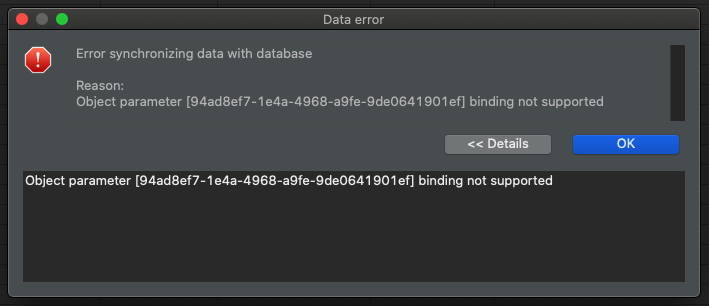
Also if you try to filter by a clipboard value (right click on uuid column -> Filter -> Clipboard -> ...) it shows the right statement, but it gets pasted without the quotes in the filter text box.


The filter by Cell Value gets pasted correctly.
 viktordd
on 19 Oct 2020
viktordd
on 19 Oct 2020
Looks like new hotfix version 7.2.3.202010191702 fixes the issue on Windows
nheilbuth
on 20 Oct 2020
Looks like new hotfix version 7.2.3.202010191702 fixes the issue on Windows
Just tried installing this version, but doesn't fix it for me, reverting to 7.1.2 also does the trick for me.
 gertcominotto
on 20 Oct 2020
gertcominotto
on 20 Oct 2020
Seems the issue is still actual for Mac
 kseniiaguzeeva
on 20 Oct 2020
kseniiaguzeeva
on 20 Oct 2020
Hotfix version 7.2.3 was published tonight.
@kseniiaguzeeva It doesn't depend on OS (or at least I can't figure out how it could depend on it).
We didn't update brew package (and other 3rd party packages), you will need to wait till 7.2.4 release if you use them.
serge-rider
on 20 Oct 2020
downloaded 7.2.3 a few minutes ago and issue is fixed for me
thanks everyone
amfine-soft-drault
on 20 Oct 2020
Yes, I can confirm that Version 7.2.3.202010191702 fixed the issue.
I'm on Mac.
@kseniiaguzeeva But I figured out that you have to take the package from the official Website. The package on GitHub Releases is still the one without the fix.
 KiSchulte
on 20 Oct 2020
KiSchulte
on 20 Oct 2020
One more fixed applied.
Data type metadata read was broken in 7.2.2. When option "Show all databases" is off then primary database data types metadata is read incorrectly.
New Early Access version with this fix is ready (https://dbeaver.io/files/ea). Please test.
serge-rider
on 20 Oct 2020
I am still having this issue with Version 7.2.3.202010191702 (Windows 10 64-bit). My primary key is varchar type. Works on 7.2.1
 Libarch
on 21 Oct 2020
Libarch
on 21 Oct 2020
verified. Tje fix will be available in 7.2.4 or you can download early access version (https://dbeaver.io/files/ea). Please test.
kseniiaguzeeva
on 21 Oct 2020
error with postgresql and inet columns still present, checked on ea version/
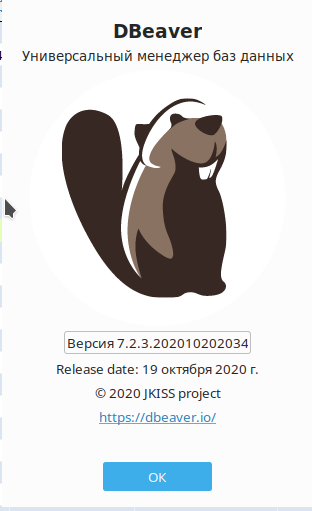
 Kazun3500
on 21 Oct 2020
Kazun3500
on 21 Oct 2020
Fixed (for me) on Version 7.2.3.202010202034. Thanks!
Libarch
on 21 Oct 2020
@Kazun3500 Thank you for the report. I can reproduce it for inet values (e.g. _PostgreSQL12 dvdrental."Xeniia"."10125"_)
DBeaver 7.2.3.202010202034
Will be fixed in scope of https://github.com/dbeaver/dbeaver/issues/10122 in 7.2.5 release
kseniiaguzeeva
on 23 Oct 2020
The issue is present in Version 7.2.3.202010191702 for the text datatype in PostgreSQL
 JekRock
on 29 Oct 2020
JekRock
on 29 Oct 2020
@JekRock 7.2.3.202010202034 works for me with varchar (on Windows)
Libarch
on 29 Oct 2020
@Libarch but doesn't work for text on Windows
JekRock
on 29 Oct 2020
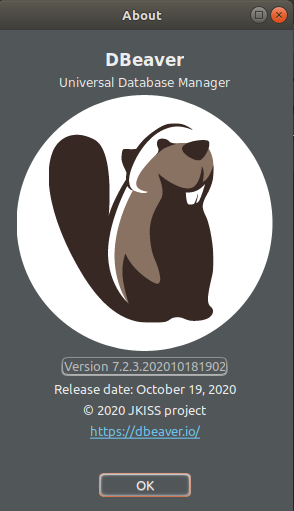


Ubuntu 20.04
DB PostgreSQL 12 on docker
 ensiente
on 30 Oct 2020
ensiente
on 30 Oct 2020
Related issues
 Chrisfufu
·
28Comments
Chrisfufu
·
28Comments
 GiantCrocodile
·
30Comments
GiantCrocodile
·
30Comments
 MrBrax
·
50Comments
MrBrax
·
50Comments
 antonyr
·
49Comments
antonyr
·
49Comments
 19edison
·
71Comments
19edison
·
71Comments
Most helpful comment
7.2.3 doesn't patch this bug @serge-rider